
Key Takeaways
- 1At $279.00 to $279.99 across Asus, Newegg, Staples and Micro Center, the MQ16FC is priced $120 below its own predecessor, the MQ16AH’s $399 MSRP, without anyone yet undercutting it.
- 2The MQ16FC’s 300 cd/m2 rating sits below what Tom’s Hardware actually measured on the older MQ16AH, 369.4 nits against a 400-nit claim, so buyers chasing brightness for a bright room are better served by the older model or by ViewSonic’s 400-nit VP16-OLED.
- 3Anyone charging a laptop through the MQ16FC’s pass-through port needs an adapter rated up to 90W to actually get the advertised 65W out of it; a 65W brick won’t do it.
- 4The InnoCN 15A1F measured within a couple points of the MQ16AH on DCI-P3, sRGB and brightness, according to Tom’s Hardware, and sold as low as $249, and later under $200 the same summer, which makes it the number to check before paying $279 for the newer Asus.
- 5Gamers should skip the OLED math entirely: the Arzopa Z3FC runs 180Hz at 2560 x 1440 for $139.99, three times the refresh rate of the MQ16FC’s 60Hz ceiling at a lower price.
- 6Buyers doing color-critical work should weigh the ViewSonic VP16-OLED, Pantone Validated and rated at 400 nits, against the MQ16FC’s uncalibrated 95% DCI-P3 claim.
- 7The one-cable setup only works if the connected laptop’s USB-C port supports DisplayPort Alt Mode; without it, the mini-HDMI port and a second USB-C power connection are both needed.
- 8Newegg’s 15-day return window is tight for catching OLED uniformity issues, so anyone planning to stress-test the panel for defects should do it immediately after it arrives.
Table of Contents
- MQ16FC Panel Specifications
- Ports and the One-Cable Pitch
- Eye Care Certifications and Blue Light Controls
- Awards and Overseas Reviews on the Listing
- MQ16AH in Daily Use
- Lenovo ThinkVision M14t Gen 2: Touch and Stylus
- ViewSonic’s Portable OLED and Touch Lineup
- LG gram +view 16: More Pixels, No OLED
- Brightness, Contrast and Color: The Category Baseline
- MQ16AH vs MQ16FC: What Changed
MQ16FC Panel Specifications
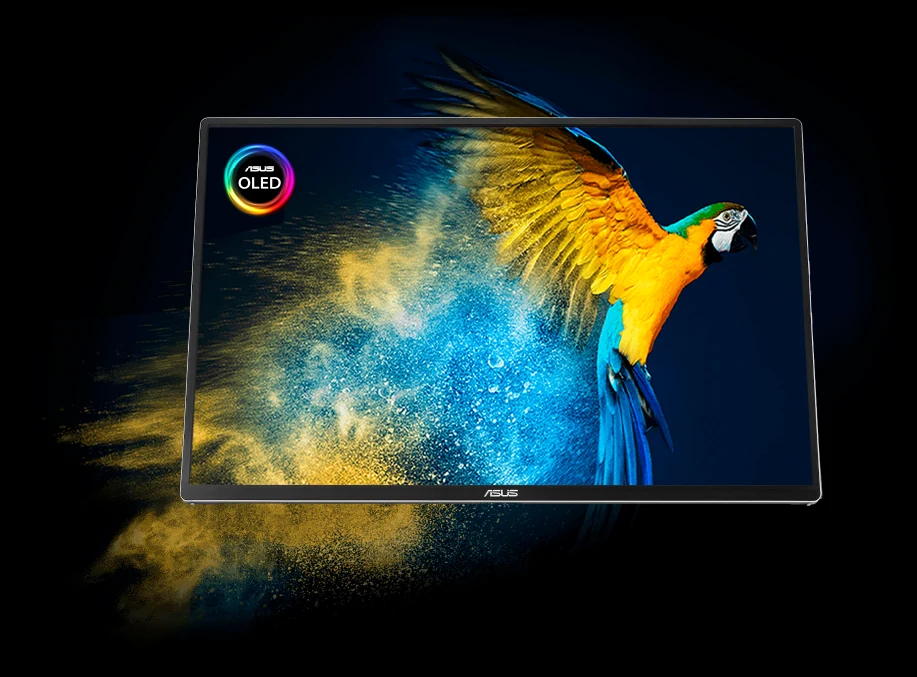
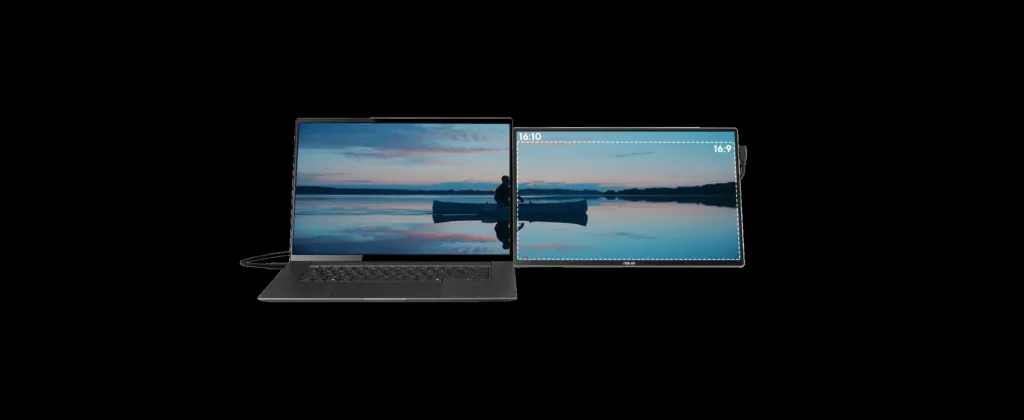
The MQ16FC’s panel is 16 inches on the diagonal in a 16:10 shape, running WUXGA at 1920 x 1200 rather than the plain 1080p most portable monitors settle for, which hands you extra vertical space for a browser tab or a code editor. Asus quotes an 89% screen-to-body ratio for how little bezel surrounds that panel, while Newegg’s own listing files the display type as FHD+ rather than WUXGA and puts pixel pitch at 0.179mm, the density figure that falls out of packing 1920 x 1200 pixels into 16 inches.
On paper the color numbers are what you’d expect from an OLED at this price: 95% DCI-P3 coverage, a contrast ratio of 100,000:1, and Delta E under 2 for accuracy out of the box. The 16.7 million color count is an 8-bit panel’s number, not the 10-bit figure some rival OLEDs advertise, and the 300 cd/m2 brightness spec is the panel’s rated output rather than a peak HDR figure — there’s no HDR peak-brightness claim attached to this listing at all.
Newegg lists the refresh rate at a flat 60Hz, with response time rated as low as 1 ms and viewing angles at 178 degrees in both directions. The fast response time doesn’t translate into a fast refresh rate here, 60Hz is the ceiling on this panel, full stop.
| Panel | OLED |
| Screen Size | 16″ |
| Display Type | FHD+ |
| Resolution | 1920 x 1200 |
| Aspect Ratio | 16:10 |
| Refresh Rate | 60Hz |
| Response Time | 1ms |
| Brightness | 300 cd/m2 |
| Contrast Ratio | 100,000:1 |
| Viewing Angle | 178° (H) / 178° (V) |
| Pixel Pitch | 0.179mm |
| Display Colors | 16.7 Million |
| Color Gamut | 95% DCI-P3 |
| Color Accuracy | Delta E< 2 |
| Screen-to-body ratio | 89% |
| Gamma Adjustment | Support Gamma 1.8/2.0/2.2/2.4/2.6 |
| Color Temp. Selection | Yes (5 modes) |
| SPLENDID Technology | Yes |
| QuickFit | Yes |
| HDCP | Yes, 1.4 |
| Power Consumption | 4.7W |
| Power Saving Mode | <0.5W |
| Power Off Mode | <0.3W |
The menu gives you five gamma points to pick from, 1.8, 2.0, 2.2, 2.4 and 2.6, alongside five color temperature modes, Asus’ Splendid presets, and QuickFit for laying out reference grids on the screen. HDCP support stops at version 1.4, which is worth knowing if you’re planning to feed this thing protected 4K streaming content rather than a laptop’s desktop.
Power draw is rated at 4.7W in normal use, dropping under 0.5W in power saving mode and under 0.3W when off. Those are small numbers on their own, but they matter to anyone planning to run this off a laptop’s USB-C port or a power bank rather than a wall outlet.
Mac Compatibility and the M Model P3 Preset
Asus calls this model Mac-tested and has added a new preset, M Model P3, meant to line the panel’s color up with how macOS expects it. It isn’t a menu toggle you flip and forget: getting there means downloading the ASUS Monitor ICC Profile from Asus’ support site first, then applying it before the preset does what it’s supposed to.
Power Pass-through on the MQ16FC
Plug the MQ16FC into a laptop with nothing else attached and the laptop feeds the monitor. Plug a USB-C power bank or wall adapter into the monitor instead, and the direction reverses: the monitor now feeds the laptop, charging it through the same cable that’s carrying video. Asus caps that outgoing charge at 65W, and that number is the whole story for whether this replaces a laptop’s own charger or just slows the battery drain.

The 65W figure isn’t free. Asus’ own footnote requires an adapter rated up to 90W before the monitor will pass 65W through to a laptop, so a 65W brick bought for the laptop itself will not deliver 65W once it’s feeding through the monitor instead. The power supply spec on Newegg’s listing, 100-240 VAC at 50/60Hz, covers wall voltage worldwide but says nothing about closing that adapter gap.
| Power Pass-through | Max. 65W |
| Adapter required for max output | Up to 90W |
| Power Supply | 100 – 240 VAC, 50/60Hz |
| Power Consumption | 4.7W |
| Power Saving Mode | <0.5W |
| Power Off Mode | <0.3W |
TechFi’s rundown of the category puts this in perspective: most portable monitors skip pass-through entirely, and the ones that include it tend to cost more for the privilege. Across the monitors that do offer it, 65W is roughly where the ceiling sits, the MQ16FC included. That ceiling is fine for a thin ultrabook and a real limit for anything hungrier; TechFi notes that laptops drawing more than 65W to charge will do so slowly through a pass-through monitor, or barely at all.
The feature earns its keep on a specific machine: a laptop with exactly one USB-C port, where that port normally has to choose between charging and driving an external display. Pass-through lets the MQ16FC take over both jobs through that single port. Without it, the choice is running the laptop on battery while the port feeds the screen, or giving up USB-C video altogether and going back to HDMI plus a separate charging cable.
Pros
- Genuine two-way power delivery: the monitor can charge the laptop or be charged by it
- Rare on portable monitors at any price, which makes this a real differentiator
- Solves the single USB-C port bottleneck on thin-and-light laptops
Cons
- Charging output tops out at 65W regardless of what’s plugged in
- Hitting that 65W ceiling requires an adapter rated up to 90W, not a 65W brick
Ports and the One-Cable Pitch
Three ports sit on the MQ16FC’s edge: two USB-C and one mini-HDMI, and both USB-C ports carry DisplayPort Alt Mode rather than one of them being power-only. That matters because it means a single USB-C cable can carry the video signal and the power draw at the same time, so plugging in one wire from a laptop lights up the screen and keeps it running with nothing else needed. From there you can mirror the laptop’s display or extend the desktop onto the second panel, whichever the laptop’s own display settings allow. What the MQ16FC does not have is any built-in speaker, so whatever plays on screen still has to come out of the laptop or a separate set of speakers.
| USB Ports | 2 x USB Type-C (DP Alt Mode) |
| Video Ports | 2 x USB-C (DP Alternative), 1 x Mini HDMI |
| Built-in Speakers | No |
| HDCP | Yes, 1.4 |
| Power Pass-through | Max. 65W |
The one-cable claim has a condition
That single-cable setup only works if the laptop’s own USB-C port supports DisplayPort Alt Mode, and plenty of laptops still ship without it. Without that support, video has to go over mini-HDMI instead, and the monitor still needs a USB-C connection just to get power, which is why Asus labels that second port DC-IN. Skip the check and you’re not carrying one cable, you’re carrying two.
Reviewers at TechFi point out that portable monitors almost never carry a full-size HDMI port, the mini-HDMI on the MQ16FC is the norm rather than the exception, and the cable to feed it is usually but not always in the box across this category. HDMI is what opens the door to a camera or a games console rather than a laptop, but it doesn’t get you out of the power question: even on HDMI, the monitor still needs a USB-C connection to run, and depending on what that USB-C port is plugged into, a separate power adapter may still be part of the setup.
- Two USB-C cables
- A mini HDMI to HDMI cable
- A power adapter
- An MTS02D tripod socket kit
- A ZenScreen sleeve and microfiber cloth
- A quick start guide and warranty card
Auto-Rotation and DisplayWidget Center
Rotation on the MQ16FC is a hardware-and-software pair, not a hardware feature on its own. The panel can tell which way it’s standing and flip the image between landscape and portrait to match, but that only happens once ASUS DisplayWidget Center is installed on the connected machine. Asus’ own copy isn’t fully consistent about who gets to use it: the main description frames the feature as working with a Windows PC, while a footnote widens that to say auto-rotate works on both Windows and macOS. A Mac owner reading only the headline claim would reasonably assume they’re out of luck.
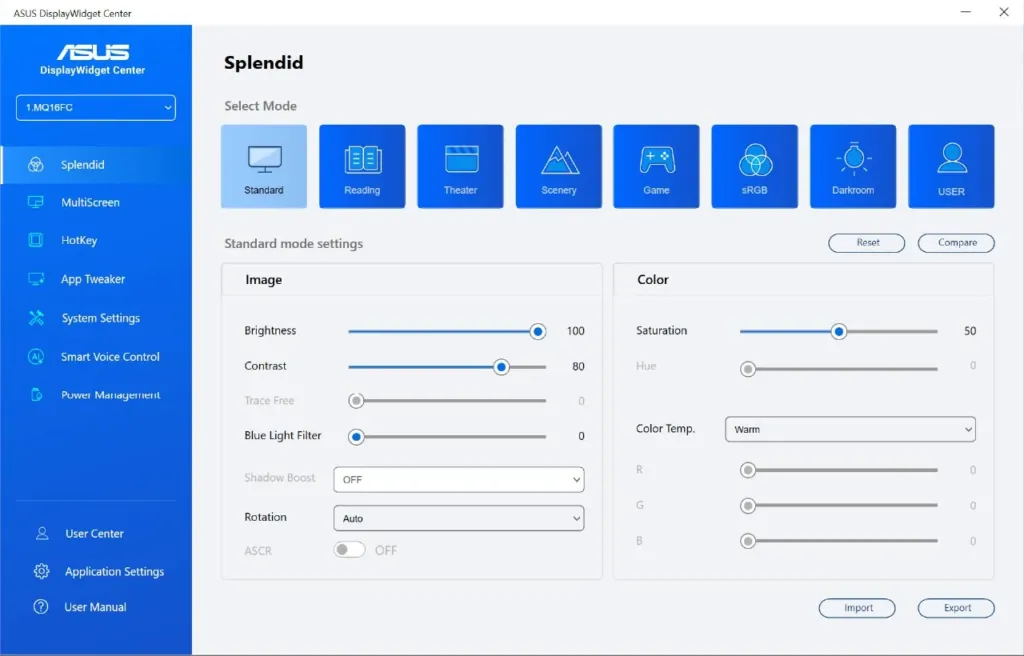
The orientation sensor is built into the MQ16FC, but it does nothing on its own. Skip the DisplayWidget Center download, available from Asus, and the screen will sit however you leave it, sensor or no sensor.
Automatic rotation is rare in this category, and the few portable monitors that manage it normally cost a lot more than the MQ16FC. Most portable screens leave the job to the user, who has to dig into OS display settings and flip the orientation by hand every time the stand changes. A handful ship with a gyroscope or orientation sensor already inside, which sounds like the same trick, but even those usually still need a separate program running before the sensor’s readings turn into anything on screen.
- Browsing the web, where pages are built to scroll down rather than sideways
- Long documents that run for pages, where portrait shows more of the page at once
- Tall spreadsheets, where more rows fit on screen without scrolling
- Reading programming code, where lines run down rather than across
- Chat and mail windows, which are naturally taller than they are wide

Weight, Stand and Box Contents
Asus puts the MQ16FC at 1290 g on its own product page, while Newegg’s spec sheet lists it at 1.5 lbs, a figure that converts to roughly 680 g. That’s not a rounding slip between metric and imperial, it’s a gap of more than 600 g between two published numbers for the same monitor. Newegg’s own listing puts the footprint at 14.13 x 9.17 x 0.35 inches, so whichever weight turns out to be right, the panel is thin and desk-sized rather than a laptop-scale slab.
| Weight (ASUS) | 1290g |
| Weight (Newegg) | 1.5 lbs. |
| Dimensions | 14.13″ x 9.17″ x 0.35″ |
| Screen size | 16″ |
| Screen-to-body ratio | 89% |
| Cabinet color | Black |

The ergo stand holds the screen at any angle from 0 to 90 degrees rather than clicking into one or two preset positions. That means it can lie nearly flat for drawing-tablet use, stand upright as a second display next to a laptop, or sit anywhere in between, and it stays put wherever you leave it instead of snapping back to a fixed notch.
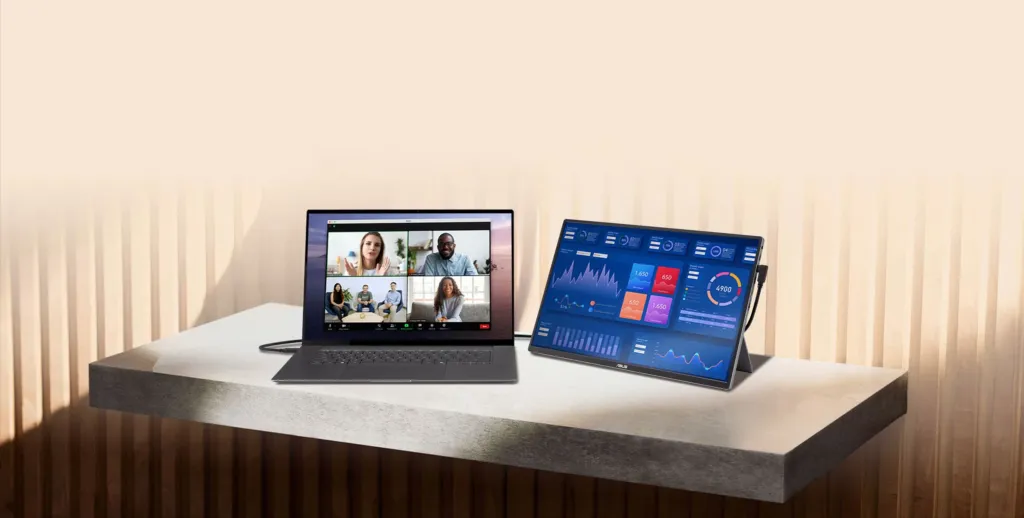
That range matters against what the cheap end of this category ships instead: a flip cover that doubles as a stand, which mostly works propping the screen up in landscape. Turn one of those setups to portrait and the screen ends up bolt upright, with the cover often too unstable to trust for long.
- A ZenScreen sleeve
- A power adapter
- The MTS02D tripod socket kit
- Two USB-C cables
- A mini HDMI to HDMI cable
- A microfiber cloth
- A quick start guide
- A warranty card
Not every portable monitor at this price ships with both a power adapter and a mini HDMI to HDMI cable in the box, and the MQ16FC includes both. Worth remembering anyway: running video over that mini HDMI port doesn’t power the screen, so it still needs one of its USB-C ports fed for power even when HDMI is doing the video.
Reviewers put the floor for a bare portable monitor, no cables or case, at around 700 g, with smaller panels landing lighter and bigger ones adding weight fast, and a full kit with cables and case packed back in climbs toward a kilogram. Against that baseline, even the heavier of the MQ16FC’s two published weights sits on the heavy side for its size, and anyone carrying a portable monitor daily feels a 300 g swing long before they notice anything else about it.
At 0.35 inches thick, the MQ16FC’s chassis is thin enough that the back panel, not the screen, is what catches your eye once it’s folded up or propped on its stand. One viewer commenting on Asus’ promo video summed up which side of this monitor people actually end up looking at:
Screw the screen, I just want that clear back panel, even though I know I’d never see it
Eye Care Certifications and Blue Light Controls
TÜV Rheinland has put its name on the MQ16FC twice, once for flicker and once for blue light, and that’s two separate tests the panel had to pass rather than one badge covering both. Asus frames the flicker-free side as removing the kind of flicker that causes eyestrain, which is a driving-electronics claim rather than a coating on the glass. The blue light side is different: Newegg’s own spec table calls it a hardware solution, not a software overlay you toggle after the fact, and the filter still exposes multiple strength settings through the monitor’s OSD menu, so whatever the hardware is doing, the user still dials it up or down rather than getting one fixed level.


The environmental side of the listing covers packaging and power draw, not the screen itself. The box is FSC Mix-certified cardboard, and Asus says it was sized deliberately to keep shipping volume down. The product page also carries an Energy Star certification, and Asus states the monitor has been tested against a set of sustainability certifications more broadly, without breaking that claim down further.

Asus lists three years of product security update support for the MQ16FC, but that window runs to a fixed date, 31/12/2026, rather than three years from whenever you buy the unit. Buy it now and the clock has already been running; buy it near the end of that window and the three years shrinks to whatever’s left before the deadline.
Don’t hang anything off it
Asus’ own documentation warns against hanging headphones or any other foreign item off the monitor, stating plainly that attaching things to it shortens the panel’s lifespan.
MQ16FC Pricing Across Retailers
Asus prices the MQ16FC at $279.00 direct from its own store, and everywhere else it turns up the number is the same to the penny above that: Newegg, Staples and Micro Center all list it at $279.99. Nobody is undercutting anybody here, which is what a launch price looks like before retailers start competing on it. Newegg is also capping purchases at two per customer, a limit that only makes sense on a listing too fresh to have settled into normal stock levels.
| Retailer | Price |
|---|---|
| ASUS Store | $279.00 |
| Newegg | $279.99 |
| Staples | $279.99 |
| Micro Center | $279.99 |
Newegg’s listing only went live on 8 June 2026, and in the time since the MQ16FC has climbed to #16 in the site’s portable monitor ranking without a single customer review posted against it. That’s a monitor selling on spec sheet and brand alone right now: buyers are moving on it faster than anyone has gotten around to writing up whether the panel they got matches the one on the box.
- Asus covers parts for one year
- Asus covers labor for one year
- Newegg accepts returns for a refund within 15 days of purchase
- Newegg accepts returns for a replacement within 15 days of purchase
A 15-day window is a tight margin for catching OLED defects like uniformity issues or stuck subpixels that sometimes only show up after a week of real use, so anyone buying this to check it thoroughly should not sit on it. Asus is also throwing in a three-month Adobe bundle with the monitor, a pitch aimed squarely at the same creative buyers the OLED panel and color accuracy are meant to win over in the first place.
Set the MQ16FC’s price against what OLED costs once you go bigger than 16 inches, and it starts to look less like a portable monitor tax and more like a bargain. One buyer’s comment on the format makes the gap concrete.
I got the 32inch but it’s just all black not silver like that I like that design mine cost me like £800 😅
Awards and Overseas Reviews on the Listing
Badges are one thing, sourcing is another. Newegg’s MQ16FC page carries a Tom’s Hardware Editor’s Choice badge next to a run of award quotes from outlets most American buyers have never heard of, and all of it arrives through the retail listing itself rather than through a page you can click through to. That’s Asus choosing which lines to surface, not a reviewer publishing independently, so the badge tells you a test happened somewhere and the quotes tell you what a handful of small sites chose to say for a listing page.
Streberi in Serbia gave the MQ16FC two awards on the same day, 3 April 2026: a Choice award and a Supreme award. What the outlet actually wrote leans on the two things a portable monitor has to get right, weight and panel: it said the black on this screen is actually black, with saturated colours and big contrast, and separately that it forgot the thing was riding along in its backpack.
A month earlier, on 9 March 2026, another Serbian outlet, SS MODS, handed the MQ16FC its Our Choice award. Its reasoning tracks Streberi’s almost exactly: OLED’s practically infinite contrast, exceptionally deep black tones, and beyond the panel itself, a balance of picture quality, mobility and functionality that it judged worth the award.
Germany’s nophilter added its own award on 19 April 2026, and unlike the Serbian sites it split its praise three ways: picture quality, build, and the range of ports on the edge of the panel.
The most useful quote in the whole set is the one that starts from doubt. AV Magazine in Italy, reviewing the MQ16FC on 3 June 2026, went in skeptical of the 300-nit peak brightness Asus lists for the panel, and came out the other side calling performance in the default and sRGB modes very good. A reviewer who names the number they distrusted before testing against it is worth more than one who only hands out a badge.
One more review sits outside the badge collection Asus put on the listing. TechFi in the Netherlands covered the MQ16FC under the title ‘OLED voor onderweg’ – OLED for on the road – as part of its own run of portable monitor coverage rather than as a quote supplied for the retail page.
- Tom’s Hardware – Editor’s Choice badge
- Streberi (Serbia) – Choice award, 3 April 2026
- Streberi (Serbia) – Supreme award, 3 April 2026
- SS MODS (Serbia) – Our Choice award, 9 March 2026
- nophilter (Germany) – award, 19 April 2026
- AV Magazine (Italy) – review, 3 June 2026
The MQ16AH: Asus’ Older ZenScreen OLED Under Instruments
Tom’s Hardware put the MQ16AH on the bench, and it’s the only Asus portable OLED in this whole category with a full lab report behind it rather than a spec sheet. On paper it’s a smaller, squarer panel than the current model: 15.6 inches, 16:9, capped at 1920×1080 and 60Hz, 8-bit color, 1ms GtG. Asus priced it at $399 when Tom’s ran the review, and every number that follows in this section came off that same unit rather than off a marketing page.
| Panel Type / Backlight | OLED |
| Screen Size / Aspect Ratio | 15.6 inches / 16:9 |
| Max Resolution & Refresh Rate | 1920×1080 @ 60Hz |
| Color Depth | 8-bit |
| Max Brightness | 400 nits |
| Response Time (GtG) | 1ms |
| Contrast Ratio (HDR, Max) | 1,000,000:1 |
| Contrast Ratio (Typical) | 100,000:1 |
| View Angles | 178 degrees (Horizontal and Vertical) |
| Screen Coating | Glossy |
| Ports | 1x Mini-HDMI, 2x USB-C (DisplayPort 1.2 Alt Mode) |
| Speakers | No |
| Dimensions | 14.12 x 8.90 x 0.35 inches |
| Weight | 1.43 pounds |
| MSRP | $399 |
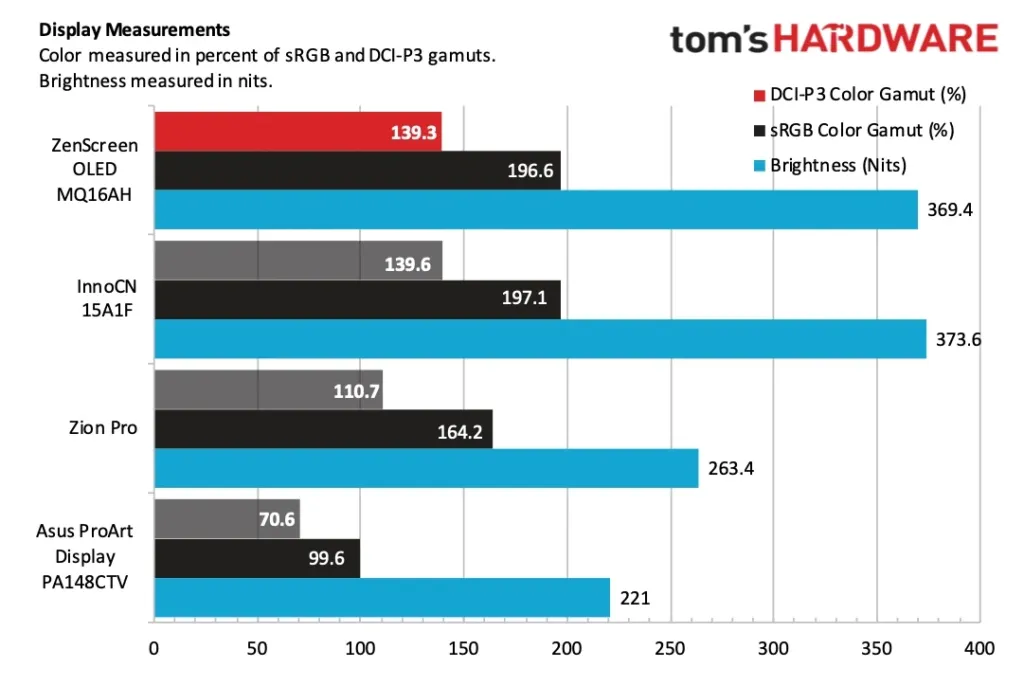
Point a colorimeter at the panel and the two numbers split in opposite directions. Brightness came in under Asus’ own claim: 369.4 nits measured against a 400-nit rating, the one spec on this sheet where the instrument didn’t back the marketing. Color coverage went the other way entirely, with Tom’s reading 139.3 percent of DCI-P3 and 196.6 percent of sRGB, numbers that leave no argument about whether this panel can carry accurate color work. Brightness is where this OLED gives something up; gamut is not.
ZenScreen OLED MQ16AH brightness: rated vs measured
ZenScreen OLED MQ16AH color gamut coverage measured by Tom’s Hardware
Contrast is rated at 100,000:1 typical and climbs to 1,000,000:1 in HDR, with viewing angles quoted at 178 degrees in both directions, the kind of numbers OLED delivers as a matter of course rather than as an achievement. What buys those numbers is the glossy coating Asus put on the panel, the same finish Tom’s called a reflection magnet: deep black and wide angles come from letting the surface stay unmatted, and that surface throws back every light source in the room.
At 1.43 pounds and 14.12 x 8.90 x 0.35 inches, it’s built to disappear into a bag, and the port layout backs that up: one mini-HDMI and two USB-C carrying DisplayPort 1.2 Alt Mode, the same one-cable setup that lets a laptop drive video and power off a single wire. Tom’s found no built-in speakers on the unit, so whatever you’re running through this screen needs its own audio path, whether that’s a headset, a laptop’s own speakers, or an external pair.
MQ16AH Build, Smart Case and Proximity Sensor
Asus builds the MQ16AH entirely out of plastic, and Tom’s Hardware came away saying it doesn’t feel cheap in hand despite that. The panel tapers to 5mm at its thinnest point and roughly doubles in thickness near the bottom, where the ports need somewhere to sit. The back is stripped down to a single tripod mount and nothing else.
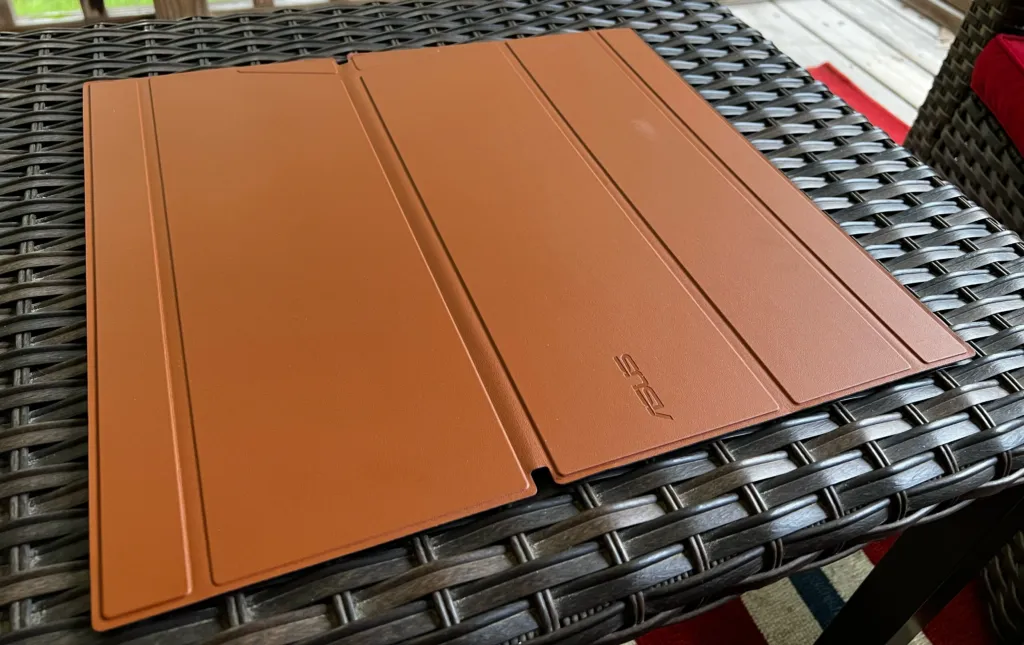
In place of a built-in stand, Asus packs a magnetic origami-style Smart Case made from faux leather, with outer edges that fold easily and multiple positions for both landscape and portrait use. Working out which fold gets you which position isn’t obvious: Asus includes two small pamphlets just to explain it, and Tom’s Hardware found itself flipping back to them repeatedly before the folds became second nature.
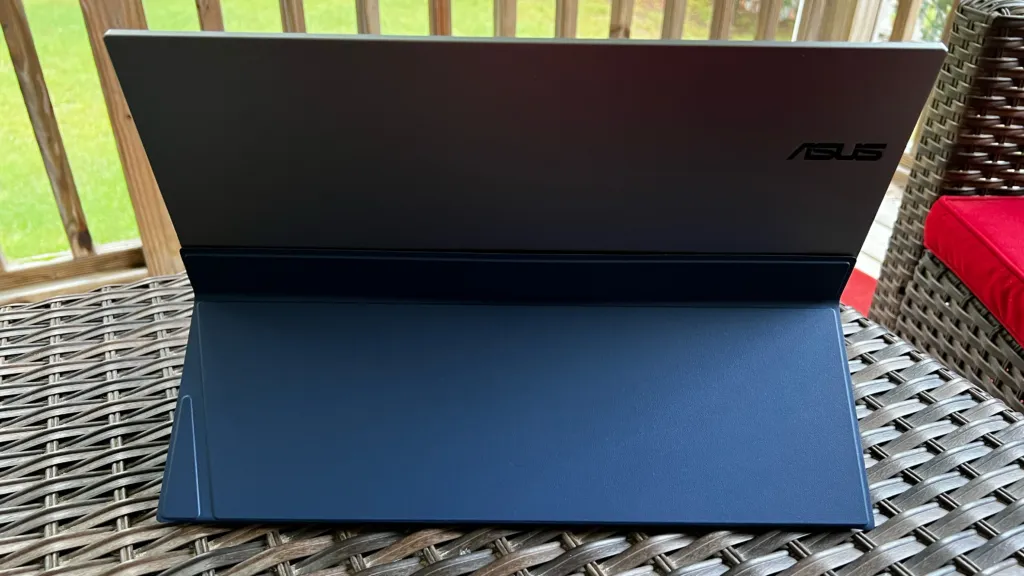
Lose the Smart Case and there’s nothing left to stand the MQ16AH up with, and even with it in place the folded case can flop over mid-use. Tom’s Hardware called the missing kickstand an annoying oversight for a monitor priced at $399, and the fix was sitting right there the whole time: a hinge built into the chassis would have made the case optional instead of load-bearing.
Two small circles sit at the far right of the chin, and they’re not decorative: they house a proximity sensor that checks whether anyone’s actually sitting in front of the screen. Walk away and the panel sleeps; come back and it wakes. Asus frames this as a power-saving feature, but the real job is protecting the OLED layer itself, since a static image left burning on an unattended panel is how burn-in starts.
Ports split across both edges: the right side carries a headphone jack, a USB-C port running DisplayPort alt mode, and a mini-HDMI port, while the left side adds a second USB-C video port plus a third USB-C that only supplies power. That power-only port exists for exactly one scenario, running video over the mini-HDMI port, which carries no power of its own and needs a separate cable feeding the monitor. The power button and three OSD buttons live on the left edge alongside it.
Pros
- Solid, lightweight build that Tom’s Hardware said doesn’t feel cheap despite an all-plastic chassis
- Thin profile at 5mm that still houses ports and a proximity sensor without bulking up
Cons
- No kickstand built into the chassis, so the Smart Case is the only way to prop the screen up
- Tom’s Hardware called that missing stand an annoying oversight at a $399 price point
The MQ16AH’s Four-Button OSD
Asus didn’t give the MQ16AH a joystick, and it didn’t saddle it with a dial either. What you get is a vertical row of four buttons, one of which is the power switch doing double duty as a menu control. Tom’s Hardware has used the five-way joystick on other Asus portables and would pick that first if given the choice, but the same reviewers rank this button column above the Asus Dial, which puts the MQ16AH’s controls in the middle of Asus’ own lineup rather than at the bottom of it.
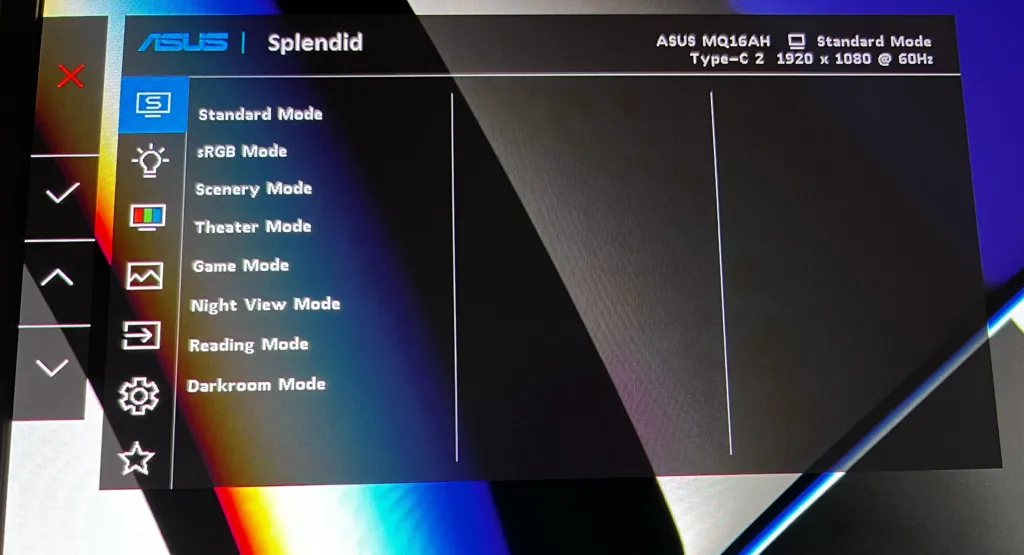
Once you’re inside the menu, the power button stops being just a power button and becomes cancel and back at the same time, with a red X and a back arrow appearing on screen to tell you which action you’re about to trigger. The remaining three buttons handle everything else: confirming a selection or scrolling up and down through the list. It’s a small enough set of jobs that the lack of labels stops mattering after the first pass through the menu.
The menu itself isn’t new. Asus carried the layout over from the earlier ROG Strix XG16AHPE, so anyone who has spent time in an Asus monitor menu before will already know where things live. Inside, there’s dedicated blue light filter controls, input selection for switching between sources, and the standard picture set of brightness, contrast, saturation and color temperature.
Eight Splendid picture modes sit in the menu, among them Standard, sRGB, Theater and Reading Mode. The part worth noticing is the header that runs across the top of every menu screen: it shows the active Splendid mode, which port the monitor is currently reading from, and the resolution and refresh rate in use, all without opening a separate settings page to check.
MQ16AH in Daily Use
Move off-center and the MQ16AH holds up: Tom’s Hardware found viewing angles good in every direction, with only a slight drop in brightness when shifting left or right of the middle. That’s the behavior that matters when this thing is propped up as a second screen beside a laptop rather than dead-center on a desk, since nobody actually sits square to a portable monitor doing double duty.
The glossy coating is where the day-to-day experience actually costs you something. At the reviewer’s own desk it was a non-issue, but move the MQ16AH near a window and reflections start creeping in from the glass and the overhead lights, and cranking brightness to full only partly fights them off. Take it outdoors, where a portable monitor is supposed to earn its keep, and the problem gets worse still.
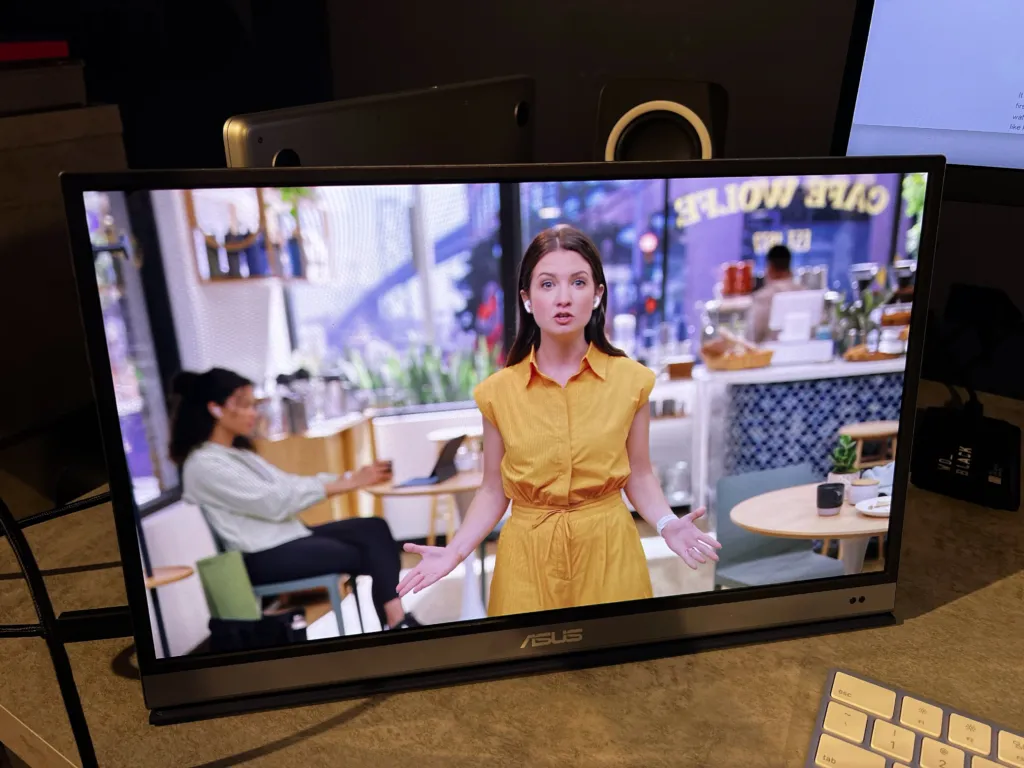
Video is where the OLED panel does its job. Watching Apple’s iPhone Keynote, presenter skin tones read as natural and the blacks came in inky, exactly what you’d expect from an OLED panel and not always what you get from one this size. An episode of She-Hulk: Attorney at Law caught the reviewer off guard, looking better than expected on a screen this small.
Editing work made the panel’s advantage concrete rather than cinematic: dark backgrounds in Pixelmator Pro rendered as true black, where an IPS panel would have shown the same backgrounds as a dirty gray. Everyday apps gave the reviewer nothing to complain about either, with Safari, Word, Excel and Slack all clean across the board.
Portrait mode earned its keep too, letting the reviewer read a Tamiya RC manual top to bottom the way a printed page would lay out. The catch is getting there: turning the screen upright means wrestling with the origami-style Smart Case stand each time, which is a fair trade for reading a document but not one you want to do repeatedly.
Pros
- Excellent colour performance across testing
- Bright screen with good viewing angles
- Solid build quality and a lightweight design
Cons
- No kickstand, so the case is required for mounting
- Glossy display is a magnet for reflections
- MSRP is far higher than similar competition
InnoCN 15A1F, the rival that set the price
Portable OLED used to be a rare thing to find in a monitor at all. Innocn is a big part of why that changed, and its 15.6-inch 15A1F is the model Tom’s Hardware reached for when it needed something to measure the ZenScreen OLED against. Innocn’s other portable OLED, the 13.3-inch 13K1F, sold under $300 according to Tom’s Hardware, and both that screen and the 15A1F later fell under $200. Once a 15.6-inch OLED panel is selling for less than $200, a $399 monitor has to justify itself against that number, not against what OLED portables used to cost.
Innocn listed the 15A1F at $349 against the Asus MQ16AH’s $399, according to Tom’s Hardware, so the MSRP gap was already there before either screen sold for a cent less. By the time Tom’s actually reviewed the Asus, the 15A1F had dropped to $249, and it had dipped below $200 that same summer. It also ships with a detachable kickstand, something the Asus doesn’t include in the box. Three separate numbers, all pointing the same direction: whatever the Asus is asking for, the InnoCN has already been selling for less.
| Asus ZenScreen OLED MQ16AH | InnoCN 15A1F | |
|---|---|---|
| MSRP | $399 | $349 |
| Street price at review time | $399 | $249 |
| Summer low | — | Below $200 |
| Stand | Magnetic origami Smart Case | Detachable kickstand |
That price gap would be easier to swallow if the two screens looked different on the bench, and they don’t. Tom’s Hardware measured 139.3 percent of DCI-P3 and 196.6 percent of sRGB on the Asus, with a maximum brightness of 369.4 nits, and the InnoCN’s DCI-P3, sRGB, and brightness results landed within a couple of points of those same figures. That’s close enough that Tom’s Hardware suspects the two monitors are built around a similar panel, even though nobody has confirmed who actually makes the one inside the ZenScreen. Two screens that measure this close, at prices this far apart, put the burden of proof on whichever one is asking for more.
Asus ZenScreen OLED MQ16AH measured color coverage
Nobody outside Asus knows who actually makes the panel in the ZenScreen OLED, and Tom’s Hardware says it wouldn’t be surprised if it turned out to match the panel in the InnoCN 15A1F. If that’s the case, the Asus carried a $50 higher MSRP for a screen that measures the same and still shipped without the kickstand the InnoCN throws in.
The ZenScreen Ink, Tested Right Before It
Asus already solved the stand problem once. The ZenScreen Ink ships with a built-in stand sturdy enough to flip between landscape and portrait without any fuss, no case to fold or unfold. The MQ16AH has no kickstand built in at all; it leans on a magnetic origami-style Smart Case to prop itself up, and Tom’s Hardware called that an annoying oversight on a $399 monitor when the company’s own cheaper model already had the fix.
Where the two monitors do match is the controls: a vertical row of four buttons, power on top and three unmarked buttons below it. Power doubles as cancel or back once you’re in the menu, and the other three confirm a selection or scroll through it. Tom’s Hardware still prefers Asus’ 5-way joystick to this arrangement, but ranks the four buttons above the touch-sensitive Asus Dial the company uses elsewhere.
Flip the comparison and the hardware that got it right stops being the OLED. Tom’s Hardware found the Ink’s viewing angles abysmal, while the MQ16AH held up in every direction off-center with only a slight taper in brightness. Between the two, Asus has a portable with the right stand and the wrong screen, and one with the right screen and the wrong stand, but not yet one with both.
The IPS ZenScreens Below the OLED
Asus doesn’t stop at the OLED. The ZenScreen MB16FC runs $169.99 against the MQ16FC’s $279.99, and at least one AI shopping answer picks the MB16FC as the better choice for most people rather than the OLED it sits sixty percent above in cash terms. That’s a signal worth taking seriously: a meaningful share of the demand Asus is chasing in this category never gets close to the OLED price, and the company built a cheaper screen specifically to catch it.
The 16-inch FHD+ IPS ZenScreen, quoted between $180 and $250, matches the MQ16FC spec for spec on the numbers that show up in a listing: 1920 x 1200, 60Hz, the same 16:10 shape. AI answers praise its build quality and its built-in kickstand, a part the OLED skips. Pay the extra for the MQ16FC and what you’re actually buying is the panel technology underneath those identical numbers, not anything the spec sheet shows.
| Model | Panel | Resolution | Refresh | Listed price |
|---|---|---|---|---|
| ZenScreen OLED MQ16FC | OLED | 1920 x 1200 | 60Hz | $279.99 |
| ZenScreen 16-inch FHD+ IPS | IPS | 1920 x 1200 | 60Hz | $180 – $250 |
| ZenScreen MB16FC 16-inch | IPS | — | — | $169.99 |
| ZenScreen 15.6-inch FHD IPS | IPS | — | — | $224.69 |
The 15.6-inch FHD IPS ZenScreen is the odd entry in this lineup: smaller and lower-resolution than every other model here, yet listed at $224.69, closer to the MQ16FC’s $279.99 than to the MB16FC’s $169.99. What it sells instead of resolution is an anti-bacterial treatment on the screen, plus a kickstand and two full-function USB-C ports, a pitch aimed squarely at business travellers rather than anyone comparing pixel counts.
TechFi didn’t just review the MB16QHG once and move on. It went back to the screen for a long-term review and still rates it among the best portable monitors around, which matters more than a launch-week score: it’s the reminder that Asus’ non-OLED ZenScreens hold up after months of actual use, not just on a spec sheet read once at a desk.
ZenScreen Duo OLED MQ149CD
The MQ149CD trades the single-panel format for two 14-inch OLED screens joined by a 360-degree hinge, so the pair folds flat, stands like a book, or splits into two independent displays depending on how you swing it. Asus rates both panels at 100% DCI-P3 coverage and pairs that with a high-contrast HDR claim, which puts the same color and contrast promise Asus makes on its single-panel OLEDs across two screens instead of one.
Walmart sellers list the MQ149CD at $599, more than double the $279.99 the single-panel MQ16FC goes for, and that gap is the whole story of what a second OLED panel costs Asus’ buyers. AI shopping answers still name the MQ149CD the best dual-screen setup on the market, but they flag the same thing this comparison shows plainly: it’s substantially more expensive, and nobody’s pretending otherwise.
TechFi put the MQ149CD through a full review rather than a spec-sheet pass, and its conclusion was straightforward: two screens beat one. That’s the one hands-on judgment sitting behind the AI answers’ praise, and it’s the data point that has to carry the case for $599 against a $279.99 single panel.
Lenovo ThinkVision M14t Gen 2: Touch and Stylus
Lenovo’s answer to the ZenScreen OLED gives up two inches of screen for a resolution that’s denser: 2240 x 1400 packed into a 14-inch, 16:10 panel, and that panel takes a finger or the stylus Lenovo puts in the box rather than a mouse cursor alone. Two USB-C ports handle DisplayPort and power delivery, the same one-cable arrangement the MQ16FC uses, and a built-in stand flips between portrait and landscape without a separate accessory to buy or lose. Nothing here is sold as an add-on; the stand and the stylus both ship in the box.
| Screen size | 14 inches |
| Resolution | 2240 x 1400 |
| Aspect ratio | 16:10 |
| Refresh rate | 60Hz |
| Touch | Yes, stylus included |
| Ports | 2 x USB-C (DisplayPort / Power Delivery) |
| Stand | Built-in, portrait and landscape |
That 60Hz refresh rate settles what this screen isn’t for: nobody’s plugging it into a Steam Deck for the frame rate. What it’s for is image quality, portability, and the stand and touch layer built around it, and on those terms TechRadar names the M14t Gen 2 the best portable monitor overall. TechFi’s review reaches the same panel from a different angle, treating it less as a rival to gaming or content-creator portables and more as its own category – a mobile monitor built for touch and stylus work first.
Shop around and the price moves under you: Best Buy has the M14t Gen 2 at $299.99, other listings put the same monitor at $329.99, and one eBay seller wants $386.65 for it. Every one of those numbers sits above the $279 Asus charges for the MQ16FC, and the M14t Gen 2 never touches that figure no matter which listing you land on.
| Retailer / listing | Price |
|---|---|
| Best Buy | $299.99 |
| Other retailers | $329.99 |
| eBay – everydayideas | $386.65 |
Arzopa Z3FC: QHD at 180Hz
Where the ZenScreen OLED chases contrast, the Z3FC chases pixels and speed: a 16.1-inch panel at 2560 x 1440 running 180Hz with FreeSync, sold direct from Arzopa for $139.99, half of what Asus wants for the MQ16FC. One AI shopping answer doesn’t call this the budget pick or the runner-up, it calls the Z3FC the best portable monitor overall, full stop.
| Model | Arzopa Z3FC |
| Screen size | 16.1 inches |
| Resolution | 2560 x 1440 |
| Refresh rate | 180Hz |
| Adaptive sync | FreeSync |
| Price (Arzopa direct) | $139.99 |
The price won’t sit still: $139.99 on Arzopa’s own site, $125 on one listing, $163.57 on another for what’s supposed to be the same monitor. What doesn’t move is who it’s built for. Every pitch around the Z3FC points at a Steam Deck, a PS5, or a gaming laptop, a handheld-and-console crowd that has nothing to do with the hybrid-worker pitch built around the MQ16FC.
180Hz is the number doing all the recommending here, the one spec that turns a $139.99 panel into an AI shopping engine’s top pick for gaming. Not everyone buys that the number means anything past a certain point.
Anything past 180/240 hertz is unrecognizable without a slow motion camera
Line the two up and the trade is exact: $139.99 buys more pixels and three times the refresh rate, $279 buys a panel rated 100,000:1 for contrast running at a third the speed, 60Hz against 180Hz, and fewer of them, 1920 x 1200 against 2560 x 1440. The Z3FC’s panel is IPS-class, not OLED, so that contrast number belongs to the MQ16FC alone. Which one’s the better buy comes down to whether the screen in front of you is a game or a photo.
Arzopa’s Cheaper Panels and the No-Name Floor
Arzopa’s Z1FC is a 16.1-inch 1080p IPS panel running at 144Hz, with FreeSync support and a claimed 106% sRGB, and it weighs 780 grams against listings that run $100 to $130 – roughly a third of what the MQ16FC costs. PCWorld points budget shoppers toward it for productivity and casual gaming, and the trade is plain: you get a refresh rate the MQ16FC doesn’t touch, in exchange for OLED contrast and the resolution bump the Asus panel offers. For anyone gaming casually on a laptop and typing the rest of the day, that’s not a hard trade to make.
The Z1RC takes the resolution route instead: 2560 x 1600 on a 16-inch panel, more pixels than the MQ16FC’s 1920 x 1200, at $124.98 – under half the Asus price. Arzopa claims 500 nits for it, which if it holds up beats what most portable monitors manage by a wide margin, and it does all that at 1.46 lb. Whether that claimed brightness survives contact with a light meter is a separate question, but on paper it’s the loudest spec in this entire cheap tier.
| Model | Size and resolution | Refresh | Weight | Price |
|---|---|---|---|---|
| Arzopa Z1FC | 16.1-inch 1920 x 1080 IPS | 144Hz | 780 grams | $100 – $130 |
| Arzopa Z1RC | 16-inch 2560 x 1600 | — | 1.46 lb | $124.98 |
| Arzopa A1 | 15.6-inch 1080p | — | — | $79.99 |
Below the Z1FC and Z1RC sits the floor of the branded market: Arzopa’s A1 at 15.6-inch 1080p runs $79.99, and another 15.6-inch Arzopa listing goes for $69.99. Neither is chasing refresh rate or color accuracy. They exist to give a laptop a second screen and nothing more, which is exactly the job they’re priced for.
TechFi went further down and found no-name panels on Amazon at roughly 50 euros, full HD if you’re willing to ignore the brand entirely. What that money buys is often only 60% sRGB coverage and brightness that tops out near 200 nits, against a category where most portable monitors don’t get past 250 nits anyway. That’s the baseline the MQ16FC’s 95% DCI-P3 and OLED contrast are actually measured against – not a premium panel beating a good one, but a properly color-accurate screen beating a category that mostly can’t manage full sRGB at any price.
Claimed brightness, cheapest portables versus Arzopa Z1RC
Fifty euros for a no-name panel means accepting 60% sRGB coverage as typical, and it means buying with no brand, no clear origin and no warranty to fall back on if the unit dies in month two. Occasionally one of these turns out fine. That’s luck, not a spec, and it’s not something a listing page will tell you in advance.
ViewSonic’s Portable OLED and Touch Lineup
Ask one of the AI shopping tools about a portable screen for photo or video work and ViewSonic comes back in 62 percent of the answers, more than any other brand in the category. That’s not just marketing copy finding its way into a chatbot’s training data; TechFi’s own review of the VP16-OLED reached for the same framing, testing it specifically as a creator’s screen rather than a general-purpose second display.
ViewSonic VP16-OLED
The color-work pickWhere the MQ16FC chases the widest audience, the VP16-OLED chases the narrower one that cares about color accuracy out of the box. ViewSonic has it Pantone Validated and factory calibrated, running 400 nits with true OLED black levels underneath. It also ships with an adjustable fold-out stand built into the monitor itself rather than a kickstand or a case flap, one less compromise for anyone setting up a second screen away from a desk.
Step up from the VP16-OLED and ViewSonic’s VX1655-4K-OLED packs a full 4K panel into 15.6 inches, listed at $499.99 against the MQ16FC’s $279.00. It covers 100 percent of DCI-P3, ahead of the Asus panel’s 95 percent, and it’s built to travel: 1.5 pounds, an integrated kickstand instead of a separate stand to pack, and dual USB-C ports carrying 60W two-way charging, so the monitor can top up a laptop or take a charge from one. Wirecutter picked it for contrast that reads as near-infinite, the same OLED trait the MQ16FC and VP16-OLED both trade on, just paired here with four times the pixel count.
The TD1656-2K trades OLED for IPS and touch: 16 inches at 2560 x 1600, well past the MQ16FC’s 1920 x 1200, with 10-point touch support the Asus panel doesn’t offer at all. It carries 65W power delivery, matching the MQ16FC’s own power pass-through, and lists at $379.99, a hundred dollars over the Asus. Buyers choosing it are paying for touch input and a denser panel, not for OLED’s contrast or black levels — the two monitors are answering different questions.
| Model | Size / resolution | Panel | Notable | Price |
|---|---|---|---|---|
| ViewSonic VP16-OLED | 15.6-inch | OLED | Pantone Validated, factory calibrated, 400 nits, fold-out stand | — |
| ViewSonic VX1655-4K-OLED | 15.6-inch 4K | OLED | 100% DCI-P3, 60W two-way charging, integrated kickstand, 1.5 lb | $499.99 |
| ViewSonic TD1656-2K | 16-inch 2560 x 1600 | IPS | 10-point touch, 65W power delivery | $379.99 |
| Asus ZenScreen OLED MQ16FC | 16-inch 1920 x 1200 | OLED | 95% DCI-P3, 65W power pass-through, auto rotate | $279.00 |
Listed price of ViewSonic portable models against the MQ16FC
LG gram +view 16: More Pixels, No OLED
LG builds the gram +view 16 around a 16-inch, 16:10 IPS panel running 2560 x 1600, which puts more pixels on the same diagonal than the Asus ZenScreen OLED MQ16FC’s 1920 x 1200. LG claims 99% DCI-P3 coverage for that panel, connects it over a single USB-C cable, and ships it with a folio stand built into the case rather than sold separately. The screen also auto-pivots between landscape and portrait, so flipping the monitor on its stand doesn’t mean digging into a settings menu to match the image to the new orientation.
| Screen size | 16-inch |
| Panel | IPS |
| Resolution | 2560 x 1600 |
| Aspect ratio | 16:10 |
| Color gamut | 99% DCI-P3 |
| Connection | USB-C |
| Stand | Built-in folio stand |
| Orientation | Auto-pivots landscape to portrait |
| Price | $249.99 (Micro Center) |
Micro Center prices the gram +view 16 at $249.99, thirty dollars under the $279.99 Staples charges for the ZenScreen OLED MQ16FC, which puts the two screens close enough that the choice comes down to what each panel technology gives up. One of the AI shopping answers Parse collected names the gram +view 16 best portable monitor overall, crediting the 16:10 ratio and the extra vertical room it opens up for laptop work; a different answer in the same set names the MQ16FC instead, so the tools themselves split on which tradeoff wins.
TechFi’s review of the Gram +View frames it plainly: more pixels is better, even on the road. That’s not a throwaway line for TechFi, either, since its own buying guidance holds that most portable monitors stop at Full HD and that a QHD-class panel still buys real, usable value at sizes up to 16 inches. Set next to the MQ16FC’s 1920 x 1200, that’s the case for the LG: 2560 x 1600 leaves more room on screen even after you scale the interface up to keep text readable.
Pros
- 2560 x 1600 hands you more desktop room than the MQ16FC’s 1920 x 1200
- LG claims 99% DCI-P3 on the IPS panel
- Auto-pivot switches orientation without a settings menu
- $249.99 at Micro Center undercuts the MQ16FC’s $279.99
Cons
- IPS contrast can’t match OLED black levels
- The folio stand stands in for a proper built-in kickstand
What AI Shopping Tools Recommend
Parse logged 354 answers out of ChatGPT Search and Google AI Mode to the same portable monitor question, with the snapshot dated 20 September 2026. Across those answers the tools named a brand 2,231 times, and 88 different brands turned up somewhere in that count. A category that spreads 2,231 mentions across 88 names isn’t one any single brand has locked down, no matter how it looks from inside a single review.
Brands named in AI portable monitor answers
ViewSonic and Arzopa tie at the top, each showing up in 62% of the answers Parse read, with Dell next at 39%. Asus sits fourth at 34%, behind a brand most desk-monitor buyers would place well above a name like Arzopa, which sells at the budget end of the category rather than competing on panel quality. The ZenScreen line is the one reviewers reach for first when they actually test these things, and that gap between reviewer familiarity and AI mention share is the story here.
Asus’s lower mention share doesn’t mean the MQ16FC goes unnamed. It keeps surfacing in these answers, just not as the default pick for ‘a portable monitor’ – it’s the one that comes up once the question narrows to image quality or creative work, where the OLED panel is the point being made rather than a footnote.
Which Outlets the Answers Cite
| Source | Citation share |
|---|---|
| Tom’s Hardware, Best Portable Monitors 2026 | 5.7% |
| RTINGS, The 4 Best Portable Monitors of 2026 | 3.8% |
| TechRadar, Best portable monitor | 3.7% |
| PCWorld, Best portable monitors 2026 | 3.2% |
| PCMag, The Best Portable Monitors for 2026 | 2.4% |
None of that citation share comes from a single review of a single monitor. Tom’s Hardware’s ‘Best Portable Monitors 2026’ roundup leads at 5.7%, with RTINGS at 3.8% and TechRadar at 3.7% close behind, then PCWorld at 3.2% and PCMag at 2.4%. What these AI tools are actually reading is a handful of best-picks pages rather than the deep individual reviews that carry the actual test numbers, which means a monitor’s showing here has as much to do with landing on those five lists as with how it measures on a bench.
The Other Screens That Keep Coming Up
- Asus’s own ROG Strix XG17AHP turns up as the gaming pick, cited for how it runs on battery rather than plugged in; the related XG17AHPE gets quoted at 17 inches with a 240Hz refresh, and PCMag is cited elsewhere for a 17.3-inch, 300Hz portable panel on the same shortlist.
- The Mobile Pixels Trio 3 Pro is the outlier of the group. It doesn’t stand on its own at all – it clips magnetically to the back of a laptop lid – and it’s also the most expensive name in the set, listed at $430 and up.
- Dell’s Pro 14 Plus P1425 is the plain work-and-travel answer at $244.99, and a separate Dell portable is listed running the same 1920 x 1200 resolution with the same 65W pass-through the MQ16FC carries.
That Dell listing matching the MQ16FC on both resolution and pass-through wattage strips the comparison down to one variable. Whatever the price gap between the two comes to, it isn’t buying more pixels or more power delivery – it’s buying the OLED panel itself, which is the one spec on that list Dell doesn’t match.
Brightness, Contrast and Color: The Category Baseline
Brightness, coverage and color are the three numbers TechFi checks first, and the floor is low: the cheapest portable monitors manage roughly 200 nits, and most of the category tops out around 250. That’s workable at a desk with the blinds down, thin the moment you’re under office fluorescents, and useless outside in daylight. Spend more and the ceiling moves to 300, 350 or 400 nits, and that jump is what actually buys comfort in a room you don’t control. Very few portable screens go past 400 nits at all.
Portable monitor brightness tiers
Peak Brightness Isn’t Full-Screen Brightness
An OLED’s HDR peak brightness figure describes only part of the panel lighting up, not the whole screen at once. That higher peak helps a film or a game hit a bright highlight, but it does nothing for a word processor, where the whole panel needs to be readable at a flat, even level.
Contrast follows its own ladder. Standard IPS portable monitors sit at 1000:1, the better ones climb to about 1500:1, and that’s the ceiling for the technology, because IPS black is a dark gray rather than actual black. VA LCD panels can beat that, but they barely show up in this category. Past 1500:1, the only place left to go is OLED, and the jump matters beyond the spec sheet: higher contrast is a large part of why colors read as richer and more intense on screen.
Color gamut has the same split between bargain and everything else. The cheapest portable monitors cover only about 60% of sRGB, so if color accuracy matters at all, TechFi’s floor is a spec sheet that explicitly states 100% sRGB coverage rather than leaving the number off entirely. Bit depth sits underneath that: 8-bit panels give 256 steps each of red, green and blue, which works out to 16.7 million colors and covers most people fine. 10-bit panels are rarer, almost always OLED, and priced for people doing image editing rather than general use.
Most portable monitors default to Full HD, 1920×1080 at a 16:9 ratio. Step up to 16:10 and the panel runs 1920×1200 instead, which is 10% more vertical space for a bit more money, and that extra height is what suits a business laptop setup where a spreadsheet or a document benefits from more room top to bottom. At the bottom of the market, 1366×768 screens still exist and TechFi’s advice is to skip them outright, since apps simply run out of vertical room to work with at that resolution.
Size and price move together past a point: screens from 16 to 27 inches push past 300 euros, and the most advanced models run well over 600. A 27-inch portable monitor is really a movable screen rather than a portable one, and weight is where that distinction shows up daily. A bare panel weighs at least about 700 grams, and once the cables and a case go into the bag that figure approaches a kilo. Shaving 300 grams off that number is the kind of difference you notice every single day you carry it.
MQ16AH vs MQ16FC: What Changed
Asus cut $120 off the price between generations, from the MQ16AH’s $399 MSRP to the MQ16FC’s $279.00, and the panel got bigger in the process: 15.6 inches at 16:9 and 1920 x 1080 gave way to 16 inches at 16:10 and 1920 x 1200. That extra 120 pixels of vertical space is the kind of thing you notice the first time you scroll a code editor or a browser tab on the new panel and don’t hit the bottom as fast. A cheaper monitor with a bigger, taller screen is the easy part of this story.
| Spec | ZenScreen OLED MQ16AH | ZenScreen OLED MQ16FC |
|---|---|---|
| Price | $399 MSRP | $279.00 |
| Screen size | 15.6 inches | 16″ |
| Aspect ratio | 16:9 | 16:10 |
| Resolution | 1920×1080 | 1920 x 1200 |
| Refresh rate | 60Hz | 60Hz |
| Rated brightness | 400 nits | 300 cd/m2 |
| Measured brightness | 369.4 nits | Not independently measured |
| Contrast ratio (typical) | 100,000:1 | 100,000:1 |
| Response time | 1ms | 1ms |
| Screen coating | Glossy | Not stated |
| Ports | 1x Mini-HDMI, 2x USB-C (DisplayPort 1.2 Alt Mode) | 2 x USB-C (DP Alternative), 1 x Mini HDMI |
| Weight | 1.43 pounds | 1.5 lbs. |
| Stand | No kickstand, magnetic origami-style Smart Case | Ergo kickstand |
Here’s where the generational upgrade gets awkward. Asus rated the MQ16AH at 400 nits, and Tom’s Hardware measured 369.4 out of it on their unit. The MQ16FC is only rated at 300 cd/m2 to begin with, and AV Magazine, who said they went in skeptical of that ceiling, confirmed peak brightness on their unit doesn’t exceed the advertised 300. These are two outlets testing two different monitors, so it isn’t a strict apples-to-apples drop, but the direction holds either way you slice it: the newer, cheaper ZenScreen OLED tops out well below where the older one actually measured.
ZenScreen OLED brightness: measured vs rated
Not every change is a downgrade. Tom’s Hardware called the missing kickstand on the MQ16AH an annoying oversight for a $399 monitor, since the only thing holding it up was a magnetic origami-style Smart Case, and if that case flops over you’re out of luck until you fold it back into position. The MQ16FC replaces that arrangement with a built-in ergo kickstand, adjustable from 0 to 90 degrees, so there’s no case to lose and no fold to get wrong.
The MQ16AH’s glossy coating picked up reflections from windows and overhead lights, and pushing brightness to its ceiling only partly cancelled them out; take the panel outside and the problem got worse. Asus doesn’t state a coating for the MQ16FC, but if it’s glossy too, that panel has less brightness in reserve to fight the same glare, given it’s rated 100 cd/m2 dimmer to start with.
Don’t read the gamut numbers as apples to apples
Tom’s Hardware put a colorimeter on the MQ16AH and measured 139.3 percent DCI-P3 and 196.6 percent sRGB. Asus claims 95% DCI-P3 and a Delta E under 2 for the MQ16FC, and that number came from Asus, not from anyone’s meter yet. Line those two figures up and it looks like a steep drop in color coverage between generations, but one side is an independent measurement and the other is a manufacturer spec sheet, so the comparison isn’t settled until somebody tests the MQ16FC the same way.
One more mismatch worth flagging: Newegg’s MQ16FC listing carries a Tom’s Hardware Editor’s Choice badge, but the only Tom’s Hardware review we have numbers from is the MQ16AH’s, and that verdict wasn’t kind. Tom’s Hardware said the MQ16AH got overshadowed by cheaper competition and that its $399 MSRP sat far above similar rivals. Whatever earned the MQ16FC its badge, it isn’t the review carrying the brightness and gamut figures in this comparison.
Cheaper Screens, Better Specs on Paper
Sixty hertz and 1920 x 1200 is what $279.99 buys on the MQ16FC, and two Arzopa models undercut that on paper for roughly half the money. The Arzopa Z3FC runs 180Hz at QHD for $139.99, three times the refresh rate at a higher resolution, and the Arzopa Z1RC hits 2560 x 1600 for $124.98 with no refresh figure stated at all. Neither one is OLED, which is the whole argument for paying more, but the spec sheet alone makes the $279.99 look hard to defend.
| Model | Resolution | Refresh rate | Price |
|---|---|---|---|
| ASUS ZenScreen OLED MQ16FC | 1920 x 1200 | 60Hz | $279.99 |
| Arzopa Z3FC 16.1″ | 2560 x 1440 | 180Hz | $139.99 |
| Arzopa Z1RC 16″ | 2560 x 1600 | Not stated | $124.98 |
TechFi’s read on those extra pixels is that they’re not wasted at this size: on screens up to 16 inches, QHD genuinely hands you more usable window space even after scaling, while 4K mostly adds detail you can’t put a second document into. The MQ16FC sits right at 16 inches and 1920 x 1200, which is exactly the size where the Arzopa’s QHD panel would have paid off in a way it wouldn’t on something smaller.
The cheap option isn’t limited to LCD, either. Tom’s Hardware found a rival portable OLED, the InnoCN 15A1F, on sale at $249, and tracked it dipping below $200 earlier that summer. In its own testing, Tom’s Hardware found the 15A1F matched the Asus panel, which makes it the strongest case against paying the OLED premium at all, since it isn’t OLED versus LCD, it’s OLED versus OLED at a lower price.
Ask an AI shopping tool to name the single best portable monitor and the MQ16FC usually isn’t the answer. Across the responses Parse collected, the top slot goes to the Arzopa Z3FC, the Lenovo ThinkVision M14t Gen 2, the LG gram +view 16, or the ViewSonic TD1656-2K, and the Asus OLED tends to get filed under premium or creative-work picks instead of best overall.
TechFi’s buying advice points extra budget somewhere other than the panel technology itself. It rates higher brightness as the upgrade most people will actually notice day to day, since most portable monitors stop around 250 nits, and it flags OLED as a considerable jump in price aimed mainly at people doing image editing work. That framing puts the MQ16FC’s 300 cd/m2 rating in an awkward spot: OLED money without the brightness gains TechFi says matter most.
Set against all of that, the people who’ve actually made the jump don’t talk about it as a marginal upgrade. Buyers moving from IPS to OLED describe a large difference, not a small one, and at least one owner called the gap against a regular IPS display striking.
I just bought an OLED they’re crazy compared to a regular LED IPS display.
Pros
- OLED contrast and black levels genuinely outclass IPS, and owners describe the gap as striking rather than subtle
- The MQ16FC is a real 16-inch, 1920 x 1200 panel rather than a spec-sheet compromise
Cons
- The Arzopa Z3FC beats it on refresh and resolution at $139.99, and the Arzopa Z1RC does the same at $124.98
- TechFi says OLED panels cost considerably more than LCD across the category, and the MQ16FC’s $279.99 sits right in that premium
- Tom’s Hardware saw a rival portable OLED, the InnoCN 15A1F, priced below $200 that same summer