
Key Takeaways
- 1If your room has any light you can’t kill, buy WOLED over QD-OLED: QD-OLED’s missing polarizer lets blacks drift purple and dark colors wash out as soon as the lights come up, while WOLED holds its low black levels far longer under the same conditions.
- 2Shopping a Tandem WOLED monitor for dark-room use, like the LG 32GX870B-B or ASUS PG27AQWP-W, check reviews for grey banding below 1 nit first – TFTCentral measured channel variation near 31 percent at 8 gray, falling to 1.25 percent by 32 gray, so the fix is often just running at 60Hz or 120Hz instead of 540Hz.
- 3Don’t pay the 4K premium for contrast or color – the MSI MPG 272URX’s $1,099.99 price over a sub-$800 27-inch 1440p OLED buys sharper text and cleaner edges, nothing the bench measured elsewhere.
- 4Burn-in risk doesn’t track panel type: Rtings found no meaningful difference between QD-OLED and WOLED, so a static taskbar left in one spot for hours is a bigger threat than whichever badge your monitor carries.
- 5If AMD FreeSync matters to your setup, don’t take MSI’s store listing at face value on the 272URX – PCWorld could only confirm official G-Sync compatibility, not the FreeSync Premium Pro MSI advertises.
- 6Buyers chasing the sharpest motion on a budget should weigh a 360Hz 1440p OLED against the 272URX’s 240Hz at 4K; PCWorld still calls 4K 240Hz the better trade for most people despite that gap.
- 7Mini-LED remains the safer pick for a bright, text-heavy desk that stays lit all day – it sustains more brightness than any OLED here and sidesteps the burn-in conversation, at the cost of blooming around white text on dark backgrounds.
MSI MPG 272URX: 26.5-Inch 4K QD-OLED at 240Hz
The MSI MPG 272URX runs a 26.5-inch third-gen Samsung QD-OLED panel at 3840×2160 and 240Hz, and that combination is the reason it’s getting a full review instead of a footnote. 27-inch 4K OLED monitors were rare before this year, and the ones that existed were stuck at 60Hz – fine for a desktop, useless for anything you’d call a gaming monitor. MSI lists the pixel density at 166 PPI, which is the number that decides how sharp text and small UI elements look at a normal desk distance, and it’s the figure everything else about this panel’s clarity traces back to.
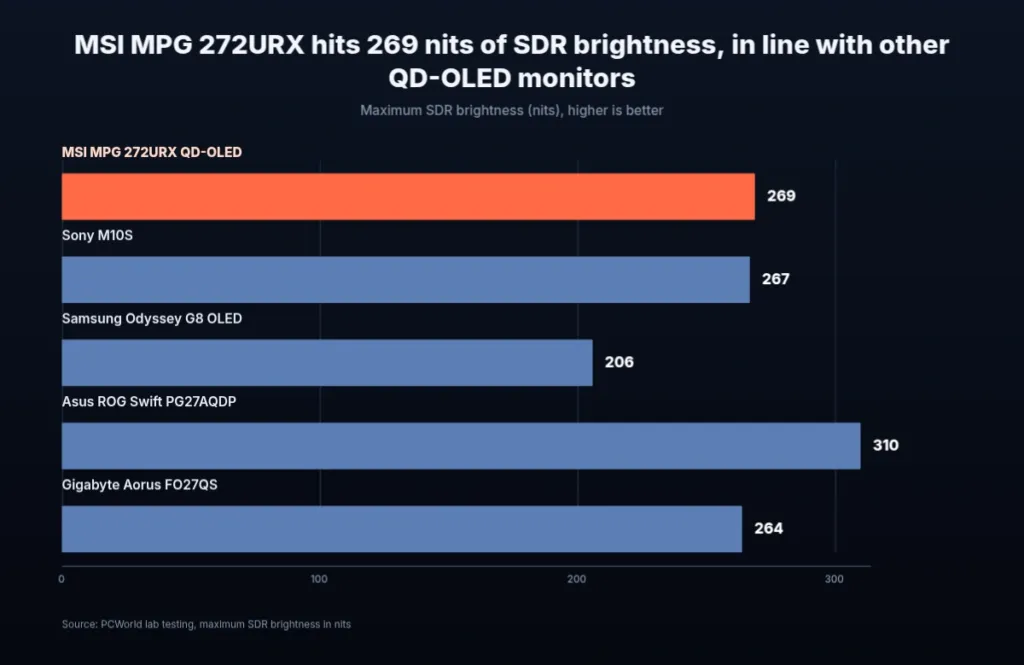
269 nits of max SDR brightness, which PCWorld measured on the MPG 272URX, isn’t a number worth getting excited about – it sits right where most QD-OLED monitors PCWorld has tested land. That’s enough for most rooms, but the glossy coating means a bright light or a sunlit window facing the screen shows up as a real reflection, not a minor annoyance. The one monitor that beat it in this same SDR test was the Asus ROG Swift PG27QDP, which runs an LG WOLED panel instead of Samsung’s QD-OLED – the first concrete sign in this review that the two panel types don’t trade blow for blow.
MSI MPG 272URX QD-OLED colour gamut coverage
The gamut numbers are where the MPG 272URX looks like every other QD-OLED PCWorld has put on a bench: 100 percent of sRGB, 98 percent of DCI-P3, 92 percent of AdobeRGB. None of that is new ground for the panel type, but it’s real coverage backed up by preset modes for sRGB, DCI-P3 and AdobeRGB built into the monitor, which is what turns a spec into something a buyer doing colour-sensitive work can actually switch on and trust.
| Colour gamut | MSI spec sheet | PCWorld measurement |
|---|---|---|
| DCI-P3 | 99% | 98 percent |
| Adobe RGB | 97.5% | 92 percent |
| sRGB | 138.2% | 100 percent |
MSI’s own spec sheet and PCWorld’s bench disagree, and the gap widens the further you get from DCI-P3. MSI claims 99 percent DCI-P3 against a measured 98 percent, close enough to ignore, but claims 97.5 percent AdobeRGB against a measured 92 percent, which is not close. The sRGB line looks like the worst offender at first glance – MSI’s 138.2 percent against PCWorld’s 100 percent – but that’s not really a contradiction: 138.2 percent is how much of the wider native gamut the sRGB primaries occupy, while 100 percent is coverage of the sRGB space itself. The AdobeRGB gap is the one worth holding against the spec sheet.
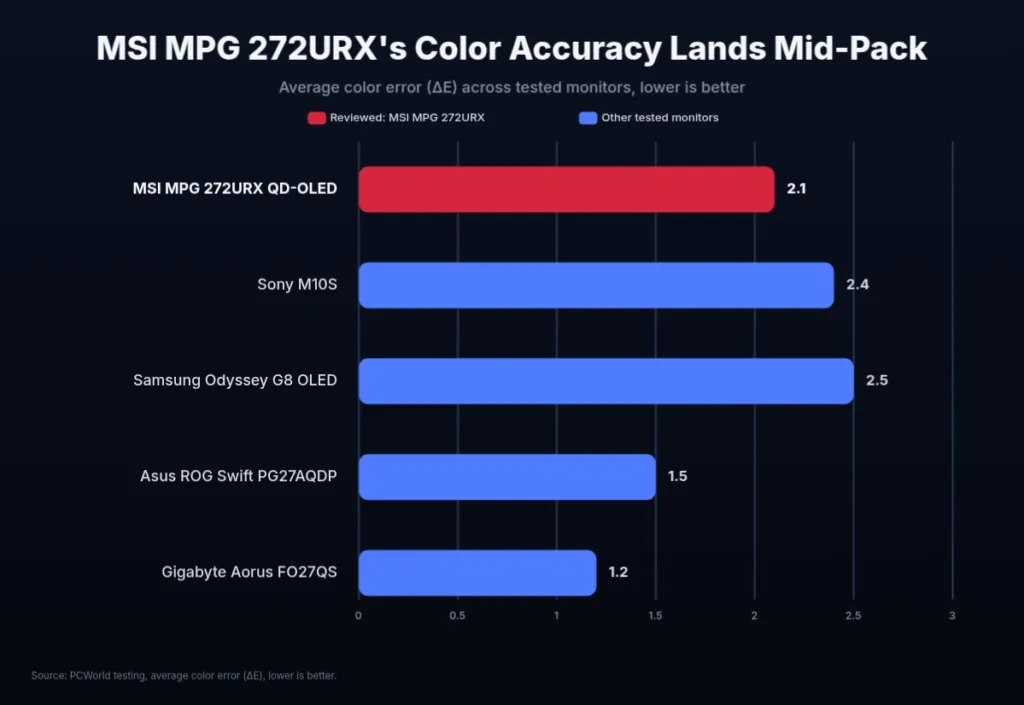
Gamma measured 2.3 against a 2.2 target, and colour temperature landed at 6100K against a 6500K target – both drift the same direction, a touch dark and a touch warm. Neither is dramatic, and a slightly dark gamma is normal for an OLED gaming monitor rather than a flaw specific to this one. The more practical problem is that MSI labels its colour temperature presets Warm and Cool instead of giving actual Kelvin numbers, so correcting that 6100K reading yourself means guessing rather than dialling in a known value.
Where the accuracy ceiling sits
The MPG 272URX’s colour accuracy is good enough for gaming, entertainment and most creative work, but it isn’t a colour-critical display. Anyone who needs better should be shopping something like the BenQ SW272U instead, and anyone doing serious desktop work should also notice this monitor has no uniform brightness mode, a feature some rivals such as Asus already provide.
4K is what actually pays off here, and it isn’t really about sharpness in the usual sense. 1440p QD-OLED monitors show subpixel aliasing around small fonts and high-contrast edges that’s genuinely ugly to look at, and the 4K panel on the MPG 272URX doesn’t remove that effect – it just raises the pixel density enough to make it hard to notice. From two to three feet away, that’s the whole case for paying the 4K premium over a 1440p QD-OLED: not a sharper picture in the abstract, but one where the panel’s own weakness finally stops showing up.
HDR brightness and 240Hz motion clarity
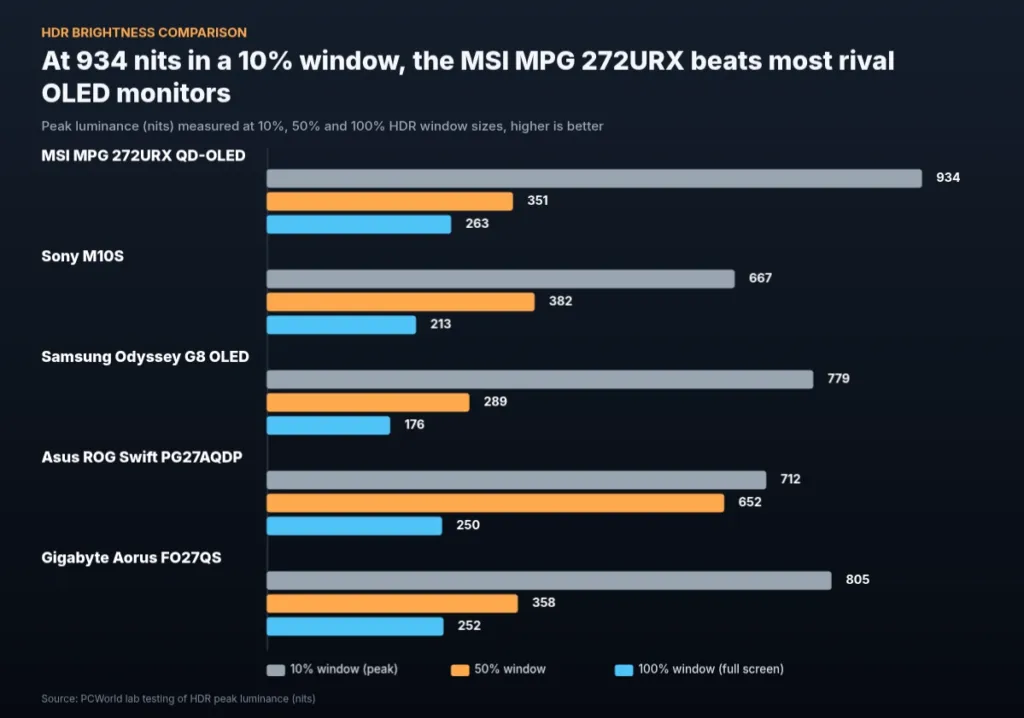
Peak brightness and sustained brightness are two different specs, and OLED punishes the gap between them harder than most panel types. On a 10 percent window the 272URX hit 934 nits, close enough to MSI’s own 1000-nit claim to call it honest marketing. Push white across the entire screen and that number collapses to 263 nits, which is just how OLED works: the panel can only dump so much power into light-emitting pixels before heat and lifespan become the limiting factor, so a small highlight gets far more of the panel’s brightness budget than a full white frame ever will. PCWorld says 934 nits still beats most of the OLED monitors it has tested, and the certification backs that up – this is a VESA DisplayHDR True Black 400 panel, the brightness tier built specifically for OLED’s deep-black, lower-full-screen-output profile.
MSI MPG 272URX QD-OLED HDR brightness
No brightness control once HDR is on
Turn HDR on and the brightness slider disappears entirely – there’s no way to dial it down for a dark room or up for a bright one. There’s also no uniform brightness mode, the setting some OLEDs use to flatten out full-screen output instead of letting it swing with content. PCWorld calls adjustable HDR brightness something that should be standard on a monitor at this price, and the 272URX ships without it.
Those numbers held up watching actual HDR content. The lightning in the Into the Storm sequence of Mad Max: Fury Road came across eye-searingly bright on PCWorld’s review unit, and the Gargantua black hole scene in Interstellar pulled out luminance gradients that a dimmer panel would have flattened into mush. PCWorld ranks the 272URX near the top of the HDR monitors it has reviewed – not the new benchmark, but close enough to it that HDR film is where this panel does its best work.
On the motion side the 272URX runs 240Hz with Adaptive Sync, a 0.03ms GtG response time, and VESA ClearMR 13000 certification – the motion-clarity rating built to measure how little a moving image smears rather than just how fast the panel refreshes. Variable refresh is where the spec sheet and the review disagree: MSI’s own store page lists FreeSync Premium Pro outright, but PCWorld found that support unofficial and could only confirm official G-Sync compatibility. Buyers running an AMD card should treat FreeSync here as a claim MSI makes rather than one PCWorld could verify.
Scrolling tests in DOTA 2 and League of Legends showed where 240Hz motion clarity still has limits: terrain, character silhouettes and spell effects stayed readable, but some character names and the fine detail in hitpoint bars got lost in the scroll. World of Warcraft, which doesn’t demand the same fast-panning precision, looked close to perfect in motion on the same panel.
240Hz is roughly the ceiling a mid-range to high-end GPU can actually feed at 4K, and you need a steady 240 FPS to get any benefit from the refresh rate at all – short of that, the extra Hz is just headroom going unused. The 27-inch 1440p OLEDs running at 360Hz still hold a small edge in motion clarity that competitive players will notice over the 272URX. PCWorld’s read is that 4K 240Hz is the better trade for most buyers, even with that gap sitting there for anyone chasing the sharpest possible motion.
Ports, Stand and Price on the 272URX
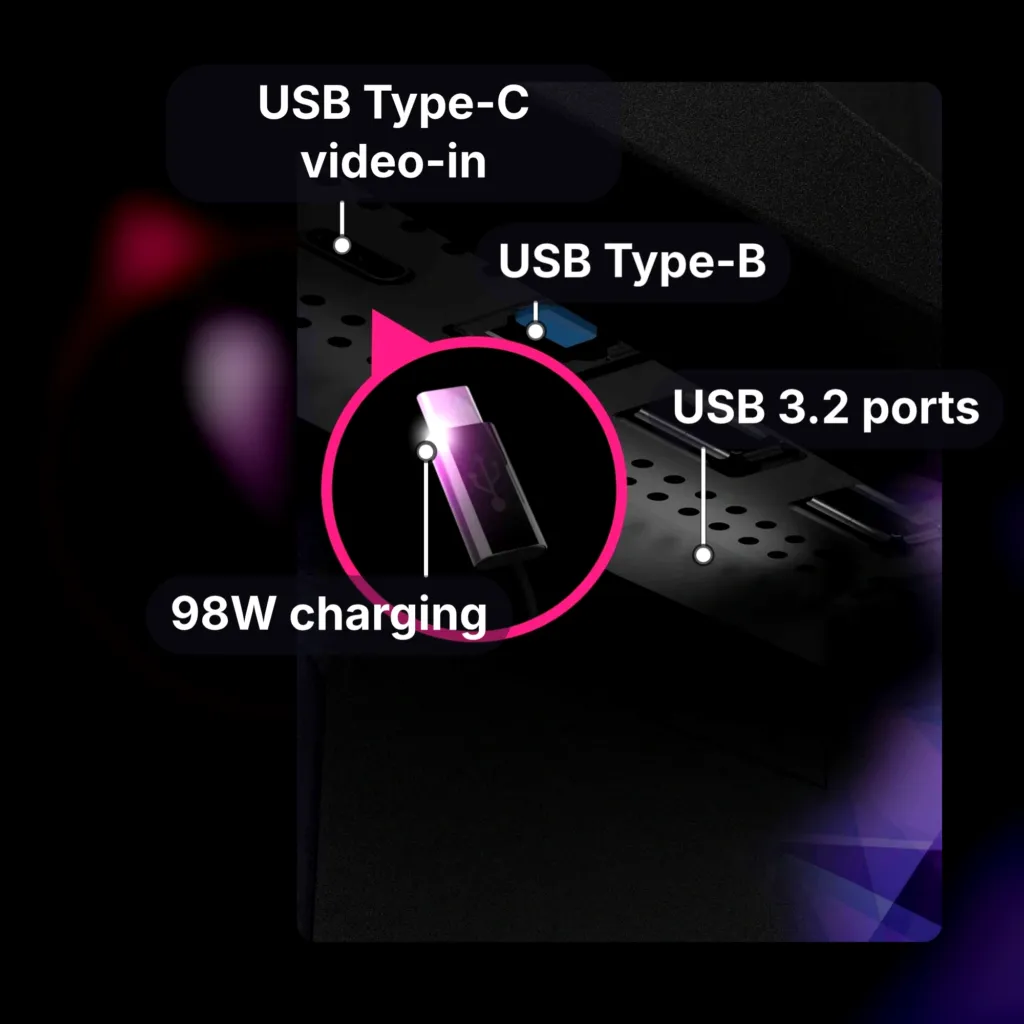
Four video inputs sit on the back of this monitor: two HDMI 2.1 ports, one DisplayPort 2.1a, and a USB-C port that doubles as a DisplayPort input and a charger. The DisplayPort connection is the one that matters most, because it runs at 80Gbps, the ceiling this version of the spec allows, and MSI says that’s enough bandwidth to push 4K at 240Hz without touching Display Stream Compression. Skip DSC and you skip the compression artifacts and added latency that come with squeezing a signal that wouldn’t otherwise fit through the pipe; feed the panel over DisplayPort 2.1a here and nothing needs squeezing. The USB-C port carries that same DisplayPort Alternate Mode signal plus power delivery, so one cable can run a laptop’s video and its charging at once.
A Charging Spec That Depends Which Page You Read
MSI’s own spec sheet puts USB-C charging on the 272URX at 98W. PCWorld’s spec list for the same monitor agrees: 98W. But the connectivity section of PCWorld’s review text says 90W instead. We’re not picking a side here – MSI’s figure and PCWorld’s own spec table both land on 98W, which gives that number 2 sources behind it, while 90W shows up exactly once, buried in the review’s prose.
Plug in a USB Type-B upstream cable and the monitor turns into a USB hub with two downstream USB 3.2 Gen 1 Type-A ports, enough for a mouse and keyboard without running either back to the tower. The KVM switch goes further: it lets 2 separate systems share this one screen, and it works alongside picture-in-picture and picture-by-picture, so a second machine’s feed doesn’t have to take over the whole panel just to stay visible.
Against the rest of the 27-inch 4K OLED class arriving this year, that connectivity is a dividing line rather than a given. Asus’s ROG Swift OLED PG27UCDM largely matches the 272URX port for port. Alienware’s AW2725Q and Samsung’s G81SF both skip USB-C with DisplayPort entirely, which means a laptop wanting to feed 4K video and power over one cable has exactly 2 monitors in this class willing to let it.
| HDMI | 2 (v2.1) |
| DisplayPort | 1 (v2.1) |
| USB Type-C video-in | 1 (DP Alternative)(98W charging) |
| USB ports | 2 x USB 3.2 (Type A), 1 x USB 3.2 (Type B; PC to MNT) |
| Tilt adjustment | -5° ~ 15° |
| Swivel adjustment | -30° ~ 30° |
| Height adjustment | 0 – 110 mm |
| Pivot adjustment | -90° ~ 90° |
| VESA mount | Yes (100mm x 100mm) |
| Weight | 18.30 lbs / 24.04 lbs |
| Dimensions w/ stand | 24.01″ x 16.62″ x 9.53″ |
| Speakers | None |
| Warranty | 3 Year |
The stand covers every axis a desk could ask for: 0 to 110mm of height adjustment, -5 to 15 degrees of tilt, -30 to 30 degrees of swivel, and a full -90 to 90 degree pivot for running the panel in portrait. All of that adds up to 18.30 lbs with the stand attached, and the cables for it route through a cutout built into the stand itself. The base underneath is large but stays flat, so the desk space it occupies is still usable for a keyboard or a notepad rather than lost to a tower-style foot.
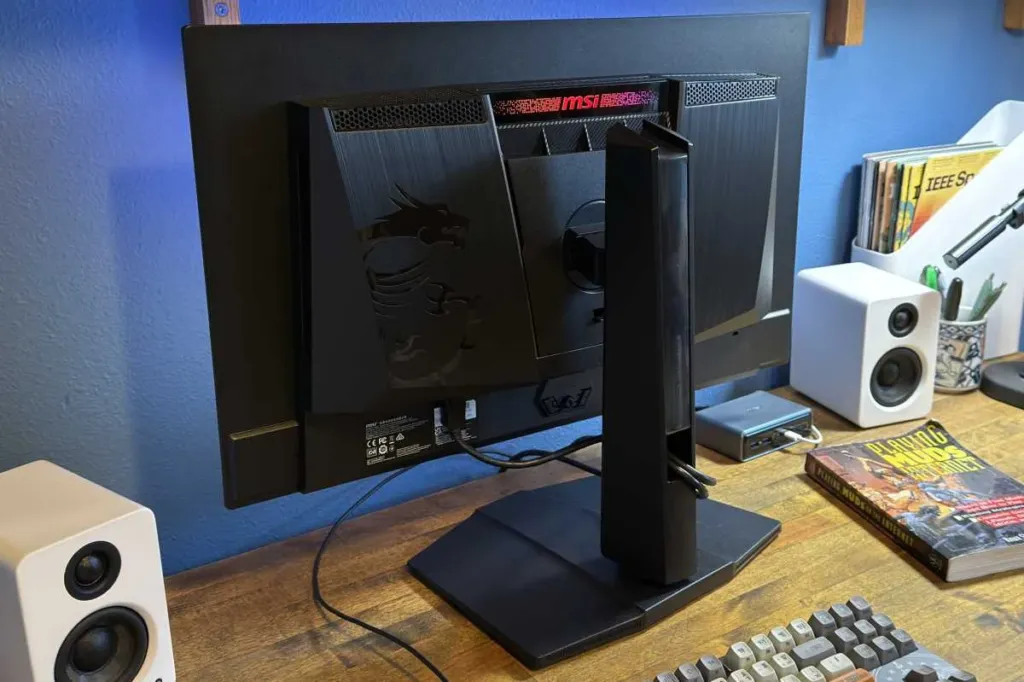
There’s no power brick hanging off this one. The 272URX runs its power supply internally, which costs it a little extra thickness but spares the desk the usual hunt for somewhere to stash a brick. Cooling a QD-OLED panel without a fan is the harder problem, and MSI handles it with a graphene film laid against the panel for thermal conductivity, paired with custom heatsinks – together, that’s what lets the monitor run fanless instead of needing forced air across it.
- Pixel shift, which moves the displayed image slightly to spread out wear across the panel
- Panel protection, a scheduled refresh cycle for the panel
- Automatic dimming when the screen detects a static image
- Boundary, taskbar and multi-logo detection, catching the static elements most likely to burn in
The chassis itself doesn’t try hard: PCWorld called the design bland and said it needed some flair. MSI’s answer is RGB lighting through Mystic Light, which syncs with other Mystic Light hardware in the same build. It’s the lighting doing a job the industrial design left undone.
Pros
- KVM switch included for running 2 systems off one screen
- On-screen joystick covers gamma and colour temperature adjustment
- Preset modes for sRGB, DCI-P3 and AdobeRGB
- Gaming overlays including crosshair, timer and black equalizer
Cons
- No built-in speakers, so owners need a headset or external desktop speakers
- No uniform brightness mode, a feature Asus offers on competing models to cap SDR brightness and cut fluctuation
- No brightness adjustment available in HDR mode
| Where | Price |
|---|---|
| MSI launch price at review | $1,099.99 |
| MSI US official store now | $899.99 |
| Amazon listing shown in PCWorld review | $1,290.52 |
| Older 27-inch 1440p OLEDs | below $800 |
MSI launched the 272URX at $1,099.99. Its own US store now lists the same monitor at $899.99. The Amazon listing sitting inside PCWorld’s review showed $1,290.52, well above what MSI itself currently charges for it on its own store. Older 27-inch 1440p OLED monitors have dipped below $800, and that’s the gap the 4K resolution here has to earn back; PCWorld’s own value case for the 272URX rests entirely on that resolution bump.
MSI’s own store listing carries 4 reviews averaging 5 stars, including one from a buyer who paired the 272URX with a 5090 after upgrading off a 1440p IPS monitor.
An all around stellar display. Games look incredible in 4k oled. Setup was easy and brightness is good.
MSI’s QD-OLED Range Below the 272URX
MSI’s own flagship costs $1,099.99, and the cheapest QD-OLED carrying the same badge costs $399.99, which says the 272URX’s size and port list are what the premium is buying, not access to QD-OLED itself. Closest to the flagship on spec is the MAG 272UP QD-OLED X24 at $699.99: 27-inch, 4K, 240Hz, the same numbers that put the 272URX in its own category, built on a newer 4th-gen QD-OLED panel instead of the third-gen panel in the flagship. Drop to the MAG 272UP QD-OLED E16 at $599.99 and the refresh rate halves to 165Hz, but MSI adds uniform HDR luminance with custom curve control, the kind of fix the flagship’s own brightness numbers made the 272URX review complain was missing.
| Model | Size and resolution | Refresh rate | Price |
|---|---|---|---|
| MAG 272UP QD-OLED X24 | 27-inch 4K (3840 x 2160) | 240Hz | $699.99 |
| MAG 272UP QD-OLED E16 | 27-inch 4K (3840 x 2160) | 165Hz | $599.99 |
| MPG 321URX QD-OLED | 32-inch 4K (3840 x 2160) | 240Hz | $859.99 |
| MAG 321UP QD-OLED X24 | 32-inch 4K (3840 x 2160) | 240Hz | $799.99 |
| MPG 321CURX QD-OLED | 32-inch curved 4K (3840 x 2160) | 240Hz | $899.99 |
| MPG 271QRX QD-OLED | 27-inch QHD (2560 x 1440) | 360Hz | $579.99 |
| MAG 272QP QD-OLED X50 | 27-inch QHD (2560 x 1440) | 500Hz | $649.99 |
| MPG 271QR QD-OLED X50 | 27-inch QHD (2560 x 1440) | 500Hz | $729.99 |
| MAG 272QP QD-OLED X24 | 27-inch QHD (2560 x 1440) | 240Hz | $399.99 |
| MAG 341CQP QD-OLED | 34-inch UWQHD (3440 x 1440) | 175Hz | $649.99 |
Step up to 32 inches and the prices actually drop further. The MPG 321URX QD-OLED runs 32-inch 4K at 240Hz for $859.99, the MAG 321UP QD-OLED X24 matches that resolution and refresh rate for $799.99, and the curved MPG 321CURX QD-OLED asks $899.99 for the same panel wrapped around the desk. All three undercut the 272URX’s $1,099.99 while handing over a bigger panel than the 26.5-inch flagship. The $799.99 X24 is also the one carrying MSI’s own claims of 1000 nits peak brightness and a DarkArmor film rated for 40 percent deeper blacks and 2.5 times the scratch resistance of an uncoated panel – figures from MSI’s spec sheet, not from a test bench, so they’re worth treating as a ceiling rather than a guarantee until somebody measures the panel directly.
The 1440p side of the lineup spends its savings on refresh rate instead of resolution. The MPG 271QRX QD-OLED hits 360Hz for $579.99, and the MAG 272QP QD-OLED X50 pushes that to 500Hz for $649.99 on a panel rated DisplayHDR True Black 500 rather than the 400 certification carried lower in the range. The MPG 271QR QD-OLED X50 asks $729.99 for the same 500Hz but adds VESA ClearMR 21000 certification and an AI Care presence sensor that checks for the user every 0.2 seconds. Cheapest of all is the MAG 272QP QD-OLED X24 at $399.99, and the one outlier in the group, the 34-inch MAG 341CQP QD-OLED, trades refresh rate down to 175Hz for the extra width at $649.99.
- MAG 272QP QD-OLED X24 – $399.99, the cheapest door into MSI’s QD-OLED range
- MAG 272UP QD-OLED X24 – $699.99 for the 272URX’s own size, resolution and refresh rate on a newer panel
- MAG 272UP QD-OLED E16 – $599.99, trades refresh rate for uniform HDR luminance with curve control
- MAG 272QP QD-OLED X50 – $649.99 for 500Hz and DisplayHDR True Black 500
- MPG 271QR QD-OLED X50 – $729.99 for ClearMR 21000 certification and the faster AI Care presence sensor
- MAG 321UP QD-OLED X24 – $799.99 for a 32-inch panel claiming 1000 nits peak brightness
QD-OLED vs WOLED Under Ambient Light
QD-OLED has no polarizer sitting over the panel, and that absence is the whole story: the moment a room has any light in it, blacks stop being black and drift purple. Dark colours go with them, desaturating faster than they do on WOLED and looking washed out well before the room gets properly bright. WOLED isn’t immune to ambient light either, it just gives ground far more slowly, holding its low black levels in a lit space where QD-OLED has already let go of them. Rtings reduces the whole comparison to one rule: QD-OLED belongs in a dark room, WOLED is the one you want when the room has light you can’t turn off.
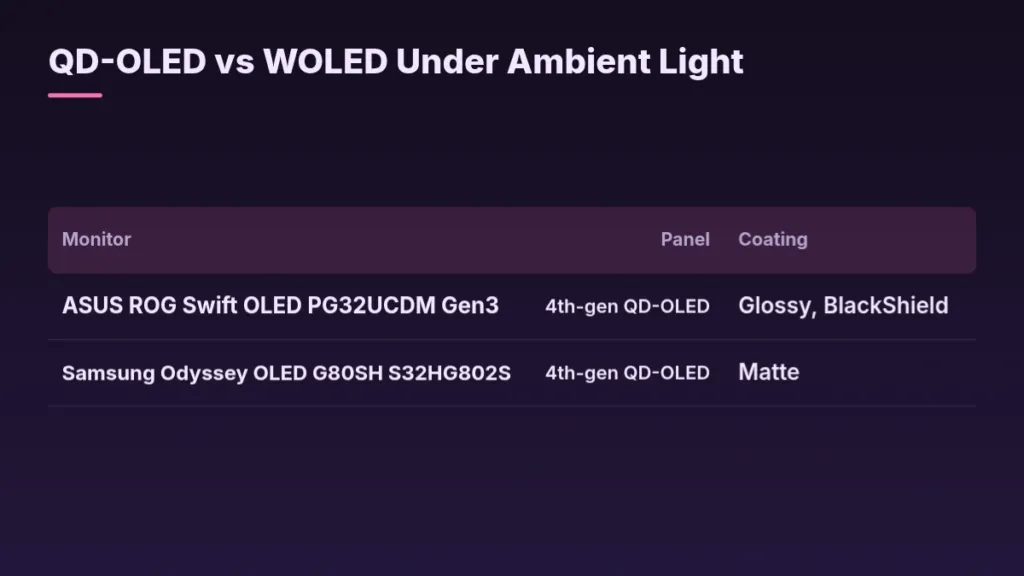
A coating can claw some of that back, and the cleanest proof is 2 monitors running the identical fourth-gen QD-OLED panel with different films on top. The ASUS ROG Swift OLED PG32UCDM Gen3 uses a glossy BlackShield coating and keeps its blacks lower in a lit room than the Samsung Odyssey OLED G80SH S32HG802S, which runs the same panel under a matte finish and lets blacks rise further. Rtings is explicit that the gap between those two is the coating doing its job, not any difference in the panel generation underneath, so the fix for a bright room isn’t waiting for the next QD-OLED revision, it’s checking which coating the specific model in front of you carries.
| Monitor | Panel | Coating |
|---|---|---|
| ASUS ROG Swift OLED PG32UCDM Gen3 | 4th-gen QD-OLED | Glossy, BlackShield |
| Samsung Odyssey OLED G80SH S32HG802S | 4th-gen QD-OLED | Matte |
WOLED gets a coating fix of its own: some ROG WOLED monitors ship with a TrueBlack Glossy finish that cuts glare while keeping blacks deep, matching what BlackShield does for QD-OLED. But WOLED’s weakness isn’t in the coating, it’s in the panel’s behaviour at low refresh rates, where gamma shifts, black levels rise, and dark-scene detail gets crushed right when a slower, more demanding game needs it most. Neither panel type gets a pass on the two faults that matter everywhere else, either: VRR flicker and burn-in risk land on QD-OLED and WOLED equally, so they’re not part of this particular decision.
Pros
- QD-OLED: best colour and deepest black of the two, but only in a room you can keep dark
- WOLED: holds its low black levels far better once ambient light is in the room
Cons
- QD-OLED: no polarizer means blacks turn purple and dark colours desaturate as soon as the lights come up
- WOLED: gamma shifts at low refresh rates, raising blacks and losing dark-scene detail
Both of these panel types are still a big step up from an IPS monitor, and owners who’ve already made the jump tend to tell newcomers the WOLED-versus-QD-OLED debate matters less than it looks on a spec sheet. One Reddit regular, coming from the other side of exactly this choice, put it plainly on r/OLED_Gaming when a shopper asked which 27-inch OLED to buy.
Since u coming from IPS.. dont stress to much about WOLED or QD LED as both will awe you away.
Three 32-Inch Panels, One Rtings Test Bench
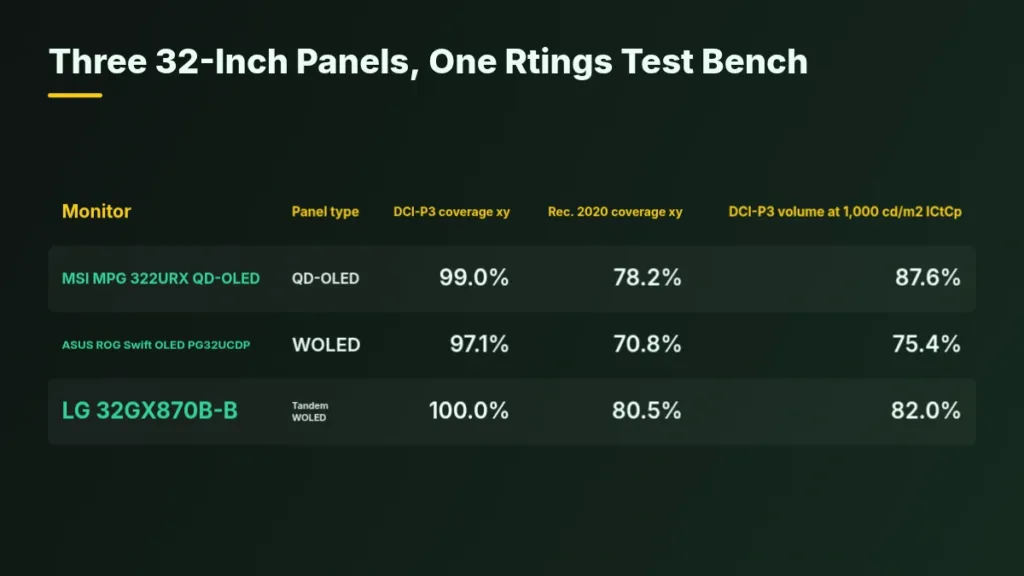
Rtings bought three 32-inch 4K monitors for this round, one carrying QD-OLED, one WOLED, and one Tandem WOLED, so size and resolution are locked and the panel is the only thing left to explain a difference. The MSI MPG 322URX QD-OLED stood in for QD-OLED, the ASUS ROG Swift OLED PG32UCDP for WOLED, and the LG 32GX870B-B for Tandem WOLED. That matched sample is what makes the numbers below worth reading as a panel comparison rather than 3 separate monitor reviews.
| Monitor | Panel type | DCI-P3 coverage xy | Rec. 2020 coverage xy | DCI-P3 volume at 1,000 cd/m2 ICtCp |
|---|---|---|---|---|
| MSI MPG 322URX QD-OLED | QD-OLED | 99.0% | 78.2% | 87.6% |
| ASUS ROG Swift OLED PG32UCDP | WOLED | 97.1% | 70.8% | 75.4% |
| LG 32GX870B-B | Tandem WOLED | 100.0% | 80.5% | 82.0% |
On DCI-P3 coverage, the three panels barely separate: 99.0% on the MSI 322URX QD-OLED, 100.0% on the LG 32GX870B-B Tandem WOLED, and 97.1% on the ASUS PG32UCDP WOLED. All three are near enough to the full space that this number alone doesn’t tell you which panel to buy. Rec. 2020 coverage is where the older WOLED starts to show its age, falling to 70.8% against 78.2% on the QD-OLED and 80.5% on the Tandem WOLED. Coverage percentages like these describe how much of a colour space a panel can reach at all, not how it behaves once brightness is pushed up inside that space, which is a different measurement with a different answer.
DCI-P3 colour volume at 1,000 cd/m2, ICtCp
Volume is where these panels actually separate. At 1,000 cd/m2 the MSI 322URX QD-OLED holds 87.6% of DCI-P3, the LG Tandem WOLED holds 82.0%, and the ASUS WOLED holds 75.4%. The Tandem WOLED lands squarely between the other two: a real step up from the older WOLED’s 75.4%, but still short of QD-OLED’s 87.6%. The tandem structure narrows the colour gap at high brightness without closing it, which is the honest way to describe what a second OLED stack buys you here.
| Panel type | Units tested | 50% std. dev. mean | 50% std. dev. median |
|---|---|---|---|
| QD-OLED | 28 | 0.764% | 0.586% |
| WOLED | 25 | 1.402% | 1.364% |
Pooled across 28 QD-OLED units and 25 WOLED units Rtings has bought and tested, gray uniformity at 50% averages 0.764% standard deviation on QD-OLED against 1.402% on WOLED, a gap that holds up at the median too: 0.586% against 1.364%. QD-OLED measures better on both counts, but Rtings themselves call the edge real without calling it significant, and uniformity varies between individual units of the same model regardless of panel type. A half-percent of standard deviation isn’t the number to decide a purchase on.
Subpixel Layout and Text Fringing
Text on a screen is rendered one subpixel triangle or stripe at a time, and that shape is the thing deciding whether a letter looks clean or smeared. Most QD-OLED panels stack their subpixels in a triangle: green sits on top, red and blue sit below it. Put a plain window on screen and that triangle shows up right at the edges – a thin green line runs along the bottom of the window, a thin purple line runs along the top. That’s a hardware arrangement baked into the panel, so it doesn’t matter whether Windows’ ClearType is switched on or off; the green-and-purple fringing is there either way.
Windows’ own text renderer makes the problem worse rather than fixing it. ClearType assumes a standard RGB stripe, so it can’t properly render either RGWB or triangular layouts when it’s handed one. Traditional WOLED panels used four subpixels – red, green, blue and white – and ClearType struggled with those too. The newer generation of WOLEDs drops the white subpixel and goes back to a plain RGB layout, and that’s the arrangement computers can actually render text on correctly.
| Monitor | Panel type | Subpixel layout |
|---|---|---|
| Corsair XENEON 27QHD240 | WOLED | RWBG |
| Sony INZONE M10S | WOLED | RGWB |
| Samsung Odyssey OLED G60SD S27DG602S | QD-OLED | Triangular RGB |
Rtings held everything else still to isolate the layout itself: 3 monitors, all 27-inch, all 1440p, all matte-coated, differing only in how their subpixels are arranged – the Corsair XENEON 27QHD240 with RWBG, the Sony INZONE M10S with RGWB, and the Samsung Odyssey OLED G60SD S27DG602S with its triangular QD-OLED layout. With ClearType turned on, the triangular QD-OLED produced the sharpest text of the three, which runs against the intuition that a stacked green-and-purple fringe should lose to a straight RGB stripe. Both WOLEDs still showed some letter fringing of their own, and between the two, RGWB rendered text a bit better than RWBG.
Samsung’s newer QD-OLED panels abandon the triangle for a straight RGB stripe, subpixels sitting side by side rather than stacked, a layout Samsung calls V-Stripe. That change drastically cuts the text fringing the triangular arrangement caused. On the WOLED side, dropping the white subpixel does double duty: it’s what lets Windows render text properly, and it’s also what stops colours washing out the way they did on the white-subpixel layouts. The Dell Alienware AW3426DW and AW3926QW, both built on RGB-stripe layouts, show no fringing at all.
Pixel density is the other way out of the problem: cram enough pixels into a small enough screen and triangular fringing shrinks below what most people will notice. The MSI MPG 272URX packs 3840×2160 into a 26.5-inch QD-OLED panel and looks as sharp as any 4K monitor from two to three feet away. That isn’t the same as the problem disappearing – 4K QD-OLED at this size still doesn’t fully remove the aliasing around small fonts, it just shrinks it small enough that nobody’s complaining about it anymore.
Scaling and Viewing Distance Matter Too
Panel type gets most of the blame for ugly text, but scaling and viewing distance often decide more of it. A 27-inch 1440p screen is still a practical middle ground for mixed desktop and gaming use, and a 27-inch 4K screen makes desktop text look cleaner again if you’re willing to run it scaled up. None of that settles how much fringing actually bothers any one person, and that answer differs from buyer to buyer – the layout that’s a dealbreaker for one person is a non-issue for the next.
Grey Banding on Tandem WOLED Panels
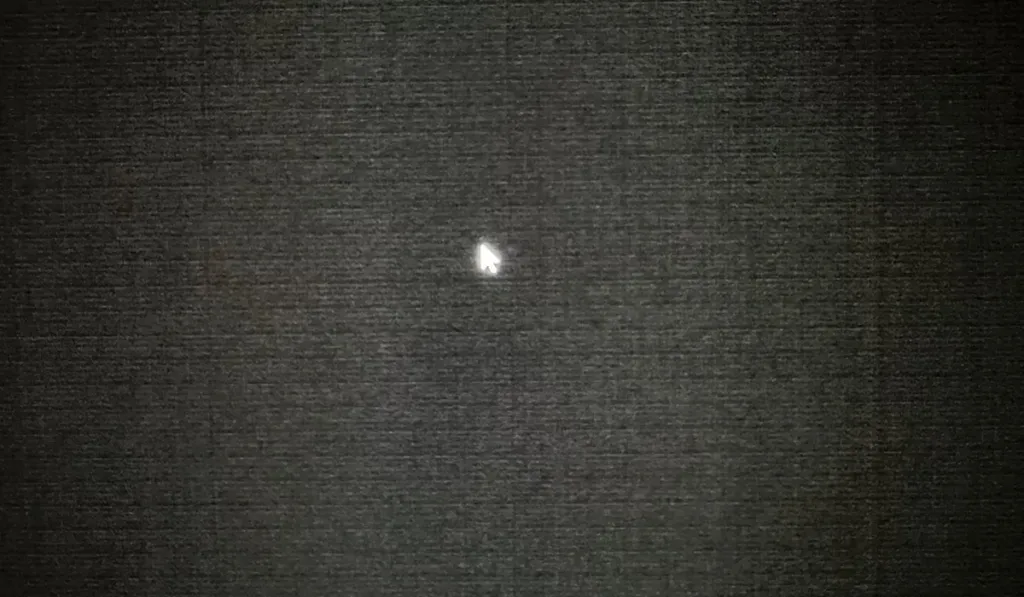
Drop a Tandem WOLED screen below about 1 nit and some owners start seeing stripes that aren’t supposed to be there. They show up as vertical or horizontal bars, sometimes with a general dirty-screen-effect texture layered over the top, and they only turn up below roughly 1 nit of luminance – nowhere near normal brightness. That makes this a dark mode and night scene problem specifically: dark games, dark apps, anything that pushes the panel into near-black. Reviewers spot it most reliably with a dark grey or near-black test pattern rather than ordinary content.

LG Display and Asus on the Driving-Current Cause
LG Display and Asus point to driving current as the cause: the digital-to-analog converter that sets each pixel’s brightness puts out a current, and near black that current is tiny. The mismatch between channels is fixed in absolute terms and minor on its own, but at those tiny currents a small, fixed gap turns into a huge proportional one. LG Display calls this a characteristic of Tandem OLED rather than a defect, and says how visible it is varies slightly from unit to unit.
| Grey level | Luminance | Typical channel variation |
|---|---|---|
| 8 gray | 0.26 nits | 31% |
| 32 gray | 4.82 nits | 1.25% |
The numbers show why the effect only shows up near black. At 8 gray, about 0.26 nits, the channel-to-channel variation runs to roughly 31 percent. Climb to 32 gray, about 4.82 nits, and the same variation falls to 1.25 percent – below what most people can see. The current mismatch between channels doesn’t change; what changes is how big a share of a very small number it ends up being.
TFTCentral’s Sample-by-Sample Results at 0.2 Nits
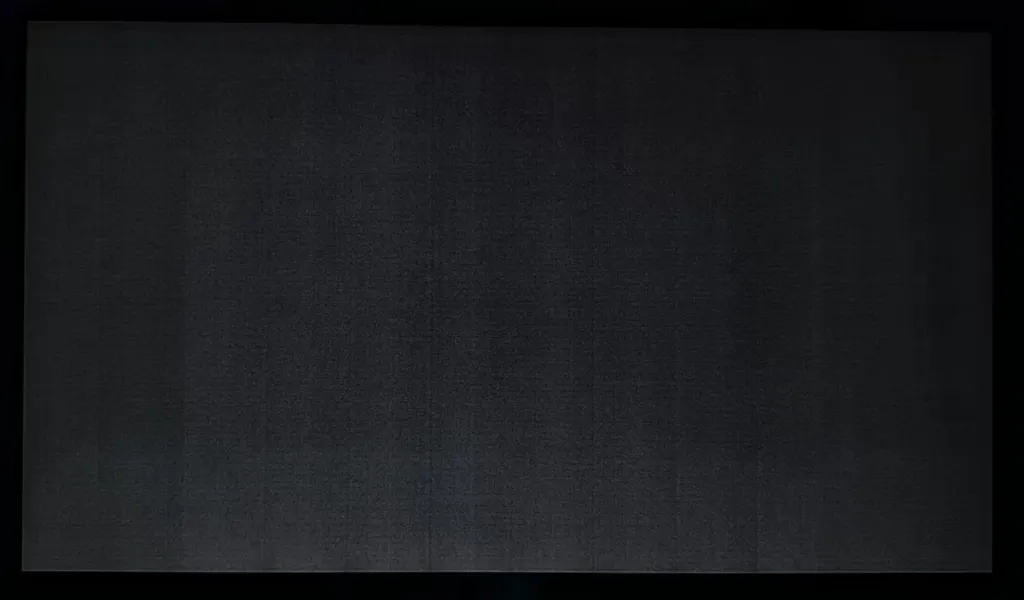
- The Asus ROG Strix XG27AQWMG showed evenly spaced vertical bars at 0.2 nits, with faint horizontal bars layered on top forming a visible grid.
- The Gigabyte MO27Q28G sample banded far more subtly, with bars that were there but easy to miss.
- The Asus ROG Swift PG27AQWP-W showed something different again: a dark, carpet-like texture that read more like dirty-screen effect than clean stripes.
- Older Gen 3 WOLED samples banded less than any of the Tandem panels tested.
- QD-OLED samples looked cleaner still at the same low luminance.
- All of this comes from single samples of each model, so it’s an indication of where the technology sits rather than a verdict on every unit that ships.



The Four-Stack Trade-off
The 4-stack structure is the most likely reason Tandem WOLED struggles here more than earlier panels: stacking 4 emissive layers is what buys LG Display’s 20 percent cut in power consumption and 20 percent increase in brightness, but it also means every one of those layers needs finer microcurrent control than a single-stack panel ever did. LG Display admits stabilizing mass production of the 4-stack design was a real challenge, and says image quality is still improving as the process gets optimized.
LG Display’s defense rests on scale: more than 30,000 of these panels have shipped worldwide, and the company says complaint and return rates stay relatively low against that number. That claim only holds together because severity swings from sample to sample of the same model – a low average doesn’t mean every unit looks the same at 0.2 nits.
Banding and Refresh Rate
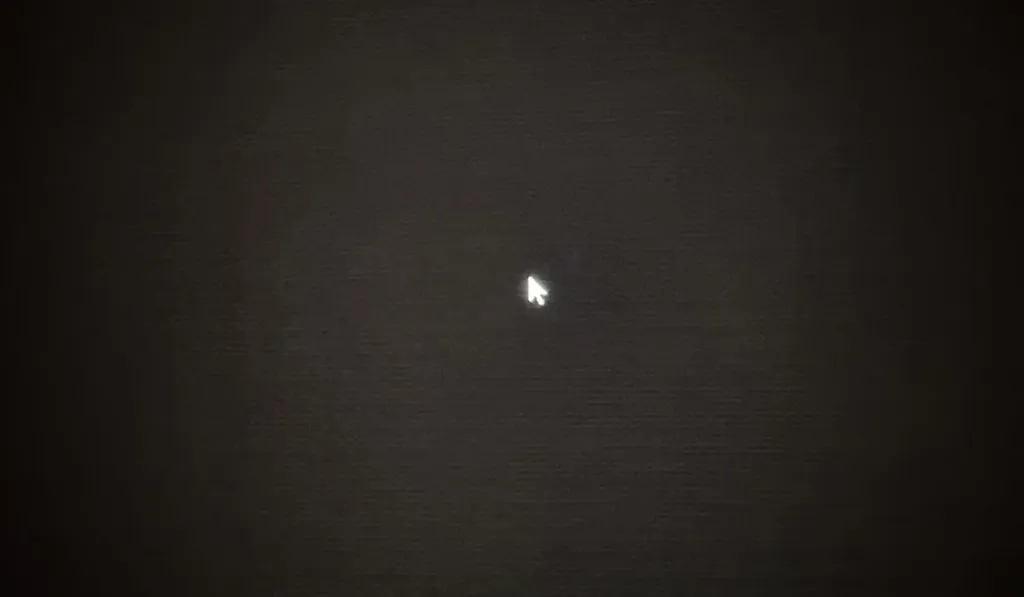
Lower the refresh rate and the banding visibly eases. TFTCentral found the PG27AQWP-W looked much better at 60Hz than at its native 540Hz, and Rtings saw the same pattern across its own two Tandem WOLED samples. The reason sits in how little time each pixel gets to charge at higher refresh rates – shorter charging windows make the kind of precise control needed under 1 nit harder to pull off. For anyone running the screen at console refresh rates of 60Hz or 120Hz, TFTCentral says the banding should barely register.
Luminance dip interval by refresh rate
Fixing a Bad Sample
- Give any new OLED about 2 weeks to bed in before judging it.
- Run a panel refresh cycle or two from the OLED care section of the OSD menu – it improved the banding in several cases.
- Judge the result on real content you’d actually watch or play, not a dark grey test pattern.
- If it’s still visibly bad in normal use after that, return or RMA the screen.
Why Reddit Photos Overstate This
The dark grey test pattern that’s spread around Reddit isn’t fixed to one brightness setting, and brightness, gamma and preset mode all shift what shade actually lands on screen – 2 monitors photographed at ‘the same’ pattern can be showing different luminance entirely. A camera also tends to exaggerate what the eye sees in near-black. TFTCentral only got comparable results by locking every sample to exactly 0.2 nits before shooting.
Asus says a firmware fix is extremely unlikely and won’t ship one as a distraction, choosing instead to work on production line optimization. Gigabyte says newer MO27Q28G batches already band less than early units, and has escalated the issue to LG Display directly. Both companies say they’ll facilitate a replacement or refund for anyone unhappy with their unit. The dithering trick that masks this kind of banding on OLED TVs doesn’t carry over cleanly to a monitor – viewed from a desk rather than a couch, it introduces its own artefacts.
Whether that production work carries into the next generation is the question owners keep asking. LG Display says it’s still reviewing additional enhancement algorithms, without committing to when or whether they land.
Can we expect less gray banding in the next generation of tandem WOLEDs?
What Actually Causes Burn-In
Rtings’ testing lands on a use-pattern problem, not a panel-type problem: there’s no meaningful burn-in difference between QD-OLED and WOLED. Switching from browsing to gaming already cuts the risk a lot, because the game world keeps changing what’s lit. The thing that actually wears a panel down is the opposite of that – the same taskbar, the same open window, the same elements sitting unchanged in the same spot for hours on end.
There is one place the two panel types might still separate, and it’s worth saying plainly how thin the evidence is. WOLED TVs show edge rot, a sign of panel degradation that shows up regardless of what’s on screen, but nobody has enough data yet on whether WOLED monitors do the same. That gives QD-OLED a very slight longevity edge on paper, not a reason to pick it on its own.
Tandem OLED is the newer fix, and it buys less than it sounds like: it reduces burn-in risk at higher brightness levels without preventing burn-in completely. High brightness was the weak spot for early-generation OLEDs because heat is what makes the organic layer decay, which is exactly why ASUS pairs its tandem panels with large custom heatsinks rather than just a marketing claim.
Warranty Cover and Burn-In Mitigation Software
- MSI covers the MPG 272URX QD-OLED for burn-in for 3 years
- ASUS offers the same 3-year burn-in warranty across its OLED monitors
- MSI’s OLED Care 2.0 adds boundary detection, catching static window edges before they bake in
- It adds taskbar detection and multi-logo detection, going after the specific static elements that cause burn-in rather than just shifting pixels blind
- It still runs pixel shift and panel refresh underneath, and dims the screen when it detects a static image left on screen
The Case for Walking Away to Mini-LED
Mini-LED sustains higher brightness than OLED in a lit room, which makes it the easier default for a desk that stays bright and text-heavy all day. The cost shows up as blooming or haloing around high-contrast edges, most visible as a halo around white text sitting on a dark background. OLED still wins dark-room gaming outright: per-pixel dimming and a near-instant response make it feel cleaner in motion and more convincing in dark scenes. Neither side comes free of a flaw.
Pros
- Sustains higher brightness in bright rooms
- Avoids the burn-in conversation altogether
- Easier to trust for long static desktop sessions
Cons
- Blooms around bright text and icons on dark backgrounds
- Loses to OLED on contrast in dark scenes
- Loses to OLED on motion feel
| Spec | KTC M27T6S | KTC G27P6 |
|---|---|---|
| Panel | Mini-LED | OLED |
| Size | 27-inch | 27-inch |
| Resolution | 1440p | 1440p |
| Refresh rate | 200Hz-class | 240Hz |
| Response time | — | 0.03ms |
| HDR | HDR1000 | — |
| USB-C charging | — | Yes |
KTC sells both ends of this decision at the same size and resolution, which is the useful part. The M27T6S is a 27-inch QHD Mini-LED with 200Hz-class speed and HDR1000; the G27P6 is a 27-inch 1440p OLED running at 240Hz with a 0.03ms response time and USB-C charging built in. 27-inch 1440p is the practical middle ground for a desk doing both work and play, so the choice between these two isn’t about which monitor wins – it’s about which flaw you can live with, blooming around white text or caution about leaving a static window open too long.
Buyers worried about burn-in often land on Mini-LED for exactly that reason, and OLED’s advantage at night in a controlled room is the thing they’re trading away to get there.
Makes sense to look at Mini-LED if you’re worried about burn-in. OLED will probably still look better at night, but if you can live with a small trade-off, Mini-LED may be the better fit for you.
If You’ve Already Decided on OLED
Panel type barely moves burn-in risk, so don’t shop on that axis. Vary what’s on screen instead of leaving the same taskbar or window parked in one spot all day, and let the warranty do the worrying for you: MSI and ASUS both cover burn-in for 3 years.
ASUS ROG’s 6-Tier OLED Panel Guide
ASUS sorts its OLED monitors into six panel types: WOLED, QD-OLED, Tandem WOLED, Tandem QD-OLED, Tandem RGB WOLED and Tandem RGB QD-OLED, and attaches a peak brightness figure to each one. Those numbers come from the panel manufacturer rather than from anything ASUS or a reviewer measured on a bench, and ASUS says so itself: actual peak brightness varies from model to model even within the same panel type. Treat the figures as what a panel is rated for, not as a promise about what the monitor sitting in front of you will hit.
| Panel type | Peak brightness spec | Example ROG monitor |
|---|---|---|
| WOLED | ~600–1,300 nits | ROG Swift OLED PG32UCDP |
| QD-OLED | ~400-1,000 nits | ROG Strix OLED XG27AQDMES |
| Tandem WOLED | ~1,500 – 1,700 nits | ROG Swift OLED PG27AQWP-W |
| Tandem QD-OLED | ~1,000 nits | ROG Swift OLED PG32UCDM Gen3 |
| Tandem RGB WOLED | ~1,000 nits | ROG Swift OLED PG32UCWM |
| Tandem RGB QD-OLED | ~1,300 nits | ROG Swift OLED PG34WCDN |
Tandem WOLED sits at the top of that sheet at ~1,500-1,700 nits, plain QD-OLED sits at the bottom at ~400-1,000 nits, and the tandem structures in between are what pulled QD-OLED up off that floor. Samsung’s Penta Tandem lifted brightness sharply over older QD-OLED panels while holding onto the quantum dot colour the panel type is known for. Tandem QD-OLED and Tandem RGB WOLED both land on the same ~1,000 nits, so the spec sheet alone doesn’t separate those two at all, and Tandem RGB QD-OLED outranks both at ~1,300 nits without catching Tandem WOLED’s number above it.
- The ROG Swift OLED PG32UCDP is a value-oriented 32-inch WOLED, the cheapest way onto this ladder because older WOLED is the cheapest panel to build.
- The ROG Strix OLED XG27AQDMES carries an older 27-inch QD-OLED panel, the entry point on the QD-OLED side for the same reason.
- The ROG Swift OLED PG27AQWP-W steps up to a 27-inch Tandem WOLED panel, the one rated brightest of the six.
- The ROG Swift OLED PG32UCDM Gen3 carries Tandem QD-OLED.
- The ROG Swift OLED PG32UCWM moves to Tandem RGB WOLED.
- The ROG Swift OLED PG34WCDN, a 34-inch ultrawide, sits at the top of the list on Tandem RGB QD-OLED, where the newest and most expensive panels land.
Some of this is marketing-term soup more than it needs to be. LG’s own name for its RGB tandem panels is Primary RGB Tandem 2.0, and the W in Tandem RGB WOLED refers to a white backlight rather than a white subpixel, which is how the same panel ends up carrying a second name, Tandem RGB OLED. Samsung’s equivalent stripe layout goes by V-Stripe.
Where the Ladder Actually Converges
At the top of the ladder ASUS says the gap between Tandem RGB WOLED and Tandem RGB QD-OLED has closed significantly: Tandem RGB WOLED still holds the purest blacks in a well-lit room, Tandem RGB QD-OLED still has slightly better colour and wins out in a dark room, but neither side is running away with it the way the brightness specs alone might suggest. ASUS adds a second warning that cuts against reading any of this too literally – 2 monitors built on the exact same panel can still deliver a different experience, because ASUS layers its own hardware and software on top of whatever panel it bought.
What the 4K Premium Actually Buys
Sharpness is the entire case for paying more for 4K QD-OLED over 1440p. Contrast, colour gamut and SDR brightness land right where older QD-OLED panels already sat, and the extra pixel density mostly erases the subpixel oddities that show up on 1440p QD-OLED screens. At 2 to 3 feet, the MPG 272URX looks as sharp as any 4K monitor around. That sharpness costs $1,099.99, while older 27-inch 1440p OLEDs have dropped below $800 – the gap between them is pixel density and nothing else the bench turned up.
WOLED held the HDR brightness lead once LG’s newer panels landed in the second half of 2024, and that generation is what most of this round measures against. But brightness stops deciding anything once a premium OLED sits in a normal room: either panel family is bright enough for a few overhead lights or dim lamps, which covers most living rooms and most desks without a window behind the screen.
The Panel Roadmap Through 2027
| Panel generation | Sizes & resolutions |
|---|---|
| QD-OLED 3rd & 4th (2024 & 2025) | 27-32″, 1440p & 4k |
| QD-OLED 5th (2026 & 2027) | 25-49″, 1080p-5k (Introduction of RGB) |
| WOLED 3rd (2025) | 27-45″, 1440p-5k2k |
| WOLED 4th (2025 & 2026) | 25-39″, 1080p-5k2k (Introduction of RGB) |
Third and fourth-gen QD-OLED covered 27 to 32 inches, 1440p and 4K; fifth-gen stretches that to 25 to 49 inches and 1080p to 5K, and brings RGB subpixels into the mix. LG’s fourth-gen WOLED runs a similar spread, 25 to 39 inches, 1080p to 5K2K, also gaining RGB. The 27-inch range that used to be nearly the whole market is now just the middle of a much wider one, and both panel families keep adding sizes and refresh rates into 2027 while the panels they replace slide down into the value brackets. None of that changes the order a buyer should shop in: size, resolution and refresh rate narrow the field first, and the panel-type argument only applies to whatever’s left after that.
The roadmap above is public, but public isn’t the same as scheduled. Nobody shopping right now has a ship date to plan around for the next brightness tier.
I’m most interested in the TB1000 displays. Sadly no release date estimate so it’s hard to get an idea of when they will hit the market.
When the Upgrade Pressure Isn’t Worth It
The one upgrade that pays off in daily use is resolution: 4K cuts out the subpixel oddities that show up on OLED panels, and the extra density makes text aliasing – visible on 1440p QD-OLED around small fonts and high-contrast edges – much harder to notice at all. Most of the rest of the gap between this year’s panel and last year’s isn’t something anyone will actually see while using the screen.
Put plainly, to anyone already running a display that works fine: owners of good displays chase specs more often than they chase an actual need.
You have an amazing TV already, don’t overthink it. It sounds to me like you have a big case of FOMO rather than a genuine need to change.
The practical worry about a high-resolution panel is whether the GPU attached to it can actually keep up, and one answer making the rounds is running demanding games at exactly half the panel’s resolution instead.
I am running 5k2 at 40″, and doing all my demanding gaming on 1080p, which is a perfect 1/2 resolution, and I find that it looks perfectly fine with all modern AA technologys.
The Cheap Shortcut
If sharpness isn’t what bothers you about your current screen, skip the 4K premium entirely. Older WOLED and QD-OLED panels now sitting in the value brackets, including 27-inch 1440p OLEDs below $800, deliver the same contrast and colour the newer 4K panels do, at a lower price.