

Key Takeaways
- 1If you’re already on AM4 with DDR4 installed, the $350 re-release price is the cost of staying put, not a market price you’re meant to compare against a fresh build.
- 2Tom’s Hardware calls $350 relatively expensive and puts the fair price $70 to $100 lower, so treat the current sticker as a premium you’re paying for convenience, not performance.
- 3The Ryzen 5 7600X3D at $246 games faster than the 5800X3D for $100 less, and that saved $100 covers a meaningful chunk of a DDR5 platform if you’re starting from scratch.
- 4Judge the chip by 1% lows, not averages: TechSpot measured a 22% gain in worst-case frame times at 1080p against a 15% average gain over the Ryzen 7 5800X, and the 1% low advantage survives a resolution bump better than the average does.
- 5Skip the upgrade if you play Apex Legends or Rainbow Six Siege almost exclusively; TechSpot measured gains of 9% or less in both, with Siege’s edge vanishing entirely above 1080p.
- 6Don’t bother with Precision Boost Overdrive; AMD doesn’t officially support it on this chip. Use PBO2 Tuner instead, stepping the curve offset from -10 down to -30 in -5 increments while watching HWiNFO or Ryzen Master for stability.
- 7At 4K on anything less than a flagship GPU, the 5800X3D’s edge over the Ryzen 7 5700X collapses to nothing, so the upgrade only pays off if your graphics card is fast enough to let the CPU matter.
The 5800X3D’s Zen 3 X3D Silicon
The Ryzen 7 5800X3D pairs 8 cores and 16 threads with a 3.4 GHz base clock and a 4.5 GHz boost, numbers that look unremarkable for an 8-core chip of its era. What sits underneath them is the real headline: 96MB of total L3 cache, or 100MB once you count the L2 sitting alongside it, per Tom’s Hardware. That cache is also why the clocks read so modestly. AMD rated the chip at 105W TDP with a 142W maximum power draw, and kept the clock pair down to keep the stacked cache cool enough to survive. On a spec sheet built around clock speed, this one reads backwards, and that’s the point of the chip.
| Architecture | Zen 3 X3D |
| Cores/Threads | 8 / 16 |
| Cache (L2 + L3) | 100 MB |
| Total L3 cache | 96MB |
| Base/Boost Clock | 3.4 / 4.5 GHz |
| TDP / Maximum Power | 105W / 142W |
| Street Price | $350 |
The 2 dies on this chip don’t come from the same company. TSMC fabs the compute die on its 7nm FinFET process, while GlobalFoundries makes the I/O die on its 12nm process, the split-fab arrangement AMD ran across the entire Zen 3 lineup.
4 years on, that 96MB allocation still looks strange next to what both companies ship now. The Ryzen 7 9700X carries the same 32MB of L3 that Zen 3 chips shipped with back when the 5800X3D launched; AMD doubled the L2 on that chip instead of touching L3 at all. Intel took the opposite route, splitting L2 and L3 more evenly and growing both pools with Arrow Lake and the Arrow Lake Refresh. Neither approach has landed anywhere near 96MB of L3 on its own, which is why the 5800X3D’s cache size still stands out against current silicon rather than reading as old news.
| CPU | Architecture | Cores/Threads (P+E) | Cache (L2 + L3) | Base/Boost Clock (GHz) | TDP / Maximum Power |
|---|---|---|---|---|---|
| Ryzen 7 5800X3D | Zen 3 X3D | 8 / 16 | 100 MB | 3.4 / 4.5 | 105W / 142W |
| Ryzen 5 7600X3D | Zen 4 X3D | 6 / 12 | 102 MB | 4.1 / 4.7 | 65W / 88W |
| Ryzen 7 7800X3D | Zen 4 X3D | 8 / 16 | 104 MB | 4.2 / 5 | 120W / 162W |
| Core Ultra 7 270K Plus | Arrow Lake Refresh | 24 / 24 (8+16) | 76 MB | 3.7 / 5.5 | 125W / 250W |
| Core i7-14700K | Raptor Lake Refresh | 20 / 28 (8+12) | 61 MB | 3.4 / 5.6 | 125W / 253W |
The Cost of Stacking Cache
Stacking that SRAM on top of the compute die insulates the cores from the heat spreader sitting above them, and that insulation is why the 5800X3D ships with relatively low peak clocks out of the box and why AMD does not officially support Precision Boost Overdrive on it. Every number on the spec sheet above is downstream of that one packaging decision.
The Stacked Cache Die, Physically
AMD calls this the 3D V-Cache die, and on the 5800X3D it is a 64MB slab of SRAM bonded straight onto the compute die rather than sitting beside it on the substrate. Through-silicon vias run vertically through that stack to wire the 2 layers together, and the bond itself uses TSMC’s SoIC process, which joins copper to copper directly instead of relying on the micro-bumps that other 3D packaging leans on. That is what makes this a genuine vertical stack rather than cache squeezed in next to the cores, and it is also why the L3 on this chip nearly triples over a standard Zen 3 part to reach 96MB in total.
| Stacked SRAM die | 64MB per CCD |
| Total L3 on 5800X3D | 96MB |
| Bonding method | TSMC SoIC copper-to-copper, no micro-bumps |
| Vertical connections | Through-Silicon Vias (TSVs) |
| Interconnect bandwidth | Up to 2.5 TB/s |
| Z-height | Same as a standard non-V-Cache processor |
AMD built the rest of the package to make that stack disappear from the owner’s side of the socket. The TSV link between the 2 dies carries up to 2.5 TB/s, enough bandwidth that the extra layer doesn’t bottleneck the cache it’s extending. The whole assembly keeps the same Z-height as a standard non-V-Cache processor, so coolers bought for an ordinary Ryzen chip bolt straight onto this one with no adapter or new mounting hardware needed. Because the 64MB die only covers the middle of the package, AMD fills in the rest with structural silicon spacers sitting over the cores, giving the heat spreader an even, flat surface to press against instead of a lopsided one.
The part AMD can’t engineer away is thermal. Stacking SRAM directly over the cores puts an extra layer of silicon between them and the heat spreader, and that layer traps heat that would otherwise move straight up and out, pushing operating temperatures higher than a standard Zen 3 die would run. AMD’s answer was to pull back on the clocks rather than fight the thermals directly: the 5800X3D tops out at 4.5 GHz boost out of the box, and AMD doesn’t officially support Precision Boost Overdrive on this chip at all, keeping power and heat inside a tighter window than its non-X3D sibling gets to use.
- AMD first showed the stacking approach on a Ryzen 9 5900X prototype at Computex 2021
- The 5800X3D became the first version anyone could actually buy, launching in early 2022
- EPYC Milan-X and Genoa-X carried the same stacking into AMD’s server lineup
- The EPYC 9684X pushes that server-side stacking to more than 1GB of total L3 cache
- The 7800X3D brought 3D V-Cache to Zen 4 on the AM5 platform
- The 9800X3D flipped the layout, moving the SRAM die below the compute die instead of above it
That last change is the one worth reading back onto the 5800X3D. Moving the SRAM die underneath the compute die on the 9800X3D puts the cores themselves closer to the heat spreader, attacking the thermal trapping problem at the source rather than working around it with lower clocks. The 7800X3D never made that change; it just leaned on Zen 4’s own efficiency gains to keep the same over-the-cores layout in check. The 5800X3D predates both fixes, which is exactly why AMD built its clock and power ceilings as conservatively as it did.
One Packaging Change on the Re-Release
The 10th Anniversary Edition isn’t a pixel-for-pixel repeat of the original die. AMD says the re-release should perform identically, but it uses a slightly different bonding process than the 2022 chip did, and a change like that can nudge power draw and thermals even when AMD doesn’t expect it to show up in benchmarks. Tom’s Hardware’s numbers in this piece come from testing the original 5800X3D, not the new re-release, so anyone buying the Anniversary Edition is trusting AMD’s word that the packaging tweak doesn’t change what they’re getting.
The 10th Anniversary Edition’s $350 Rivals
AMD knocked $100 off the original MSRP to land the 10th Anniversary Edition at a $350 street price, and that sounds like a real concession until you look at what else occupies that number. Tom’s Hardware calls $350 very competitive waters and reckons the re-release is still $70 to $100 too expensive for what it’s offering.
The reason AMD brought the chip back at all sits one step away from the CPU itself. Tom’s Hardware says DDR5 prices are out of control, and the 5800X3D slots straight into existing AM4 boards running DDR4, which means buying one skips a memory market that’s currently punishing anybody building new.
| CPU | Street Price | MSRP | Architecture | Cores/Threads | Cache (L2 + L3) | Base/Boost Clock (GHz) |
|---|---|---|---|---|---|---|
| Ryzen 7 5800X3D | $350 | — | Zen 3 X3D | 8 / 16 | 100 MB | 3.4 / 4.5 |
| Core Ultra 7 270K Plus | $350 | — | Arrow Lake Refresh | 24 / 24 (8+16) | 76 MB | 3.7 / 5.5 |
| Ryzen 5 7600X3D | $246 | $300 | Zen 4 X3D | 6 / 12 | 102 MB | 4.1 / 4.7 |
| Ryzen 7 7800X3D | $399 | $450 | Zen 4 X3D | 8 / 16 | 104 MB | 4.2 / 5 |
| Core i7-14700K | $340 | $410 | Raptor Lake Refresh | 20 / 28 (8+12) | 61 MB | 3.4 / 5.6 |
Intel sits on both sides of that $350 mark. The Core i7-14700K streets at $340 against a $410 MSRP, undercutting the 5800X3D while bringing 20 cores and 28 threads, and it also supports DDR4 memory, which makes it the one direct platform-level threat for an AM4 owner weighing where to spend $350. The Core Ultra 7 270K Plus matches that price exactly and brings 24 cores and 24 threads to the table.
The harder comparison comes from AMD’s own lineup. The Ryzen 5 7600X3D has fallen to $246 from a $300 MSRP and is both faster in games and cheaper despite running just 6 cores alongside 102MB of cache, and the roughly $100 saved goes some way toward covering the cost of a DDR5 board. The Ryzen 7 7800X3D sits only $49 above the 5800X3D at $399, down from a $450 MSRP.
Stock Is Already Thin
Even at a price Tom’s Hardware calls too high, the Ryzen 7 5800X3D is sold out at most retailers. Amazon is the one place still listing it, and it’s doing so at list price.
Buyers who tracked the chip through its original run remember paying less for it than AMD is asking now.
Guess the high price tag won’t sell. Lowest price was ~$320-330 at CC from years ago. HODL!
A second thread of buyer opinion weighs the 5800X3D against AMD’s cheaper X3D sibling rather than against its own price history.
5800X3D is well worth it. With that being said, if you can find a 5600x3d around $180 vs the $300-$350 5800X3D is going for, it’ll do just fine. It’s like 10% less performance in gaming.
- The $350 price only makes sense for somebody who already owns an AM4 board and DDR4 memory, since the comparison then runs against the CPU alone
- Tom’s Hardware puts the chip $70 to $100 too expensive for anyone starting a platform from scratch, where the board and memory cost count too
- Even a lower price would be questionable if DDR5 cost what it normally does, since the whole case for buying rests on today’s abnormal memory market
TechSpot’s 1080p Run: 41 Games vs the 5800X
TechSpot ran both chips on an MSI X570S Carbon Max WiFi board with identical DDR4-3800 CL16 memory held at a 1:1 FCLK ratio, the fastest clock Ryzen 7 can run that way, so neither chip gets a memory advantage the other doesn’t have. An RTX 3090 Ti with Resizable BAR enabled drove all 41 games across 3 resolutions, and at 1080p a card that fast stops being the bottleneck and hands the limit back to the CPU, which is exactly where the 5800X3D’s cache gets to show what it does.
The headline number TechSpot landed on is a 15% average frame rate gain at 1080p, but averaging 41 results together buries how lopsided that gain actually is. 25 of those games picked up 10% or more, 13 cleared 20%, which works out to 32% of the whole suite, and only 10 gained 5% or less. A quarter of the games barely noticed the extra cache; the rest noticed plenty.
1080p average frame rate gain over the Ryzen 7 5800X
ACC leads the field with a 43% average gain, with Battlefield V close behind at 41% and StarCraft II at 32%. Fortnite climbed as much as 27% faster at 1080p, and that number holds at 1440p too, which says the engine is still CPU-limited even a step up in resolution. Call of Duty Warzone picked up as much as 26%, but only in the moments where the CPU rather than the GPU is setting the pace. Halo Infinite averaged a 23% gain, and Microsoft Flight Simulator landed between 21% and 23% at 1080p. The pattern across the top of that list is racing sims, battle royales and real-time strategy titles that lean hard on memory access, exactly the workload a bigger cache is built to absorb.
Cities Skylines is essentially a single-core game, yet it still improved by almost 20% across the board, a gain that can’t come from spreading work across extra threads since there’s nothing extra to spread it to, which means it’s the cache itself doing the work. Valorant rose 18% at 1080p, F1 2021 gained 17%, and Red Dead Redemption 2 ran up to 16% faster, though that number only shows up at 1080p. Death Stranding closes out the list with a 14% average gain.
One owner on Reddit made exactly this upgrade, swapping a 5800X for a 5800X3D while running an RTX 4070 Ti, after dealing with the kind of lags and stutters a 15% average on a chart doesn’t fully capture.
I went from the 5800x to 5800x3d with rtx4070ti and in gaming it literally looks more like I’ve upgraded my GPU so was well worth the upgrade for me. Before the upgrade I suffered massive lags and stutters, sometimes having wait a few seconds for the CPU to catch up.
1440p and 4K: Where the GPU Takes Over
Push the same 41 games up to 1440p and the 5800X3D’s lead shrinks from the 15% average TechSpot measured at 1080p down to 9%. Nearly 70% of the games in the set drop into single-digit gains at that resolution, and the reason isn’t a weaker cache, it’s a faster GPU: the RTX 3090 Ti is now the part deciding how many frames come out, not the chip feeding it work.
Ryzen 7 5800X3D average uplift over Ryzen 7 5800X by resolution
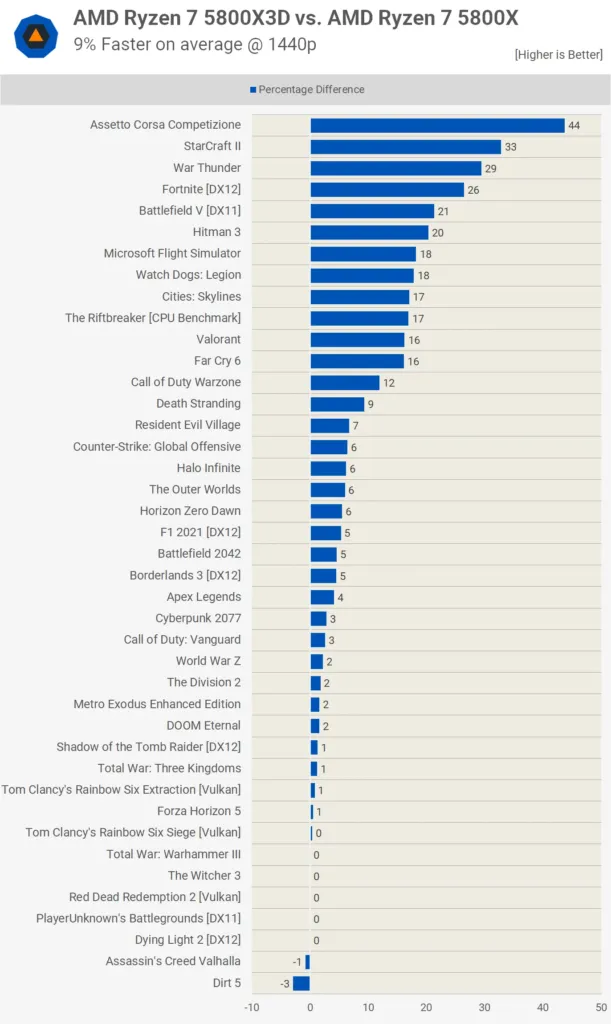
The 9% average hides how unevenly that number is earned. Death Stranding stayed up to 20% faster on the 5800X3D at 1440p, and Microsoft Flight Simulator held an 18% gain, both still firmly double digits. Halo Infinite, by contrast, had already thinned to a 6% average lead at the same resolution, which is the spread an average can’t show: some games are still cache-bound at 1440p, most aren’t.
Ryzen 7 5800X3D gain over Ryzen 7 5800X at 1440p by game
At 4K the GPU bottleneck tightens further, yet a handful of games still hand the 5800X3D a real margin. Fortnite was up to 19% faster, Battlefield V held a 14% boost, and Assetto Corsa Competizione’s 1% lows improved by 30% even at 4K. That last figure is the interesting one: ACC isn’t a lightly loaded game that happens to favor either chip, it’s cache-sensitive in a way resolution doesn’t erase.
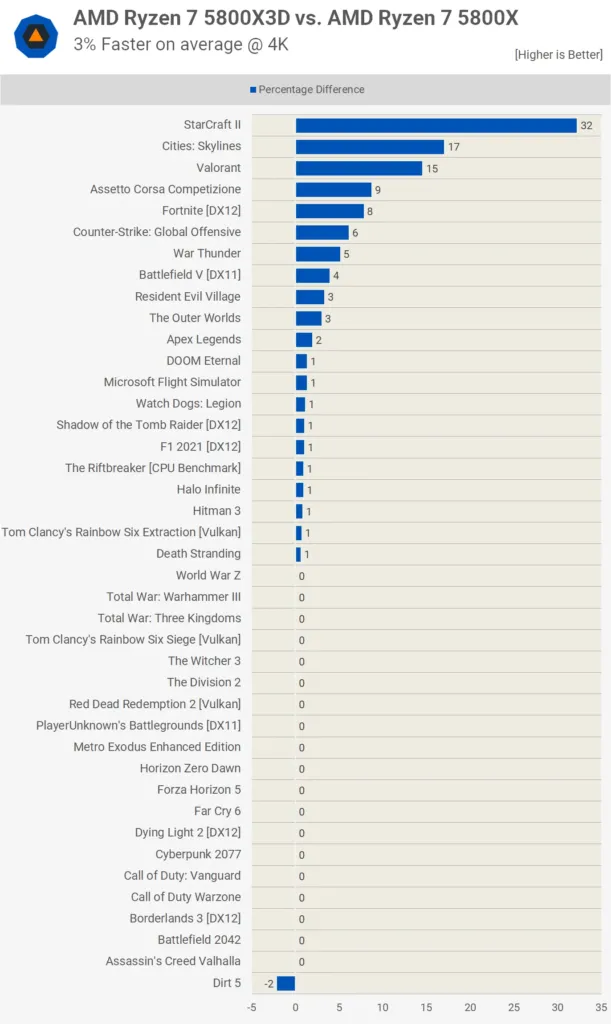
- StarCraft II stays heavily CPU bound at 4K because the 12-year-old game still runs on a single core, so resolution never shifts the bottleneck off the CPU
- Cities Skylines stays CPU limited at 4K for the same reason, resolution doesn’t change who’s doing the deciding
- Valorant barely loads the graphics card at any resolution, which leaves the CPU in charge even at 4K
- Call of Duty Warzone goes entirely GPU limited at 4K, erasing whatever lead the 5800X3D held at lower resolutions
- F1 2021 shows no gains at all at 4K, the two chips land in the same place
- Halo Infinite’s advantage is basically neutralised at 4K, following the same path most of the 41-game set takes
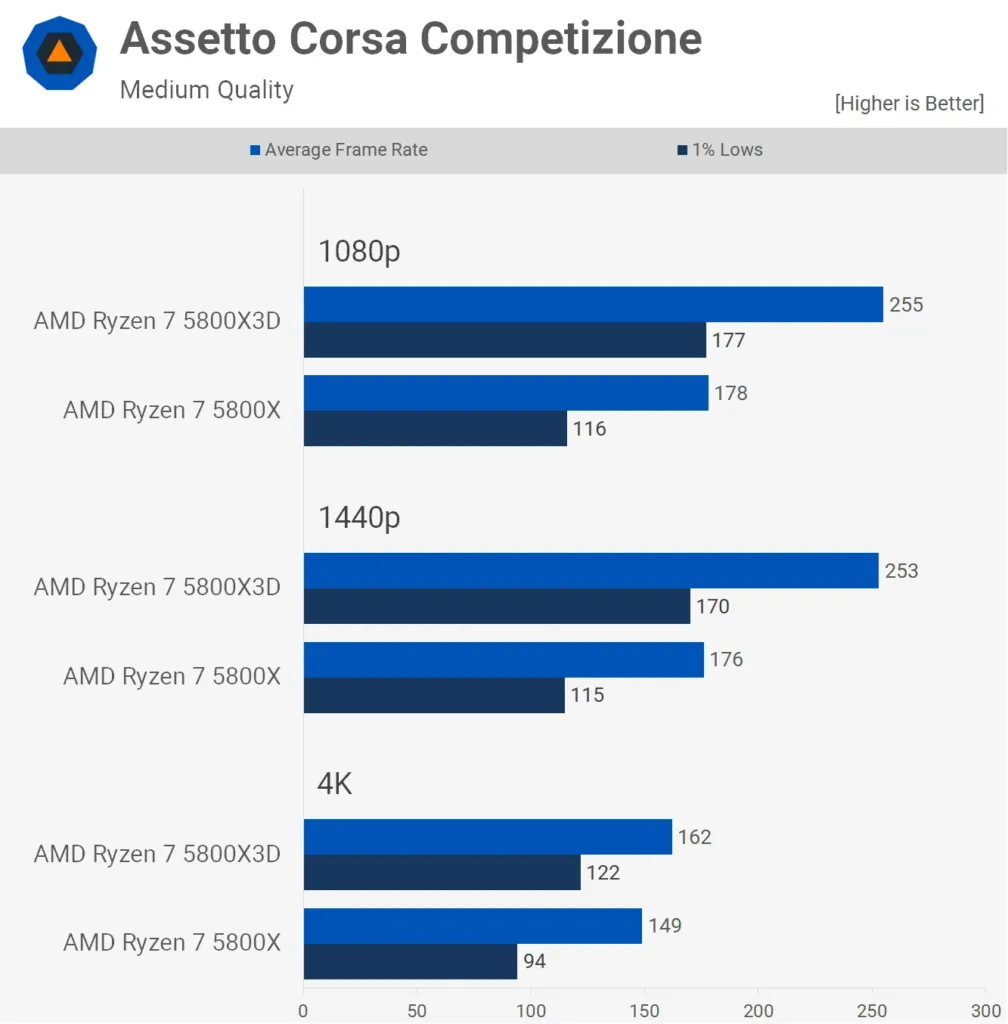
TechSpot’s 1080p 1% Lows: The Cache’s Real Job
Averages describe how fast a game runs on paper; 1% lows describe whether it stutters while you’re playing it, and that gap is where the 5800X3D’s cache does its most convincing work. TechSpot measured a 15% average frame rate gain across 41 games at 1080p, but the 1% lows rose 22%, a bigger number attached to the frames that actually feel bad when they’re slow. That gain showed up broadly rather than in a couple of outlier titles: 22 of the 41 games improved their 1% lows by more than 20%, and only a handful landed in single digits, which is as close to a universal effect as a 41-game test is going to show.
1% low improvement at 1080p, 5800X3D vs 5800X
The Outer Worlds tops the chart with a 57% jump in 1% lows, far ahead of ACC’s up to 53% and StarCraft II’s 52%, but that top spot is partly a confession about the 5800X rather than a pure win for the X3D. The Outer Worlds is an Unreal Engine 4 game that has never run well on AMD hardware, and its average frame rate on the 5800X3D only rose 22% even as its worst frames jumped 57%, which says the plain 5800X was leaving a particularly deep hole for the cache to fill. Those margins shrink at 1440p and almost vanish at 4K, which fits a gain that’s about the CPU clearing a bottleneck at 1080p rather than the game simply running better everywhere. ACC and StarCraft II show no such asterisk; both are CPU-bound titles where a 52-53% cut to the worst frames is the cache doing its job cleanly.
Below that top tier sits a run of games where the gains are smaller but still large enough to change how a game feels: F1 2021 at 40%, Halo Infinite at 35%, Battlefield V at 33%, Death Stranding at 31%, and Valorant at 24%. A 30-something percent cut to the worst 1% of frames is the difference between a game that holds steady and one that visibly catches when the action gets busy, and that’s true whether the title is a racing sim, a shooter, or a competitive game where Valorant’s 24% gain matters most on exactly the frames a player notices.
What the percentages mean in actual frames
Percentages alone don’t tell you if a number is worth caring about once a game is already fast, so look at where the floor lands. Fortnite’s 1% lows stay above 250 fps with the 5800X3D, and Halo Infinite’s clear 100 fps at both 1080p and 1440p. For anyone running a high refresh monitor, that’s the number that decides whether a dip ever shows up on screen at all.
Push the resolution up and the 1% low advantage holds together better than the average frame rate gains do. Battlefield V still gained 30% on its 1% lows at 1440p even as its average rose only 21% there, and F1 2021 makes the point sharper still: its 1% lows improved 22% at 1440p while its average frame rate moved just 5%, and at 4K its average showed no gain at all. That’s the case for watching frametimes rather than averages when weighing whether the extra cache is worth paying for: the smoothness it buys survives a resolution bump that erodes the headline speed almost entirely.
Apex Legends and Rainbow Six Siege: Cache-Proof Games
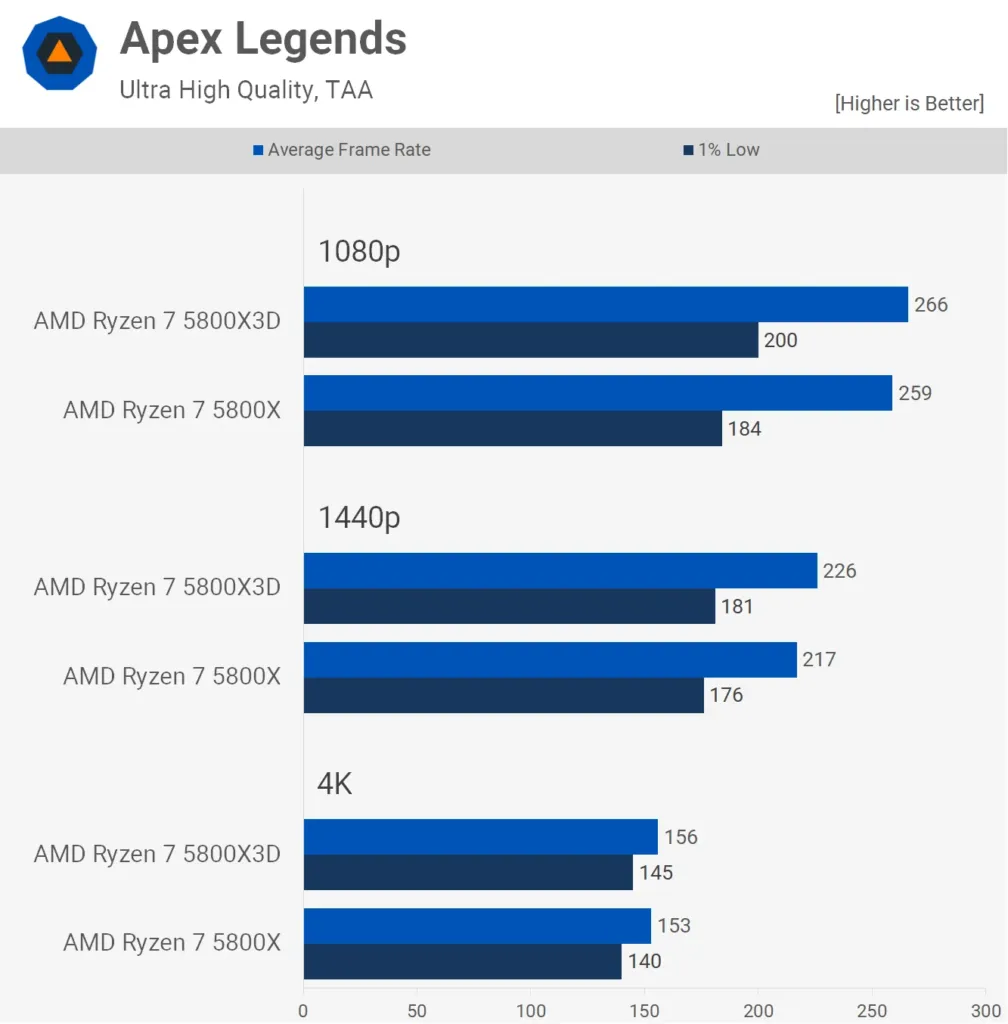
Apex Legends is where the 5800X3D’s extra cache runs into a wall: TechSpot measured the 1% lows rising at most 9%, and the average frame rate barely twitched at 3%. That’s a small enough gap that TechSpot told Apex players flat out not to bother paying for the X3D. The lesson cuts both ways here: a cache-heavy chip only pays off when a game’s engine actually leans on the memory access patterns that stacked SRAM is built to intercept, and Apex evidently doesn’t lean that way at all.
Gains over the Ryzen 7 5800X at 1080p
Rainbow Six Siege tells a similar story: its 9% gain at 1080p disappears entirely once you move up to 1440p and 4K, per TechSpot. Dying Light 2 shows almost nothing above 1080p either, and Red Dead Redemption 2 turns mostly GPU bound at those same 2 higher resolutions. None of this is the cache failing to do its job; it’s the bottleneck sliding off the CPU and onto the graphics card, a place no amount of L3 can follow it.
The GPU Ceiling on Every Gain
TechSpot ran all of this testing on an RTX 3090 Ti, one of the fastest consumer cards you can buy, and that card is doing a lot of the work behind every number in this section. Drop to a slower GPU and the bottleneck shifts onto the graphics card even sooner, shrinking whatever lead the 5800X3D was showing. Push far enough in that direction and the 5800X3D ends up no faster than the much cheaper Ryzen 7 5700X, because once the GPU sets the ceiling, the stacked cache has nothing left to prove.
The $450 Launch Price vs. Zen 3 and the 12900K
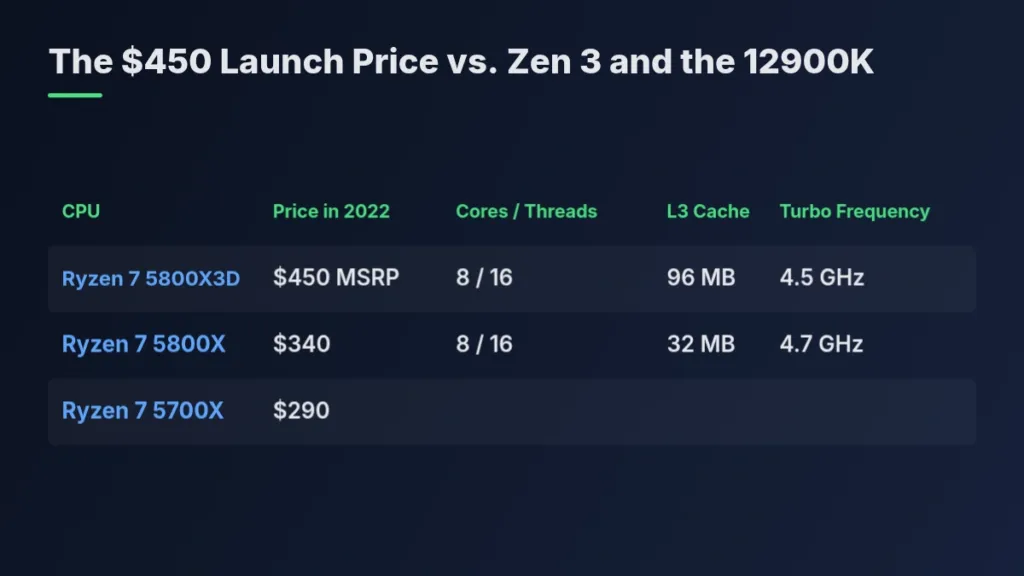
A $450 price tag only means something once you see what else was sitting on the shelf next to it in 2022. AMD’s own non-X3D Ryzen parts undercut it badly: the Ryzen 7 5800X was going for $340 at the time, per TechSpot, and the new Ryzen 7 5700X had just landed at $290. Measured against those two, the 5800X3D’s launch price wasn’t a modest step up, it was a 32-55% premium over chips sharing the same 8-core, 16-thread layout, and that gap is exactly what a buyer had to decide the extra cache was worth.
| CPU | Price in 2022 | Cores / Threads | L3 Cache | Turbo Frequency |
|---|---|---|---|---|
| Ryzen 7 5800X3D | $450 MSRP | 8 / 16 | 96 MB | 4.5 GHz |
| Ryzen 7 5800X | $340 | 8 / 16 | 32 MB | 4.7 GHz |
| Ryzen 7 5700X | $290 |
TechSpot never put the 5700X through its own benchmark run, but it didn’t need to. The 5700X trails the 5800X by about 2% on frequency, close enough that TechSpot said its performance matches the 5800X outright. That makes the $290 chip a stand-in for everything the $340 chip does, which means the comparison the X3D actually had to win wasn’t against $340, it was against $290.
Turn the comparison around to Intel’s flagship and the same $450 price looks cheap instead of steep. Across a 40-game run the Core i9-12900K and the 5800X3D came out tied overall, yet the X3D undercut it by almost 30% on price while drawing less power and proving easier to cool. Dropping the 12900K onto DDR4 memory to claw back some of that cost gap didn’t close it either; even in that cheaper configuration, Intel’s chip still cost more and ran slower than AMD’s.
What the premium over the 5800X bought, in the end, was a 15-22% average gain depending on which metric you track, climbing as high as 50% in standout titles like Watch Dogs Legion. That’s a genuine jump, but it’s not a value play, and TechSpot said so directly: buyers shopping on performance per dollar were pointed at the Ryzen 7 5700X or the Core i7-12700F instead.
A Chip That Clocks Conservatively by Design
Stack 64MB of SRAM on top of the compute die and you’ve put a layer of silicon between the cores and the heat spreader that has to shed its own heat before any of it reaches the IHS. The 5800X3D’s clocks reflect that: a 3.4 GHz base and a 4.5 GHz boost, paired with a tight power budget of 105W TDP and 142W maximum, and AMD doesn’t officially support Precision Boost Overdrive on this chip at all. The clocks aren’t a binning shortfall, they’re the price AMD set for putting that much cache where it sits.
The other side of that conservatism is a chip that barely draws anything. Tom’s Hardware lists the 5800X3D as highly efficient at both idle and peak load, and part of why is architectural rather than just a locked-down boost table: pulling a value out of local cache costs less power than sending the request out to the memory channels and waiting on RAM. A chip that hits its own cache more often is a chip that makes fewer of those expensive trips, and the power meter shows it.
AMD clearly knew the clock ceiling was a real cost, because it fixed it twice. The Ryzen 7 7800X3D rode Zen 4’s efficiency gains to a 4.2 GHz base and a 5 GHz boost at 120W TDP and 162W maximum, well past what the 5800X3D’s 3.4/4.5 GHz and 105W/142W figures allow for. The Ryzen 7 9800X3D went further and moved the SRAM below the compute die entirely, putting the cores back in direct contact with the heat spreader rather than behind it. The 5800X3D is the generation that paid for figuring that out.
The Re-Release Isn’t Quite the Same Chip
AMD says the 10th Anniversary Edition should behave identically to the original 5800X3D, but it uses a slightly different bonding process to join the cache die to the compute die underneath. That’s exactly the kind of change that moves power draw and operating temperature without touching frame rates, since the bond affects how heat gets out, not how fast the cores run. Worth remembering: every power and thermal figure in this piece comes from reviewers testing the original chip, not the new one.
The PBO2 Tuner Workaround
Most AM4 motherboards simply refuse to let you touch CPU ratio or voltage on the 5800X3D, a lockdown both AMD and the board makers share responsibility for. Owners get around it with PBO2 Tuner, a Windows utility that applies an AMD curve optimizer offset without going near the BIOS at all. It’s effectively an undervolt, and the payoff is real: lower temperatures and a boost clock that holds at its peak for longer instead of backing off under sustained load.
Install the Tools
Download Debug-cli.7zp, which contains PBO2 Tuner.exe, and install HWiNFO or Ryzen Master alongside it so you can actually watch voltage and temperature while you work.
Set a Baseline
Run OCCT or Cinebench R20/R23 to load the CPU fully before changing anything, and record how high it boosts and what temperatures it reaches. Without this number, you have nothing to compare the tuned result against.
Dial In the Curve Offset
Open PBO2 Tuner.exe and select the Curve tab. Start at a -10 offset, then step down in -5 increments from there, aiming for a minimum offset of -30.
Confirm Stability at Each Step
Stress test at every increment rather than jumping straight to -30, and use HWiNFO or Ryzen Master to confirm the curve actually applied rather than assuming it took.
Make the Offset Survive a Reboot
The offset drops on every reboot, restart or wake from sleep, so set up a Windows Task Scheduler task with triggers for both startup and wakeup that passes your tested offset back to PBO2 Tuner.exe as a startup argument.
- Beyond a better cooler, there isn’t much else left to try on this chip
- An AM4 offset bracket reportedly drops core temps 5-10 degrees and suits AIO or custom water cooling blocks
- Raising the base clock is possible but not recommended
- Past that, nothing changes without AMD or the board makers unlocking more of the chip
Staying on AM4 or Jumping to AM5
Every AM4 owner eyeing this chip is really answering one question: keep the board already in the case, or start over on AM5 with DDR5. The 5800X3D became the chip gamers talk about in reverent tones for a reason that has nothing to do with raw numbers and everything to do with friction. It revitalised the AM4 platform by dropping straight into motherboards people already owned, running on the same DDR4 they already had installed, with 3D V-Cache that needs no special motherboard and no exotic cooling to tame it. That drop-in nature is the whole reputation. There was no new socket to buy into, no new memory kit to source, just a chip swap that turned an ageing platform into something worth keeping for another few years.
Tom’s Hardware is blunt about who this re-release is actually for: existing AM4 owners, and mainly them. If you already have the board and the DDR4 sitting in your case, and you missed the short window a few years back when the chip went on sale for less, the math barely matters anymore, because there is nothing else that drops into that socket and does what this one does. That’s not a value purchase in any normal sense. It’s a stranded-platform purchase, where the AM4 owner is paying to keep using hardware they already bought rather than shopping against the wider market.
The moment a motherboard and a RAM kit enter the shopping cart alongside the CPU, the appeal collapses. Tom’s Hardware puts the Ryzen 5 7600X3D’s street price at $246, $100 under the 5800X3D, while also crediting it with superior gaming performance. That gap in price goes a long way toward covering the cost of the DDR5 platform sitting underneath it, which is the arithmetic that makes AM5 the better buy for anyone starting from zero.
| CPU | Street Price | Architecture | Cores/Threads | Cache (L2 + L3) | Base/Boost Clock (GHz) | TDP / Maximum Power |
|---|---|---|---|---|---|---|
| Ryzen 7 5800X3D | $350 | Zen 3 X3D | 8 / 16 | 100 MB | 3.4 / 4.5 | 105W / 142W |
| Ryzen 5 7600X3D | $246 | Zen 4 X3D | 6 / 12 | 102 MB | 4.1 / 4.7 | 65W / 88W |
| Ryzen 7 7800X3D | $399 | Zen 4 X3D | 8 / 16 | 104 MB | 4.2 / 5 | 120W / 162W |
AM4 owners keep having this argument with each other in build-help threads, and the people actually living with the decision tend to land on one variable above all the others: what resolution they play at. If the GPU is doing the limiting at 4K anyway, the CPU underneath it starts to matter a lot less.
The 5800X3D is basically the final boss of AM4, you won’t regret it. At 4K you’re GPU bound anyway so the platform swap would just be money you could put toward games or a bigger SSD. Grab the chip and ride that socket into the sunset.
Not everyone weighing in agrees that near-identical frame rates settle the question. Some owners point out that the comparison isn’t really about performance at all, it’s about how much runway is left on the socket itself, since AM4 has none and AM5 has years ahead of it.
They will be practically on par – the difference is that AM5 has a future, AM4 does not (that said 5800x3d + 32GB is good still for a loooong time)
The One Question That Decides This
Ask yourself just one thing: do you already own the AM4 socket? If yes, the $350 is simply the price of staying put, and Tom’s Hardware says just about any price counts as a deal when there’s nothing else to buy for that board. If no, buying a motherboard and RAM alongside this chip erases its appeal entirely, because Tom’s Hardware is clear that it stops looking impressive the moment a full platform is on the shopping list too.
The Combined Verdict, 4 Years Later
Tom’s Hardware doesn’t normally revisit a chip once its review has run; a review captures how something stacked up against its rivals at one moment, and that moment closes once the piece publishes. AMD re-releasing the 5800X3D in 2026 broke that rule, because the chip got to compete in a different market than the one it launched into, and the new piece sits alongside the 2022 review rather than replacing it. That’s the honest version of what a re-review means: the chip itself hasn’t changed, but a good product can slide and a mediocre one can improve as everything around it moves.
What These Numbers Actually Measure
Every benchmark in this piece came off the original 5800X3D, not the 10th Anniversary Edition now selling at $350. AMD says the two chips should perform identically, but the Anniversary Edition uses a slightly different bonding process for its stacked cache, and if that difference shows up anywhere it will be in power draw and thermals rather than frame rates.
Read the combined data as a verdict on two different jobs. In games, the 5800X3D is the ceiling for what a DDR4 platform can do, full stop, and that’s a real achievement for a chip built on a 4-year-old memory standard. Step outside games and that ceiling disappears: the extra cache gives nothing back to applications that lean on raw cores and clocks, and the chip falls well behind the rest of the DDR4 field once the workload stops being a game. Both things are true of the same chip at the same time, and neither one cancels the other.
How much of that gaming ceiling you actually see depends on which games you play, what resolution you run, and what’s in the GPU slot. TechSpot’s 41-game set put the 5800X3D 15% ahead of the 5800X at 1080p, a margin that fell to 9% at 1440p and mostly disappeared at 4K once the GPU became the bottleneck instead of the chip. 10 of those 41 games gained 5% or less even at the resolution most favorable to the 5800X3D, so someone running 4K on a modest card isn’t buying the same upgrade as someone running 1080p on a flagship GPU.
Pros
- Still a legendary DDR4 processor, in Tom’s Hardware’s words
- Top-shelf DDR4 gaming performance
- Drops straight into existing AM4 motherboards with DDR4 support
- Highly efficient, with low power draw at both idle and peak
Cons
- Limited productivity performance
- $350 is relatively expensive for what the chip offers, per Tom’s Hardware
- Tough to justify at that price unless you’re already on AM4
Tom’s Hardware puts the asking price $70 to $100 higher than it should be, and even that lower figure only works because DDR5 prices are running high enough right now to keep a DDR4 holdout competitive at all. Measured against what else $350 could buy, the gap gets harder to defend: the Ryzen 5 7600X3D sells for $246 and games faster, while Intel’s Core i7-14700K sells for $340, supports DDR4, and doesn’t give up the productivity performance the 5800X3D does.