
Key Takeaways
- 1Buy the Tapsafe for the NFC unlock and the clip, not for speed. Tom’s Hardware, PCWorld and Funky Kit all found it mid-pack.
- 2Don’t treat the lock as encryption. Tom’s Hardware saw nothing encrypted or decrypted, and someone who disassembles the drive could likely reach the data without your password.
- 3Turning the security off means running a reset command that erases everything on the drive, so copy your files elsewhere first.
- 4If reads come in low, run a secure erase in DiskPart and reformat. That cured the inconsistency for Tom’s Hardware, though every one of its charted numbers was taken after the erase.
- 5It’s a big-file drive. Video and photo folders copy quickly, but small-file reads placed third from last and write IOPS sat behind every other drive on Tom’s chart, so keep programs and boot files off it.
- 6Long writes hit a cliff. Tom’s Hardware saw 1,800 to 1,900 MB/s for five minutes, then roughly 250 MB/s, then under 70 MB/s past 14 minutes. PCWorld’s 1TB unit fell off at 260GB.
- 7The Team Group PD20 is $235 for 2TB, and the 1TB Tapsafe alone is $219 direct.
The Tapsafe: Metal Body, Clip and Plates
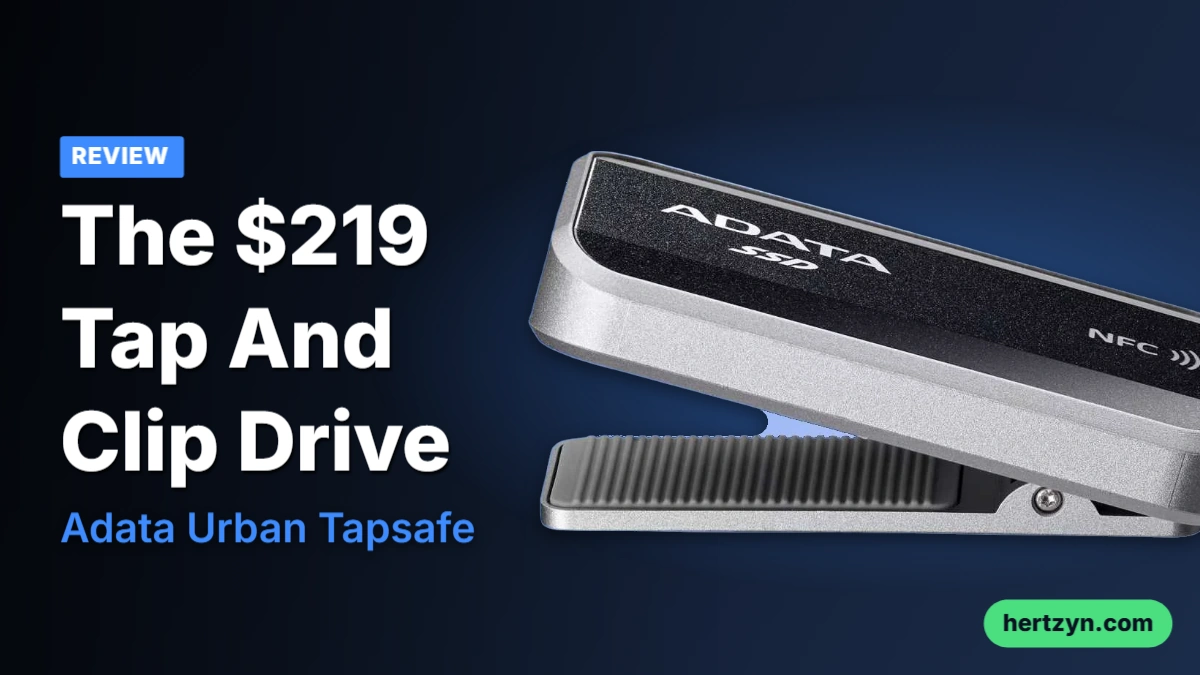
External drive makers have stopped competing on raw speed and started competing on tricks. Sharge’s Disk Pro and Orico’s Book Drive P10 Plus both went that way, and the Tapsafe is Adata’s version of the same bet. What you get is a silver metal chassis that Tom’s Hardware compares to a lighter for size, and it feels very solid in the hand, which is more than plenty of plastic-shelled portables can claim.
| Interface / Protocol | USB 3.2 Gen2 2×2 (20 Gbps) |
| Sequential Read | Up to 1,900 MB/s |
| Sequential Write | Up to 1,900 MB/s |
| Dimensions | 2.70 x 1.42 x 0.76 inches / 68.68 x 36.18 x 19.18 mm |
| Weight | 72.61 grams |
| Controller | RealTek RM1220 |
| NAND | Unspecified |
| 1TB model number | SURB-TAP-1000GCCBK |
| Warranty | 5 years |
| In the box | USB Type-C cable, quick start guide |
On paper it’s 2.70 x 1.42 x 0.76 inches (68.68 x 36.18 x 19.18 mm) and 72.61 grams, rated at up to 1,900 MB/s for both reads and writes. That matching pair is worth a second look, since a drive that promises the same figure in both directions is promising a lot of the write side. The spec sheet leaves out what’s inside: PCWorld found a RealTek RM1220 controller, but Adata never says what NAND it’s using on the 1TB SURB-TAP-1000GCCBK or any other capacity. Flash you can’t identify is flash you can’t judge, and that gap matters once writes run long.
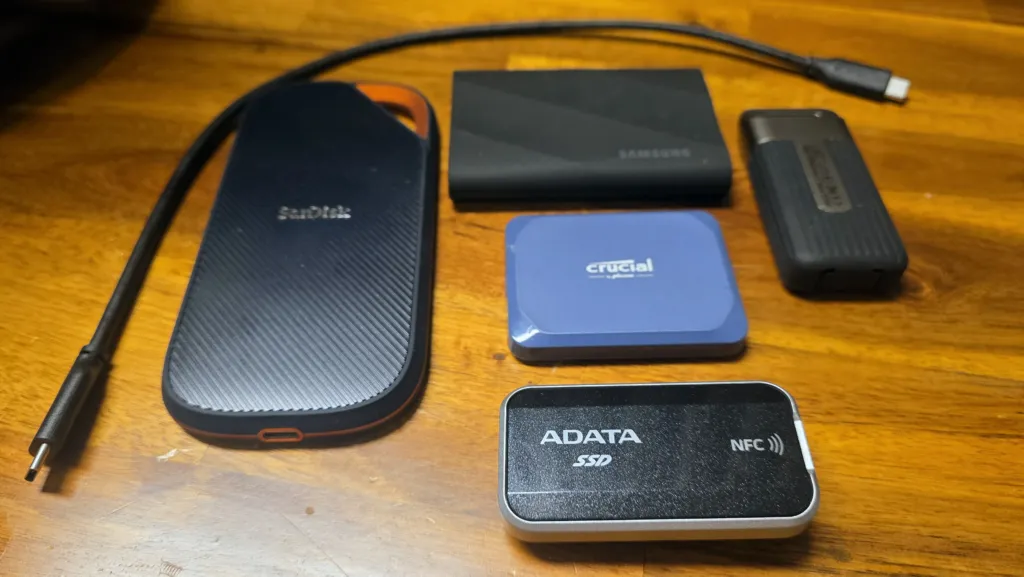
The clip is what sets this apart from the magnet-backed drives it competes with. It’s a big integrated one on the back, with ridged silicone pads on both sides of the opening so it bites down instead of sliding. The catch is that it only opens about half an inch, so think pocket edges, thin bag straps and light rigs rather than anything chunky. PCWorld reckons roaming IT staff will like it, and that’s the right crowd: people who carry a drive all day and want it attached to them rather than buried in a bag.
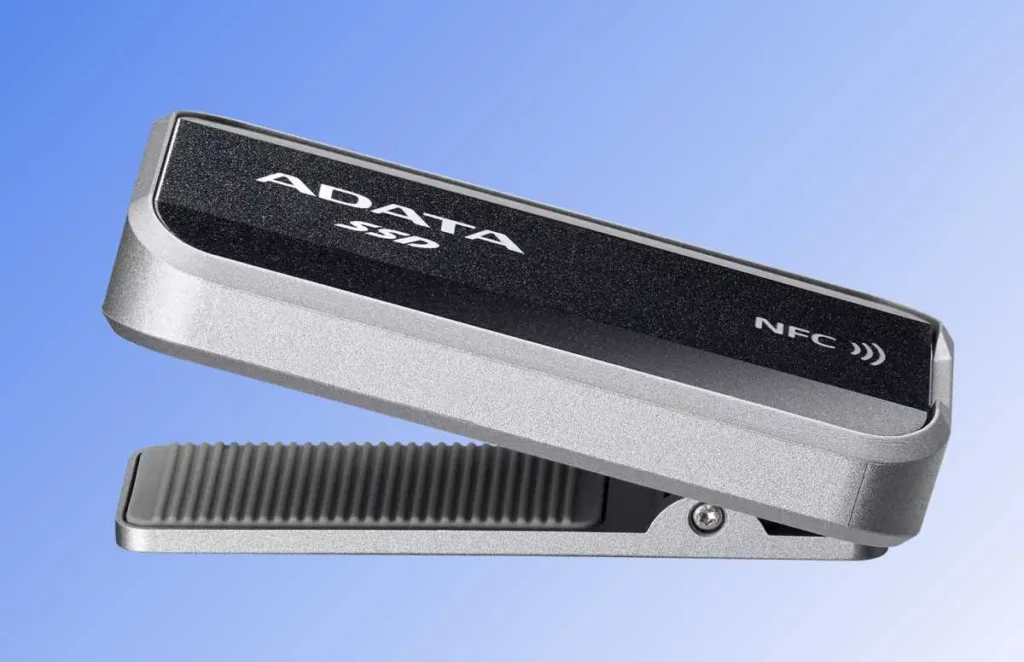
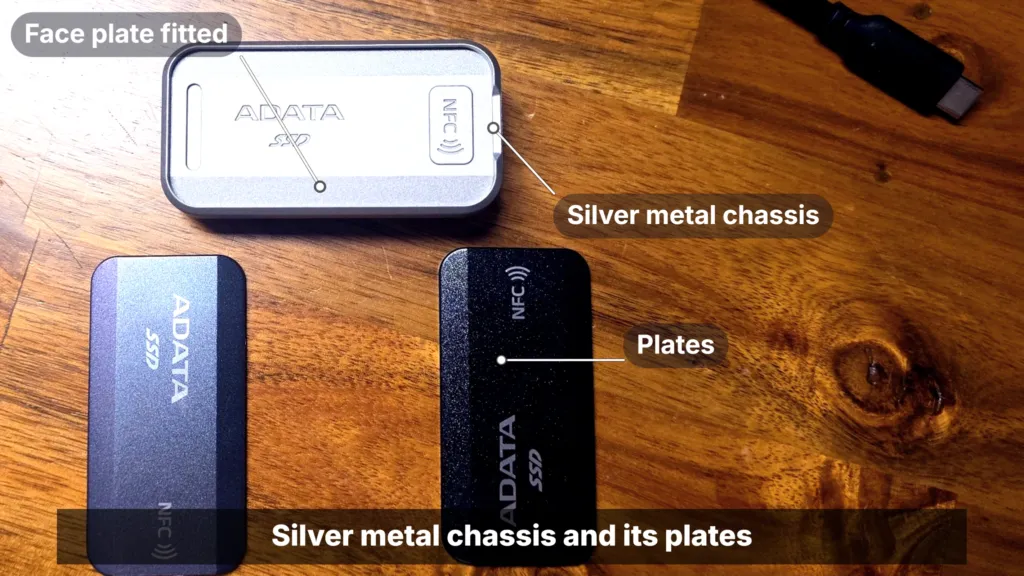
Adata ships two magnetic face plates: a black, starry-charcoal one and a pearlescent one that shifts between silver, grey and purple depending on the light. Both reviewers found the plates sit tight yet pop off with little force, so swapping is easy and nothing rattles loose in a pocket. PCWorld preferred the pearlescent plate to the charcoal one, which is a fair call if you’re going to look at the thing on a desk all day.
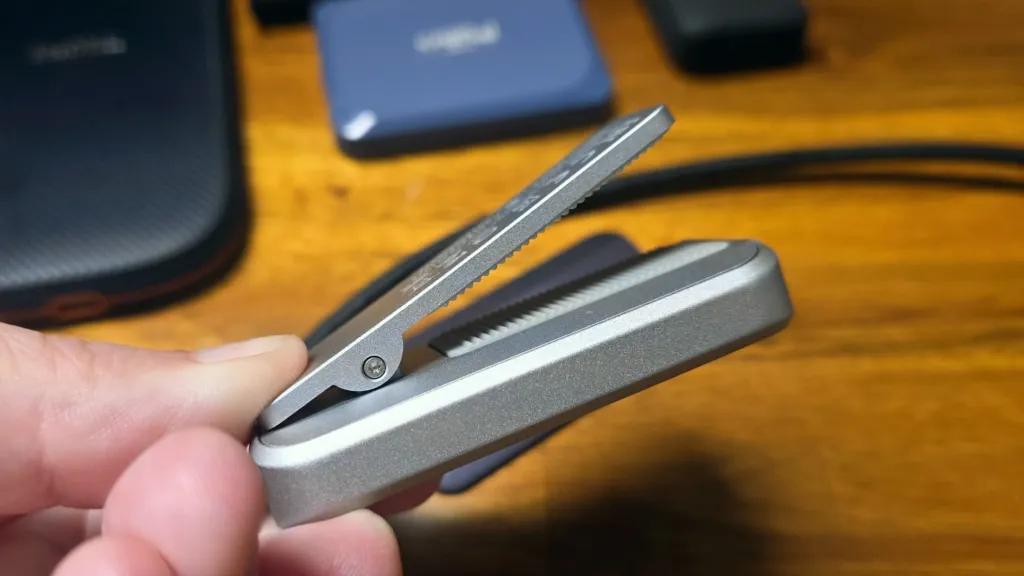
The box is bare: a USB Type-C cable and a quick start guide. The warranty is where Adata spends its money. Five years is longer than the two or three most drives in this class get, and for a drive whose flash Adata won’t name, that promise does more to justify the price than any plate does.
Long cover isn’t a new move for Adata, and owners of its drives tend to expect it. One of them says they had an Adata D50 replaced last year.
Usually have lifetime warranty I got my adata D50 replaced last year
Tap-to-Unlock and the Tapsafe App
Until a phone taps it, the Tapsafe is invisible: a locked drive doesn’t show up in Windows at all, so there’s nothing to browse and nothing to fumble with. Pull the cable and it locks itself again, which means every plug-in starts the routine over. Adata offers the app on both Android and iOS, so this isn’t an Android-only trick, and whichever phone is in your pocket can do the unlocking.
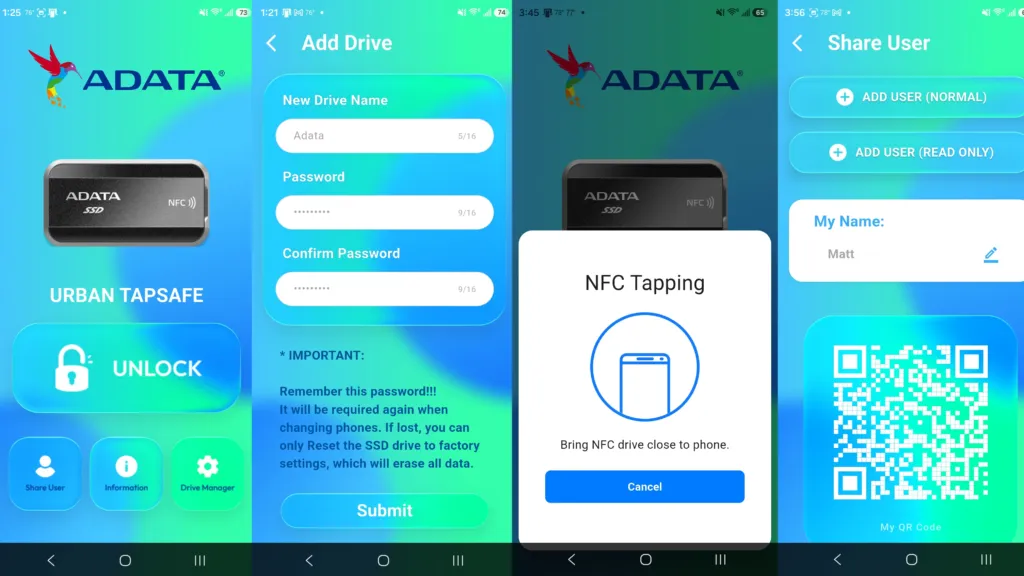
Open the app with your fingerprint
Launch the Tapsafe app and it asks you to authenticate the same way you unlock the phone, with your fingerprint. The app is behind a lock of its own before it ever gets near the drive.
Add the drive and set a password
Tap Add Drive, give the drive a name, then create a password and confirm it. On iOS, PCWorld found the Submit button scrolled off the bottom of the Add Drive screen, which cost a moment of hunting.
Tap the phone to register the drive
With the drive plugged in and powered, tap the back of your phone against it to register the pairing. Plugging into a PC for this step is the route that registered cleanly.
Unlock it day to day
Plug the drive in, open the app, hit Unlock and move the phone to the drive. The activity light glows steady red until you unlock, then turns blue and the drive pops open in Explorer.
Setup didn’t go cleanly for either reviewer. Tom’s Hardware’s first attempt failed with the drive plugged into a Samsung S25 Ultra, and the error claimed the drive had no power. Registering it against a PC instead worked fine, and once it was set up, unlocking straight from the phone worked too. The reviewer blamed a fiddly phone USB port rather than the drive, which fits: the same hardware behaved once the phone wasn’t the one supplying the connection.
Learn where your phone’s NFC sits
Unlocks sometimes fail on the first try until you work out where your phone’s NFC chip is, and that spot differs from one phone to the next. Find it once and the tap stops being a coin flip.
Sharing is where the phone-as-key idea earns its keep. You can grant access to up to nine other people and set each one to read-only or read and write, so a colleague can pull files off the drive without being able to overwrite anything. They install the app and scan a QR code from yours, and from then on their own phone’s tap opens the drive. It’s not remote access, though: guests need the drive physically in front of them, so this is a way to hand a drive around a room rather than to share files across town.
PCWorld’s reservation is the flip side of that auto-lock. The drive relocks every time it leaves a port, so the phone has to be on you whenever you want your files, and PCWorld reckons biometrics on the drive itself would beat that.
People already get annoyed when a phone app is the only way in, and a drive you have to tap inherits that gripe. One commenter, talking about a car, put it bluntly:
I agree most frustrating thing, sometimes you have to use the app no matter what you do. Same goes for locking the car 😡
What the Tapsafe Lock Really Does
The listings say hardware encryption, and Tom’s Hardware found none. 81-Sports and SHOPRO.LT, both carrying the 1TB SURB-TAP-1000GCCBK, tick yes for hardware encryption and for password protection. Tom’s Hardware watched the lock and unlock process and saw nothing being encrypted or decrypted at any point. Adata itself makes no specific claims about hardware security, so the tick boxes look like something the retailers added on their own, and the word ‘safe’ in the name is doing the rest of the selling.
| Source | Hardware encryption | Password protection |
|---|---|---|
| 81-Sports listing (1TB) | Yes | Yes |
| SHOPRO.LT listing (1TB) | Yes | Yes |
| Tom’s Hardware testing | No encryption or decryption happening | User-set password in the app |
What the lock does is simpler than encryption: the drive won’t be recognized over USB until you unlock it, and that’s the whole trick. A steady red activity light means it’s still locked, and the light turns blue once the phone has done its job. Since nothing scrambles the files, they sit on the flash exactly as you wrote them, and Tom’s Hardware points out that someone who disassembles the drive could likely reach the data without the app or your password. It’s a door that stays shut only for people who use the front entrance.
The Way Out Wipes the Drive
Switching the drive’s security off means running a reset command, and that erases all data on it. PCWorld found it asks you to type in a rather long key first, and said it wouldn’t choose that route itself. If you lock yourself out, don’t assume there’s a gentle way back: copy anything you care about somewhere else before you rely on this drive.
- The app lets you set your own password on top of the NFC tap, so a stolen phone alone isn’t necessarily the whole story.
- Tom’s Hardware rates NFC access as less secure than AES-based encryption, which is what a proper encrypted drive would use.
- For keeping files private on a basic level, Tom’s calls the drive fine.
- For anything that genuinely demands hardware encryption or high-level data security, Tom’s says it’s the wrong drive.
Read Speed Consistency Across Two Testbeds
Reads are supposed to be the boring half of an SSD review. Writes are where drives wobble, because that’s where caching runs out and speeds swing, so when Tom’s Hardware and PCWorld each found this drive’s reads moving around on their own separate rigs, that’s worth stopping on before any explanation. Two independent benches hitting the same oddity makes a fluke sample a poor bet. They didn’t agree on the cause, though, and the two explanations point buyers in different directions.
Out of the box, Tom’s saw reads top out below 1,000 Mb/s while writes ran nearly double that, which is backwards from how a drive normally behaves. Swapping cables and machines didn’t pin it on anything, since the drive sometimes read closer to its rated speed and sometimes didn’t. When the same setup gives different answers, the cable and the port are off the suspect list, and the drive’s own state is what’s left.
A secure erase through DiskPart followed by a reformat finally sorted it, and afterwards the drive matched its sequential ratings. The catch is that every Tom’s number in this article was taken after that erase. Read those charts as the drive at its best, not as what you’d have seen the first time you plugged it in.
Slow reads? Erase it first
If your Tapsafe reads well under its rating, run a secure erase in DiskPart and reformat the drive before you write it off as faulty. That fixed the inconsistency for Tom’s, and reads and writes both matched the sequential ratings afterwards. It costs you an afternoon and whatever’s on the drive, so back up first.
PCWorld blamed the amount of data instead. Its reads never dipped below 1.1GBps and peaked at 1.9GBps, but the full 1.9GBps only showed up with 4GiB and 8GiB data sets, and speeds dropped as soon as the set reached 16GiB. PCWorld runs every drive through CrystalDiskMark 8 with a 64GiB data set, so its charted figures sit at the low end of that range. Daily use with small files will look better than those charts do.
PCWorld read speed range, Adata Urban TapSafe 1TB
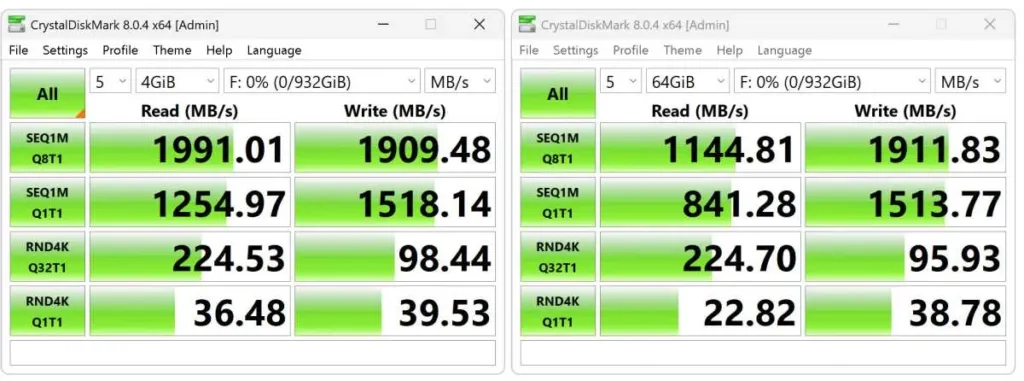
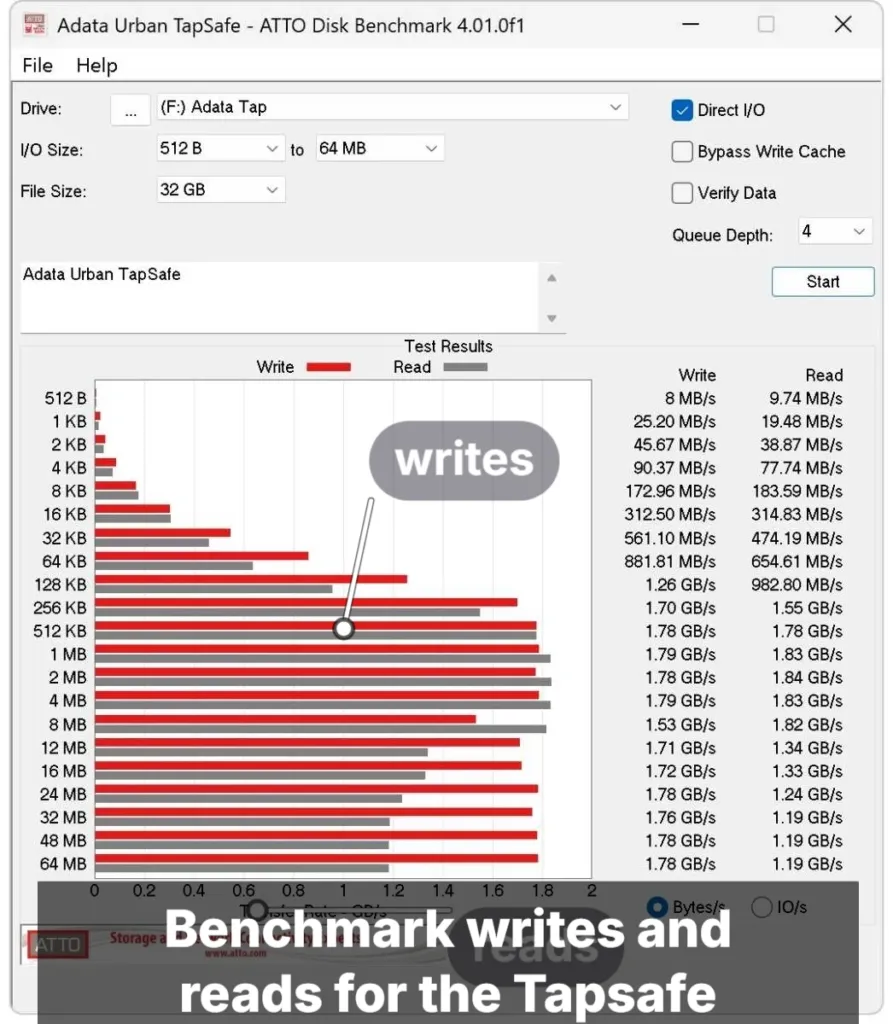
I can’t recall seeing read performance vacillate like this before. Write performance varying is normal, but not reads.
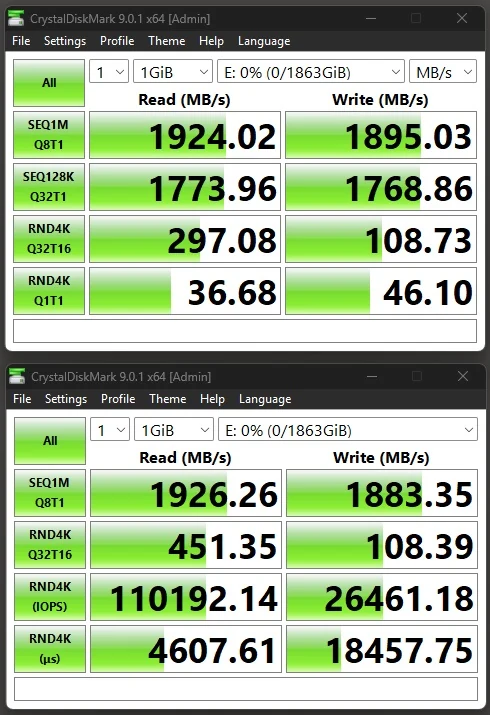
Funky Kit is the counterweight. It reported no stability or thermal issues across its run, with CrystalDiskMark reads of 1.926 GB/s and writes of 1.895 GB/s, both close to Adata’s rated figures. That fits a drive that’s fine under some conditions and not others, rather than one that’s broken.
Chart Placings on Tom’s Hardware’s Testbed
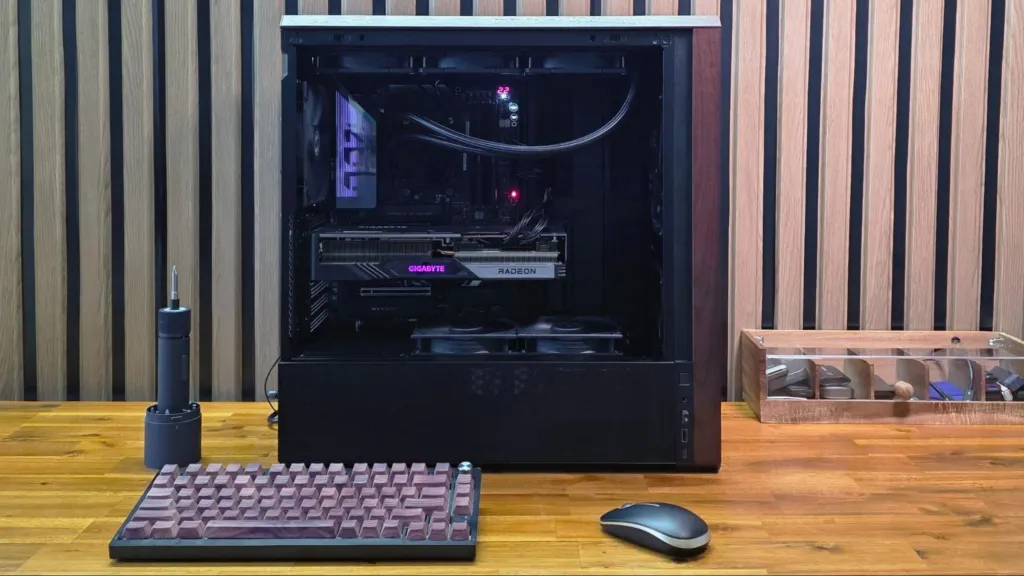
Tom’s Hardware rebuilt its external SSD testbed because upcoming drives need native USB4, and the result is a Ryzen 7600X on an Asus ROG Crosshair X870E Hero, sitting in a Lian Li Lancool 217 case. The rebuild also moved the charts to CrystalDiskMark 8, which matters if you’ve got old review numbers in your head: anything measured on version 7 can’t be lined up against these placings. The Tapsafe’s 2TB numbers are only comparable with drives Tom’s has run on this rig.
| CPU | AMD Ryzen 7600X |
| Motherboard | Asus ROG Crosshair X870E Hero |
| Case | Lian Li Lancool 217 |
| Synthetic benchmark | CrystalDiskMark 8 |
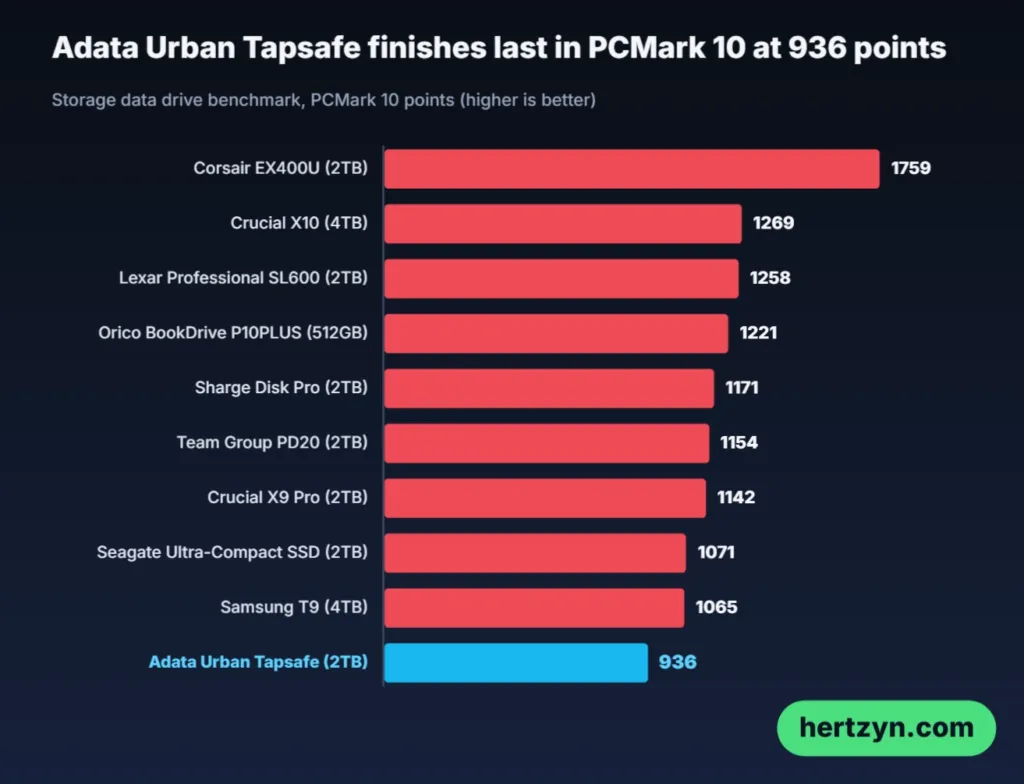
The trace test is where the Tapsafe looks worst: dead last on Tom’s chart, behind the Samsung T9 and behind the Crucial X9 Pro and Sharge Disk Pro, which are both 10 Gbps drives. A 20 Gbps drive losing to 10 Gbps ones on a benchmark built from real application activity is not what the spec sheet promises. Funky Kit ran PCMark 10 as well and called the result above average, though that was measured against USB 3.2 drives on a different rig, so the two verdicts aren’t really arguing about the same field.
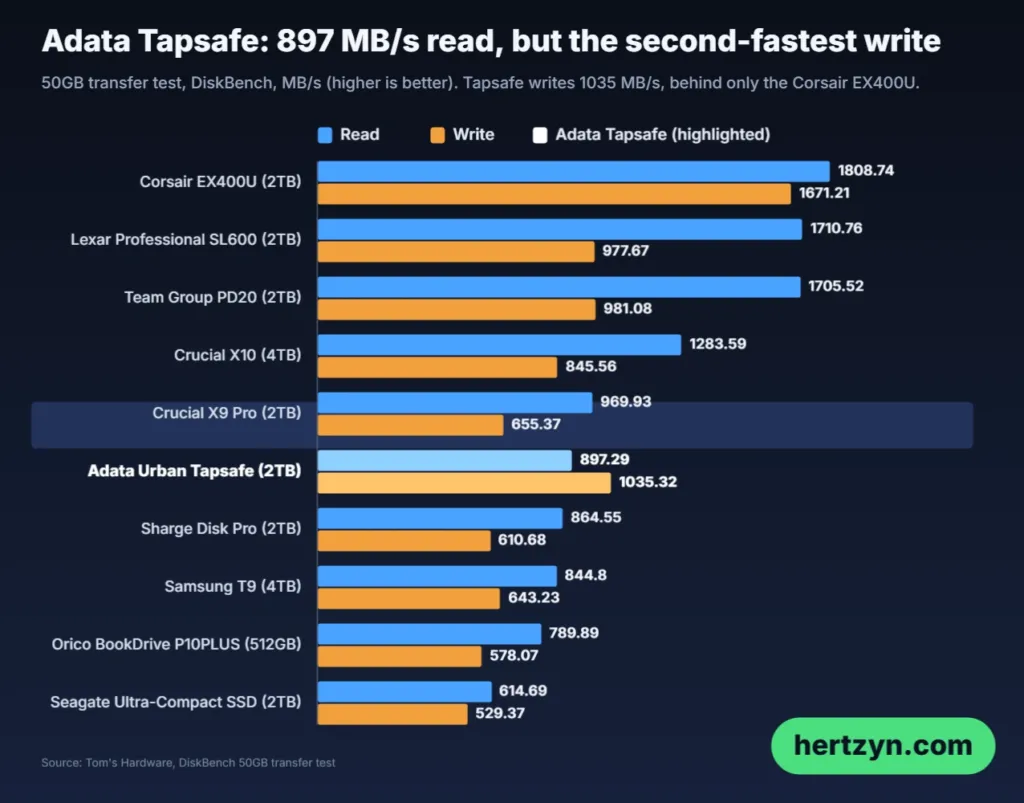
Straight file copies tell a much kinder story. DiskBench reads came in at 897 MB/s, which is mid-chart, and on writes the only drive that beat it was Corsair’s 40 Gbps model, a faster class of interface altogether. Every other drive on the rig, including the ones that beat it in PCMark, wrote slower.
The sequential CrystalDiskMark run repeats the shape. The Crucial and Team Group drives, its two 20 Gbps rivals, read faster, but only Crucial and Corsair wrote faster, so on big-file writes the Tapsafe sits at the top of the chart.
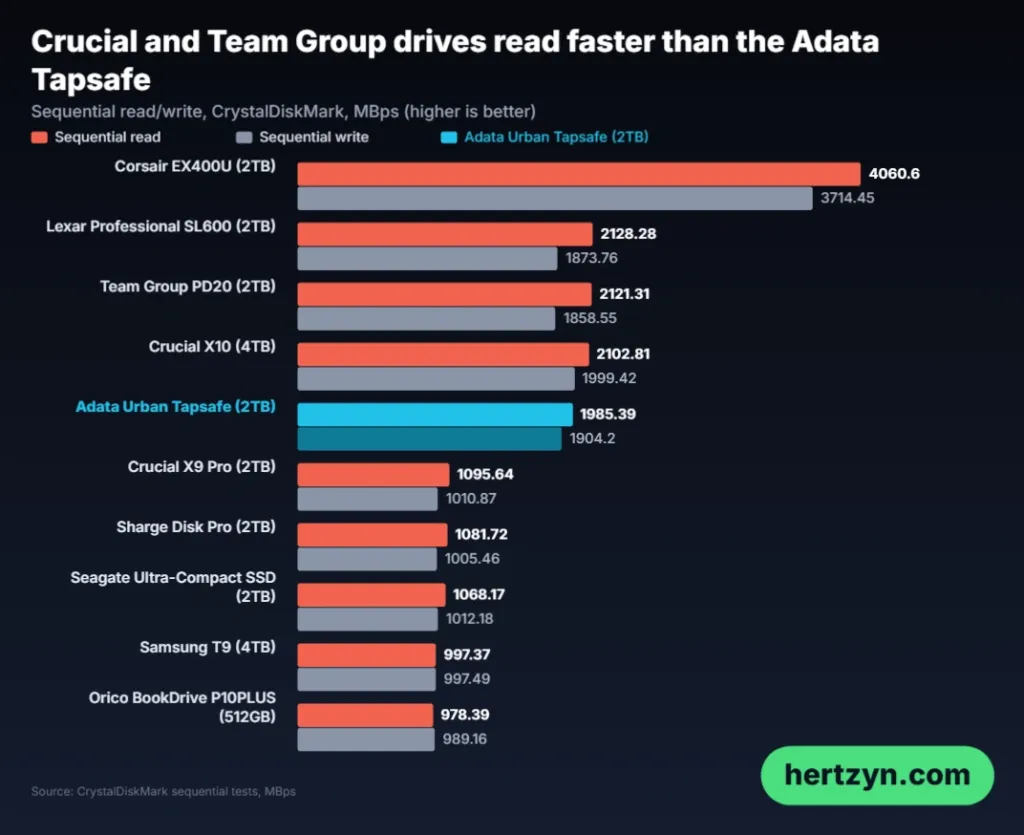
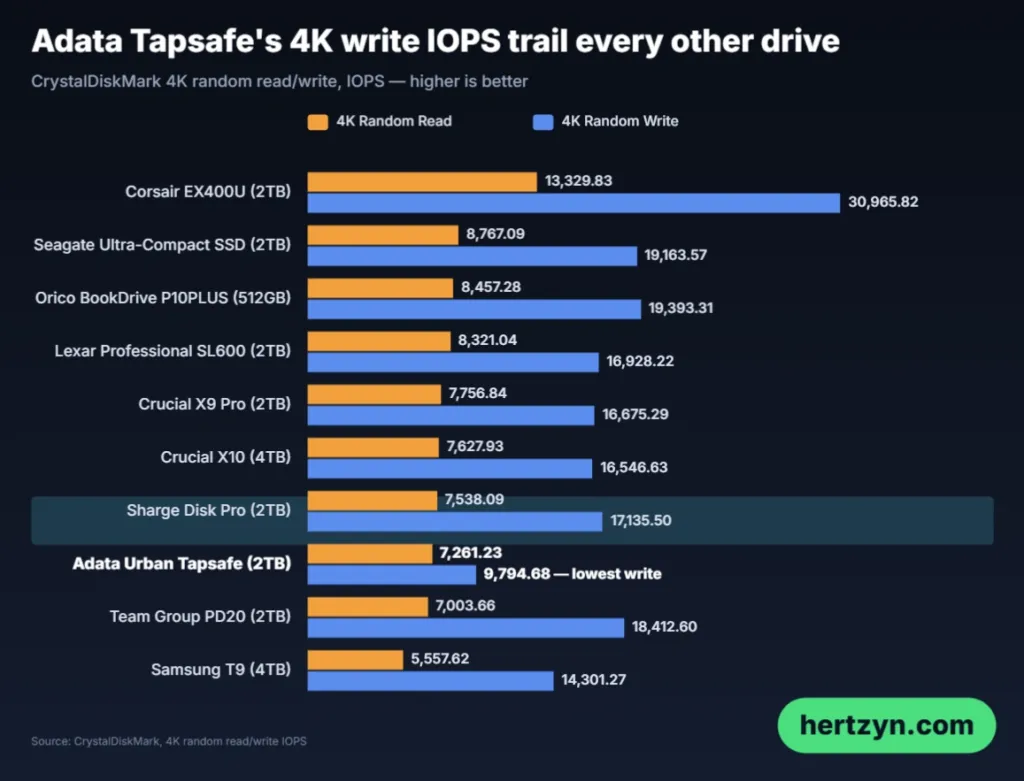
Small files are where it falls apart. Reads came third from last, and write IOPS sat well behind every other drive on the chart, not just the fast ones. That’s the most likely reason for the PCMark last place, since a trace test leans on exactly this kind of scattered work.
Keep Programs and Boot Files Off It
With small-file reads third from last and write IOPS behind every other drive, don’t run programs directly off the Tapsafe and don’t use it as a boot drive. It’s for storing and moving files.
PCWorld’s 48GB Transfer Tests on the 1TB
Don’t drop PCWorld’s numbers into the same table as the other two reviews, because they come from a different drive. Adata sent PCWorld the 1TB Tapsafe, while Tom’s Hardware and Funky Kit both tested the 2TB. Capacity decides how much NAND is left over for caching, and a smaller drive has less room for a secondary cache, so the 1TB results aren’t straight swaps for the 2TB figures. Read them as a second opinion on the same product rather than a repeat of the first.
| Capacity tested | 1TB |
| Motherboard | Z790 (PCIe 5.0) |
| CPU | i5-12400 |
| Memory | Two Kingston Fury 32GB DDR5 modules (64GB total) |
| Graphics | Intel integrated graphics |
| OS | Windows 11 (22H2) 64-bit |
| 48GB transfer source | ImDisk RAM disk taking up 58GB of the 64GB total memory |
| 450GB file source | Samsung 990 Pro 2TB |
The rig is a Z790 board with an i5-12400 and 64GB of Kingston Fury DDR5. The memory is the interesting part: PCWorld carves a 58GB ImDisk RAM disk out of it and pulls the 48GB test data from there. RAM is faster than any drive you could plug in as a source, so the source never holds the transfer back and whatever speed you see is the Tapsafe’s own.
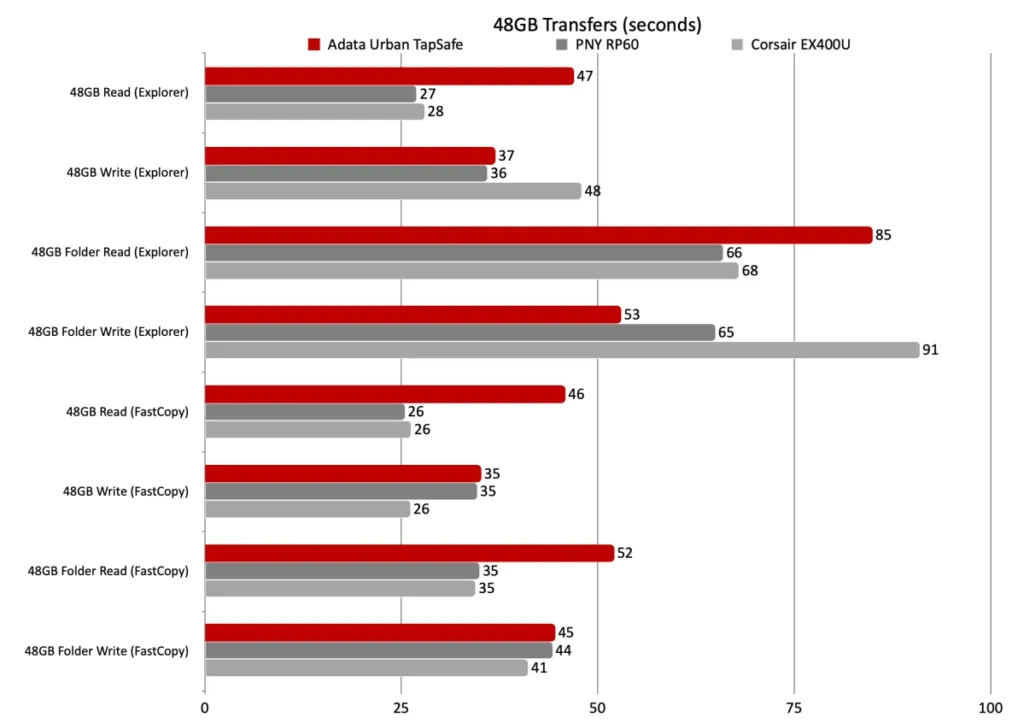
Across eight 48GB tests, the Tapsafe took second place in just two and never finished first. It was charted against only two drives, the PNY RP60 and the Corsair EX400U, so second place in two tests out of eight is a thin return. The Corsair had twice as much NAND to work with, which softens that result, but the PNY was also 1TB and the Tapsafe still couldn’t get past it in the other six.
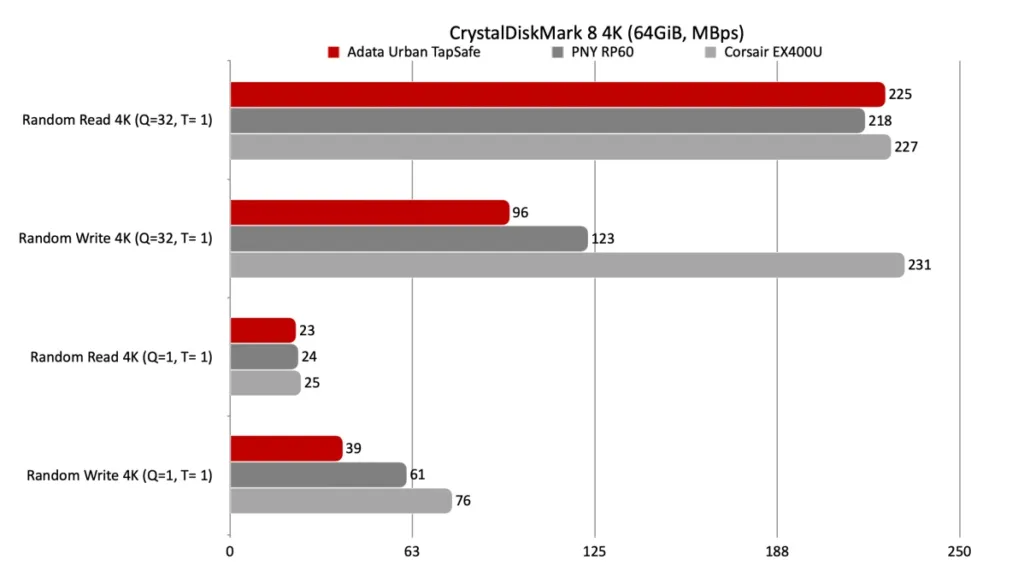
Every PCWorld chart uses CrystalDiskMark 8’s 64GiB data set, so each drive is tested the same way and the bars are comparable. The Tapsafe hardly aced the 4K tests there either. The slowdown is less stark than on the sequential reads, though, so small-file work is where it hurts least.
One Slow Format
On one occasion, PCWorld saw a format take 30 to 45 seconds when it normally takes 2 to 5. It happened once, so it’s a quirk worth knowing about rather than a verdict on the drive.
PCWorld’s advice is to think of the Tapsafe as a 15Gbps SSD, which is a class that doesn’t exist, and if you do you won’t be let down. It still beats 10Gbps drives, with super-long writes the exception. Plug it into anything other than a USB 3.2×2 port and you should expect roughly 1GBps, whatever the box says.
Funky Kit’s 2TB Results on a 9800X3D
Funky Kit put the 2TB Urban Tapsafe on a Ryzen 9800X3D with an MSI X870I EDGE TI EVO board and a 64GB ADATA LANCER BLADE DDR5-6000 kit. That memory is Adata’s own, so the drive’s maker supplied part of the bench it was measured on, which is worth knowing though nothing suggests it changes an external SSD’s numbers. Of the three testbeds, this is the only one built on current AMD gaming parts, and it’s the second 2TB result you can set beside Tom’s Hardware’s.
ATTO gave 1.86 GB/s read and 1.78 GB/s write. Both sit under the rating, but ATTO uses a different access pattern from CrystalDiskMark and usually lands below a drive’s rated spec, so a shortfall here is the normal result and not a warning sign.
Funky Kit, ADATA Urban Tapsafe 2TB
CrystalDiskMark read reached 1.926 GB/s and write 1.895 GB/s, against Adata’s rating of 1,900 MB/s both ways. Reads came in a hair above the claim and writes a hair below it. No other reviewer of this drive got that close to the spec, which makes this the friendliest of the three sets of numbers.
The trace-style tests split. PCMark 10 came out above average for USB 3.2 storage, while the 3DMark Storage score landed slightly below the class average, short of the score close to 950 that Funky Kit had counted on. Don’t lose sleep over it: 3DMark Storage replays game-loading workloads, and that’s not what anyone buys a portable drive for.
Blackmagic’s Disk Speed Test is the useful one if you shoot video. It suggests real-time 12K writes at 60 FPS would give the drive trouble, and every popular resolution up to and including 8K is fully supported. The ceiling sits at 12K capture, which this drive isn’t built for, and hardly anyone recording to a pocketable SSD will be near it.
One benchmark is missing from Funky Kit’s set. The AIDA64 random read and write tests aren’t meant for portable storage, and each pass would take about three hours, so Funky Kit ran the Read Test Suite instead.
Sustained Writes and Where the Cache Ends
Five good minutes, then two steps down. In its 15-minute sequential write run, Tom’s Hardware saw Iometer hold 1,800 to 1,900 MB/s for the first five minutes, then drop to roughly 250 MB/s once the cache was spent. That’s where most reviews would stop, but the run kept going, and past the 14-minute mark the drive sank below 70 MB/s. That last figure is the one to remember, because it’s slower than a laptop hard drive, and it means the 250 MB/s plateau was a rest stop rather than the floor.
Adata Urban Tapsafe sustained sequential write, Iometer 15 minutes
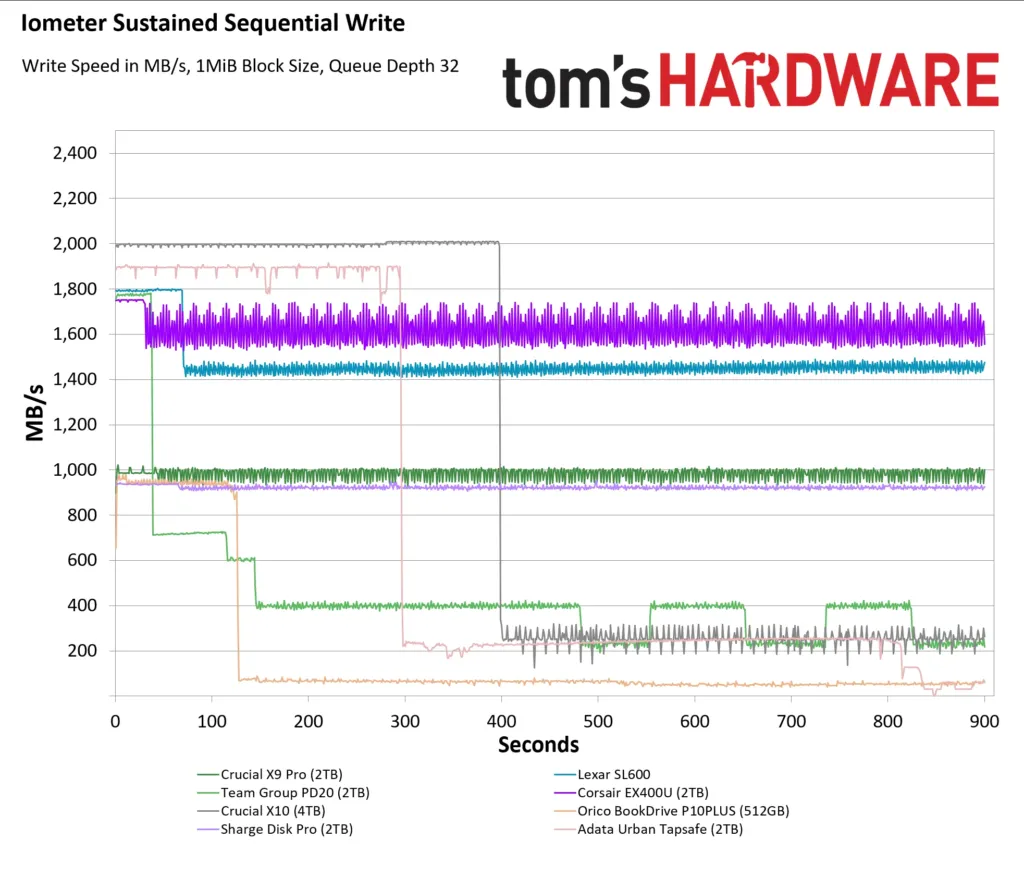
Against the drives it was run beside, the Tapsafe lands in the middle. Team Group’s drive started slower and fell faster, so Adata wins that one. Crucial’s X10 is the better choice if you write big files for long stretches, and Corsair’s USB4 drive beats the Tapsafe too, though it costs much more, so anyone who wants to beat this drive on sustained writes has to pay to do it.
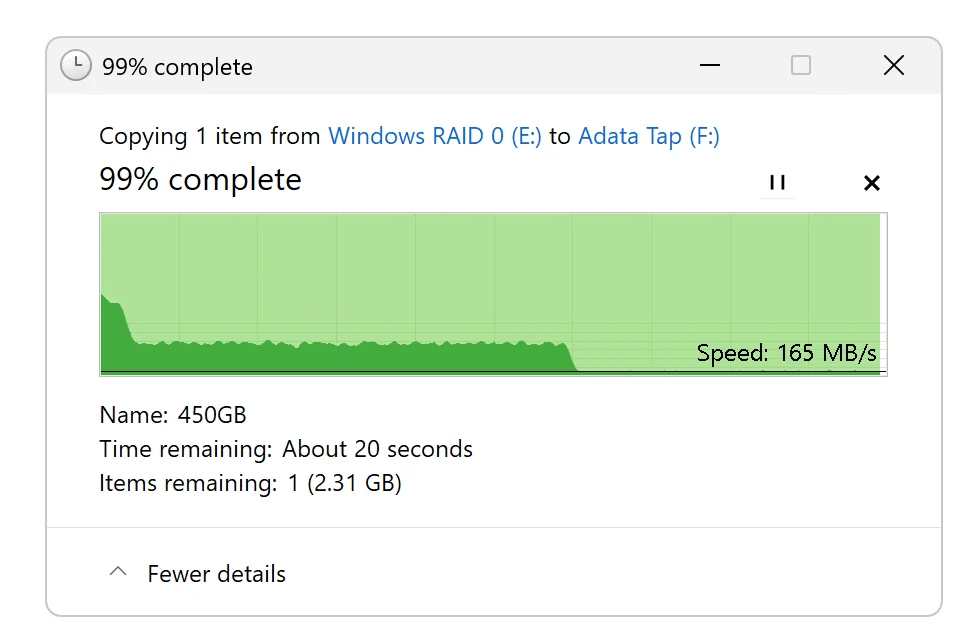
PCWorld came at it differently, with one enormous 450GB file instead of a timed hammering, and got the same ending. The 1TB unit ran at full speed until the 260GB mark, then fell to 150 to 200MBps for the rest of the copy. PCWorld expects the 2TB model to slow nearer 500GB, and it’s also upfront that most people never write a single 450GB file, which is fair: this cliff is real, but it sits well outside a normal day’s use.
| Test | Full-speed phase | After the cache | Source |
|---|---|---|---|
| Iometer, 15 minutes sequential | 1,800 to 1,900 MB/s for five minutes | About 250 MB/s, then below 70 MB/s past 14 minutes | Tom’s Hardware |
| 450GB single-file write, 1TB unit | Full speed to the 260GB mark | 150- to 200MBps | PCWorld |
A native write speed under 200MBps is what QLC NAND looks like once the tricks stop, and that’s PCWorld’s reading of the flash inside. It also explains why the cliff sits where it does: the more NAND a drive carries, the more of it can be set aside as secondary cache, so capacity decides how long the fast phase lasts. Corsair’s EX400U had twice the NAND to work with, and it holds up longer for that reason rather than because its controller is cleverer.
Capacity buys distance
The 1TB unit fell off at 260GB. The 2TB should hold full speed to roughly 500GB, but that’s PCWorld’s expectation, not something anyone measured on the 2TB.
Tapsafe Pricing Against the X10 and PD20
Buy direct from Adata and the 1TB Tapsafe is $219 and the 2TB is $391. Amazon asks $228 and $411, and PCWorld’s text quotes $229 and $412, a dollar above Amazon at each size. Tom’s Hardware supplied the direct and Amazon figures, so the two US reviews disagree by pocket change on the retail price, but the direct store undercuts both at each capacity, by $9 at 1TB and by $20 at 2TB.
| Capacity | Adata direct | Amazon | PCWorld |
|---|---|---|---|
| 1TB | $219 | $228 | $229 |
| 2TB | $391 | $411 | $412 |
Even that tidy table won’t hold still. PCWorld’s own automated price box shows $476.68 at Amazon, well above the $229 and $412 in its written review, so the same page carries two different answers. European listings for the 1TB drive are all over the place too: 255.00€ at SHOPRO.LT and 377,99 € at 81-Sports. Check the price on the day you buy, because any figure printed in a review, this one included, is a snapshot.
The Crucial X10 is the closer match on price, and Tom’s Hardware found it the faster of the two 20 Gbps drives. It costs $238 at 1TB, which is more than the Tapsafe’s $219 direct price, but at 2TB it flips: $368 for the X10 against $391 for the Tapsafe, about $30 less once you compare it with Amazon’s $411 as well. There’s a catch on the X10 side. Micron shut down the consumer Crucial brand after the drive launched, so what’s on shelves is what you’ll get, and it’s worth buying sooner rather than later if it’s the one you want.
2TB price, 20 Gbps external SSDs
The Team Group PD20 is where the Tapsafe’s pricing gets uncomfortable. It’s a 20 Gbps drive at $235 for 2TB, which is $7 more than the 1TB Tapsafe costs direct, so for barely more money you’d get twice the space. Tom’s Hardware does concede the other side of it: neither the PD20 nor the X10 has NFC unlocking or a clip. The extra money on the Tapsafe is buying those two features, and it isn’t buying speed or capacity.
PCWorld reads the same price the other way round. It expected the NFC hardware to push the Tapsafe above average, and concluded that $229 for 1TB actually sits slightly under other name-brand 1TB drives. Tom’s Hardware calls the drive expensive. Both can be right, because PCWorld is comparing against name-brand 1TB drives and Tom’s Hardware is looking at what 2TB costs on the 20 Gbps alternatives.
None of these figures look like last year’s. AI demand is soaking up the cutting-edge flash, and PCWorld notes SSDs still cost far more than they did a year ago. Vendors were running razor-thin margins on drives before that, so nobody selling them has much reason to hurry back to the old prices, which makes $229 for 1TB a fair reading of this year’s market rather than a rip-off by last year’s standard.
Buyers aren’t expecting a rescue either, and one on r/PHbuildapc put the case against waiting bluntly.
It hasn’t been a good time to buy a pc for a year or two now. Just get one if you need it because the prices aren’t coming down anytime soon.
Three Verdicts on the Urban Tapsafe
Nobody who tested this drive came away calling it a fast 20 Gbps drive, and they got there on three different benches, so this isn’t one reviewer’s unlucky unit. Tom’s Hardware puts it well clear of the slowest 20 Gbps drives, which is a polite way of saying mid-pack. PCWorld tells you to think of it as a 15Gbps drive, and that’s a reviewer marking the spec down for you before you’ve spent anything. Funky Kit is blunter: it isn’t one of the fastest portable SSDs it has tried. When three separate rigs land on the same shrug, the speed is the drive’s own, and the 20 Gbps on the box is a ceiling rather than a description.
- Tom’s Hardware: recommended only if you want NFC unlocking and sharing, and the high price keeps the drive niche.
- PCWorld: buy it for the clip and the security, not for speed.
- Funky Kit: the most relaxed of the three, and expects people shopping for portable storage to be happy with it.
Each of the harder two has a particular buyer in mind, and they get there from different features. Tom’s Hardware pictures collaborative projects and family file storage, which fits an app that can share the drive with up to nine other users. PCWorld pictures IT staff roaming the building all day, which is the beefy integrated clip on the back doing the talking. One buyer wants the drive passed around, the other wants it stuck to them, and neither picture has anything to do with how fast it moves data.
Slow by 20 Gbps standards still leaves it useful. Tom’s Hardware says it’s fine for recording video and moving big files, and PCWorld agrees it beats 10Gbps drives, with the exception of very long writes. The catch is the port: Tom’s is clear that you need a 20 Gbps connection to see the top speed at all.
Check Your Port First
Plug the Tapsafe into an ordinary 10 Gbps port and you’re paying for speed you won’t get. PCWorld saw roughly 1GBps on anything other than USB 3.2×2, and Tom’s Hardware says a 20 Gbps port is what you need for top speed.
The case against comes from two directions. Tom’s Hardware points at Team Group’s PD20, which nearly matches the Tapsafe apart from sustained writes and sells for $235 at Amazon in the 2TB size, well under the Tapsafe’s $411 there. PCWorld goes a step further and says cheaper 10Gbps drives are fast enough for most people. Skip the lock and the clip, and both reviewers are pointing you at the exit.
Some of the wariness has nothing to do with the benchmarks. People arrive with a view of Adata already formed, and since the company sells storage under its XPG brand as well, that view travels with the name. One reader put the expectation plainly.
I thought adata xpg is a good brand.