
Key Takeaways
- 1If you just want this exact drive for less money, buy the WD Black SN850P instead. Same hardware, same BiCS5 flash, and NeoTeo priced it as low as $234.99 at 1TB against the 850P’s $309.99.
- 2At 1TB, give up a little write bandwidth (6,300 MB/s instead of 6,600 MB/s) to save on the smallest capacity in the lineup, since 2TB through 8TB all run the same rated write speed.
- 3Don’t buy the 8TB model expecting a deal: Sandisk’s own US listing shows it at $2,249.99 discounted off a $3,699.99 list, which is higher than the $2,959.99 it launched at three months earlier.
- 4For a laptop or a slim PC, skip the 850P entirely and look at the WD Black SN7100 instead. It draws less power, posts class-leading 4KiB read latency, and Home Office World lists the 2TB model at $329.99 with no heatsink to source or fit.
- 5Once the 850P’s 595GB cache runs dry, writes settle at 1.6 GB/s to native TLC. That’s well above where Gen 3 drives topped out, so the cliff looks worse on a chart than it feels moving an actual 50GB file set.
- 6If you’re building a NAS or want sustained write headroom over years of heavy use, the eight-channel, DRAM-equipped 850P has more to give than the four-channel Addlink A93, even though the A93 is barely slower loading PS5 games.
- 7A Gen 5 drive buys you nothing in a PS5: three independent sources confirm the console caps any drive down to Gen 4 speeds, so paying extra for Gen 5 bandwidth here is money spent on a number the console never lets you use.
The Drive Under the Sandisk Badge
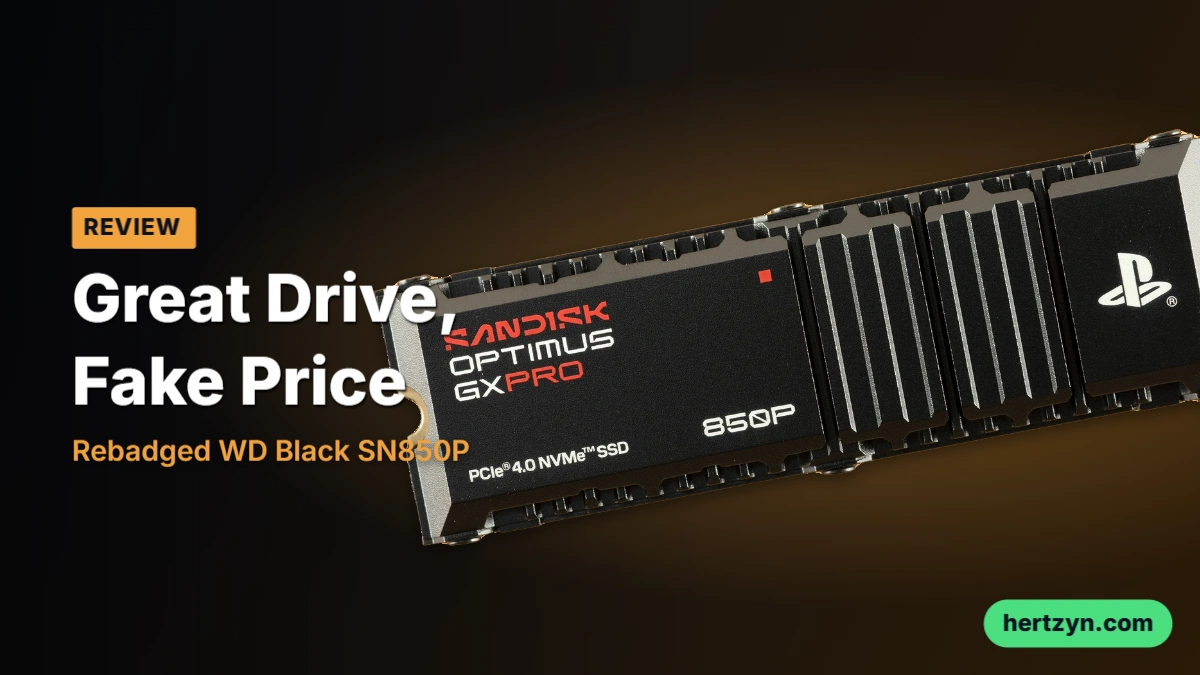
The 850P is a WD Black SN850P wearing a new name tag, and the SN850P itself is nothing more than an SN850X with a heatsink cut to Sony’s spec. Testing turned up no real surprises once that lineage was confirmed. Sandisk’s wider rebrand kept the underlying model numbers intact across the board, so what looks like a new drive lineup is mostly WD Black and WD Blue hardware sold under a different name.
Buyers didn’t need a lab to reach the same conclusion. When one owner put a WD-branded SN850X next to a Sandisk-branded version on r/ssd, the comparison landed exactly where the spec sheets do.
They’re the same product, just the branding/packaging changed
Eight Channels, DRAM and BiCS5 Flash
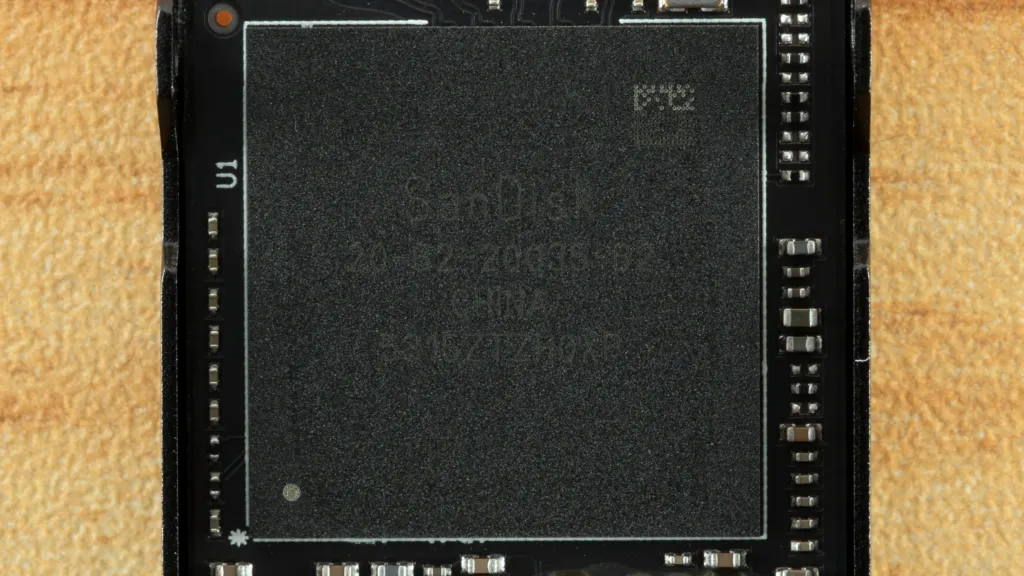
Strip away the badge and the branding, and the 850P is a proper SSD: an eight-channel controller paired with DRAM, running TLC flash rather than anything cut down to hit a price. Eight channels mean the controller can talk to more flash dies at once, which matters more as capacity climbs and there’s simply more flash to keep fed. That DRAM and TLC combination is also why the drive isn’t boxed in as a PS5-only part; it’s built to do the job in a regular PC just as well. The exact amount of DRAM is a point that doesn’t line up cleanly: NeoTeo found 1GB of DDR4 on its 2TB review sample, while Sandisk’s own spec table for the 850X lists 2GB on the 2TB capacity and up. Neither figure gets reconciled here, so the honest answer is a range rather than a fixed number.
The flash itself is where the 850P shows its age. It runs BiCS5 TLC, a generation behind the BiCS8 flash in Sandisk’s own newer GX Pro 8100 and GX 7100, and behind the BiCS8 in WD’s own Black SN7100 too. The 850X is the oldest design left in the Optimus range, and Tom’s Hardware traced the drive’s weaker small-block latency straight back to that older flash. The trade is a clean one: slower on the smallest, most latency-sensitive writes, but backed by a full eight-channel DRAM design that keeps holding up once the workload gets heavier than a game install.
| Form factor | M.2 2280 |
| Interface | PCIe 4.0 x4 |
| NVMe version | NVMe 1.4 |
| NAND | BiCS5 TLC 3D CBA |
| Flash channels | Eight |
| DRAM | Yes |
| Warranty | Five-year limited warranty |
Sandisk’s PS5 Licensing Claims
- Officially licensed and tested by Sandisk for both PlayStation 5 and PlayStation 5 Pro.
- A heatsink Sandisk says was designed specifically to fit the consoles’ M.2 slot.
- Up to 8TB of added storage, with games stored and played directly from the drive.
- Compatibility with ordinary M.2 M-key PCs that take a 2280-length drive.
- A June 18, 2026 launch that added the 850P to Sandisk’s licensed PS5 lineup.
Paying for Maturity, Not a Console Tune
Firmware can, in principle, be tuned specifically for a PS5-bound drive. Testing found any such tuning on the 850P barely moves the numbers. What’s actually different about this drive is maturity: hardware and firmware that have had years to settle, not some console-specific speed trick baked in under the hood.
Put it all together and Tom’s Hardware’s read holds up: this is a great PS5 SSD wrapped in a genuinely mature package, bought at a stiff premium over the hardware underneath it. It’s also reliable and consistent enough to earn a spot in a regular desktop, not just a console. The 850P was designed with the PS5 in mind, but there’s nothing stopping an enthusiast PC builder from putting it to the same use.
The GX PRO 850P Spec Sheet by Capacity
Sandisk sells the GX PRO 850P from 1TB up to 8TB, and the rated numbers barely move across that range. Reads sit at 7,300 MB/s from 1TB all the way through 4TB, and only the 8TB model drops, to 7,200 MB/s. Writes are the one place capacity actually buys you something: the 1TB drive is rated at 6,300 MB/s while 2TB and up all run 6,600 MB/s. So the only real decision the spec sheet forces is at the bottom of the range — go 1TB and you give up a little write bandwidth, go anywhere above it and the number is identical whether you land on 2TB or spring for 8TB. All four capacities are the same M.2 2280, PCIe 4.0 x4, NVMe 1.4 drive underneath.
| Capacity | Sequential read | Sequential write | Endurance | Height with heatsink |
|---|---|---|---|---|
| 1TB | 7,300 MB/s | 6,300 MB/s | 600 TBW | 9.89 mm |
| 2TB | 7,300 MB/s | 6,600 MB/s | 1,200 TBW | 9.89 mm |
| 4TB | 7,300 MB/s | 6,600 MB/s | 2,400 TBW | 10.31 mm |
| 8TB | 7,200 MB/s | 6,600 MB/s | 4,800 TBW | 10.31 mm |
Endurance climbs cleanly with capacity, doubling at every step: 600 TBW at 1TB, 1,200 TBW at 2TB, 2,400 TBW at 4TB, 4,800 TBW at 8TB. What doesn’t move is the warranty clock sitting underneath all of it, five years no matter which capacity you buy. That means the 1TB buyer is given the same five-year window as the 8TB buyer but an eighth of the endurance to spend inside it, so somebody who writes heavily to the drive has a lot less room to work with on the smallest model. Hardware encryption, at least, is consistent across the whole range, which is more than the DRAM-less Optimus drives in this lineup can say.
With the heatsink fitted, the 1TB and 2TB drives stand 9.89mm tall, while 4TB and 8TB step up to 10.31mm. Both clear Sony’s 11.25mm ceiling for anything going into the PS5’s M.2 bay, so none of the four capacities is going to be a tight physical fit. But the step itself says something: more flash to cool at the bigger capacities means a taller heatsink, and that eats into the clearance margin even though every capacity still fits comfortably under the limit.
On DRAM, the published numbers don’t agree with each other. Club386’s spec table lists 1GB of DDR4 on the 1TB drive and 2GB of DDR4 on 2TB and above, but NeoTeo reports that the 2TB sample it had on hand carried only 1GB. One of those figures is the published table, the other is what showed up in an actual unit. The random IOPS numbers Club386 rates at 2TB, 1,200K reads and 1,100K writes, are the numbers that DRAM cache is there to support, which is exactly why the disagreement matters to anyone comparing spec sheets before buying.
Two DRAM numbers for the same drive
Shoppers comparing spec sheets for the 2TB GX PRO 850P will find two different DRAM figures in circulation: Club386’s published table says 2GB, while NeoTeo says the sample it actually inspected carried 1GB. NeoTeo is clear that its figure describes the one unit it looked at, not a claim about every 2TB drive shipping. Worth knowing before you treat either number as settled.
| NAND | BiCS5 TLC 3D CBA |
| Interface | PCIe 4.0 x4 |
| Protocol | NVMe 1.4 |
| Form factor | M.2 2280 |
| Random read IOPS (2TB) | 1,200K |
| Random write IOPS (2TB) | 1,100K |
| Hardware encryption | Yes |
| Heatsink version | Yes |
| Limited warranty | Five years |
| Maximum capacity | 8TB |
Launch Pricing for the GX PRO 850P
Sandisk launched the 850P on June 17 2026 with a price ladder that climbs harder than capacity does. The 1TB opened at $379.99, 2TB at $759.99 (almost exactly double), 4TB at $1,499.99 (double again), and 8TB at $2,959.99 — a price nobody expects to see on a console expansion drive.
| Capacity | June 17 2026 launch price | September 26 2026 price |
|---|---|---|
| 1TB | $379.99 | $309.99 |
| 2TB | $759.99 | $609.99 |
| 4TB | $1,499.99 | $1,139.99 |
| 8TB | $2,959.99 | $2,249.99 |
By September 26, every capacity had come down from launch: 1TB to $309.99, 2TB to $609.99, 4TB to $1,139.99. The 8TB is the exception that breaks the pattern, Sandisk’s own US listing shows it at $2,249.99, framed as a discount off a $3,699.99 list price that is higher than anything the drive launched at three months earlier.
The 8TB 850P Against a PS5
Spend $2,959.99 on the 8TB 850P at launch and you’ve paid 3.3 times what a PS5 Pro costs, or 4.5 times a base PS5, spending more on storage than on the console it slots into. Meanwhile the 8TB WD Black SN850X lists at $1,470 on Amazon, and Samsung’s Gen 5 9100 Pro 8TB runs $2,159. Both sit well under what Sandisk is asking for a Gen 4 drive.
The 850P Against WD’s Own SN850P
The drive the 850P is rebadged from costs less than the 850P at every capacity where both were quoted. NeoTeo put the SN850P 2TB at $494.99 and its 1TB at $234.99; Tech Insider put the 2TB at around $209.99, and Tech4Gamers put the 1TB at $220. Even taking the higher of those figures, the SN850P undercuts the 850P at 1TB, 2TB and 4TB, and a Samsung 990 Pro 1TB, at $220, sits in the same bracket as the cheaper SN850P quotes.
Sandisk points to what the badge buys: official PlayStation licensing, a heatsink cut to Sony’s spec, and firmware tuned for the console. Licensing isn’t free, but the SN850P carries the same license and still costs less at every capacity above — so licensing alone doesn’t explain the gap between the two.
A NAND Shortage Sits Under Every Price
- SSD prices are up roughly 60-80% on where they sat three years ago
- A 1TB SSD that cost $50 to $60 in 2023 now runs over $150
- 2TB drives once priced near $150 now run $270 to $500
- Supply pressure tied to AI demand has produced a NAND and DRAM shortage, and it’s the floor every price above sits on, though it doesn’t explain Sandisk pricing above drives built from the same hardware
With flash prices moving like that and no sign of easing, the practical advice circulating among buyers isn’t to wait for a correction, it’s to buy more than you need right now.
Tbh with how crazy the SSD prices are, and probably will be in the future. I recommend ppl to buy as much as they would think they need for the next next year or two.
PS5 Transfers and 3DMark’s Storage Trace
3DMark’s storage test puts a drive through the motions that actually matter in a living room: loading a game, saving mid-session, installing a new title. Here the 850P beats the original Black SN850X outright, and the likely reason is boring rather than architectural — newer BiCS5 flash, more mature firmware, the kind of gains a drive picks up just by shipping later. An SN850X updated to current firmware would probably close most of that gap on its own. What’s more telling is who it beats by less: the DRAM-less Addlink A93 trails but isn’t embarrassed, and the DRAM-less WD Black SN7100 holds up well enough that the DRAM cache starts to look optional for this specific job.
The 45µs Bar
Tom’s Hardware treats 45µs or better as excellent for load-time latency. Anything a drive posts under that line is splitting hairs, not winning races.
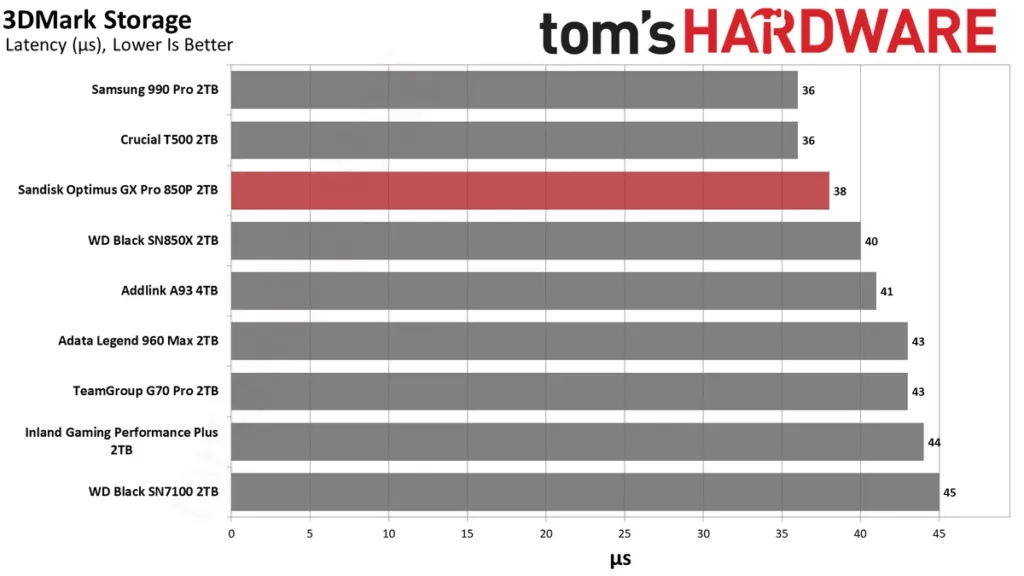
The PS5 Transfer Test: 192GB Each Way
Tom’s Hardware’s console test is straightforward: move over 192GB from the PS5’s internal storage to the 850P, then over 192GB back, with throttling kept at bay so the drive is tested at its best rather than its worst. Run the PS5’s own internal storage check on top of that and you’ve got the whole picture. One thing to set expectations before the numbers show up: Sony’s PS5 only takes one extra M.2 drive, and it has to clear PCIe 4.0 speeds with at least 5,500 MB/s sequential read to qualify. Every drive that clears that bar loads games at close to the same speed, so the transfer figures are the only part of this test that actually separates one drive from another.
The 850P’s only win in the console test is writing data to the drive, and it’s not by much. Where it earns its keep isn’t day one performance, it’s day five hundred: with more wear and a fuller drive, the extra headroom should let it hold its peak speed longer than drives running closer to the edge. Tom’s Hardware is blunt about what that doesn’t buy you — don’t expect faster game loads, and don’t expect better frame rates. A faster SSD doesn’t raise FPS. Frame rates are decided by the GPU and CPU, full stop, and no amount of sequential read speed moves that needle.
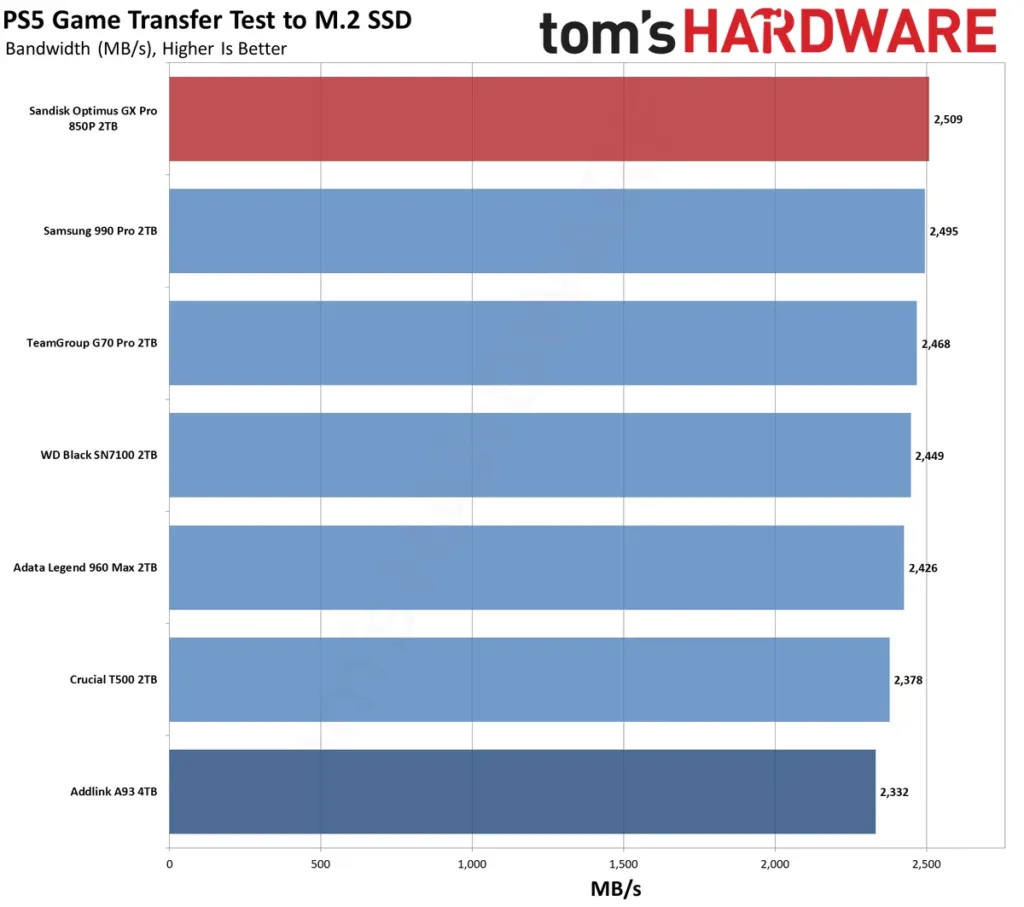
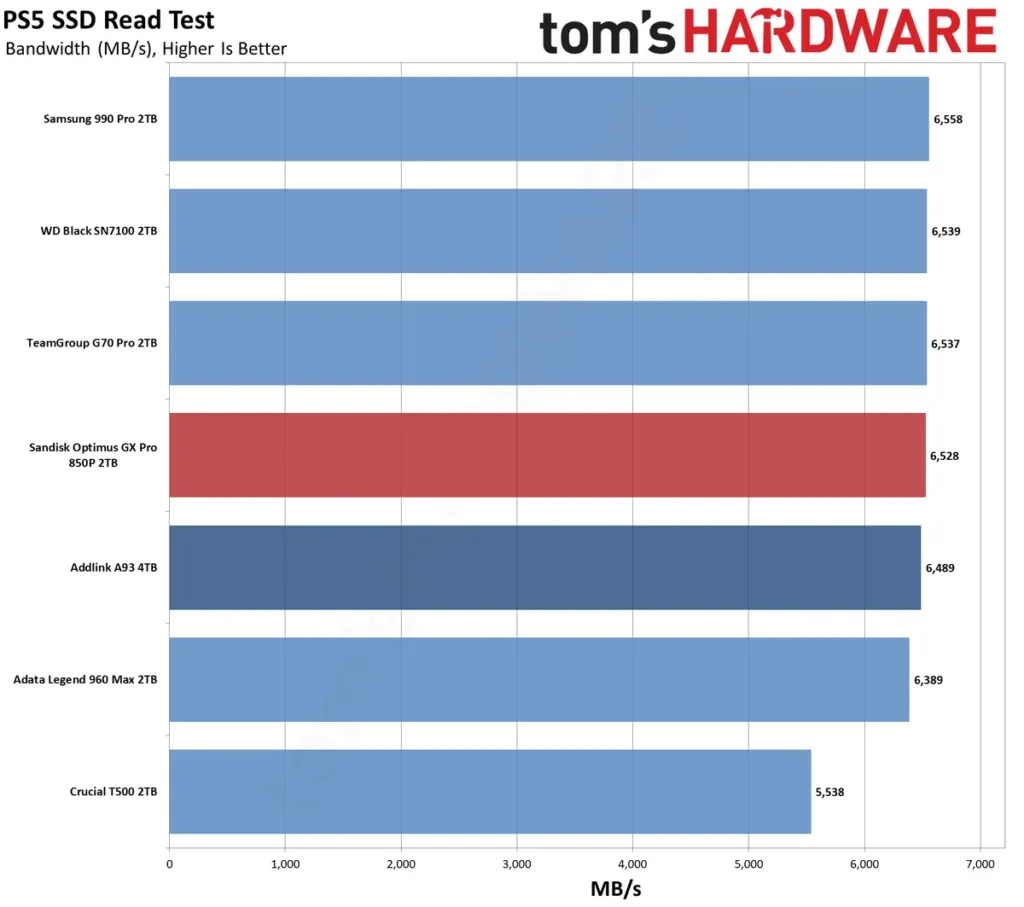
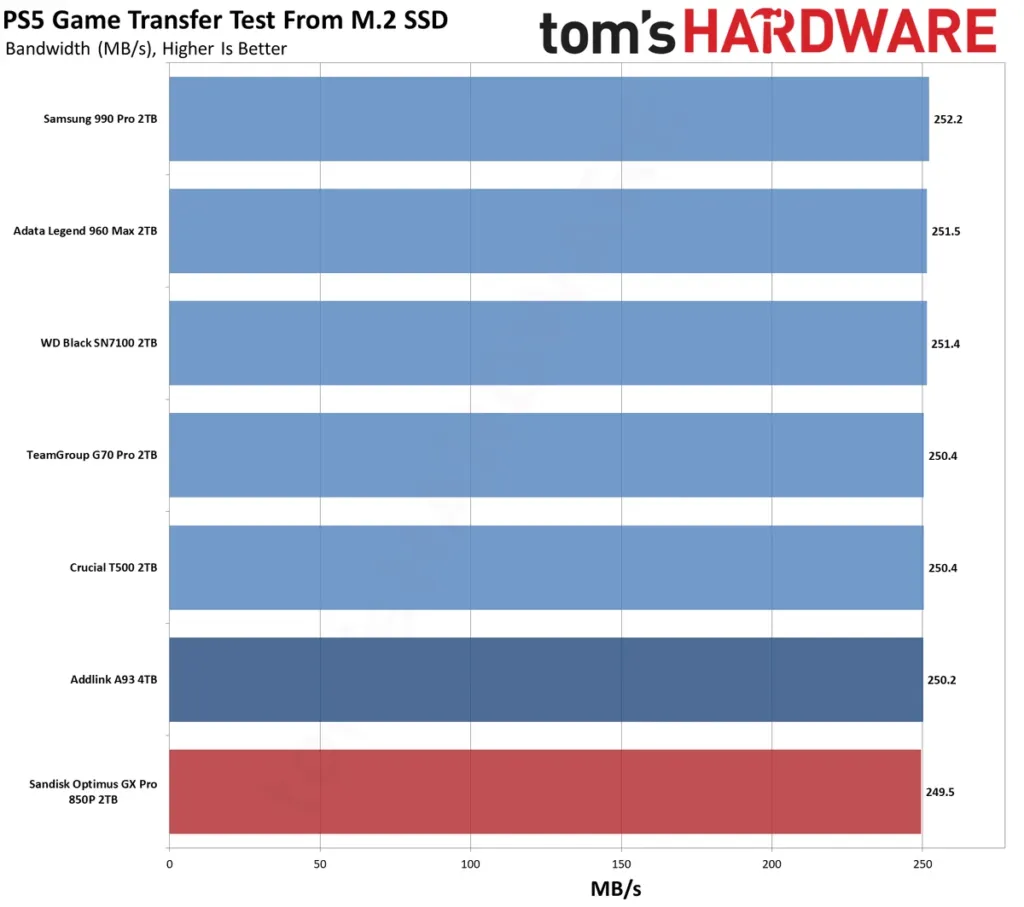
- Tom’s Hardware has named the WD Black SN850X its pick for best PS5 SSD for years running.
- The SN850P is just the console-specific version of that same drive.
- The plain SN850X delivers a near-identical console experience for less money.
- What earned the recommendation was top-tier Gen 4 performance, proven reliability and an excellent heatsink.
- Every bit of that carries straight over to Sandisk’s 850P, badge change and all.
Tom’s Hardware’s bottom line on the console side is about as flat as a verdict gets: for a PS5, you can genuinely buy almost anything that qualifies and be fine, and if you specifically want the quality end of that field, the 850P is basically as good as it gets. That sits awkwardly next to a claim from an Alibaba buying guide, which puts verified drives at 15-25% faster load times than base PS5 storage. Tom’s Hardware ran the drives and measured almost no difference between them; the Alibaba guide is making a sales case, not reporting a bench. When a reviewer who timed the loads and a buying guide trying to sell you one disagree by that much, it’s worth noticing which of the two actually put a stopwatch on it.
PCMark 10 and the Boot Drive Question
PCMark 10’s application traces put the 850P mid-pack, and mid-pack here is nothing to apologize for: it beats most of the DRAM-less field doing the everyday stuff these traces simulate. Where it loses ground is to the Black SN7100, and the reason has nothing to do with sequential speed or channel count. The SN7100 runs BiCS8 flash, which simply answers requests faster than the older BiCS generation the 850P is built on. This is a latency gap, not a bandwidth one, and it’s the kind of gap a rated MB/s number never shows you.
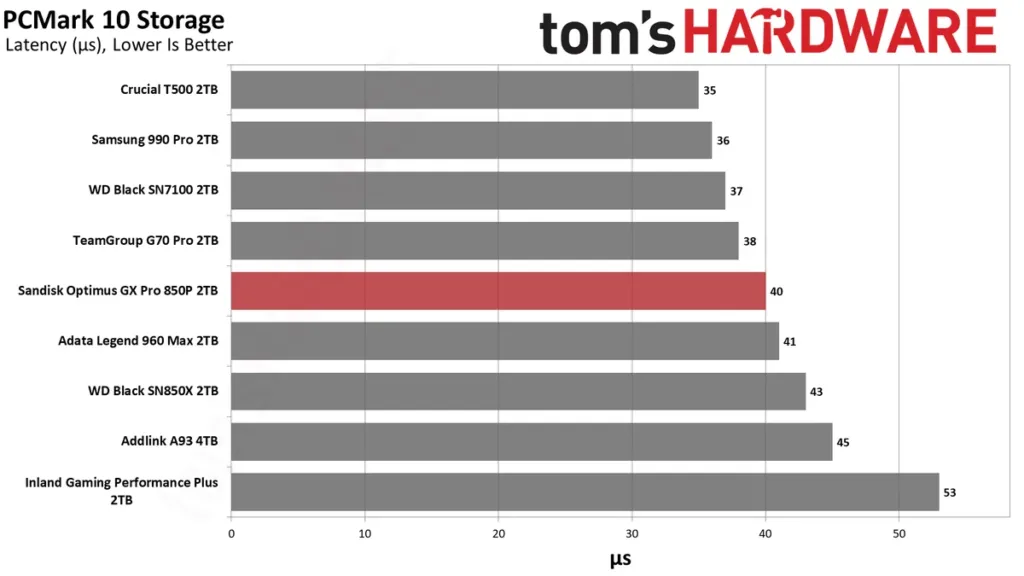
None of that makes the 850P a bad choice for an OS drive. Tom’s Hardware treats anything at or below 45µs as good, and the 850P clears that bar, which is really all a boot drive needs to do. What it gets in exchange for giving up a few microseconds to the SN7100 is eight flash channels and a dedicated DRAM cache, and that’s the kind of overhead that pays off less in a fresh benchmark and more a year or two in, once the drive is older and the workload has gotten heavier.
ATTO: Mirroring the Black SN850X
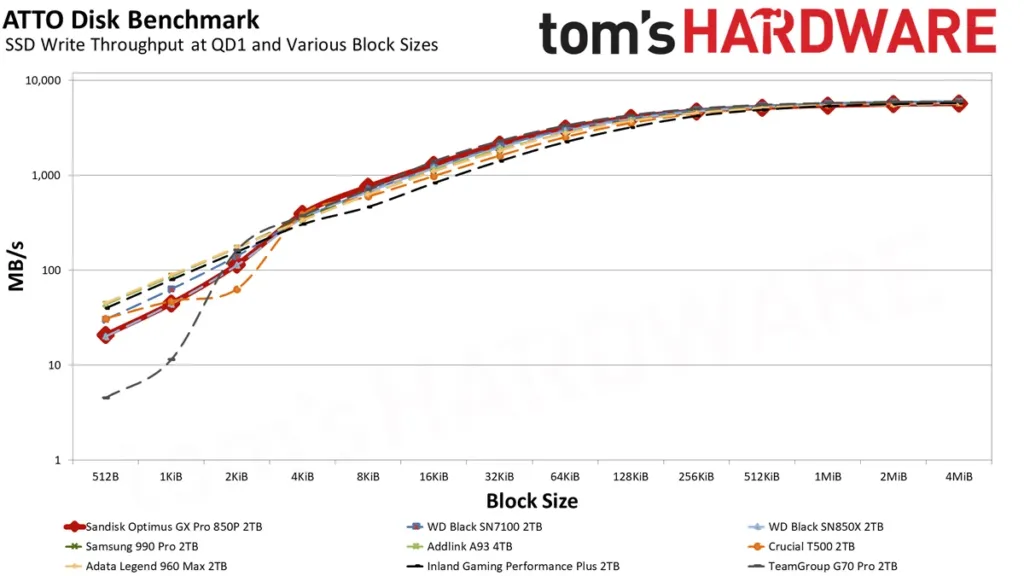
ATTO is where the 850P stops being interesting, in the best way. It tracks the Black SN850X across the whole block-size curve, nothing anomalous shows up, and the drive stays consistent whatever workload you throw at it. The one soft spot sits between 512B and 2KiB, where both the 850P and the SN850X dip down toward the Legend 960 Max and the WD Black SN7100. That the 850P and SN850X move together isn’t a coincidence: they’re built on proprietary controllers that share the same underlying foundation. The Legend 960 Max stands apart there as the only drive in the group running an SMI controller instead, which makes its presence in that same low patch worth noting rather than explaining away.
Why the Small-Block Dip Isn’t a Flaw
4KiB gets used as the standard cluster and sector size for a reason, but it’s already a logical page sitting downstream of what the flash itself is doing, which works in 16KiB physical pages. Chasing anything smaller than that logical 4KiB floor means more memory load and more latency for the controller to absorb. A manufacturer weighing that cost against power draw and long-term wear can reasonably decide it isn’t worth optimizing for. The dip isn’t a mistake anyone missed; it’s a trade nobody felt was worth making.
CrystalDiskMark at 4KiB, Queue Depth 1
At 4KiB and queue depth 1, the read result is the same story as everywhere else: average, with the SN7100’s BiCS8 flash sitting in a class of its own that nothing else in this group touches. The 45µs-or-below bar for good read latency still applies here, and the 850P still clears it. Writes are a different chart entirely, and the 850P sits right at the top of it, ahead of the A93, the Legend 960 Max, and the 990 Pro, which fill out the bottom. Reads tend to matter more to how a drive actually feels day to day, so this is the less important half of the result, but it’s still the half the 850P wins outright.
Those chart-topping 4K writes aren’t really a PS5 feature at all. They’re the kind of number that makes a drive attractive for NAS duty or as a caching tier, workloads a PlayStation never asks of it. What it signals instead is where this drive actually came from: a controller good enough to win outside the one job Sandisk is selling it for.
DiskBench and the Mixed 50GB File Set
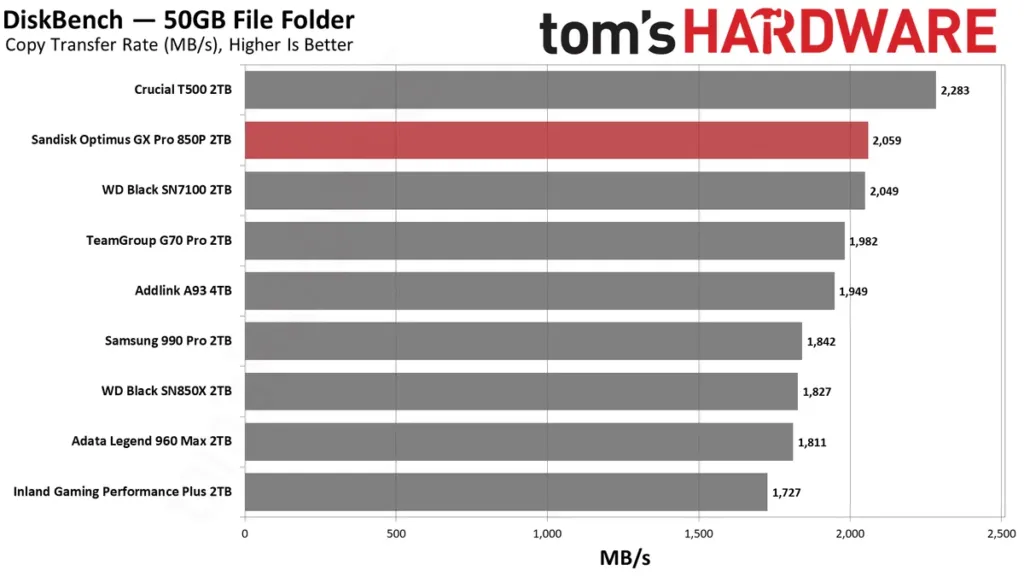
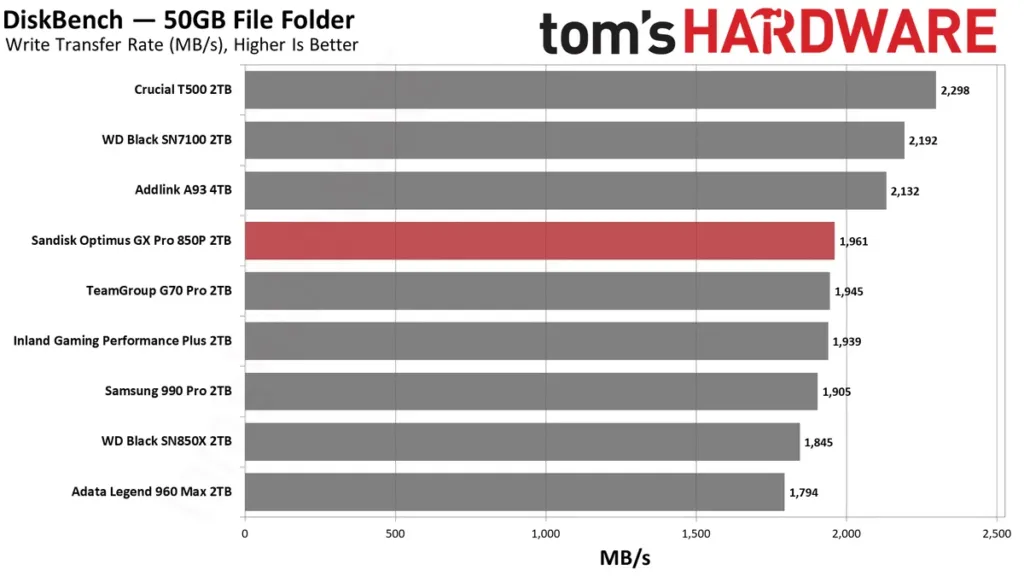
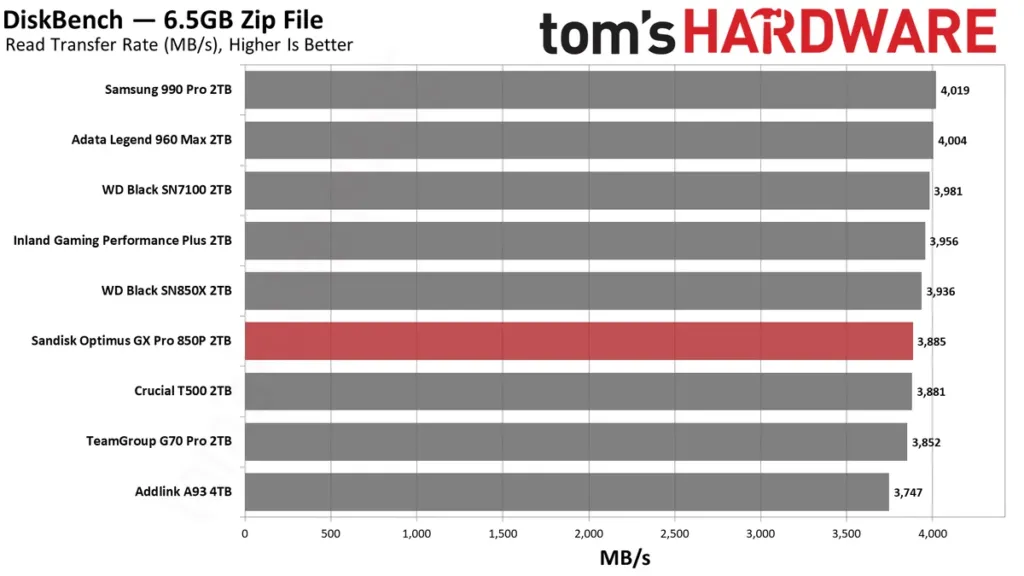
DiskBench writes 31,227 files to the drive, a pile of pictures, PDFs and videos adding up to 50GB, then copies that whole folder to a new location before reading back a freshly written 6.5GB zip. None of it is designed to hurt. 50GB fits inside the SLC cache on practically every drive in this class, so what gets measured here is a drive at its best, not a drive under siege.
A solid Gen 4 drive should push around 2 GB/s on the copy and around 4 GB/s on the read, and the gap between those two numbers isn’t a mystery: a copy is a write and a read happening at once, and the write is always the slower half, so it’s the write speed that sets the ceiling on how fast the copy finishes. The 850P lands right where that yardstick says it should, nothing above, nothing below.
On the copy test specifically, the 850P finishes second, behind the T500, and Tom’s Hardware weights this particular result more heavily than any other number in its suite, so second place here carries more than second place would somewhere else. The T500 isn’t winning because its controller is smarter; its flash simply has more planes, and more planes means more raw bandwidth to work with. The Black SN7100 stays in the same conversation for a similar reason, its newer generation of BiCS flash keeping it competitive without needing a DRAM cache to do it.
Losing to the T500 doesn’t stop this from being the 850P’s strongest showing against the field. It beats the Black SN850X it was built from by a significant margin, and it beats the Samsung 990 Pro too, the drive it’s actually meant to compete with on price. Why the 850P pulls ahead of its own parent isn’t fully settled, maybe more mature firmware, maybe the newer BiCS5 flash underneath it, but whichever it is, this is the one chart where the 850P looks like the drive Sandisk’s price tag says it should be.
This is also the result that matters most, because this is what most people actually do with a drive: move files between drives, run a backup, install a software update. None of that happens at the high queue depths that make the numbers on the box look good, and smaller files never get anywhere near theoretical throughput no matter what drive they’re sitting on. Judged on the workload people actually run rather than the one printed on the spec sheet, the 850P earns the mantle of a genuine high-end Gen 4 drive.
The Catch on This Win
The DRAM-less Addlink A93, a drive that costs a fraction of the 850P, isn’t much slower on this exact test. For somebody who copies a folder now and then, that gap is nearly invisible. It only turns into real time, and real money’s worth of it, for somebody who moves files like this all day long.
SLC Cache Size and the Post-Cache Floor
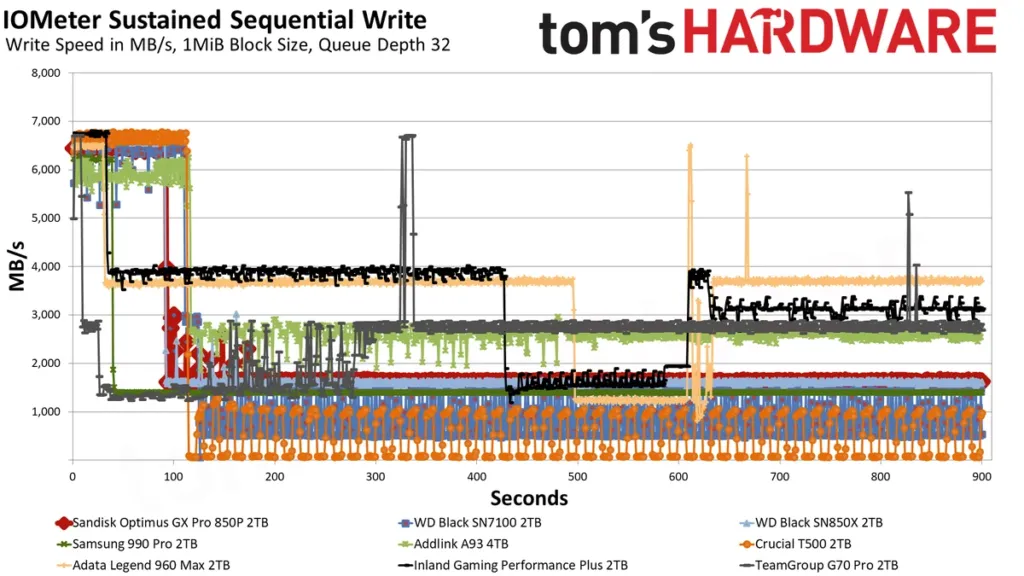
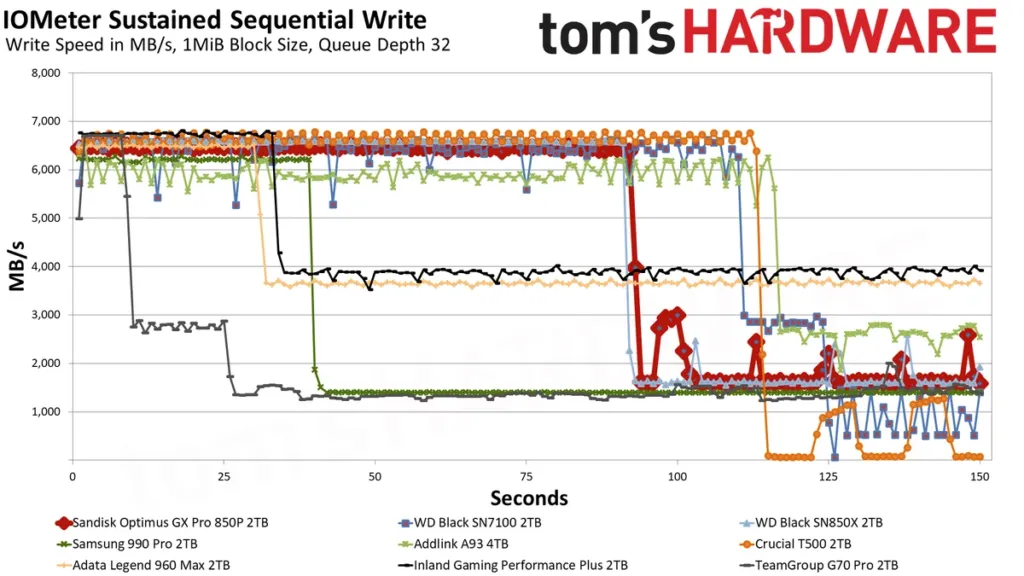
Tom’s Hardware ran the 850P through 15 minutes of sequential writes in Iometer, with idle rounds built in to watch the cache recover. Writes held above 6.46 GB/s for just over 92 seconds before falling off, which works out to a 595GB cache. That number lines up almost exactly with the Black SN850X’s own cache size, one more piece of evidence that the 850P is that drive wearing a different badge.
Sandisk Optimus GX Pro 850P 2TB sequential write: in cache vs post-cache
A 3-bit TLC drive can in theory turn a third of its own capacity into cache, so on a 2TB drive 595GB is not Sandisk squeezing out the maximum. It’s still enough to swallow large file writes without the drive ever having to touch native TLC speeds, and that headroom is what makes the 850P worth considering for work that has nothing to do with a PS5.
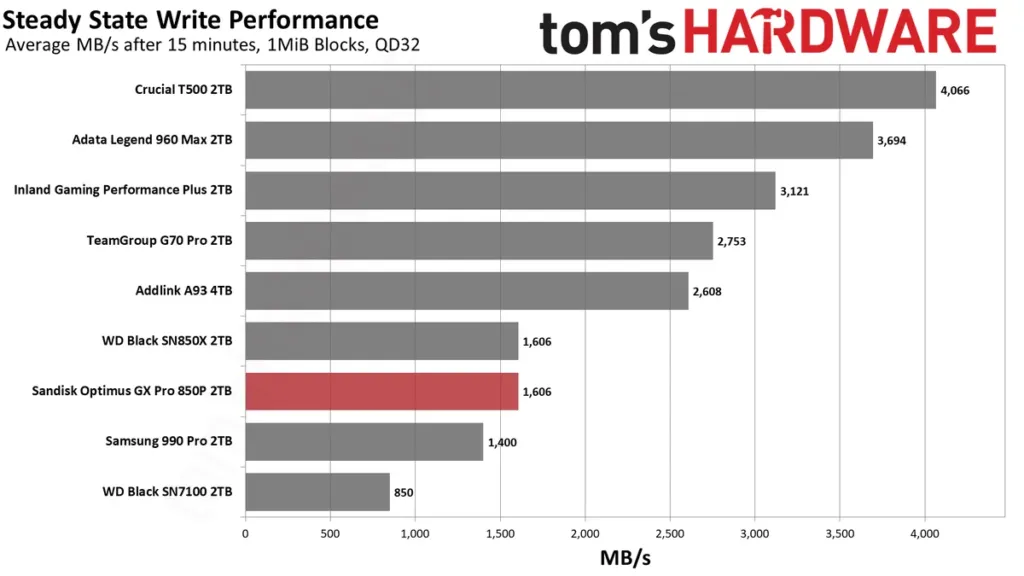
Once that cache is gone, Tom’s Hardware measured writes settling at 1.6 GB/s to native TLC. Set against a 7,300 MB/s rated peak that looks like a cliff, but 1.6 GB/s is at or above where the best Gen 3 drives topped out full stop — and the 850P gets there with a bigger, faster cache sitting in front of it than any Gen 3 drive had.
Samsung’s 990 Pro lands in a similar spot: steady once its own cache runs dry, but slow next to what newer drives manage in that same state. The flash explains the gap. Newer flash packs more planes and runs lower latency, and both of those feed straight into throughput.
There’s another way to build this. The Inland Gaming Performance Plus runs a smaller cache and gets higher sustained speeds for it, and the Adata Legend 960 Max makes the same trade. A bigger number isn’t the whole story, though, some drives that hit a higher sustained figure don’t write smoothly once they get there, and a drive that stutters through its post-cache state feels worse in hand than its spec sheet suggests.
| Drive | Cache approach | Effect after the cache |
|---|---|---|
| Sandisk Optimus GX Pro 850P 2TB | 595GB SLC cache | 1.6 GB/s to native TLC |
| WD Black SN850X | Cache size near identical to the 850P | Same older BiCS flash profile |
| Samsung 990 Pro | Large cache | Consistent but slow outside the cache |
| Inland Gaming Performance Plus | Smaller cache | Higher sustained speeds |
| Adata Legend 960 Max | Smaller cache | Higher sustained speeds |
This profile lands the 850P somewhere its PS5 branding doesn’t suggest: it’s steady enough, with enough speed outside the cache, to run as a NAS drive. Tom’s Hardware would still reach for the Inland Gaming Performance Plus for that job first, since a cache this large leans the 850P toward everyday consumer workloads rather than the sustained writes a NAS throws at a drive. Against the Crucial T500, though, the 850P probably comes out ahead, mostly because it has twice the T500’s flash channels, and that extra channel count is what tells once capacity climbs.
Sold as a console drive, built for more
Sandisk sells this as a PS5 expansion drive and nothing else on the box says otherwise, but the heatsink and the cache profile behind it would hold up just as well bolted into a desktop or stuffed into a NAS. The console badge is selling this drive short.
Efficiency in the Lower Half, a 54°C Heatsink Result
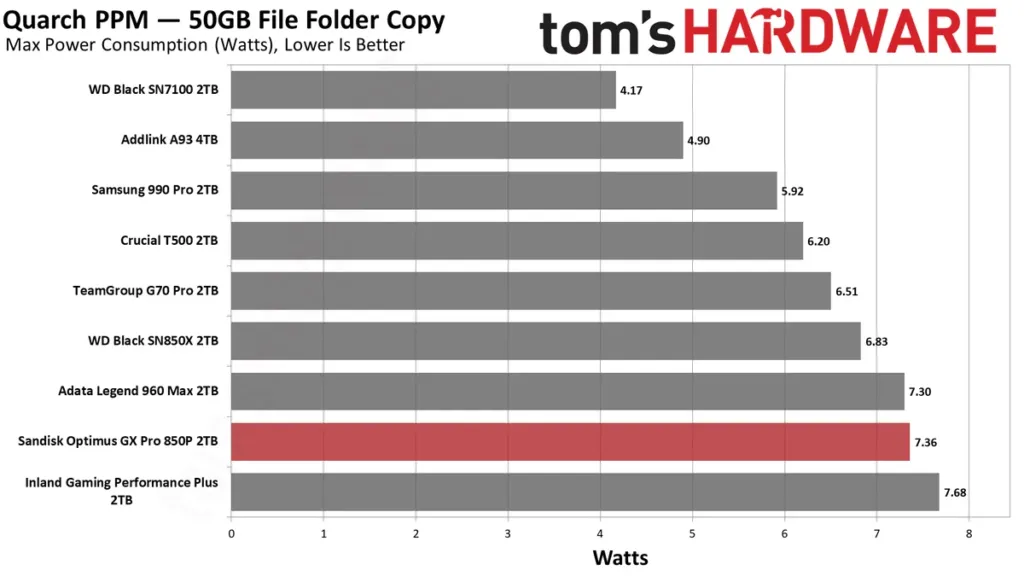
On power draw per watt, the 850P sits in the lower half of the field Tom’s Hardware tested it against. It beats the SM2264-based Legend 960 Max and the E18-based Gaming Performance Plus, but that’s beating two older controller platforms rather than winning the category — anything built on newer silicon and newer flash pulls ahead of it. The drives that actually chase efficiency hard tend to be DRAM-less, trading the dedicated cache chip for a lower power floor. If watts per megabyte is the thing you’re optimizing for, the 850P was never built to win that fight.
The Efficiency Bar
Tom’s Hardware sets the bar for a high-end Gen 4 drive at 400 MB/s per watt, and says most drives in that class manage to clear it.
That lower-half placing matters less than it sounds like it should. The 850P ships with a heatsink bolted on, which already rules it out of laptop duty, and that same heatsink is what keeps throttling off the table as a concern regardless of where the drive sits on power draw. Where the number actually bites is if you pull the heatsink off and drop the bare drive into something like a small form factor media box, where every watt and every degree has nowhere to go. NeoTeo’s review of the 2TB model flagged power efficiency as a drawback too, right alongside the price, so this isn’t just Tom’s Hardware’s read on it.
What the heatsink actually does, though, is the real story. Under testing it peaked at 54 degrees Celsius, a number Tom’s Hardware called a fantastic result, and one that sits a long way off from anywhere the controller would start clamping down on itself. Whatever the 850P costs in watts, the heatsink Sandisk ships in the box is earning its keep.
| CPU | Intel Core i9-12900K |
| Motherboard | Asus ROG Maximus Z790 Hero |
| Memory | 2x16GB G.Skill DDR5-5600 CL28 |
| Graphics | Intel Iris Xe UHD Graphics 770 |
| CPU Cooling | Enermax Aquafusion 240 |
| Case | Cooler Master TD500 Mesh V2 |
| Power Supply | Cooler Master V850 i Gold |
| OS Storage | Sabrent Rocket 4 Plus-G 2TB |
| Operating System | Windows 11 Pro |
That 54°C figure came out of a controlled room, not a worst case. Tom’s Hardware ran its tests at roughly 22°C ambient, with every drive prefilled to 50% capacity and installed as secondary storage rather than the boot drive, and with background Windows tasks like indexing and antivirus switched off so they couldn’t skew the numbers. Active cooling ran on every SSD in the test pool unless the review says otherwise, which is the baseline the 850P’s heatsink was working against when it held that peak.
The Four-Channel Case: Addlink A93
Addlink builds the A93 with no DRAM cache and half the flash channels the 850P carries, four instead of eight, and that stripped-down layout is exactly why it runs cooler and costs less. None of that is a compromise if all you’re doing is slotting it into a PS5, because the console has no mechanism for using performance beyond what a drive like this already delivers. Sony’s own bar for expansion storage sits well under what either of these drives can do, so the extra channels and the DRAM cache are headroom a console owner never gets to spend.
The 850P does come out ahead when Tom’s Hardware runs both through 3DMark’s storage trace, and it stays ahead in DiskBench too, but by a margin Tom’s Hardware itself calls small. If the drive’s whole job is holding games and nothing else, going DRAM-less here isn’t a corner cut, it’s a legitimate way to pocket the difference in price.
Channel Count and the 4TB Sample
The A93 sample Tom’s Hardware tested is the 4TB model, and that capacity only exists because Addlink revised the controller specifically to address that much flash. A four-channel controller is really built to handle up to four dies per channel, 16 dies total, and on 1Tb dies that works out to 2TB. Push a four-channel design past that point and you stop getting more performance for the extra flash, which is exactly where an eight-channel controller earns its keep: it’s the layout you want once capacity climbs past what four channels can manage well.
| Sandisk Optimus GX Pro 850P | Addlink A93 | |
|---|---|---|
| DRAM | Yes | No |
| Flash channels | Eight | Four |
| Review sample capacity | 2TB | 4TB |
What actually justifies the 850P isn’t speed you’ll notice loading a game, it’s reliability and consistency: eight channels let its controller manage more flash at once, which is exactly what a 2TB drive this generation needs done well. And plenty of enthusiasts still want DRAM in the mix regardless of console math, because it keeps paying off in performance and endurance over years of use, not just in a benchmark run.
A Dissenting View on DRAM-less Drives
Not everyone shares Tom’s Hardware’s comfort with DRAM-less drives in a PS5. Alibaba’s own PS5 buying guide tells shoppers to avoid DRAM-less controllers outright, pointing to inconsistent latency spikes during large asset streaming, the kind of streaming that’s routine in open-world games. That’s a direct contradiction of the benchmark story above, and nothing here resolves it either way.
Tom’s Hardware calls the 850P a quality, mature product, and the strongest version of that argument has nothing to do with channel counts at all. By their math, a 2TB Black SN850X bought at its lowest price has outperformed the stock market, and Tom’s Hardware is upfront that this isn’t as crazy a claim as it once sounded.
The Cheaper, DRAM-less Rival: SN7100 / Optimus GX 7100
The SN7100 runs BiCS8 flash, a newer generation than the BiCS5 the 850P is still built on, and that one difference is the whole story behind the latency numbers. It beat the 850P in PCMark 10, and Tom’s Hardware puts it in a class of its own at 4KiB reads, the small, single-queue-depth requests that make a system feel fast rather than just benchmark fast. None of the 850P’s extra channels or DRAM cache close that gap, because the flash itself is answering faster before any of that architecture gets involved.
That flash advantage doesn’t come free. Club386 notes the SN7100 carries no dedicated DRAM at all, just a 64MB host memory buffer borrowing a sliver of system RAM instead of running its own chip, and the rated numbers show where that costs it: the 2TB SN7100 is rated for 1,000K random read IOPS against 1,200K on the 2TB Optimus GX PRO 850X, the DRAM-equipped family the 850P belongs to. Latency is one thing, sustained random throughput at scale is another, and this is where the 850P’s extra hardware earns its keep.
| Spec (2TB) | SANDISK Optimus GX 7100 | SANDISK Optimus GX PRO 850X |
|---|---|---|
| NAND | BiCS8 TLC 3D CBA | BiCS5 TLC 3D CBA |
| Cache | 64MB HMB | 2GB DDR4 |
| Interface | PCIe 4.0 x4 | PCIe 4.0 x4 |
| Seq. read (MB/s) | 7,250 | 7,300 |
| Seq. write (MB/s) | 6,900 | 6,600 |
| Random read IOPS (K) | 1,000 | 1,200 |
| Random write IOPS (K) | 1,400 | 1,100 |
| Hardware encryption | No | Yes |
| Heatsink version | No | Yes |
| Limited warranty | Five years | Five years |
On its own numbers the 2TB SN7100 is rated for 7,250 MB/s sequential reads and 6,900 MB/s sequential writes, and the 4TB model carries a 2,400 TBW endurance rating, all of it respectable for a DRAM-less drive. What Sandisk doesn’t sell is a heatsink version of the 7100 at all, and that matters for exactly one reason: the PS5’s M.2 bay wants a heatsink, and the 850P ships with one built in. Buy the 7100 for a console and you’re sourcing a heatsink yourself or hoping the slot’s own shroud is enough.
Put it in a PS5 specifically and the argument above barely shows up in practice. Home Office World measured the SN7100 within about 2% of the fastest PS5 drives going, and while Tom’s Hardware ranks it the weakest of the DRAM-heavy 3DMark field, weakest there still means a good score, not a bad one. The 850P’s extra IOPS headroom is real on a bench, but a PS5 doesn’t generate the kind of sustained random load that would let the 850P turn that headroom into a win a player would notice.
Price and power settle the rest of it. Home Office World lists the 2TB SN7100 at $329.99, and it draws little enough power to be the sensible pick for a laptop or a slim system, a slot the heatsinked 850P can never fill no matter how the benchmarks come out. For a PS5 or a desktop this is a close argument over IOPS and sequential ceilings; for anywhere space or battery life is the constraint, there’s no argument at all.
That tradeoff isn’t just showing up in lab numbers. Owners comparing the SN7100 against the older SN850X on Reddit are landing on the newer drive, and one of them laid out why.
I’d rather go with the SN 7100 over the SN850X. The 7100 is the newer design, practically the same speed as the Gen 4 SN850X but uses less power and runs cooler.
Pros
- Wins on latency outright thanks to its newer BiCS8 flash
- Draws less power and runs cooler than the 850P
- 2TB model costs $329.99, well under 850P pricing
- No heatsink to buy or fit, since there’s no heatsink SKU to source in the first place
Cons
- No dedicated DRAM, just a 64MB host memory buffer standing in for it
- Rated 1,000K random read IOPS against 1,200K on the 850X
- No heatsink version sold, a problem for a PS5 bay that wants one
- Scores lowest of the DRAM-equipped field in 3DMark’s storage test
The Samsung 990 Pro
The 850P’s real competition on a desktop isn’t a bargain DRAM-less drive, it’s the Samsung 990 Pro. Both run proprietary in-house controllers rather than the off-the-shelf silicon you’ll find in cheaper drives, and both sit in the same premium Gen 4 bracket: the 990 Pro’s 2TB model sells for around $389.99. The comparison isn’t quite apples-to-apples though, because most 990 Pro SKUs ship with no heatsink at all, and a PS5 buyer needs one included or has to buy one separately.
| Samsung 990 Pro rated sequential read | 7,450 MB/s |
| Samsung 990 Pro rated sequential write | 6,900 MB/s |
| Samsung 990 Pro 2TB price | $389.99 |
| Samsung 990 Pro heatsink | Sold separately in most SKUs |
On paper the 990 Pro wins outright: 7,450 MB/s reads and 6,900 MB/s writes against the 850P’s 7,300 and 6,600. Run the drives through tests that look like actual use and that lead evaporates. The 850P beat the 990 Pro on DiskBench’s copy pass, and on 4KiB QD1 writes, the small single-queue requests that make a system feel responsive rather than just fast on paper, the 990 Pro landed among the weakest drives tested while the 850P came out on top. The spec sheet and the stopwatch are telling two different stories here.
Where the two actually agree is what happens once the cache runs dry. The 850P settles to 1.6 GB/s writing straight to native TLC, and the 990 Pro lands in the same neighborhood, both of them looking slow next to anything built on newer flash. That’s not a controller problem on either side, it’s the generation of NAND underneath: newer flash packs in more planes and lower latency, and that’s the only place the extra throughput was ever going to come from.
Pros
- 850P: won DiskBench copy performance against the 990 Pro
- 850P: led on 4KiB QD1 writes
- 850P: ships with a heatsink already fitted
- 990 Pro: rated higher at 7,450 MB/s reads and 6,900 MB/s writes
- 990 Pro: Tom’s Hardware found it exceptionally consistent across general and gaming storage tests
- 990 Pro: Samsung Magician covers firmware updates and health monitoring, software the 850P has no equivalent for
Cons
- 990 Pro: most SKUs leave the heatsink out, an added cost for a PS5 buyer
- 990 Pro: among the weakest drives tested on 4KiB QD1 writes
Both drives feel like premium drives because that’s exactly what they are, and there’s nothing wrong with that. Nobody choosing between the 850P and the 990 Pro is picking between a fair price and a markup, they’re picking which premium drive they trust more with their save files.
With the benchmarks this close, reputation ends up doing real work in the decision. People worry about their storage staying put, and they bring stories to back that worry up.
My 990 pro has intermittent disconnects. My WD sn850x is rock solid. Get the sn850x.
One disconnected drive isn’t a verdict on the whole 990 Pro line, and Tom’s Hardware’s own bench work found it exceptionally consistent across both general and gaming storage tests, not just fast in a headline sequential number. The 850P’s case rests on being a mature hardware and firmware product, reliable and consistent in its own testing, not on the 990 Pro being secretly bad. Weigh the anecdote for what one drive going wrong is worth, and weigh the bench results for what they actually measured.
The Optimus Lineup Behind the 850P
Sandisk didn’t build a new range when it rolled out Optimus, it just put a new sticker on WD’s Black and Blue drives and left the model numbers doing the real identifying. Walk into a store today and you’ll still see WD and Sandisk badges sitting side by side, often on drives that are otherwise identical under the hood. The one thing Sandisk actually added is a five-year Acronis True Image license bundled with every drive wearing the Optimus name, which is worth something if you’ve never bought backup software before and nothing at all if you already have. Worth saying plainly before going further: the spec sheet behind most of what follows comes from Club386’s own Optimus guide, and Club386 discloses that guide as sponsored by Sandisk.
| Drive | Was | Interface | NAND | Cache |
|---|---|---|---|---|
| SANDISK Optimus GX PRO 8100 | WD_Black SN8100 | PCIe 5.0 x4 | BiCS8 TLC 3D CBA | 1GB-8GB DDR4 |
| SANDISK Optimus GX PRO 850X | WD_Black SN850X | PCIe 4.0 x4 | BiCS5 TLC 3D CBA | 1GB-2GB DDR4 |
| SANDISK Optimus GX 7100 | WD_Black SN7100 | PCIe 4.0 x4 | BiCS8 TLC 3D CBA | 64MB HMB |
| SANDISK Optimus 5100 | WD Blue SN5100 | PCIe 4.0 x4 | BiCS8 QLC 3D CBA | 64MB HMB |
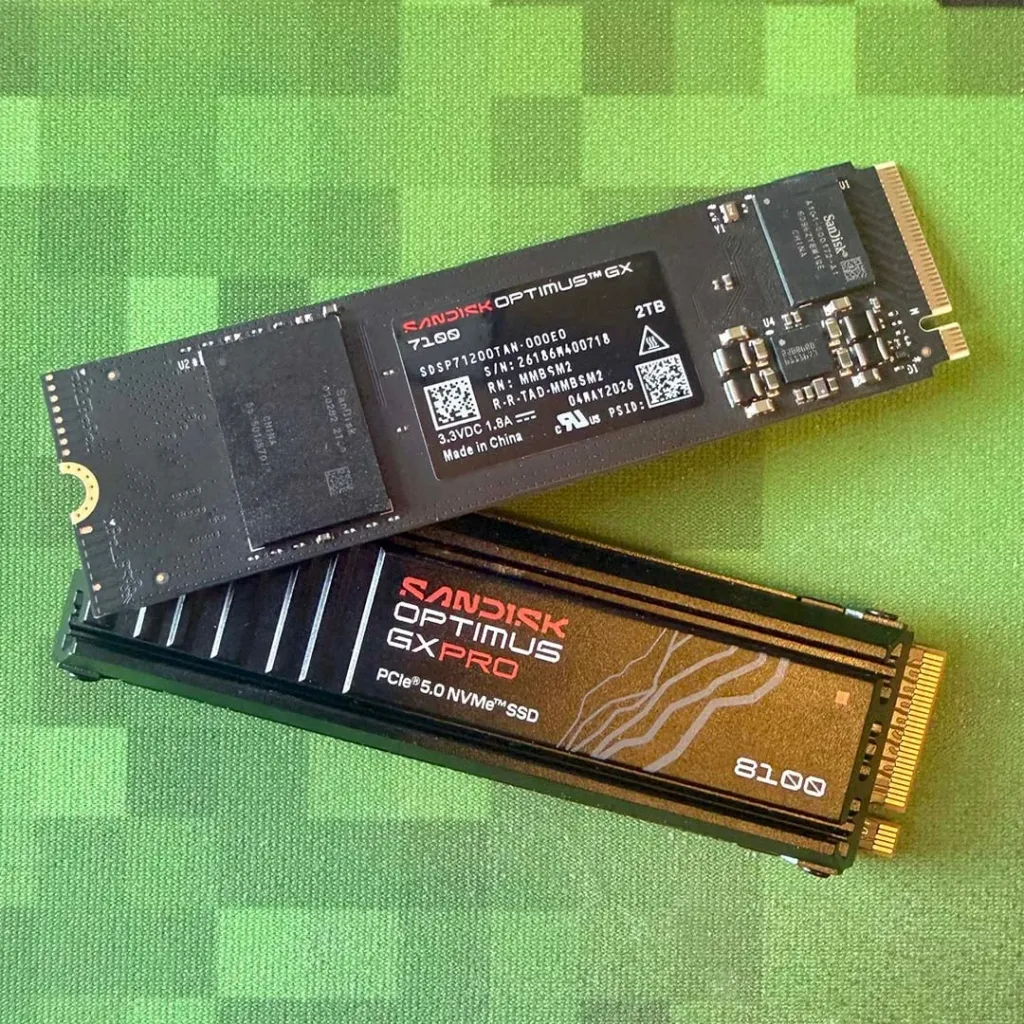
GX PRO 8100: The Gen 5 Flagship
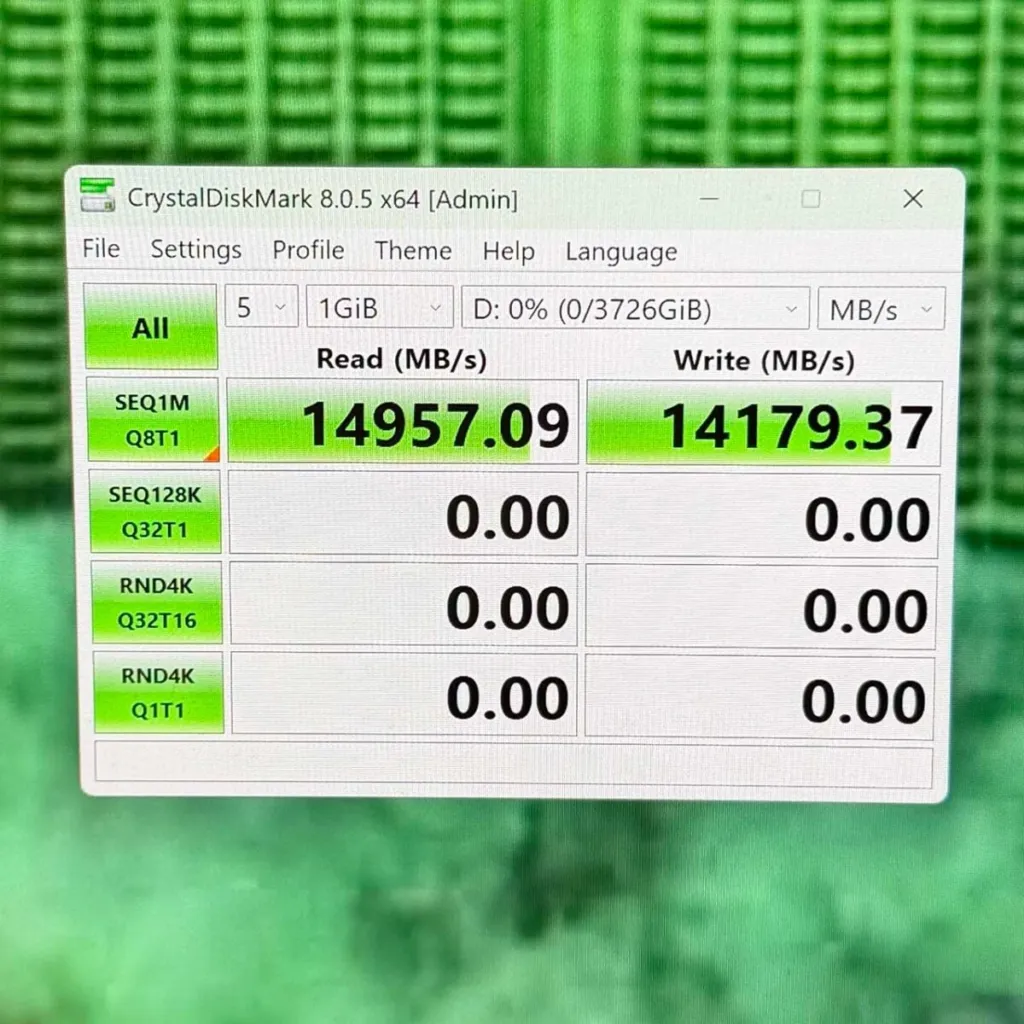
At the top of the Optimus range sits the GX PRO 8100, which is the WD_Black SN8100 with nothing changed but the name. Sandisk rates it at 14,900 MB/s sequential reads, the fastest number anywhere in the lineup, but writes tell a less even story: 14,000 MB/s on the 2TB and 4TB models, dropping to 11,000 MB/s on the 1TB and to 13,200 MB/s on the 8TB. DRAM scales with capacity here, one gigabyte of cache for every terabyte of flash, so the 1TB model writing slowest is also the one running the thinnest cache. Club386 rates its MTBF at 1,750,000 hours, a figure that says more about the spec sheet than about a PS5, where nobody keeps a drive spinning long enough to find out.
Optimus GX PRO 8100 rated sequential write by capacity
Club386 measured the 8100 peaking at 55°C under load, against 63°C on a Crucial T700 tested the same way. That number only holds with a cooler attached, though – Sandisk sells the 8100 with an anodised aluminium heatsink and a built-in RGB LED, and without one, a Gen 5 drive moving this much data has nowhere to put the heat it makes.
SANDISK Optimus GX PRO 8100 1TB
The Gen 5 flagship of the Optimus rangeFirst listed for sale in February 2026, the 1TB GX PRO 8100 now shows up on Pangoly from CDN$ 419.99 – enough time on shelves for that price to reflect the market settling rather than launch-week scarcity.
GX PRO 850X: The Drive Without the Badge
The GX PRO 850X is the 850P’s unlicensed twin: same SN850X hardware, same BiCS5 flash – the oldest in the whole Optimus range – just without the PlayStation certification that lets the 850P walk straight into a PS5. That missing licence didn’t stop it winning, though – Club386 had the 850X taking every single gaming benchmark in its own review. It also carries DRAM the 7100 can’t match, 1GB at 1TB and 2GB above that, and the payoff shows up in random reads: the 2TB 850X is rated at 1,200K IOPS against 1,000K on the 7100.
The 7100’s Handheld Versions
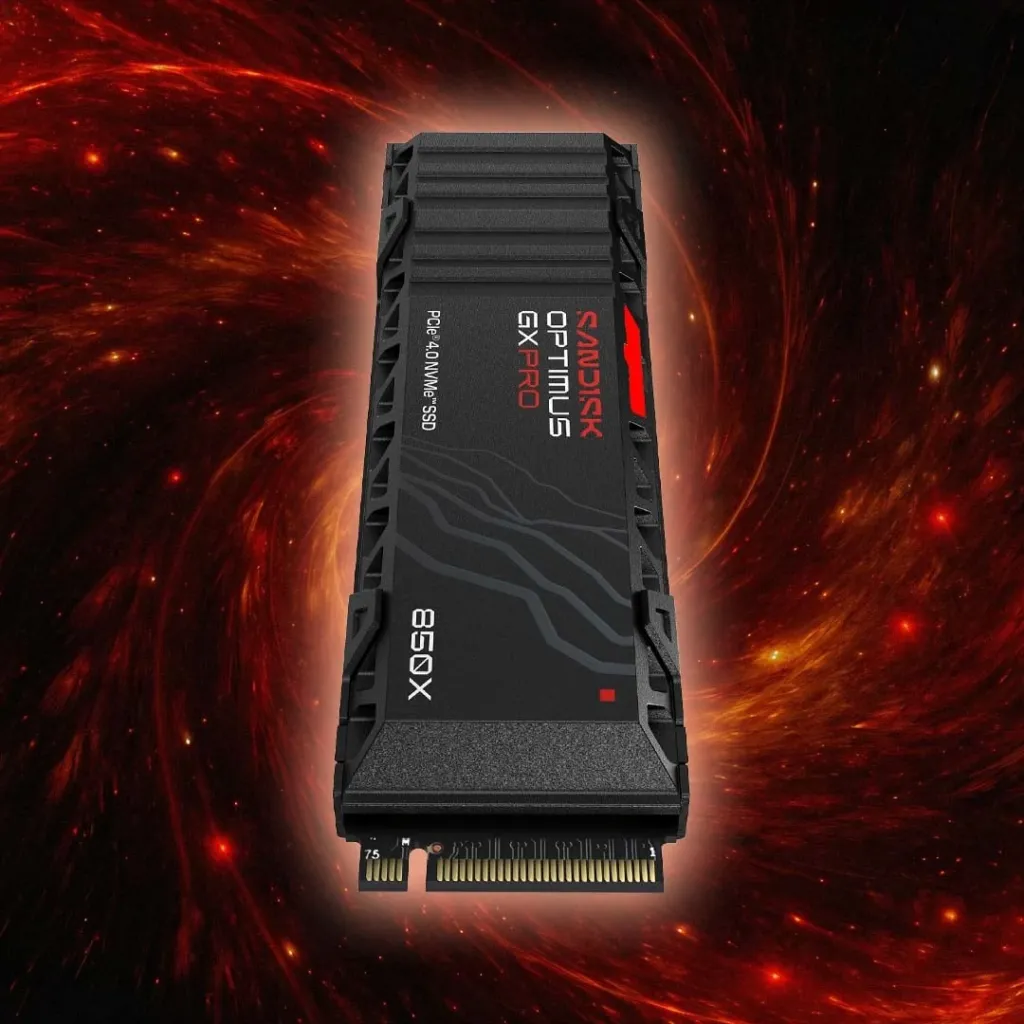
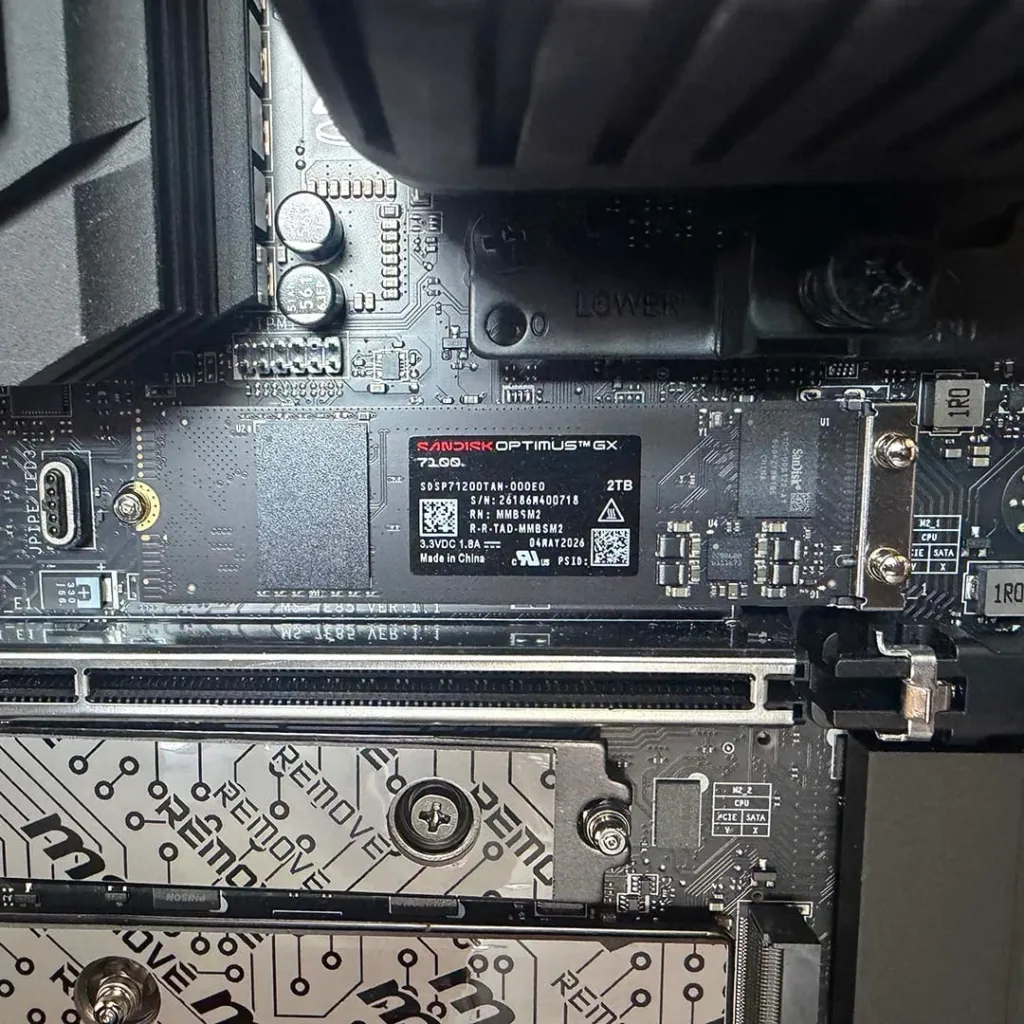
- GX 7100X is Sandisk’s officially licensed drive for the ROG Xbox Ally X, and its specs barely differ from the standard 7100.
- GX 7100M is the M.2 2230 version built for the Steam Deck and MSI Claw A8, sold only in 1TB and 2TB.
- Shrinking the drive costs it something: 7100M random writes drop to 1,300K IOPS from 1,400K on the full-size 7100.
- None of that matters much in a Steam Deck anyway – its M.2 slot only runs PCIe 3.0, well below what either drive is built to push.
Optimus 5100: The QLC Budget Option
The Optimus 5100 is the WD Blue SN5100 renamed, and it’s the only drive in the range built on QLC flash – four bits stored per cell instead of the three TLC uses everywhere else in the lineup. It shares its Polaris 3 controller and PCIe 4.0 x4 interface with the 7100, and reads nearly as fast, 7,100 MB/s at 1TB and 2TB, with writes at 6,700 MB/s at those same capacities. What QLC costs is endurance rather than speed: the 5100’s 2TB model is rated for 900 TBW against 1,200 on the 7100, and that gap widens to 1,200 TBW against 2,400 at 4TB. What it buys back is price – a 500GB 5100 sells for under $100 at MSRP, still covered by the same five-year warranty as everything else wearing the Optimus name.
| Capacity | Optimus 5100 endurance | Optimus GX 7100 endurance |
|---|---|---|
| 500GB | 300 TBW | 300 TBW |
| 1TB | 600 TBW | 600 TBW |
| 2TB | 900 TBW | 1,200 TBW |
| 4TB | 1,200 TBW | 2,400 TBW |
The Cheapest Way to 4TB in a PS5
Tech Insider tracks the WD Blue SN5100 4TB at around $479.99, making it the cheapest 4TB drive that clears Sony’s PS5 requirements – its 6,900 MB/s read speed sits comfortably above the console’s 5,500 MB/s floor. The catch is that it ships bare, so a heatsink is something you’re adding yourself, either bought separately or bundled in at checkout.
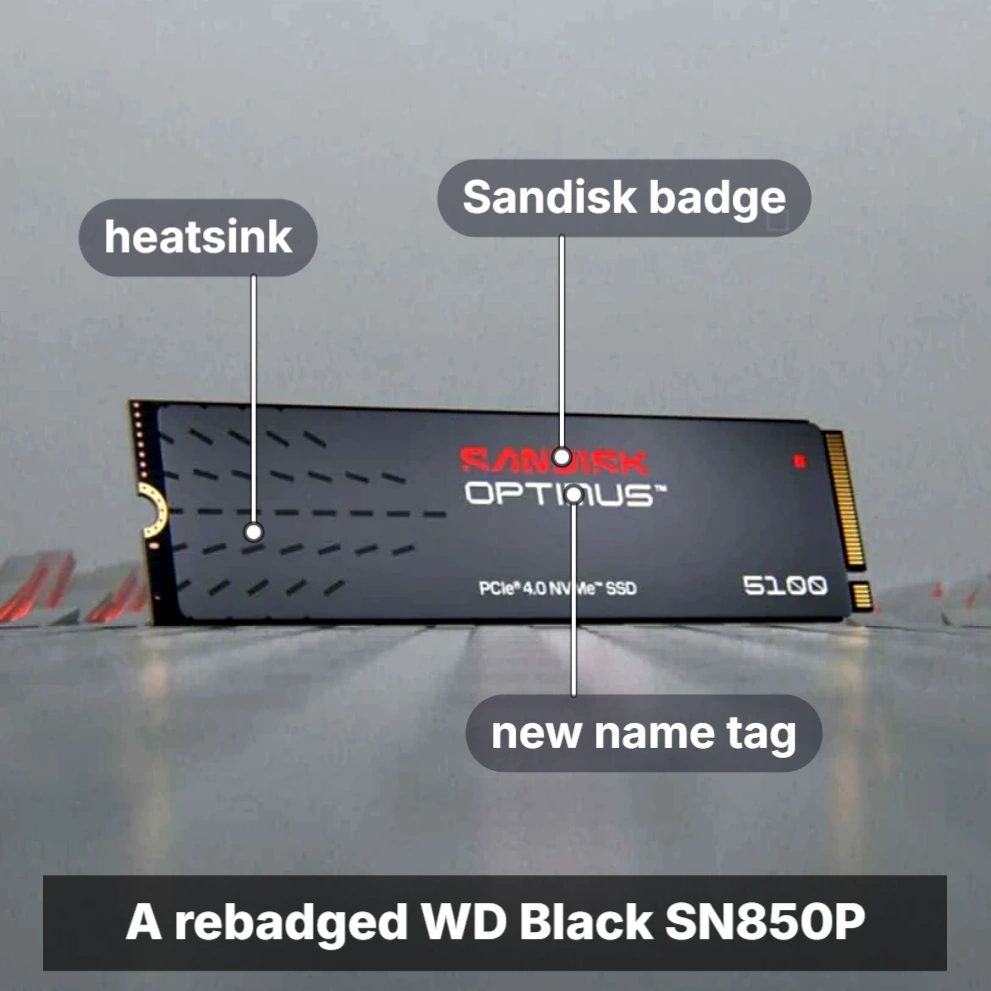
The 850P and the WD Black SN850P are the same hardware sold under two names, and at review time the Sandisk version cost more than the WD one at 1TB, 2TB and 4TB alike. That gap hasn’t gone unnoticed by the people actually buying these drives.
You’re paying a premium for the same drive as a WD SN5100 but with the “Optimus” name
I bought the SanDisk 4tb from Amazon and it didn’t even have a sticker on it, not like I’ll ever see it but still a bit miffed
Sony’s Speed Floor and Size Ceiling
Sony’s 5,500 MB/s figure isn’t a minimum you can slide under and still get decent performance, it’s a locked gate. Drop below it and the console throws an error and refuses the drive outright – there’s no degraded mode, no fallback to a slower read speed, just a flat no. That’s the opposite of how a gaming PC treats a slow drive, which boots up and runs, just slower. Buy a drive that misses the number on the box and you’ve bought one that won’t work in the PS5 at all, not one that works worse.
| Interface | PCIe Gen4 x4 NVMe, M.2 Key M (Socket 3) |
| Minimum sequential read | 5,500 MB/s |
| Max total thickness with heatsink | 11.25mm |
| Max module width including heatsink | up to 25mm |
| Max height above PCB | 8.0mm |
| Max height below PCB | 2.45mm |
| Capacity range | 250GB – 8TB supported |
| Screw type required | Phillips #1 |
Length is where the official-sounding guides start contradicting each other. Tech Insider lists five supported lengths, 2230 through 22110, with 2280 as the factory standoff position Sony actually ships the console with. Alibaba’s sourcing guide says the opposite: only 2280 fits, full stop. In practice the disagreement barely matters, because nearly every drive sold with PS5 branding ships in 2280 anyway, so a buyer picking from the licensed shelf never has to find out which guide was right.
Gen 5 Buys You Nothing Here
Three sources land on the same answer: a Gen 5 drive slots into the PS5 and gets capped down to Gen 4 speeds, so the extra bandwidth you paid for never gets used. Tom’s Hardware goes further and says Gen 5 drives shouldn’t go in a PS5 at all, flagging the extra cooling they need inside a sealed console bay. Alibaba’s guide raises the stakes again, claiming a Gen 5 drive may fail to initialise in the slot in the first place. Whatever the exact failure mode, the conclusion holds: paying the Gen 5 premium for a PS5 upgrade is money spent on a number the console won’t let you use.
The heatsink is a trap with two sides to fall off. Skip it, or buy a bare drive, and sustained load pushes the controller toward thermal throttling – Alibaba’s guide puts the onset near 70°C core, while verified PS5 drives hold under 65°C under the same load. The symptom isn’t a crash, it’s longer load times and the odd stutter that looks like a software problem until you check the drive temperature. Go the other way and bolt on an aftermarket desktop heatsink built for open-air PC cases, and you can blow straight through the 11.25mm limit – at which point the expansion bay cover simply won’t close, heat problem solved by creating a fit problem.
- Sony’s modification policy permits third-party M.2 drives, and the warranty stays intact as long as installing one doesn’t damage the console.
- There’s only one M.2 slot, so going bigger later means pulling the old drive out rather than adding a second one.
- External USB storage can hold PS5 games but can’t launch them – it’s fine for backward-compatible PS4 titles, nothing more.
- Format the drive inside the PS5’s own menu. Never format it on a PC first.
Run the numbers and 2TB stops looking like an upsell. The stock drive leaves about 667GB usable once the system itself is accounted for, and a modern AAA install now runs 80GB to 150GB with patches layered on – Final Fantasy VII Rebirth alone shipped at 155GB. Average PS5 game size has already pushed past 80GB, which means three or four big titles can fill the stock drive on their own. That arithmetic is why 2TB keeps turning up as the practical sweet spot rather than a capacity picked for round numbers.
The 850P isn’t launching into empty shelf space. Nextorage brought out its NEM-PAD heatsink SSD in September 2026, built to PS5 and PS5 Pro’s expansion requirements, and Seagate’s officially licensed Game Drive PS5 has dropped to around $99.99 for 1TB and $149.99 for 2TB. Every one of these clears Sony’s speed and size limits same as the 850P does, which is exactly what makes the 850P’s price ladder the question reviewers keep coming back to.
| Drive | Capacity | Sequential read | Heatsink included | Approx. price |
|---|---|---|---|---|
| Seagate Game Drive PS5 NVMe SSD (Officially Licensed) | 1TB | ~7,000 MB/s | Yes | ~$99.99 |
| Seagate Game Drive PS5 NVMe SSD (Officially Licensed) | 2TB | ~7,000 MB/s | Yes | $149.99 |
| WD_BLACK SN850P (Official PlayStation-licensed) | 2TB | ~7,000 MB/s | Yes | ~$209.99 |
| PNY CS3140 (PS5 Heatsink Bundle) | 2TB | ~7,000 MB/s | Yes | ~$179.99 |
| WD_BLACK SN850X (PS5 heatsink edition) | 2TB | 7,300 MB/s | Yes | ~$389.99 |
| WD Blue SN5100 | 4TB | 6,900 MB/s | Heatsink required (bundled or third-party) | ~$479.99 |
Check the Spec Sheet, Not the Marketing Line
Before anything goes near the console, confirm three numbers on the actual spec sheet: the interface is PCIe Gen4 x4 NVMe, the rated sequential read is 5,500 MB/s or higher, and the form factor is M.2 2280.
Measure the Drive With Its Heatsink On
Measure the assembled drive and heatsink together against the 11.25mm total thickness limit, and check the width stays within 25mm including the heatsink.
Let the Console Format It
Insert a compliant drive and the PS5 detects it and prompts a format on first boot; on an empty drive that finishes in under a minute.
Move the Existing Library Over
Head to Settings, Storage, Console Storage to move games onto the new drive; a single title takes 5 to 20 minutes depending on its size.
What the Full Test Set Adds Up To
Add up every test in this piece and what you get is a drive that never once put a foot wrong. Not one of them turned up a surprise, good or bad, because there’s nothing left to discover about this hardware or this firmware – both have been out in the world long enough that whatever problems they had would have surfaced by now. Across PS5 transfers, application traces, mixed file copies and sustained writes, the 850P never buckles on a particular workload the way a newer or cheaper design sometimes does. That’s the whole pitch: not a headline number, just a drive with a track record that nothing here contradicts.
Pros
- Doesn’t struggle with any one workload, and feels like a premium drive the way the SN850X line always has
- No real weak spot across PS5, desktop or laptop use
- A known quantity, with no architectural surprises to worry about
Cons
- Something else beats it in every single category you could name
- Less expensive drives match it once it’s sitting inside a PS5
- Desktop rivals beat it in some areas, and some drives do better in a laptop too
NeoTeo’s take on the 2TB sample splits along the same line as everything else here. Working from Sandisk’s own rated specs rather than benchmark runs of its own, NeoTeo praised how the drive performs and how cool it stays, then turned around and criticized the price and the power efficiency. That’s a qualitative read rather than a number anyone can hold it to, but it lands in the same place the bench data does: good drive, bad value, nothing efficient about it.
Not everybody needs a Gen 5 powerhouse, and both Tom’s Hardware and Home Office World’s gaming SSD roundup land on the same conclusion: PCIe 4.0 is still the better value for most gaming PCs. Being built on Gen 4 isn’t the limitation it sounds like on a spec sheet. The 850P would be perfectly at home in an enthusiast’s desktop, not just bolted to the side of a console, and nothing in the testing suggests it’s being held back by the interface it runs on.
- Buyers who refuse to guess what controller and flash a generic-brand drive is actually hiding inside it
- Anyone who values their data enough to worry about storage stability over the long haul
- People who want a no-nonsense drive with a proven track record and nothing left to prove
- Not for buyers with one specific use case or a tight budget in mind – they’re better served elsewhere, as earlier sections in this piece show