
Key Takeaways
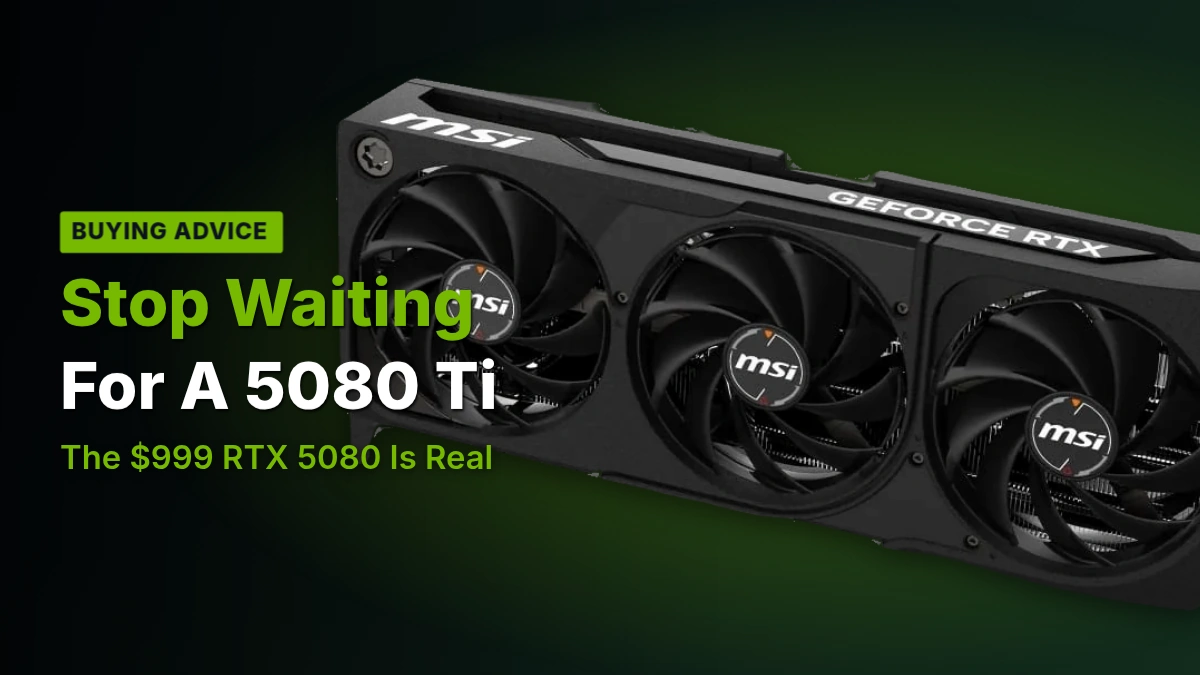
- 1Don’t hold out for an RTX 5080 Ti. The only page that mentions one gives it no price and no benchmark, while the RTX 5080 has a confirmed $999 MSRP you can actually act on today.
- 2At 4K and 60Hz, the RTX 5080 has slack left: in Resident Evil 2: Remake, our reviewer pushed internal resolution scaling to 180% before the game itself, not the GPU, refused to go further.
- 3The RTX 5090’s $1999 price buys twice the cost of a 5080 but not twice the frame rate, and PCMag scored it half a point lower than the 5080 for it. Skip it unless you specifically need the 32 GB of GDDR7 for non-gaming work.
- 4The 16 GB VRAM ceiling is a real disagreement, not a settled fact: LTT Labs calls it underwhelming for a card this high in Nvidia’s lineup, while Bottleneck_Pc calls it comfortable today with no guarantee it stays that way. Buy accordingly if you plan to keep the card past this generation.
- 5Pair the 5080 with AMD’s 9800X3D if you’re building fresh, since Bottleneck_Pc and PC Guide both land on it, but don’t panic over anything else: every CPU in Bottleneck_Pc’s 15-chip ranking bottlenecks the card by only 1% to 5% at 1440p.
6 Months In: A $999 RTX 5080 at 4K
PCMag’s writer reviewed the RTX 5080 Founders Edition, gave it 4.5 stars and an Editors’ Choice award, and then spent $999 of his own money on one in June and kept playing. His setup matters more than usual here, because it shapes every number that follows. He games on a 50-inch 4K TV locked to 60Hz, and he caps the card at 60fps with V-Sync on purpose. He isn’t chasing a frame counter, he wants the cleanest image at 4K and nothing above 60, which means the numbers below aren’t a ceiling test, they’re a report on whether a $999 card can hold that line without compromise.
| Card | Nvidia GeForce RTX 5080 Founders Edition |
| Price paid | $999 |
| Bought | June |
| Display | 50-inch 4K TV |
| Refresh rate | 60Hz |
| Frame target | 60fps with V-Sync |
| PCMag review score | 4.5, Editors’ Choice |
Kingdom Come: Deliverance II is the game that pushed him to buy the card, and 6 months later it’s still the one that makes the 5080 sweat. Running native at 4K with everything maxed, it swings between 40 and 60fps, and holding a steady 60 meant dialing settings down further than he’d hoped, from experimental all the way to high in places. Turning on DLSS 4 solved it outright: a locked 60fps at 4K with everything maxed, and he says he could barely tell the image apart from native. For a card he’s using specifically to avoid upscaling, that’s a reluctant endorsement of DLSS 4 rather than a marketing win.
Kingdom Come: Deliverance II at 4K, maxed settings
Ghostwire: Tokyo is the opposite story. It used to be the game that punished his old card, and now it just holds 60fps at 4K maxed with DLSS switched off entirely, GPU usage sitting between 90 and 100 percent the whole time. Pulling the V-Sync cap off only lifted that to roughly 70fps, and it never dropped below 60 either way. A card that’s being worked that hard and still has only about 10fps of headroom above its own cap isn’t being held back by the display, it’s close to its real ceiling in this game.
Resident Evil 2: Remake is where he ran out of ways to challenge the card before the card ran out of room. Uncapped, it hit roughly 170fps, but that introduced noticeable flicker, so he put the 120fps limit back and started pushing the internal resolution scale instead to force more work out of it. At 120 percent scaling it held 120fps without trouble. He kept climbing until the game itself refused to run past 180 percent, not the GPU. That’s the clearest sign in 6 months of use that this card has slack left for games lighter than Kingdom Come.
| Game | Settings | Result |
|---|---|---|
| Kingdom Come: Deliverance II | 4K maxed, native | 40 to 60fps |
| Kingdom Come: Deliverance II | 4K maxed, DLSS 4 | Locked 60fps |
| Ghostwire: Tokyo | 4K maxed, DLSS off, V-Sync on | 60fps, GPU at 90 to 100 percent |
| Ghostwire: Tokyo | 4K maxed, V-Sync off | About 70fps, never below 60 |
| Resident Evil 2: Remake | Maxed, uncapped | About 170fps, noticeable flicker |
| Resident Evil 2: Remake | 120 percent resolution scale | 120fps held |
| Resident Evil 2: Remake | 180 percent resolution scale | Game refused to run |
The number he keeps coming back to isn’t a frame rate at all. His home office stopped getting uncomfortably warm during long sessions, and the card runs cooler and quieter than the 3080 Ti it replaced. 6 months in, he expects his next upgrade to land on the CPU, not the graphics card, which is as direct a verdict on how much life he thinks is left in this 5080 as any benchmark could give.
He isn’t the only 5080 owner talking this way. Owners running theirs at 4K report the same kind of settled satisfaction, including one driving a 4K, 165Hz OLED monitor off the same card, and they’ve already worked out exactly how big a jump it would take to move them.
I already have a 5080 and I’m happy with it playing at 4k 165hz on an OLED monitor, I don’t need anything else for now, unless the next GPU represents a 50% in raster and 60% more performance in RT, PT and DLSS, I don’t actually care.
The RTX 5080 Ti that one page mentions
Search the corpus for an RTX 5080 Ti and you find exactly one page willing to talk about it. Nobody gives it a price. Nobody runs it through a single benchmark. What the Yalman page offers instead is shape: more CUDA cores than the plain RTX 5080, and a higher base clock. Those two claims are everything that page says about the card, and neither one comes with a number attached.
- More CUDA cores than the RTX 5080
- A higher base clock than the RTX 5080
- Gains said to land in 3D rendering
- Gains also said to land in ray tracing
- The price gap is called hard to justify for gaming
- Pitched as the longer-lived buy, not the faster one
Even the page pushing the Ti won’t make a gaming case for it. The gains it describes sit in 3D rendering and ray tracing work, not frame rates, and it says outright that the price gap is hard to justify for gaming because the plain RTX 5080 already covers 4K ultra for most buyers. Strip that away and the only argument left for a Ti is longevity, not speed you’d notice in a game tonight.
The 16 GB VRAM ceiling
This is the real argument hiding behind the Ti rumor, and reviewers don’t agree on it. LTT Labs lists the RTX 5080 memory as 16 GB of GDDR7 and calls that underwhelming for a card sitting second in Nvidia’s own lineup. Bottleneck_Pc looks at the same 16 GB and calls it comfortable today, then adds the honest caveat that whether it stays comfortable is an open question. Same number, 2 reviewers, two different bets on how long it lasts.
Owners on Reddit have already done the math on what a fix would cost, and most of them don’t like the answer. A bigger-memory 5080 would need an 80-class price tag nobody wants to pay.
Tbh, I’m still surprised people think a 5080 24gb is coming. Even if it does, y’all really wanna spend $3000 on an 80 class card?
Other owners aren’t waiting on either card. One bought a 5080 for $1,100 and plays at 1440p, and says the memory ceiling that worries LTT Labs has never once shown up in practice.
Crazy I got my 5080 for 1100 I play 1440p competive games it literally never gets near 16gb vram less alone 28gb the prices will be outrageous I’m sticking w my 5080 16gb and will upgrade when the 60 series cards drop
Don’t plan around a card nobody has measured
The RTX 5080 has a $999 MSRP and 16 GB of GDDR7, both numbers you can hold a reviewer to. The RTX 5080 Ti has neither a price nor a single benchmark anywhere in this corpus. Waiting for one isn’t waiting for a better card, it’s waiting for a rumor to grow numbers.
GB203: The Chip Under the 5080
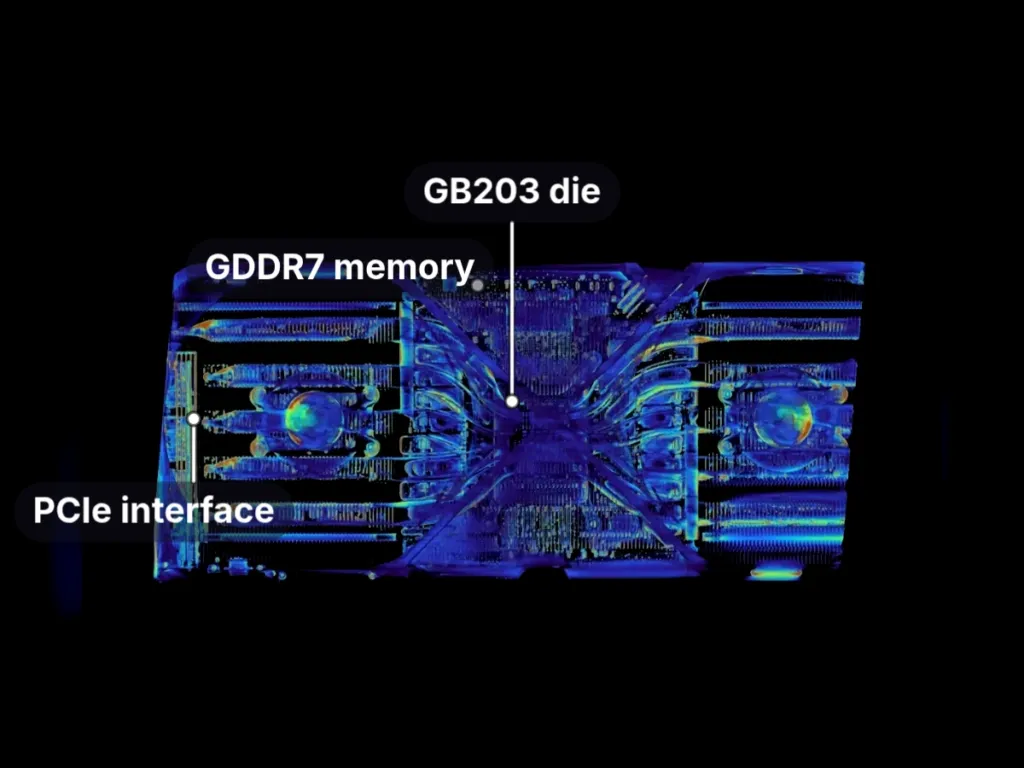
The RTX 5080 runs on the Blackwell GB203 chip, which PC Guide names down to the exact part: GB203-400-A1. That die measures 378 mm² and packs 45.6 billion transistors onto it, a density of 120.6 million transistors per square millimeter. Those four numbers are the ones every page agrees on, which makes them the fixed point for the disagreements that follow.
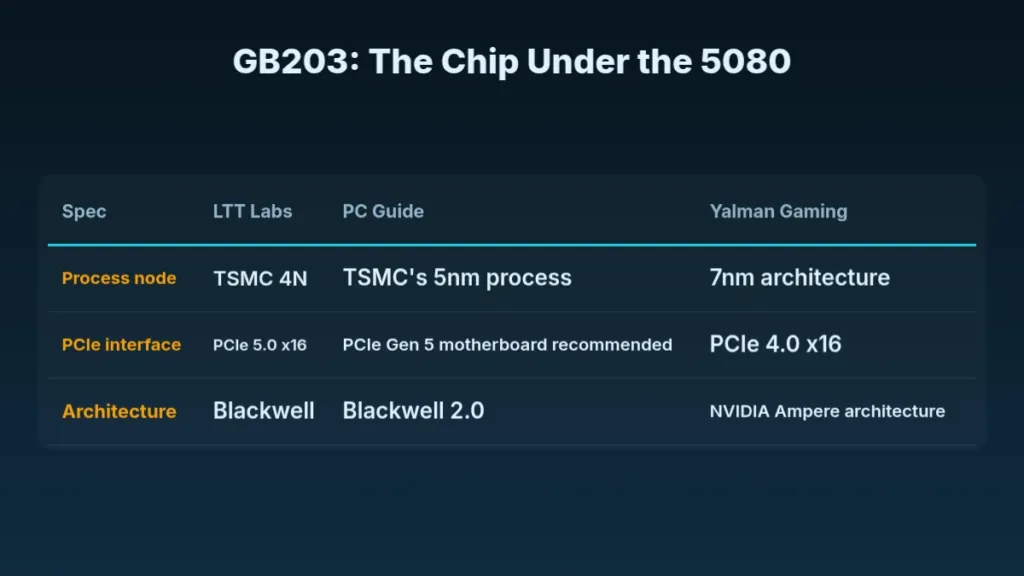
| Spec | LTT Labs | PC Guide | Yalman Gaming |
|---|---|---|---|
| Process node | TSMC 4N | TSMC’s 5nm process | 7nm architecture |
| PCIe interface | PCIe 5.0 x16 | PCIe Gen 5 motherboard recommended | PCIe 4.0 x16 |
| Architecture | Blackwell | Blackwell 2.0 | NVIDIA Ampere architecture |
Past that fixed point, the pages scatter. LTT Labs calls the node TSMC 4N, PC Guide calls it TSMC’s 5nm process, and Yalman Gaming calls it a 7nm architecture — 3 reviewers, three different numbers for the same chip. They split on the PCIe interface too: LTT Labs lists PCIe 5.0 x16, Yalman Gaming lists PCIe 4.0 x16. But the node and the bus are at least arguable readings of the same silicon. Calling the 5080 an Ampere architecture card, which Yalman Gaming does repeatedly, isn’t a different reading of anything. The 5080 is a Blackwell card, full stop, and a page that gets the architecture wrong is a page whose other numbers you should check twice.
| Architecture | Blackwell |
| GPU Chip | GB203 |
| Die Size | 378 mm² |
| Shader Cores | 10752 CUDA Cores |
| Logical Block | 84 Streaming Multiprocessor |
| AI Acceleration Cores | 336 Tensor Cores |
| Ray Tracing Cores | 84 Ray Tracing Cores |
| Base Clock | 2295 MHz |
| Boost Clock | 2617 MHz |
| Memory Type | 16 GB GDDR7 |
| Memory Data Rate | 30 Gbps |
| Memory Bus | 256 bit |
| Memory Bandwidth | 960 GB/s |
| L2 Cache | 64 MB |
| L1 Cache | 128 KB per SM |
| PCIe Interface | PCIe 5.0 x16 |
| Total Design Power | 360 W |
| Outputs | 1 x HDMI 2.1b, 3 x DisplayPort 2.1b |
| Power Connections | 1 x 12V-2×6 |
| Encoder | 2 NVENC 9th Gen |
| Decoder | 2 NVDEC 6th Gen |
| Vulkan | 1.4 |
| Length | 300 mm |
| Weight | 1639 g |
| Slot Width | Dual Slot |
LTT Labs put a sample on the bench and measured what’s actually there: 84 Streaming Multiprocessors carrying 10752 CUDA cores between them, plus 336 Tensor Cores for AI work and 84 Ray Tracing Cores, one per SM. The same measurements put the base clock at 2295 MHz and the Founders Edition boost at 2617 MHz, backed by 64 MB of L2 cache. Where another page disagrees with LTT Labs on anything downstream of the die itself, these are the numbers to trust.
The memory side reads better on paper than it does once you do the math. 16 GB of GDDR7 running at 30 Gbps sounds fast, and it is, but it’s stuck on a 256 bit bus, and that bus is what actually caps the card at 960 GB/s of bandwidth, faster chips can’t make up for a narrower highway to put them on. Outputs are 3 DisplayPort 2.1b and 1 HDMI 2.1b, and Vulkan support moves up to 1.4.
Two ninth-gen NVENC encoders sit on the chip alongside two sixth-gen NVDEC decoders, which matters more to anyone streaming or editing off this card than to anyone just gaming on it.
Total design power lands at 360 W, and Nvidia and MSI both ask for an 850W power supply to run it. Power comes in through a single 12V-2×6 plug, the same connector Yalman Gaming describes as a 16-pin — same part, different name. The Founders Edition board itself runs 300 mm long, weighs 1639 g, and fits in 2 slots, which is the number that actually decides whether this thing goes in your case.
Yalman Gaming’s Spec Sheet Has Three Wrong Answers
One retail page calls the 5080 an Ampere card when it’s Blackwell, lists its memory as GDDR6X when it’s actually GDDR7, and puts the interface at PCIe 4.0 x16 where LTT Labs measures PCIe 5.0 x16. That’s three wrong facts on a single page, and if you’re pricing a card off those numbers, the performance figures sitting next to them deserve the same skepticism.
RTX 5090: Twice the Price
Nvidia prices the RTX 5090 at $1999, exactly double the $999 RTX 5080 Founders Edition’s starting price, and the extra money doesn’t buy twice the performance. PCMag’s own reviewer, the same one who’s spent months living with a 5080, tells gamers flat out not to buy a 5090. That $1999 is enough to buy a $999 RTX 5080 outright and still have $1,000 left over for the rest of the build.
| RTX 5090 Founders Edition | RTX 5080 Founders Edition | |
|---|---|---|
| Price | $1999 | $999 |
| PCMag review score | 4.0 | 4.5 |
PCMag scored the RTX 5090 Founders Edition a 4.0, rated Excellent, half a point below the 4.5 ‘Outstanding’ it gave the RTX 5080. The 5090 is the faster of the two cards and it’s still the one that lost the half star, which says the score is tracking what the money buys rather than raw speed.
What the 5090 Brings on Paper
Nvidia’s own spec sheet lists 32 GB of GDDR7 on the RTX 5090, moving 1792 GB/sec of memory bandwidth. The company credits the card with 3352 AI TOPS, more than double the RTX 4090’s 1321. None of those are measured figures – they’re Nvidia’s own numbers – and none of them are the same thing as double the frames in an actual game.
| Memory Configuration | 32 GB GDDR7 |
| Memory Bandwidth | 1792 GB/sec |
| AI TOPS | 3352 |
| AI TOPS (RTX 4090) | 1321 |
| Starting Price | $1999 |
Case and Power Supply Demands
- An 850W power supply, at minimum, says Nvidia
- 3 free expansion slots for the Founders Edition card
- 304mm x 137mm x 61mm of clearance for the card itself
- Another 36mm of room on top of that, for the power cables
- 3 PCIe 8-pin cables feeding the included adapter, or
- One 450W-or-greater PCIe Gen 5 cable instead
Measure Twice
Nvidia’s 304mm x 137mm x 61mm clearance figure covers the card alone. The company says to add another 36mm on top of that for the power cables, so measuring a case to the card’s own dimensions leaves you short a slot’s worth of room. The 850W figure carries the same catch: it’s a minimum, not a recommendation.
The GeForce RTX 3080 Ti He Traded In
Before the 5080, our reviewer ran a GeForce RTX 3080 Ti, a card Nvidia launched at $1200 back when $1200 bought you the second-best Ampere chip Nvidia made. Partner 3080 Ti cards go for about $999.99 on average now, which means the card he left behind once cost more than a 5080 does today, and it still sits on a GA102 die built on Samsung’s 8N process, measuring a massive 628 mm².
| GPU Chip | GA102 |
| Architecture | Ampere |
| Technology | Samsung 8N |
| Die Size | 628 mm² |
| Shader Cores | 10240 CUDA Cores |
| Boost Clock | 1665 MHz |
| Memory Size | 12 GB |
| Memory Type | GDDR6X |
| Memory Bus | 384 bit |
| Memory Bandwidth | 912.4 GB/s |
| Total Design Power | 350 W |
| Processor Launch Quarter | 2021-Q2 |
The 3080 Ti carried 12 GB of GDDR6X across a 384-bit bus, good for 912.4 GB/s of bandwidth per LTT Labs, driven by 10,240 CUDA cores running a 1665 MHz boost clock inside a 350 W power budget. That 384-bit bus pushing 912.4 GB/s isn’t far off what the 5080 manages on a narrower bus, and the 5080 still carries more memory on top of it than the 3080 Ti’s 12 GB.
This was never a second-tier Ampere card. In 4K 1% low testing, LTT Labs clocked it just 2 fps behind the 3090, landing far closer to Nvidia’s flagship of that generation than to the plain 3080 it was named after. Anyone swapping a 3080 Ti for a 5080 is retiring a card that was near-flagship Ampere, not some midrange leftover.
GeForce RTX 3080 Ti memory and power against the RTX 5080 Founders Edition
The original Kingdom Come: Deliverance came out in 2018, and even that game was already dipping below 60fps on the 3080 Ti at 4K peak settings. A 7-year-old title stuttering on a near-flagship Ampere card tells you Kingdom Come: Deliverance II was never going to run well on the same silicon, and that’s exactly why our reviewer bought a 5080.
Ghostwire: Tokyo, released in 2022, makes the clearest case for the 3080 Ti’s software ceiling. The card struggled to hold 60fps at 4K max settings, and the only fix on offer was DLSS 2, because DLSS 3 and DLSS 4 simply aren’t available on it. Turning DLSS 2 on bought back the frame rate, but our reviewer could see the image quality it cost.
| Game | On the RTX 3080 Ti | On the RTX 5080 |
|---|---|---|
| Kingdom Come: Deliverance (2018), 4K peak settings | Dropped occasionally from 60fps | Not tested |
| Kingdom Come: Deliverance II, 4K maxed | Not tested | 40fps to 60fps; 60fps with DLSS 4 |
| Ghostwire: Tokyo, 4K max, DLSS off | Struggled to hold 60fps | Held 60fps flawlessly, 90-100% GPU usage |
| Ghostwire: Tokyo, DLSS | DLSS 2 only; slight image quality loss | DLSS off by choice, or on to cut GPU load |
| Resident Evil 2: Remake, 4K maxed | Probably good enough for the reviewer | 120fps at 120% image quality setting |
Resident Evil 2: Remake came out in 2019 and still leans on modern hardware hard enough to matter. Our reviewer was running a GeForce GTX 970 when it launched, a card with no chance of handling it at maxed 4K settings, then spent years on the 3080 Ti in between, a card that probably would have handled Resident Evil 2 well enough on its own. The 5080 just does it better – the longer line from GTX 970 to 3080 Ti to 5080 is the real upgrade story here, not a single generational jump.
The upgrade paid off somewhere the benchmarks don’t show, too. The 3080 Ti ran hot enough to make our reviewer’s home office uncomfortable during games, while the 5080 runs cooler and quieter in the same room with the same games, never going over 80 degrees C and typically holding near 70 degrees C.
Pros
- Still delivers excellent performance for existing owners, per LTT Labs
- Fell only 2 fps behind the 3090 in 4K 1% lows
- Performs much closer to a 3090 than to a 3080
Cons
- Partner cards now sell for around $999.99, 40-series money for a card from 2021
- Cheaper 40-series cards already match or beat it
- The 40-SUPER line gives better price-to-performance in most applications
- Supports neither DLSS 3 nor DLSS 4
Where the DLSS 4 Gap Actually Comes From
The frame rate gap between these two cards isn’t just silicon. On the 5080, Kingdom Come: Deliverance II ran at 40fps to 60fps at 4K maxed without any upscaling, and DLSS 4 is what pushed it to a steady 60fps. The 3080 Ti supports neither DLSS 3 nor DLSS 4, so no amount of waiting or driver updates will ever bring that frame rate up on Ampere hardware.
Blackwell Drops the Temperature Slider
Nvidia quietly pulled a slider that used to sit right next to the power limit in every tuning utility. Older GeForce cards gave you two knobs for GPU Boost to chase: a temperature target and a power limit. On RTX 50, the temperature target is gone, and only the power limit remains adjustable. Nvidia hasn’t said why, and the timing lines up with another quiet removal: RTX 50 cards no longer report hotspot temperature at all, so there’s less to see and less to tune.
The RTX 3080 Founders Edition shows how the old system worked, and it worked on two different numbers that got treated as one. The temperature target defaulted to 83 °C and could be dragged anywhere from 65 to 90 °C in GPU-Z’s Advanced tab, but that was never a hard wall, just a value the card tried to hover near. The real ceiling, where the chip actually starts cutting clocks, is the spec maximum Nvidia lists: 93 °C for both the 3080 and the 3080 Ti. Everyone treated the 83 like a limit anyway, which meant fans spun harder than the card strictly needed.
| Card | Adjustable temperature target | Spec maximum temperature |
|---|---|---|
| GeForce RTX 3080 Founders Edition | 83 °C default, 65–90 °C range | 93 °C |
| GeForce RTX 3080 Ti | 83 °C default, 65–90 °C range | 93 °C |
| GeForce RTX 5080 | None — removed | 88 °C |
| GeForce RTX 5090 | None — removed | 90 °C |
With the adjustable target gone, the spec maximum is the only ceiling left on Blackwell, and Nvidia set it lower than before: 88 °C on the 5080, 90 °C on the 5090, against 93 °C on both 30-series cards. The one number owners still get to watch is also a tighter one than the card it replaced.
| RTX 3080 FE standard power limit | 320 W |
| RTX 3080 FE maximum power limit | 370 W |
| RTX 3080 FE minimum power limit | 100 W |
| RTX 3080 FE power slider range | -69 % to +16 % |
The power limit is the knob that survived, and on the 3080 FE it covers real range: a 320 W standard limit that can be pushed to 370 W or pulled back to 100 W, a slider spanning -69 % to +16 %. Board partners treat that number as a real target in a way they never treated the temperature slider, which is a big part of why losing the thermal one matters less than it sounds. Nobody complains when boost gets capped by power, because that’s the limit everyone already designed around.
- GPU-Z’s PerfCap Reasons panel shows which limit is currently throttling the card, power or thermal
- HWiNFO logs each limit separately as a yes or no flag
- MSI Afterburner logs the same flags as 0 for inactive and 1 for active
- GPU-Z’s graph colours the active limit green for power and purple for thermal
Not every 30-series card tells the same story here, which is why the comparison only works on two of them. The 3080 Ti runs its power limit 30 W above the plain 3080 and actually reaches the thermal limit, while the 3080 doesn’t; push the Ti to 400 W and the behavior shows up clearly on the monitoring tools above. The 4080 doesn’t make the comparison at all, because its cooler is oversized enough to keep it nowhere near a thermal ceiling in the first place.
None of this matters much in practice, because the cards never get close to either ceiling. Most custom boards sit at 70-75 °C under load, and even hitting the old 83 °C target was rare. PCMag’s 5080, run hard at 4K for months, never passed 80 °C and usually sat closer to 70. MSI’s own RTX 5080 SHADOW 3X OC is quoted at 70-75 °C under load. 2 sources landing in the same band isn’t a coincidence; it’s where these cards live.
One owner’s numbers land lower still, on a card with the fans deliberately held back on a 420 mm radiator.
I’ve got a 5800X3D and a 5080 on a 420×45, and it’s absolutely fine, even with my fan speeds *really* kneecapped; 5080 runs Steel Nomad stock (375 W) at 60-61 degrees, real games significantly cooler.
What to actually watch
Ignore whatever the old temperature target used to mean to you. The number that matters on a 5080 is the spec maximum, 88 °C, and on a 5090 it’s 90 °C; that’s where throttling genuinely starts. Owners are reporting load temperatures anywhere from 60 °C to 80 °C, which puts real-world Blackwell cards nowhere near their own ceiling. A 5080 sitting in the 70s isn’t cooking, it’s doing exactly what it was built to do.
Picking a CPU for the RTX 5080
2 ranking sites, Bottleneck_Pc and PC Guide, agree on the 9800X3D as the top pairing for the RTX 5080, and that agreement runs deeper than just naming a winner. Bottleneck_Pc ranks 15 CPUs against the card at 1440p, and every one of them, top to bottom, bottlenecks it by somewhere between 1% and 5%. The $447 9800X3D sits at the top of that list, but the chip at the bottom isn’t far behind it, which tells you the GPU is doing almost all of the limiting at that resolution and the CPU choice barely moves the number.
AMD Ryzen 7 9800X3D
The chip both ranking sites put at the topAt $447 and a 99/100 gaming score from Bottleneck_Pc, the 9800X3D is the chip everyone points at for this card, and PC Guide’s own testing backs the pick up: it ran the 9800X3D to 334fps in Cyberpunk 2077 and found that even an RTX 5090 couldn’t bottleneck it. A 5080 asks a lot less of a GPU than a 5090 does, so if the fastest card Nvidia sells can’t trip this chip up, a 5080 isn’t going to either.
Bottleneck_Pc’s 1440p estimates for the 9800X3D run 77fps at Ultra settings, 112fps at Balanced, and 153fps at Performance, and that would be a useful spread of numbers if it belonged to the 9800X3D alone. It doesn’t: every one of the 15 ranked chips returns those exact same three figures. That repetition is the clearest sign in the whole table that the GPU, not the CPU, is setting the ceiling at this resolution, and no amount of extra cores or clock speed changes what the card itself can push.
Bottleneck_Pc scores the RTX 5080 itself at 93/100 for gaming and recommends pairing it with a CPU rated at least 78/100, which is a fairly low bar given how many chips clear it. The warning that comes with that number is aimed at 1080p, where Bottleneck_Pc calls a mid-range or budget CPU a significant bottleneck, not at the 4K or 1440p territory this card is actually built for.
| CPU | Cyberpunk 2077 FPS at 1080p | Price |
|---|---|---|
| AMD Ryzen 7 9800X3D | 334 | $447 |
| AMD Ryzen 5 9600X | 325 | — |
| AMD Ryzen 9 9950X | 319 | — |
| Intel Core Ultra 9 285K | 216 | — |
PC Guide’s own Cyberpunk numbers tell a sharper story than a bottleneck percentage can: the 9800X3D hit 334fps and the Intel Core Ultra 9 285K trailed at 216fps on the same test, and the gap between the chip everyone recommends and the one that trails the field is right there in those two figures. The 285K’s result sits just 3 FPS behind the older 14900K, which isn’t a flattering place for Intel’s newest chip to land. The real surprise is the AMD Ryzen 5 9600X, a 6-core budget part that still hit 325fps, nearly matching the flagship X3D chip and leaving the idea that you need a big core count for this card looking shaky. PC Guide ran all of these pairings with an RTX 4070 Ti or 4070 Ti Super, not a 5080, so the frame rates are a measure of the CPUs against each other rather than against this specific card.
- AMD Ryzen 9 9950X: both sites call it a strong all-rounder, with 16 cores and 32 threads for anyone doing more than gaming on the same machine
- Intel Core Ultra 9 285K: the multi-core leader at 41,436 Cinebench R23 points, and it runs cool for the job, peaking at 84°C under Furmark 2
- AMD Ryzen 5 9600X: the budget route at just 65 W TDP, and the Cyberpunk numbers above show it isn’t the compromise its price suggests
- AMD Ryzen 7 7800X3D: the cheaper X3D chip at $348, and it still keeps up with the RTX 5080 rather than holding it back
PCMag’s reviewer tested his RTX 5080 with an AMD Ryzen 9 9950X, a chip PCMag calls one of the fastest consumer processors around, and a 9950X still bottlenecked the card in a few of his tests. He read that as untapped performance sitting in the 5080 itself, waiting on a faster CPU to unlock it, which cuts hard against a ranking table that puts every chip’s bottleneck somewhere between 1% and 5%.
Two numbers, 2 different tests
Bottleneck_Pc’s table says nothing bottlenecks the RTX 5080 by more than 5%. PCMag’s reviewer, with the card in his own machine, says his 9950X did. Both can be telling the truth at once: Bottleneck_Pc measures at 1440p, and PCMag’s reviewer games at 4K, on different titles and different scenes than any ranking table runs. A number that holds at one resolution doesn’t automatically hold at another.
Not every page has caught up. The Pakistan Online Gaming PC Store page run by Yalman still recommends an Intel Core i9-11900K or Ryzen 9 5900X for the RTX 5080, with the older i7-10700K and Ryzen 7 5800X listed as its mid-tier options, and it warns that a weak CPU will bottleneck this GPU. Those chips are 2 generations behind the 9800X3D consensus everywhere else, which makes that page worth reading as outdated advice rather than a genuine alternative view.
That same warning shows up outside the review pages too, in the kind of question people actually ask before buying. One Reddit poster weighing a 5080 gaming laptop against a cheaper machine got told the processor, not the GPU, was the thing to worry about.
That Ryzen processor is gonna heavily limit how well your 5080 performs. Get the Legion, at least the Ultra 9 in it will keep up well with the 5070 Ti it’s paired up with, plus you get a much better OLED screen, aluminium (all though not CNC like the ROG Zephyrus) build and better overall aspect ratio.
MSI’s SHADOW 3X OC
MSI builds the GeForce RTX 5080 16GB SHADOW 3X OC, and it’s the only partner card any of the sources in this corpus bother to spec out. MSI quotes a 2640 MHz boost clock, a card measuring 303 x 121 x 49 mm, and 16GB of GDDR7 running at 30 Gbps across a 256-bit bus. Power draw is listed at 360W, with MSI recommending an 850W power supply to feed it. Display output comes through 3x DisplayPort 2.1b and 1x HDMI 2.1b.
| GPU Architecture | NVIDIA Blackwell |
| CUDA Cores | 10,752 |
| Memory | 16GB GDDR7 |
| Memory Speed | 30 Gbps |
| Memory Interface | 256-bit |
| Boost Clock | 2640 MHz |
| Power Consumption | 360W |
| Recommended PSU | 850W |
| Dimensions | 303 x 121 x 49 mm |
| Display Outputs | 3x DisplayPort 2.1b, 1x HDMI 2.1b |
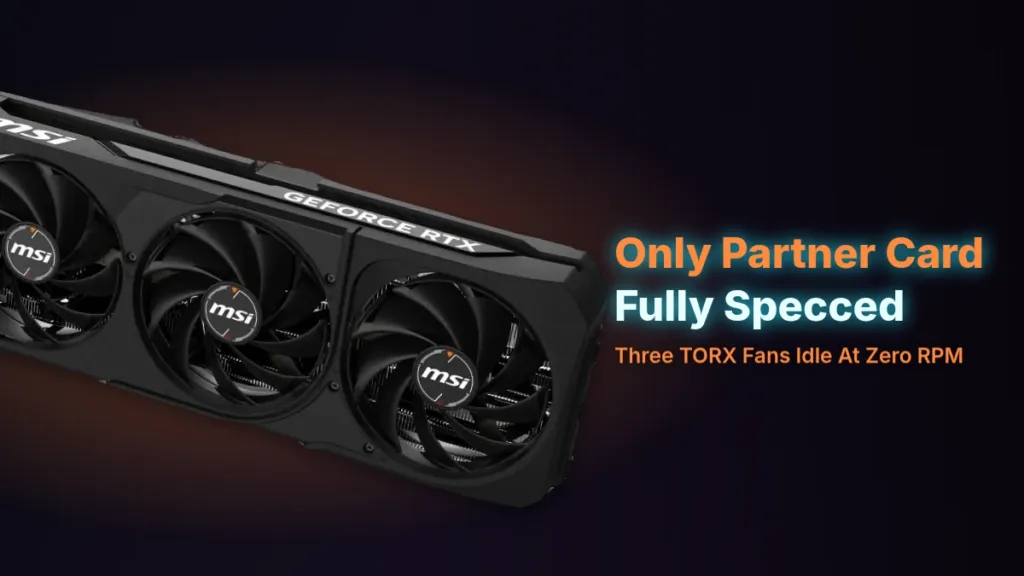
The cooler is 3 TORX Fan 5.0 fans sitting over a nickel-plated copper baseplate, with copper core pipes built to maximise contact with the GPU underneath. MSI has the fans drop to zero RPM at idle, and claims load temperatures of 70-75 °C once the card is actually working.
MSI GeForce RTX 5080 16GB SHADOW 3X OC published frame rates
The published numbers run from 95 FPS in Cyberpunk 2077 at 4K Ultra with ray tracing on, up to 210 FPS in Call of Duty: Modern Warfare III at 1440p Ultra, with Microsoft Flight Simulator at 85 FPS, Red Dead Redemption 2 at 130 FPS and Hogwarts Legacy at 175 FPS sitting in between. None of that comes with a test system or a driver version attached. The numbers exist on the page; what produced them does not.
A Page That Disagrees With Itself
| Figure | First value given | Other values on the same page |
|---|---|---|
| Factory boost clock | 2640 MHz | 1850 MHz |
| Card length | 303 mm | 317 mm, 12.6 inches |
| Idle power draw | 25W | 30-40W, 30-50W |
| Gaming power draw | 300W | 350W peak, 350-400W |
| Overclocked power draw | 400W | 450-500W |
| Overclock performance gain | 5% | 10%, 15% |
The spec table says 2640 MHz boost, then a later section on the same page claims 1850 MHz as the factory boost. Length moves around just as much: 303 mm in the spec list, 317 mm in a compatibility section, 12.6 inches somewhere else. Power follows the same pattern across nearly every table on the page, idle draw quoted at 25W in one spot and 30-50W in another, gaming draw at 300W with 350W peaks, overclocked draw climbing as high as 450-500W depending on which section you read. A page that can’t agree with itself on how long the card is isn’t a page to pull a frame rate from without checking it elsewhere first.
Don’t Type This Into Afterburner
The overclocking section quotes gains of 5%, 10% and 15% without settling on one, and its suggested settings are 1950 MHz core and 2000 MHz memory. That core number sits below the 2640 MHz boost clock the same page’s spec table already claims out of the box, so following the advice as written would mean clocking the card down, not up. Treat these as numbers printed on a page, not settings to dial in.
The SHADOW 3X OC sells for PKR 140,000 to PKR 160,000 in Pakistan, with a 2-year warranty quoted alongside it. That warranty term is said to vary by retailer and local distributor, so it’s worth confirming directly with whoever is selling the card rather than taking the quoted figure as fixed.
What $999 Actually Buys at Retail
Nvidia set the RTX 5080 Founders Edition at $999, undercutting what the RTX 4080 launched at, and that’s the number everyone quotes when they talk about this card. LTT warns upfront that actually securing one at that price may prove challenging, and PCMag backs that up from the retail side: partner cards got inflated well past $999 almost from the start. The sticker price and the price you pay turned out to be two different numbers the moment the card hit shelves.
| Listing | Price | Stock | Last checked |
|---|---|---|---|
| Amazon | $993.00 USD | In Stock | 2026-07-24 |
| Newegg | $1320.00 USD | In Stock | 2026-09-22 |
| Newegg | $1789.99 USD | In Stock | 2026-09-22 |
Line those listings up by date and the pattern is obvious: the only price under MSRP, $993.00, was last checked back on 2026-07-24. The two listings checked 2 months later, on 2026-09-22, run $1320.00 and $1789.99, both well clear of $999. That’s LTT’s warning made concrete; the sub-MSRP price is the old one, and the recent ones climb from there.
PCMag’s writer generally expects a board-partner cooler to run a little cooler than the Founders Edition at a similar price, so that was his preference going in. It didn’t hold up at checkout. Partner cards near $999 were hard to find for a while, and the heavily overclocked models that were in stock carried an even bigger premium on top of that. He ended up buying the $999 Founders Edition not because he preferred it, but because the alternatives he actually wanted weren’t on the table at a price worth paying.
He’d already settled the $1,000 question for himself at review time, weighing the 5080’s price against its performance before he ever bought one, and he bought his card in June. For him the number stopped being a live debate the day he paid it.
Not everyone who overpaid feels burned, though. Plenty of buyers who paid above MSRP for a 5080 now measure that deal against what lesser cards cost today, and the comparison tends to flatter the decision rather than sting it.
I felt stupid for buying a 5080 for 1300 in May. To see a 5060ti going for 1k now, i feel so much better. The 9070 and 9070xt are THE cards to buy.
Others run the same math and land somewhere else entirely. Rather than relief at what a 5080 build costs next to a cheap card, they look at the total and decide the money belongs on AMD and older parts instead, pointing to a 5800X3D and 32GB of DDR4 as the cheaper route to a similar gaming experience.
Too much money for that 5080 PC. It’s better, but not that much. Buy 32GB of DDR4 (2x16Gb) and 5800X3D. And that 9070XR. It will be 50% or more cheaper.
None of this is a new problem invented by the 5080. The RTX 3080 Ti launched at $1200 and now averages $999.99 from partners, and LTT’s verdict on that card at that price is that the 40-SUPER line beats it on price-to-performance in most applications. That’s the same shape of argument people are now making against paying inflated prices for a 5080: the sticker number only tells you what Nvidia wanted once, not what the card is worth against what else $999.99, or $1300, or $1789.99 can buy.
Pros
- Launched at $999, below the RTX 4080’s launch price
Cons
- LTT warns securing a card at MSRP may prove challenging
- Partner cards were inflated well past $999, says PCMag
- Heavily overclocked models carried an even bigger premium
- Listings on LTT’s page run as high as $1789.99
Lab Numbers vs. 6 Months of Real Use
LTT Labs put the RTX 5080 on a bench and came back with a different card than the one PCMag has been playing on for 6 months. Their gen-on-gen number lands at 10-20%, bought with roughly 15% more power draw than the last generation pulled. That uplift doesn’t come free of competition, either: LTT Labs found the 5080 sometimes fails to decisively beat the Radeon RX 7900 XTX, and its performance often aligns closely with the RTX 4080 Super, the card it’s supposed to be replacing. On raw rasterized frames, that’s a card standing still.
| What was measured | LTT Labs finding |
|---|---|
| Gen-on-gen performance gain | 10–20% |
| Power consumption change | roughly 15% more |
| Against the RTX 4080 Super | often aligns closely |
| Against the Radeon RX 7900 XTX | struggles to decisively beat it |
LTT Labs’ own conclusion follows from those numbers: there’s no substantial leap over the previous generation, and whatever appeal the 50-series has, it’s in the AI features bolted on top rather than in the silicon doing more raw work. PCMag’s reviewer, running the same card for months, calls it the best graphics card of this generation. Neither one is wrong. They’re measuring different things.
Nvidia’s own page spells out what those AI features actually are. DLSS 5 adds something called 3D-Guided Neural Rendering on RTX 50-series cards, and Dynamic Multi Frame Generation can produce up to 5 generated frames for every frame the GPU actually renders. Over 800 games and applications support RTX in some form, which is the scale that makes the software case plausible. But Reflex 2 Frame Warp, one of the features in that same lineup, is still listed as coming soon, which means part of the pitch for this generation hasn’t shipped yet.
- DLSS 5 introduces 3D-Guided Neural Rendering on RTX 50-series cards
- Dynamic Multi Frame Generation can produce up to 5 generated frames per rendered frame
- Reflex 2 Frame Warp is listed as coming soon, not shipping
- Over 800 games and applications support RTX
Nvidia’s own marketing page for the RTX 5090 quotes Eurogamer calling it the new fastest gaming GPU, The Verge calling it a new king of 4K, and TechRadar calling it the best there is. Those are reviewer lines Nvidia chose to put on its own site, and they’re about the $1999 5090, not the $999 card this section is about, but they show what the top of this stack gets credited with when the frame count alone does the talking.
PCMag’s reviewer normally upgrades his 4K setup every 2 to 3 years, and he expects DLSS frame generation to stretch that interval further out this time. He also says he’d rather not use DLSS when he can avoid it. The best-of-generation case for the 5080 rests on a feature its own biggest fan would turn off if he didn’t need it.