

Key Takeaways
- 1The 7950X3D has been seen as low as $599, giving it more room below the $1000 ceiling both chips share at the top of the market.
- 2Factor in platform costs before deciding: AM5 locks you into pricier DDR5 kits and X670 boards, while Z790 still takes cheaper DDR4.
- 3Don’t trust a single gaming benchmark. Tom’s Hardware measured a 12% 7950X3D lead with an RTX 4090, Tech4Gamers measured 4%, and Club386 had the 13900KS ahead instead.
- 4For lightly threaded productivity apps, the 13900KS’s roughly 2,000-point Geekbench 5 single-core score is the number that matters, not an all-core render benchmark.
- 5Intel’s 253W turbo TDP versus AMD’s 162W package cap isn’t just a spec sheet number – it shows up in real gameplay power draw too, at 126.7W versus 113W.
- 6Size your power supply around Club386’s 624W full-system peak measurement, not around either CPU’s quieter gaming-average draw.
- 7AMD’s 95C operating ceiling on the 7950X3D is a design target, not a failure state; reviewers measured average gaming temperatures of just 79.4C.
- 8Budget for a 360mm AIO liquid cooler regardless of which chip you pick – neither AMD’s efficiency edge nor Intel’s higher ceiling gets you out of serious cooling.
Pricing and Platform Costs
Reviewers have tracked the 13900KS selling anywhere from $643.47 up to $1000, while the 7950X3D has been seen as low as $599 and as high as that same $1000 ceiling. Both chips can cost you the same at the top of the market, but the 7950X3D gives shoppers more room to find a bargain below it.
The CPU price tag is only half the story. Intel’s platform still accepts cheaper DDR4 memory kits and pairs with Z790 boards, while AMD’s AM5 platform locks buyers into pricier DDR5 kits and X670 motherboards that cost more than their Z790 counterparts. Anyone building from scratch is paying that DDR4-versus-DDR5 gap and that board premium on top of whichever chip they pick, and for a lot of budget-conscious builders that’s where the real decision gets made.
Not everyone weighing these numbers lands on the same math, and some viewers can’t understand why anyone would still pick Intel when AMD’s high-end laptop configurations are sitting right there:
@Guiny BRO WHY INTEL… BRO JUST GET AN MSI RAIDER A18 HX. IT HAS A 5090 AND A 9955HX3D. BROOOO. WHY???
Gaming Performance with an RTX 4090
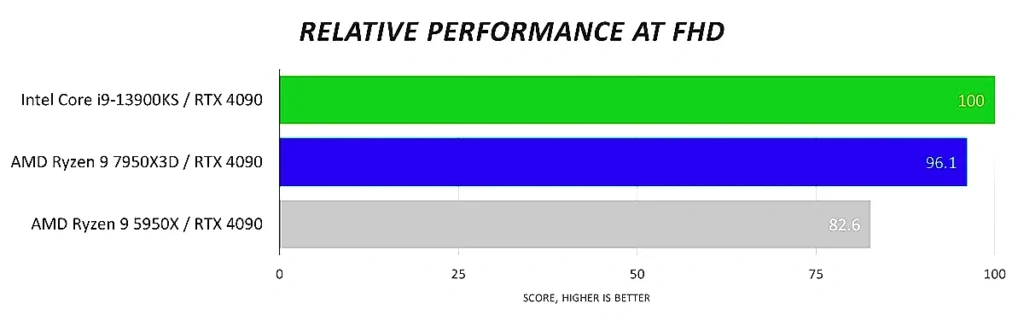
Pair either chip with an RTX 4090 and the answer to ‘which is faster’ depends entirely on whose spreadsheet you’re reading. Tom’s Hardware measured the 7950X3D pulling ahead by 12%, Tech4Gamers measured the same chip’s advantage at just four percent, and Club386 came out the other way entirely, putting the 13900KS narrowly on top overall. A 12% lead and a 4% lead for the same processor is already a wide spread to reconcile, and a third lab reversing the winner altogether means nobody buying on gaming framerates alone has a single number to trust.
That spread hasn’t gone unnoticed by the people actually watching these numbers get published. Readers comparing the three results side by side have grown vocal about how differently each outlet appears to have set up its test bench, since a gap this size between labs testing the same two chips with the same graphics card suggests the methodology, not the silicon, is what’s moving the needle.
u shluld jave conpared the same gpu and cpu both in thr pc and the compuyer that way ir would be a fair test
Productivity Tells a Different Story: Intel Leads Single- and Multi-Threaded Work
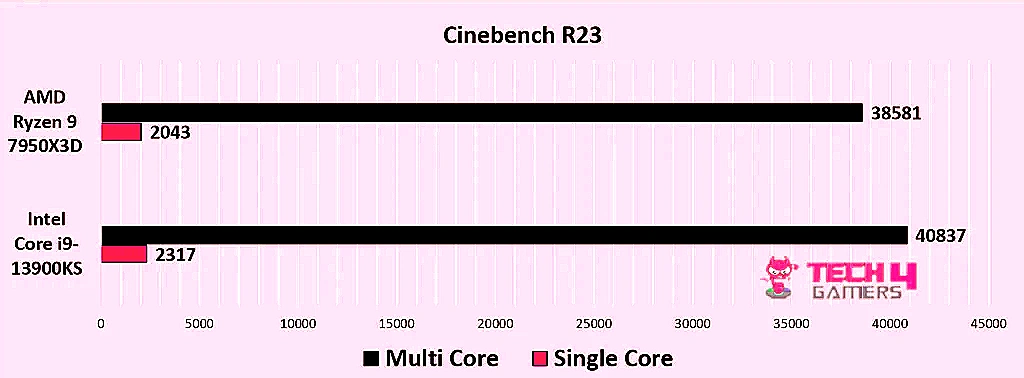
Cinebench R23 Multi-core
The single-core picture backs up the multi-core one. Bottleneck Calculator put the 13900KS at roughly 2,000 points in Geekbench 5 single-core, a workload that never gets to spread across the 7950X3D’s extra cache or cores and rewards raw per-core throughput instead. For anyone whose day-to-day work leans on lightly threaded apps, that’s the number that matters more than any all-core render score.
None of this means the 7950X3D’s extra cores go to waste once you’re back in a game. Most engines still lean hard on one or two threads for the main render loop, which is why the 13900KS’s core advantage doesn’t carry over to gaming the way it does in Cinebench. But not every engine is built that way, and one that spreads more of its work across the core count can turn AMD’s productivity disadvantage into a gaming advantage instead.
if you use concurrent chunk management engine or whatever its called you can utilize more cores to render chunks which will boost fps alot
Power Consumption and Efficiency: AMD Wins This One Outright
Look at the ceilings each chip is allowed to hit and the gap is obvious before either one runs a single benchmark: Intel specs the 13900KS for a 253W turbo TDP, while AMD caps the 7950X3D’s package power tracking at 162W. That’s not a testing variance, it’s the limit each manufacturer designed the silicon and its cooling expectations around.
Neither chip runs anywhere near its rated ceiling once you’re actually gaming, but the gap survives anyway: Tech4Gamers logged the 7950X3D averaging 113W during gameplay against 126.7W for the 13900KS. That’s the number that matters for anyone weighing heat and noise during a normal session rather than a synthetic stress test, and AMD comes out ahead of it.
Average Gaming Power Draw
Zoom out to the whole build and Club386 measured a full system pulling 624W at peak, a figure that has to account for the GPU alongside whichever CPU is installed. Anyone sizing a power supply for one of these rigs needs to plan around that peak, not around either chip’s quieter gaming average.
95C Is the Plan, Not a Failure
That 95C ceiling is a design target rather than a warning sign, since Zen 4 is built to run right up against it without throttling. In practice, gaming loads don’t push that hard: reviewers measured average temperatures of 79.4C during gameplay, well under the limit and with headroom to spare even on a chip that’s technically allowed to run hotter.
The bottleneck isn’t the silicon, it’s what’s sitting on top of it. AMD’s heatspreader on these chips is thick enough that it measurably restricts how fast heat gets from the die to your cooler, and delidding a Zen 4 chip to strip that heatspreader away drops temperatures by 20C. That’s a modification for enthusiasts willing to void a warranty for lower numbers, not something most buyers should plan a cooling strategy around, but it tells you exactly where the thermal ceiling is actually coming from.
Whichever chip you land on, budget for the same cooler: both processors need a 360mm AIO liquid cooler to keep them in check. Neither AMD’s efficiency advantage nor Intel’s higher power ceiling gets you out of buying serious liquid cooling, so factor that cost into either build regardless of which side of this comparison you pick.
pls do you know the best cooling pad to reduce the cpu temps the most on this laptop
- ASUS ROG Maximus Z790 Hero: 20+1 power stages give the 13900KS the clean, well-regulated current a 253W turbo load actually draws on, which matters more here than on a lower-power chip since undersized VRMs are what force a turbo chip to throttle before it ever hits its thermal limit.
- MSI MPG Z790 Carbon WiFi: this is the board for anyone sitting on a DDR4 kit already, since it supports DDR4 memory rather than forcing a DDR5 upgrade alongside the CPU, trading some memory bandwidth for a meaningfully cheaper build.
- Gigabyte Z790 AORUS Master: five M.2 slots mean a 13900KS build can carry a boot drive, a dedicated game library drive, and still have room left for whatever storage format shows up next, without anyone reaching for a PCIe expansion card to add more.