
Key Takeaways
- 1A VRM problem doesn’t show up at boot, it shows up after sustained load: the FX-8350’s frame rate collapse in Battlefield 1 didn’t start until roughly fifteen minutes in.
- 2The ASRock 970 Extreme 4 hitting 71C during a game, versus the Gigabyte X870 AORUS ELITE WIFI7 topping out at 58C under a harder Blender load, is the entire budget-versus-enthusiast argument in two numbers.
- 3Phase count is a useful shorthand for VRM quality, but check whether a manufacturer doubled components without adding real phases before trusting a spec sheet.
- 4The Ryzen 9 9900X pulls 176W through its EPS12V cables under sustained load per GamersNexus measurement; a board rated well below that figure is the bottleneck, not the chip.
- 5For anyone still on LGA 1700, the Intel Core Ultra 9 285K forces a full motherboard swap since it only runs on LGA 1851.
- 6Buyers chasing zero throttling risk should look at the MSI MEG Z890 GODLIKE’s 26-plus phases or the ASUS ROG Maximus Z890 Extreme’s 24+1+2+2 array, both well above the 20-phase tier where the Gigabyte AORUS MASTER and ASRock Z890 Taichi sit.
- 7Photoshop work doesn’t need the same VRM headroom as gaming or rendering: the 9900X’s 11,385 Puget Systems score comes from short bursts, not the sustained saturation that exposed the 970 Extreme 4.
Table of Contents
- VRM Thermal Throttling Is Costing You 15-20% of Your CPU
- AMD FX-8350: When the Frame Rate Just Falls Off a Cliff
- ASRock 970 Extreme 4: A Board That Runs Hot Even at Rest of the Load
- Battlefield 1
- Intel Core Ultra 9 285K: LGA 1851 or Nothing
- A 16+2+2 twin digital VRM puts the Gigabyte X870E AORUS ELITE WIFI7 well outside the territory where a 970 Extreme 4 or an FX-8350 rig ever lived.
- Gigabyte X870 AORUS ELITE WIFI7
- ASUS ROG Maximus Z890 Extreme: 24+1+2+2 Phases and Nowhere Left to Throttle
- ASUS ROG Maximus Z890 Hero: 22+1+2+2 Phases for the Buyer Who Isn’t Rationing Watts
- ASUS ROG Strix Z890-E Gaming WiFi
- ASUS ProArt Z890-Creator WiFi: 16+1+2+2 Phases at 90A, Built for the Workstation Crowd
- MSI MEG Z890 GODLIKE: 26-Plus Phases for Buyers Who Refuse to Compromise
- Gigabyte Z890 AORUS MASTER: A 20+1+2 Direct VRM Sits Between the Elite Boards and the Flagship Tier
- ASRock Z890 Taichi: Enthusiast Power Delivery Wrapped in a Different Look
- Dragon’s Dogma 2
- F1 24
- Stellaris: Measured in Seconds, Not Frames
- Baldur’s Gate 3
- Blender: Rendering Under Sustained All-Core Load
- Chromium Code Compile
- Adobe Photoshop: The Puget Systems Score
- Adobe Premiere: The Puget Score
- SpecWS: What the Chip Does When Nobody’s Watching a Frame Counter
VRM Thermal Throttling Is Costing You 15-20% of Your CPU
Budget boards choke under sustained multi-threaded load, full stop. Cheap out on the VRM and the CPU you paid for never gets to run at the clocks it’s rated for once the workload gets serious. Move up to mainstream or enthusiast boards and the picture flips entirely: none of the flagship processors tested throttled at all, and VRM temperatures across that mainstream-to-enthusiast tier stayed bunched within a 15C range of each other. That’s the real dividing line in this market, and it isn’t between mainstream and enthusiast, it’s between budget and everything above it.
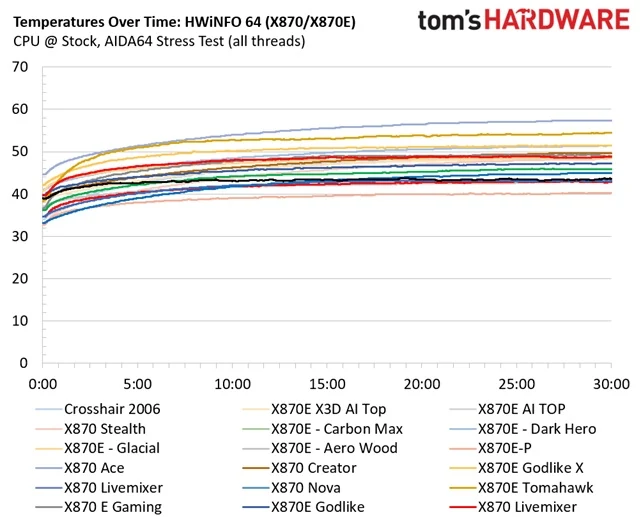
More power phases means each one carries less of the load, which is why phase count gets treated as a shorthand for VRM quality. It’s a shorthand you should be suspicious of, because some manufacturers double up components on the board without adding any real phases at all. That doubled component count looks like a beefier VRM on a spec sheet, but it doesn’t do what an actual phase increase does for the thermal load.
The comments section on this makes clear how long some of these platforms have been asked to keep running.
The last build I did was 10 years ago fx8350 and a Radeon 7850 with 1 gb vram lol.
Not everyone gets to choose the timing. For some, the motherboard simply makes the decision for them.
Thanks to my old motherboard dieing 3 months ago, I was forced to upgrade a little.
When an upgrade does happen, the bill has gotten worse. One builder tracking CPU-and-motherboard bundle pricing watched it climb by as much as $150.
Well, I have tracked the Micro Center’s 3-in-1 Bundle prices going UP $100-150 for 270K+ and 7800/9800/9850X3D CPUs, often with lesser featured motherboards now.😞
Faced with that math, plenty of builders are working the problem from the other direction: keep the board, swap the chip.
I upgraded cpu to 5800x3d and 5070ti. instead of going full replacement with MOBO and new ram.
That strategy holds up when the board underneath was built to last. One reader got nine years out of a high-end board before the platform finally aged out.
Had my 8700k @4.8 ghz on a Hero MB with 32 gb ddr4 for 9 years and upgraded the GPU twice.
AMD FX-8350: When the Frame Rate Just Falls Off a Cliff
The user’s package temperature reading tells the real story here: 59C, logged right before the frame rate collapsed. That’s not a scary number by itself, and on a modern flagship it wouldn’t raise an eyebrow, but the FX-8350 is an old design with an old thermal profile, and 59C sitting immediately upstream of a performance drop is exactly the signature you’d expect from a chip getting throttled rather than one running into some other bottleneck. This isn’t a VRM story like the flagship boards in the previous section, it’s a chip that’s simply run out of thermal headroom under sustained load.
ASRock 970 Extreme 4: A Board That Runs Hot Even at Rest of the Load
The board’s own sensor hit 71C during a gaming session, and that’s not a CPU package reading, that’s the motherboard itself cooking. A number like that coming off the board rather than the chip points straight at the VRM, the circuitry actually responsible for feeding the processor clean, stable power. Anyone still running a 970 Extreme 4 with a modern CPU bolted on top of it is asking a decade-old power delivery design to do a job it was never built for, and 71C is the board telling you it’s struggling to keep up.
Battlefield 1
Battlefield 1 is where the throttling behavior showed up in the wild rather than on a synthetic load, and the timeline matters as much as the symptom: the drops didn’t hit at launch or during the first firefight, they started roughly fifteen minutes in. That delay is the tell. A VRM that’s undersized doesn’t fail the instant a game boots, it fails once heat has had time to build across sustained load, and fifteen minutes of continuous multi-threaded work is exactly the window where a budget board’s power delivery stops keeping pace with what the CPU is asking for. Anyone benchmarking a board off a five-minute run will miss this every time; the real test only starts once the chip has been cooking for a quarter hour.
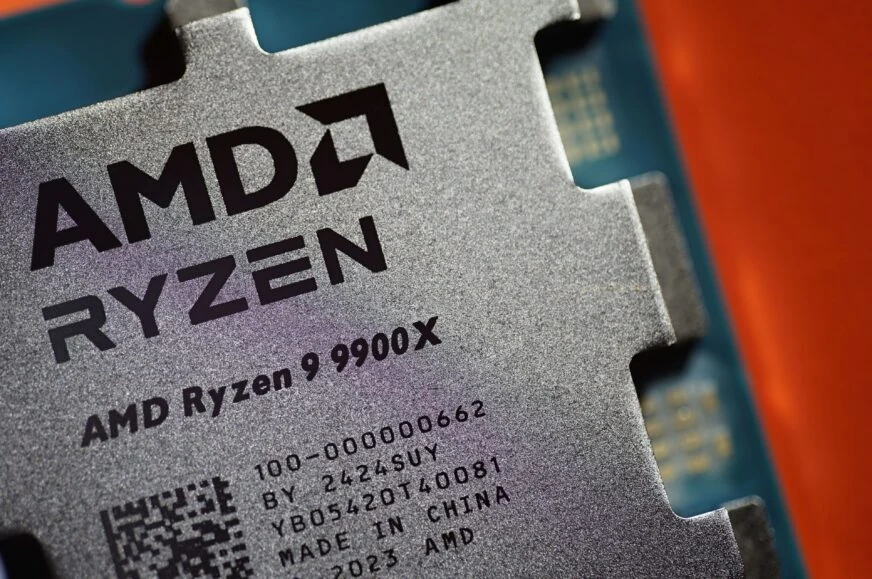
AMD Ryzen 9 9900X
AMD’s mainstream flagship built on Zen 5Twelve cores of Zen 5 is the starting point, but what a board can actually deliver to them is the real question this chip poses to a motherboard’s VRM.
| Base Clock | 4.4 GHz |
| Max Boost (1 core) | 5.6 GHz |
| Thermal Design Power (TDP) | 120W |
| Package Power Tracking (PPT) | 170W |
Gamers Nexus logged the 9900X holding between 5200 and 5300MHz across all twelve cores under sustained load, with a single core sitting steady at 5625MHz whenever the workload let it lean on just one thread. That gap between all-core and single-core is the chip working exactly as designed, spreading power where the task needs it rather than pinning every core to its ceiling, and it only holds up as long as the board underneath can keep feeding it.
Tom’s Hardware put the heat output at roughly 150W during heavy testing, while Gamers Nexus measured 176W actually pulled through the EPS12V cables, a gap that reflects conversion losses rather than a disagreement between the two labs. Under a 360mm liquid cooler, Gamers Nexus saw the package settle at 70 degrees Celsius, a number that’s entirely unremarkable for a chip drawing that much power and confirms the 9900X isn’t the thermal problem in this equation. Feed it 176W of clean, stable delivery and proper cooling, and it holds its clocks; the failure point sits with whatever’s supplying that power, not with the silicon itself.
Intel Core Ultra 9 285K: LGA 1851 or Nothing
- Socket: LGA 1851. Anyone still sitting on an LGA 1700 board is buying a new motherboard, not just a new chip, whatever the retailer’s bundle page implies.
- Power delivery: this is a flagship-tier processor, and the VRM lesson from the throttling cases above applies here too. Pair it with a board that can’t sustain the load and the 285K never runs at its rated clocks under anything heavy.
- Memory: DDR5 only, no DDR4 fallback on this platform. That’s one more line item for anyone still holding onto a DDR4 kit expecting to reuse it.
A 16+2+2 twin digital VRM puts the Gigabyte X870E AORUS ELITE WIFI7 well outside the territory where a 970 Extreme 4 or an FX-8350 rig ever lived.
Three PCIe 5.0 M.2 slots mean storage stops being the bottleneck long before the CPU does, and around back Gigabyte adds dual USB4 Type-C ports running at 40Gbps, giving external drives and docks a lane fast enough to actually use that Gen 5 throughput.
Gigabyte X870 AORUS ELITE WIFI7
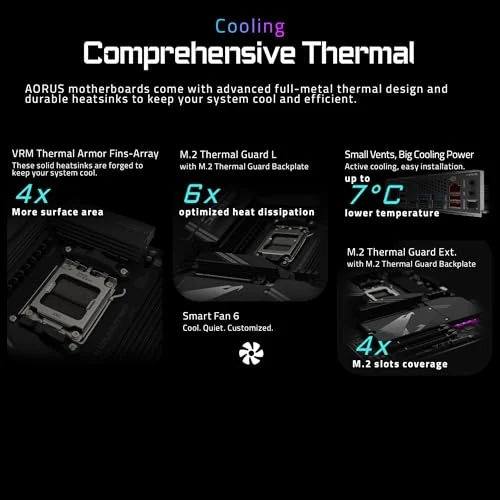
Vivid Repairs put the board through Blender renders, the kind of sustained all-core load that exposed the 970 Extreme 4 for what it is, and logged the VRM heatsinks peaking at 58C. That’s 13 degrees under the 71C the 970 Extreme 4 hit just running a game, on a workload considerably harder than a game session, which is the 16+2+2 array and its 105A stages doing exactly what a board this price should do.
- Two PCIe 5.0 M.2 slots wired straight to the CPU, no chipset detour to eat into that bandwidth
- One PCIe 4.0 M.2 slot routed through the chipset, fine for a secondary drive that isn’t chasing peak sequential speeds
- A single 40Gbps USB4 Type-C port on the rear I/O, per Vivid Repairs
- Wi-Fi 7 and 2.5GbE wired networking, giving buyers a choice rather than locking them into one connection type
ASUS ROG Maximus Z890 Extreme: 24+1+2+2 Phases and Nowhere Left to Throttle
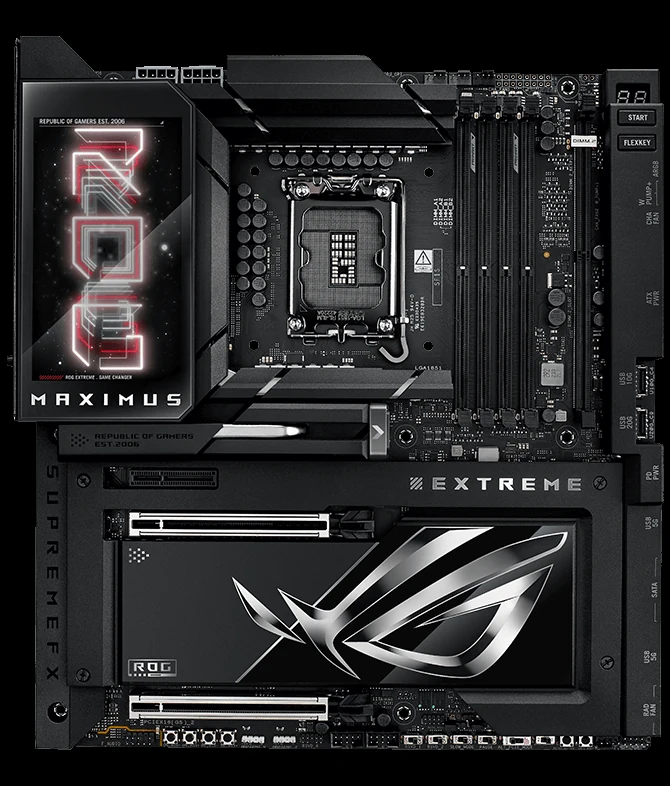
- Up to 256GB of DDR5 memory support, enough headroom that capacity stops being a planning concern for even the heaviest multitasking or content-creation rig.
- Three onboard PCIe 5.0 M.2 slots, matching what the Gigabyte X870E AORUS ELITE WIFI7 already offers and confirming that Gen 5 storage lanes are now standard at this tier rather than a differentiator.
- Two Thunderbolt 5 USB Type-C ports on the rear I/O, a step up from the USB4 40Gbps ports on Gigabyte’s board and enough bandwidth to run high-refresh external displays or fast external storage without the port itself becoming the limit.
ASUS ROG Maximus Z890 Hero: 22+1+2+2 Phases for the Buyer Who Isn’t Rationing Watts
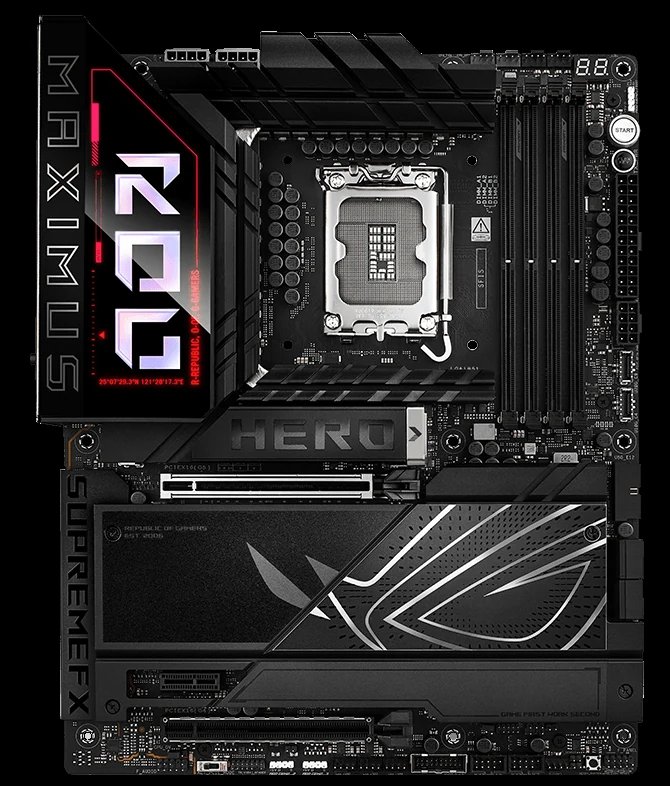
Three PCIe 5.0 M.2 slots put storage on equal footing with the CPU’s own bandwidth ceiling, no waiting on a Gen 4 drive to catch up. Round back, two Thunderbolt 4 ports give anyone running an external GPU enclosure or a fast capture rig a connection that won’t be the thing slowing the workflow down.
ASUS ROG Strix Z890-E Gaming WiFi
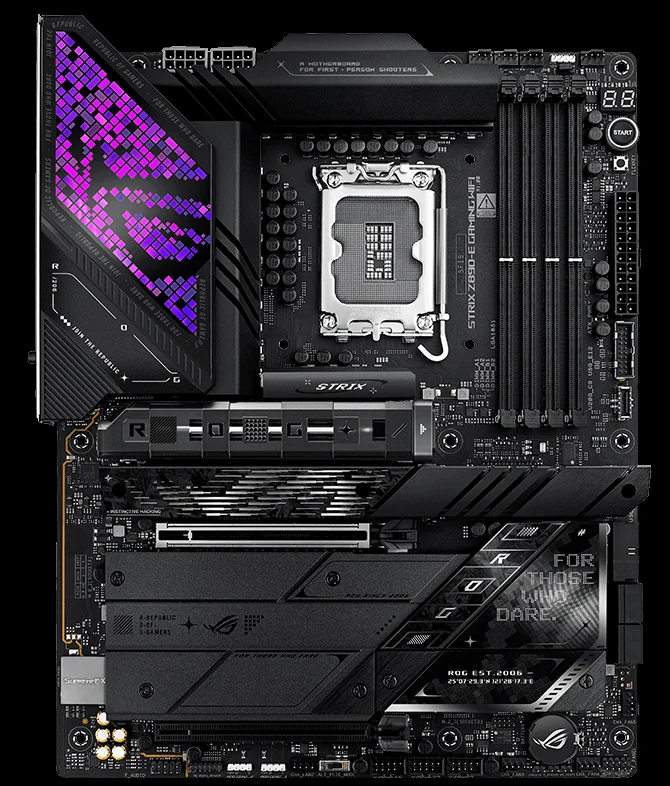
Those 18 primary stages are rated for 110A each, and that’s the number that decides whether this board is a sensible home for a flagship Arrow Lake chip or a bottleneck waiting to happen once the load runs long. A 970 Extreme 4 never had anything close to that kind of headroom, which is exactly why it hit 71C running a game. Stack 110A across 18 phases and the Strix Z890-E isn’t rationing anything even under an all-core render job that runs for hours.
- Three PCIe 5.0 M.2 slots, so the fastest consumer drives on the market aren’t waiting on the interface to keep up
- Two Thunderbolt 4 ports on the rear I/O for external storage, capture devices, or eGPU boxes without a bandwidth penalty
ASUS ProArt Z890-Creator WiFi: 16+1+2+2 Phases at 90A, Built for the Workstation Crowd
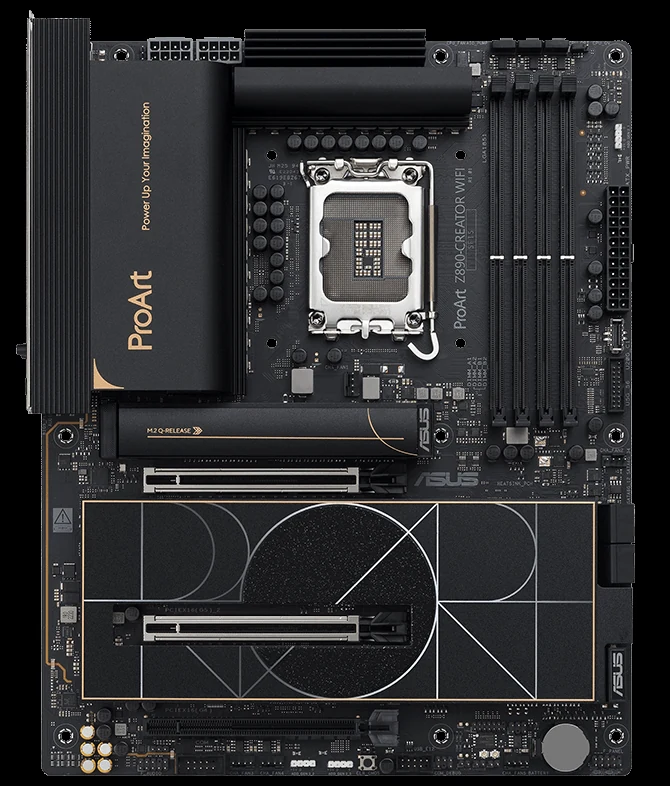
- One PCIe 5.0 M.2 slot, a single fast lane rather than the three some enthusiast boards pack in, which makes sense on a board built around external connectivity rather than piling on internal drives.
- Two Thunderbolt 5 ports on the rear panel, a step up from the Thunderbolt 4 seen on boards like the Maximus Hero, and the kind of bandwidth a creator moving raw video off an external drive actually needs rather than just wants.
MSI MEG Z890 GODLIKE: 26-Plus Phases for Buyers Who Refuse to Compromise
At 26 or more phases, the MEG Z890 GODLIKE sits above every board covered so far, including the 24+1+2+2 array on the ASUS ROG Maximus Z890 Extreme and the 22+1+2+2 setup on the Maximus Z890 Hero. That kind of phase count exists for one reason: to spread current across enough silicon that no single stage is ever working hard enough to become the weak point, which is precisely the failure mode that put the 970 Extreme 4 at 71C running nothing more demanding than a game. Nobody buying a board like this is worried about throttling under a sustained Blender render or a marathon gaming session; the phase count alone puts that question to rest before the CPU is even installed.
- Dual PCIe 5.0 x16 slots give full-bandwidth expansion room for multi-card setups or add-in cards that need every lane Gen 5 offers.
- A dynamic dashboard screen sits on the board itself, the kind of visual flourish MSI puts on the GODLIKE line to mark it out from the rest of the Z890 stack.
Gigabyte Z890 AORUS MASTER: A 20+1+2 Direct VRM Sits Between the Elite Boards and the Flagship Tier
Gigabyte Z890 AORUS MASTER
Fin-Stack Cooling Meets Gen 5 StorageThe 20+1+2 direct VRM on the AORUS MASTER puts it ahead of anything a 970 Extreme 4 owner ever had, and Gigabyte backs it with large fin-stack heatsinks rather than the thin stamped plates that let boards like that one hit 71C under nothing more than a gaming session. More surface area moving heat off the MOSFETs means the phases stay in their efficient operating range longer under sustained load, which is exactly the scenario that exposes an undersized board. On the storage side, Gigabyte fits multiple PCIe 5.0 M.2 slots, giving fast NVMe drives room to run at full Gen 5 bandwidth without forcing a choice between primary and secondary storage speed.
ASRock Z890 Taichi: Enthusiast Power Delivery Wrapped in a Different Look
ASRock built actual moving gears into the Taichi’s heatsink shroud, which is the kind of thing that either sells the board on sight or does nothing for you, but it’s not what matters once the chip is under load. What matters is the phase count sitting at 20 or more, a number that puts the Taichi in the same conversation as the Gigabyte AORUS MASTER and the ASUS Strix Z890-E rather than anywhere near a budget board struggling to keep a flagship Arrow Lake chip fed. Spread current across that many phases and no single stage is carrying enough of the load to become the thing that throttles the CPU three hours into a render.
Storage gets at least one PCIe 5.0 M.2 slot, enough to run a Gen 5 drive at its full speed instead of pinning it back to Gen 4 numbers. For anyone building around a flagship CPU on this board, that slot means the storage side of the build isn’t the part left behind while the VRM does its job.
Dragon’s Dogma 2
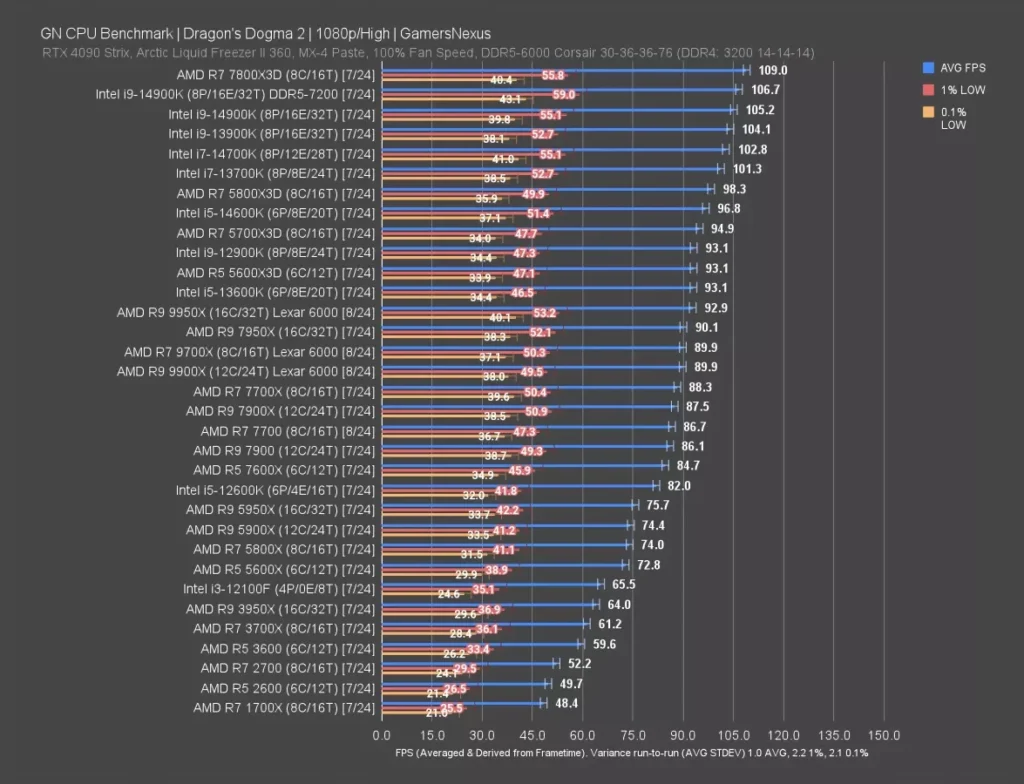
Dragon’s Dogma 2 has a reputation for grinding CPUs down in crowded city areas, and GamersNexus clocked the Ryzen 9 9900X at 90 FPS average here. That’s a comfortable number for a game known to punish weaker chips, and it’s further evidence that the throttling problems documented earlier in this piece are a motherboard failure, not a CPU one: give a 9900X the power delivery it deserves and it has no trouble holding a smooth frame rate even in a title this demanding.
F1 24
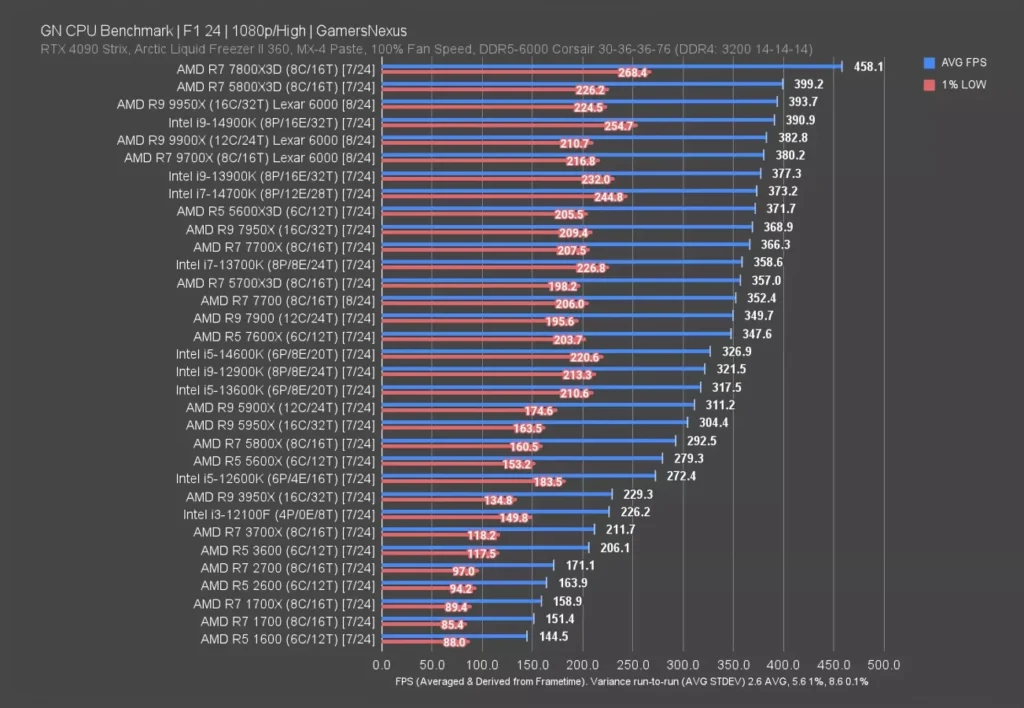
GamersNexus put the 9900X’s F1 24 average at 383 FPS, a number that has nothing to do with the CPU’s ceiling and everything to do with the motherboard underneath it. A chip capable of pushing a racing sim that far is a chip a budget board will strangle the moment the VRM heats up, which is exactly the pattern this piece has already traced through the 970 Extreme 4 and the FX-8350. Put the 9900X on one of the enthusiast boards covered above and 383 FPS is the number you actually get to keep.
FFXIV: Dawntrail
FFXIV: Dawntrail
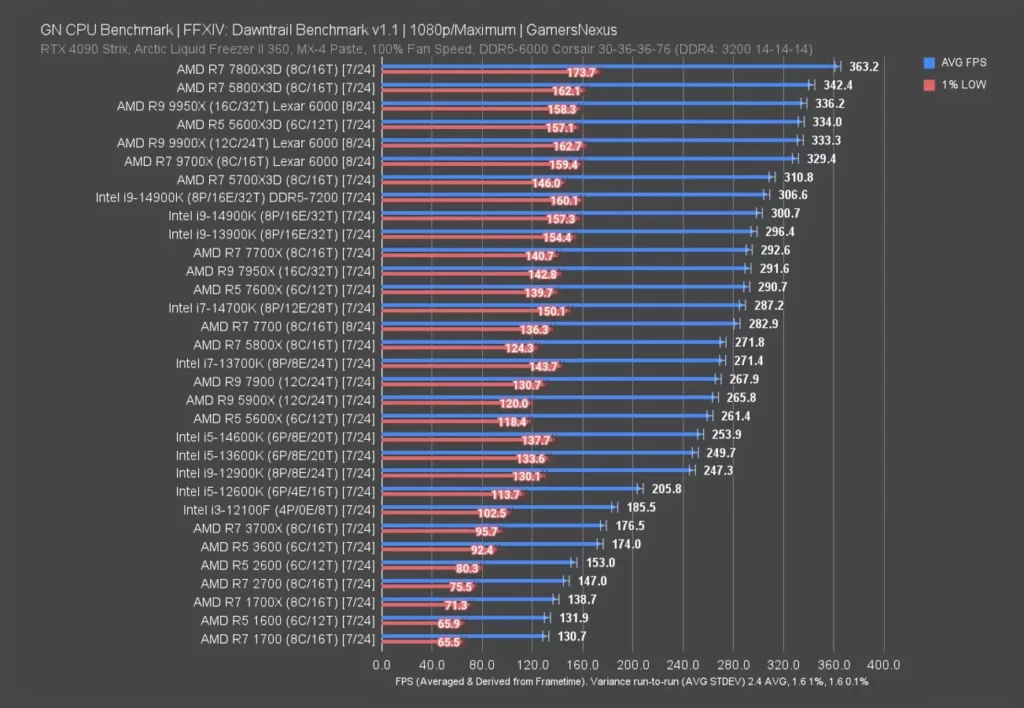
FFXIV: Dawntrail doesn’t ask a CPU for much compared to the racing sim or the open-world grinder covered earlier in this piece, and GamersNexus’s 333 FPS average on the 9900X reflects that: an MMO engine built to run on a decade of hardware generations at once was never going to tax a flagship Zen 5 chip the way F1 24 or Dragon’s Dogma 2 do. What matters here isn’t the ceiling, it’s that a number this high is trivially easy for a well-fed VRM to sustain, which means any shortfall a gamer sees in this title traces straight back to the board underneath rather than the silicon on top of it.
Stellaris: Measured in Seconds, Not Frames
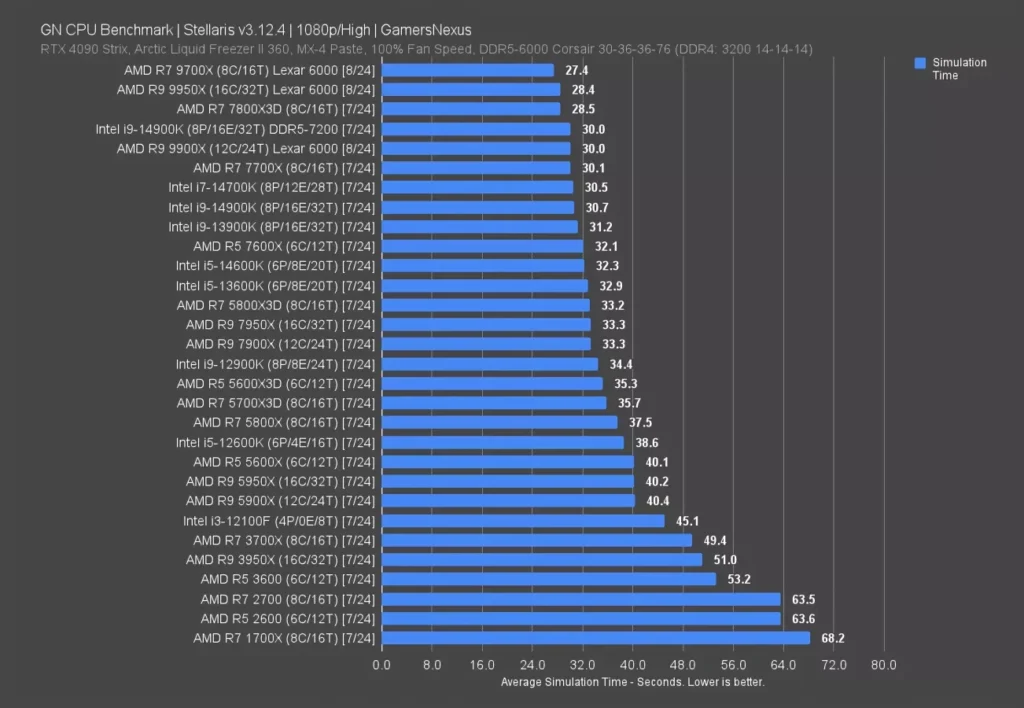
GamersNexus put that 30-second result 10% ahead of the 7900X on the same test, and in a game where the CPU is doing nothing but crunching empire-management logic turn after turn, that gap is the whole story: fewer seconds waiting on the galaxy to advance, one generation to the next, with no GPU load or frame pacing to muddy what’s actually being measured.
Baldur’s Gate 3
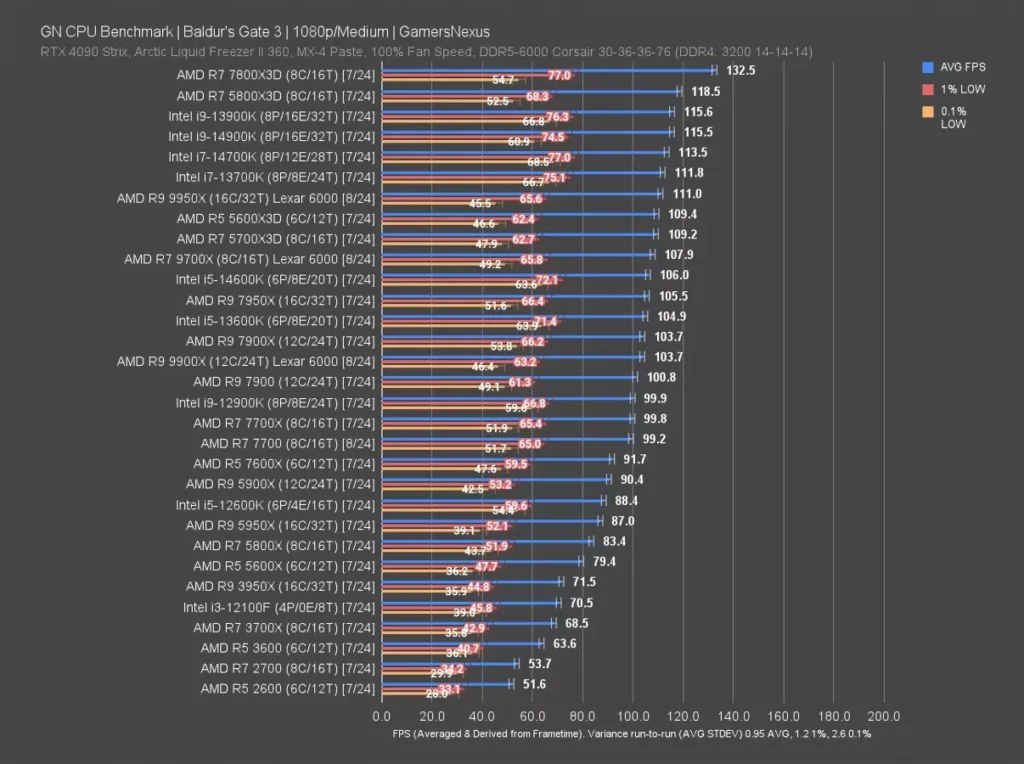
Baldur’s Gate 3 is notorious for bogging down in Act 3, where the number of NPCs and active scripts on screen at once turns into a CPU problem no GPU can bail you out of, and GamersNexus logged the 9900X averaging 104 FPS here. That’s well below the 383 FPS the same chip posted in F1 24 and the 333 FPS it hit in FFXIV: Dawntrail, which says nothing bad about the processor and everything about how much heavier this engine leans on it. A number that low on a flagship chip is exactly the kind of sustained load where a weak VRM starts shaving clocks off the top, so the board underneath this CPU matters here more than it did in any lighter title covered so far.
Blender: Rendering Under Sustained All-Core Load
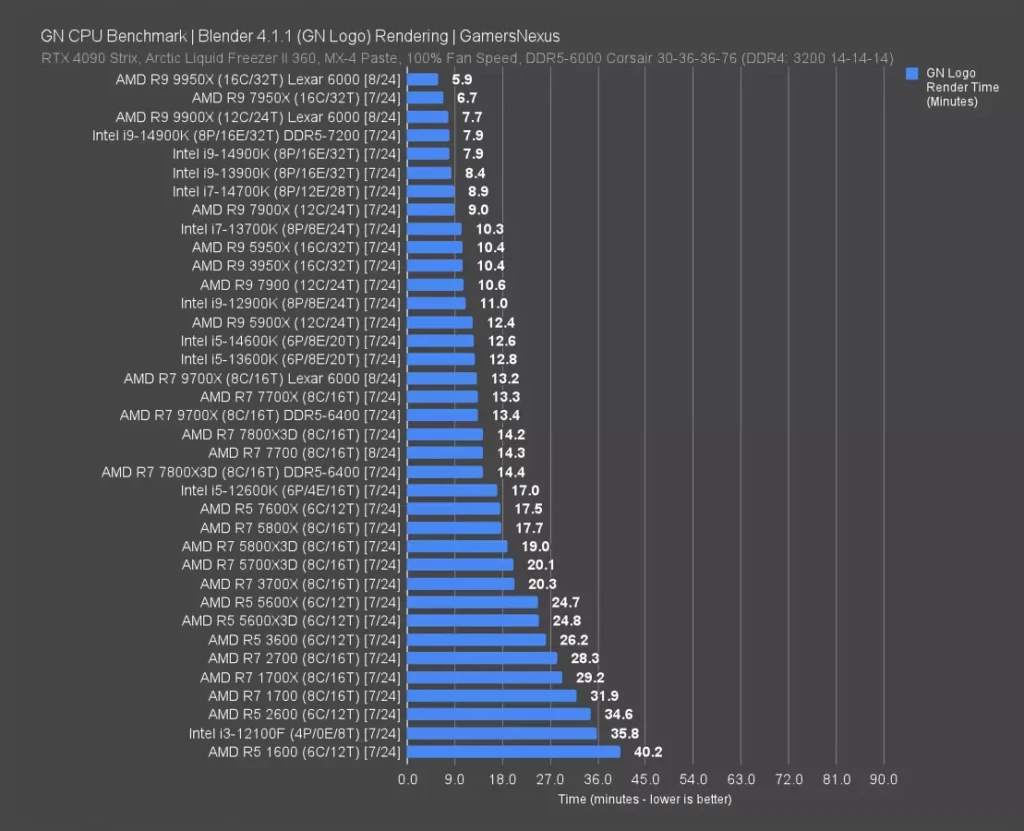
Rendering isn’t a frame rate test, it’s a stopwatch test, and GamersNexus clocked the 9900X finishing this Blender render in 7.7 minutes. There’s no frame pacing to argue about and no 1% low to dig through, just a chip locked into an all-core load for the entire run, the exact scenario that separates a VRM with real headroom from one that starts shedding clocks the moment the timer passes the ten-minute mark. A board that can’t hold that line isn’t going to show it in a quick synthetic spike, it’s going to show it here, minute seven or eight, with the render time creeping up instead of the chip finishing on schedule.
Chromium Code Compile
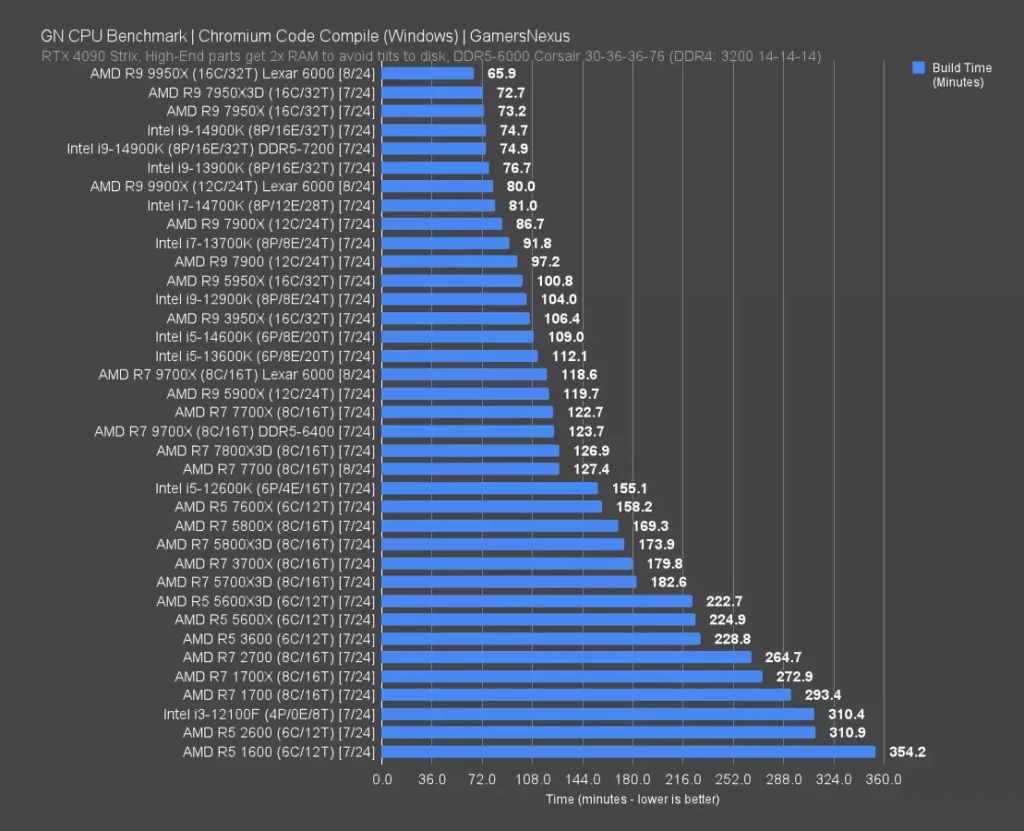
This isn’t a frame rate or a clock speed, it’s raw sustained compute across every core for as long as the job takes, and GamersNexus put the 9900X at 80 minutes to finish compiling Chromium’s source, a result that lands it dead even with Intel’s 14700K. The 9950X, sitting one rung up in AMD’s own stack, does the same job in 66 minutes, a 14-minute gap that has nothing to do with motherboard and everything to do with the extra cores that chip is packing. Set the 9900X against its own predecessors and the generational story is the whole point: the 7900X took 87 minutes for this same compile, and the 5900X needed a full 120 minutes, half again as long as the 9900X and proof that anyone still running a 5900X in a workload like this is leaving 40 minutes on the table every time they build.
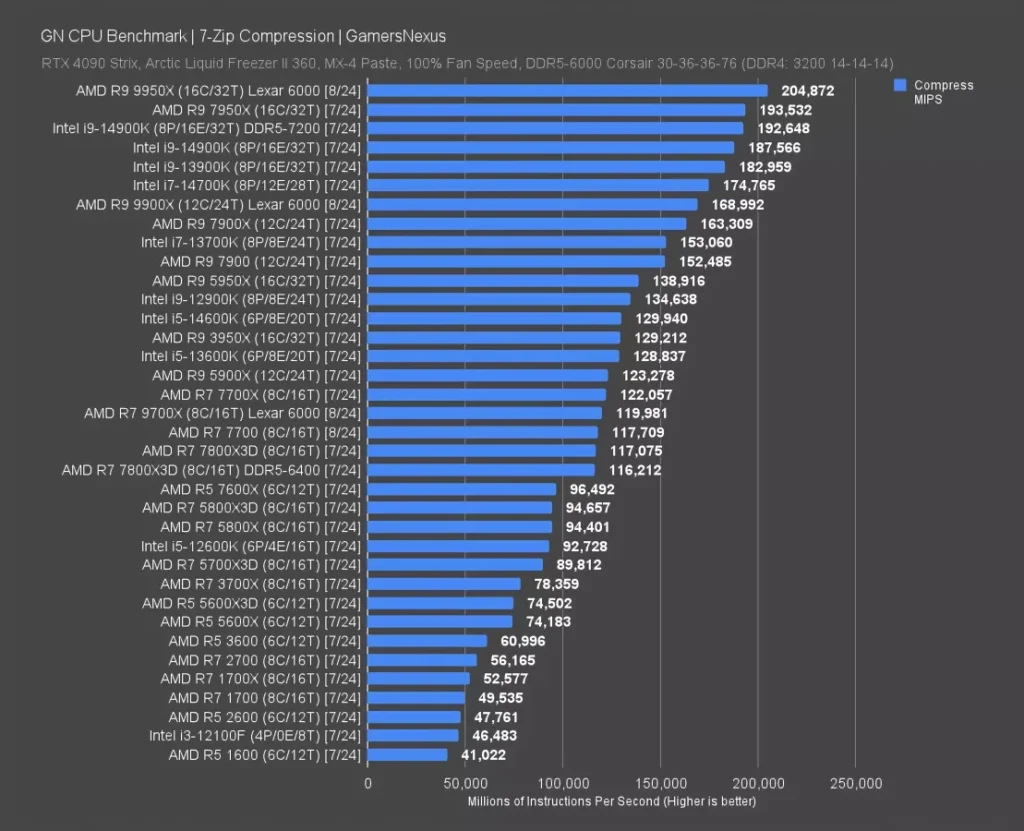
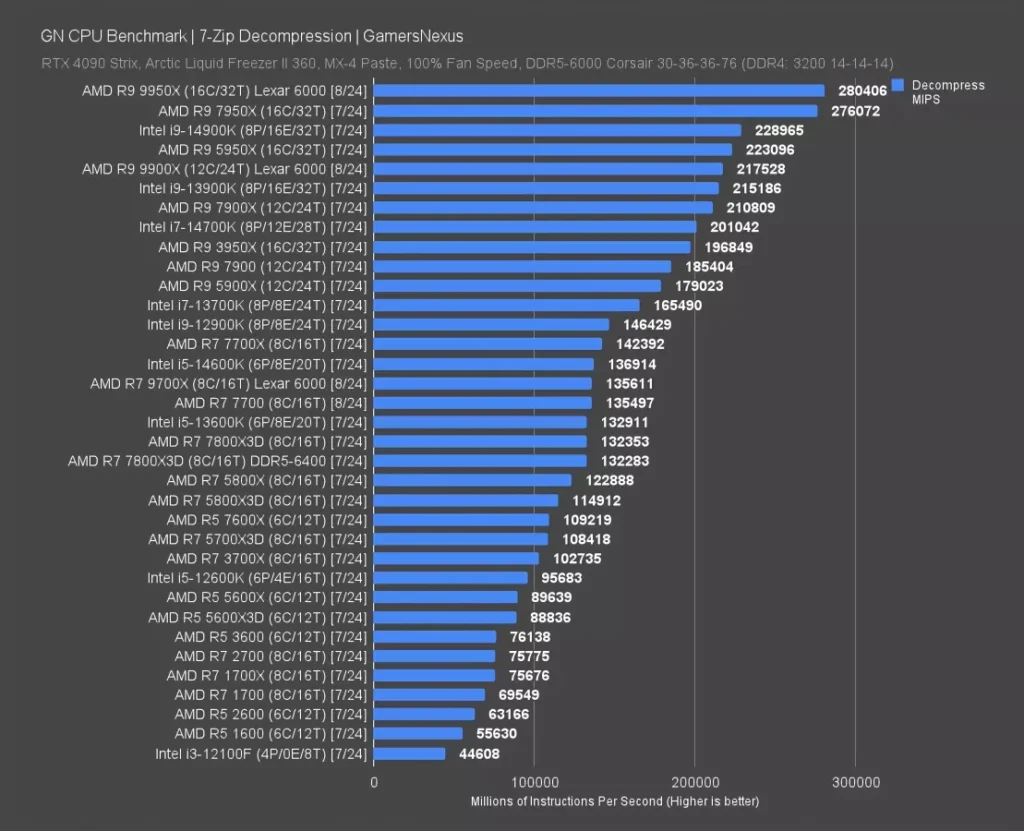
7-Zip scores in MIPS rather than frames or minutes, and the 9900X posted 168.9K on compression against 217.5K on decompression, decompression coming in well ahead because unpacking an archive is a lighter, more parallel-friendly job than the dictionary matching compression demands. Neither number means much sitting alone, but together they say this chip has plenty of throughput to spare for archiving work, which is exactly the kind of sustained multi-threaded task that exposes a weak VRM the same way Blender and Chromium did earlier in this piece. A board that throttles under those loads will bleed MIPS off both numbers, and the drop won’t show up as a stutter, it’ll show up as a longer wait on every archive you open or pack.
Adobe Photoshop: The Puget Systems Score
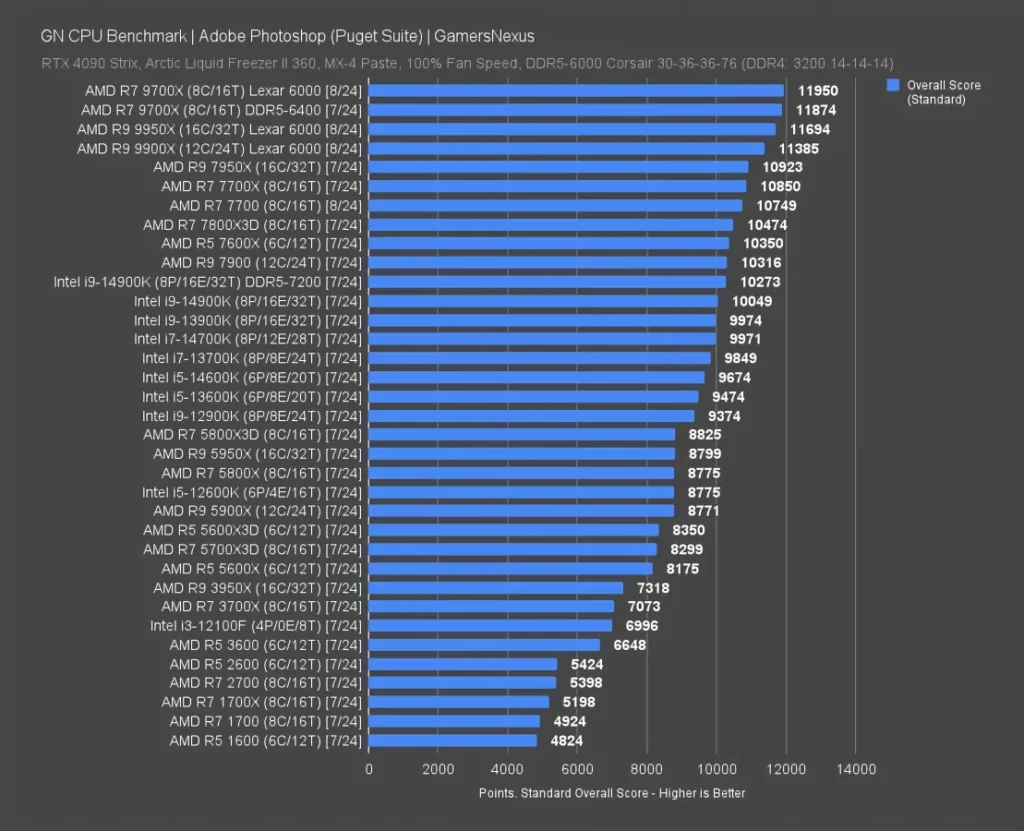
GamersNexus’s Puget Systems suite put the 9900X at 11,385 points in Photoshop, a workload built around filter stacks and layer-heavy compositing rather than anything that stresses all twelve cores for minutes at a stretch. That’s a different kind of load than the Blender render or the Chromium compile covered earlier in this piece, and it’s exactly the kind a budget board’s VRM can survive without ever breaking a sweat: short bursts, not sustained saturation. Anyone buying a 9900X for photo work rather than rendering or compiling doesn’t need to spend up on power delivery the way this piece has been arguing for gaming and content creation workloads, because Photoshop simply never asks the chip to hold peak clocks long enough to expose a weak VRM.
Adobe Premiere: The Puget Score
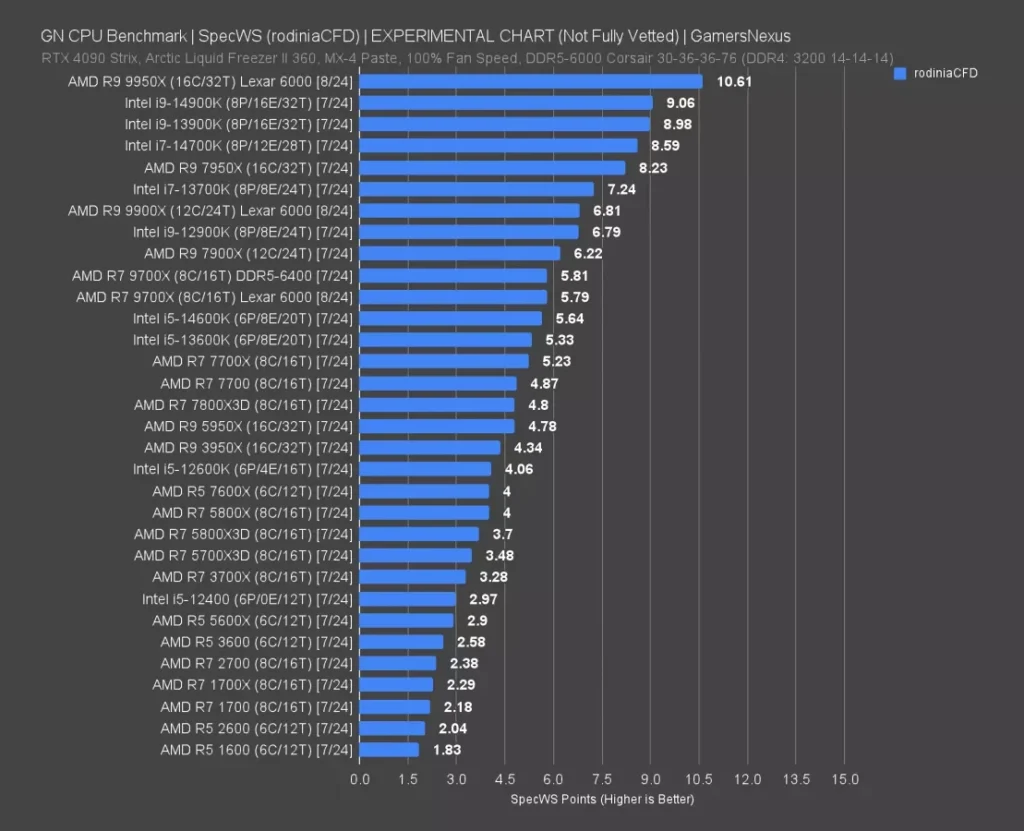
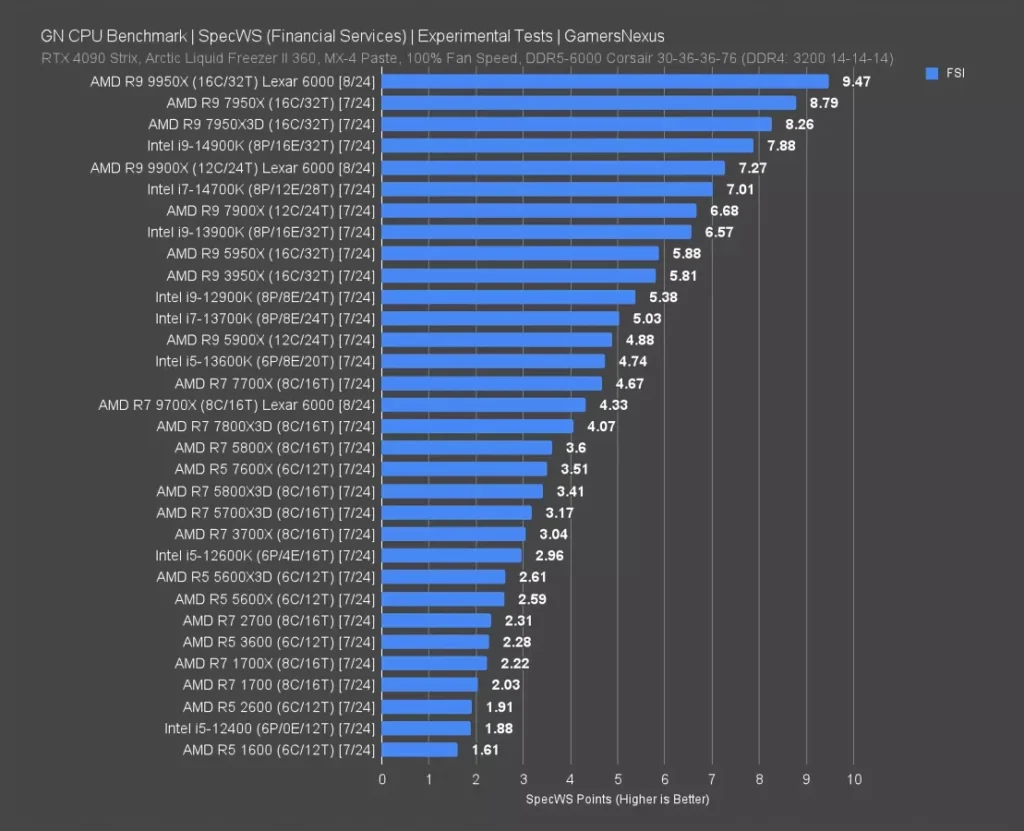
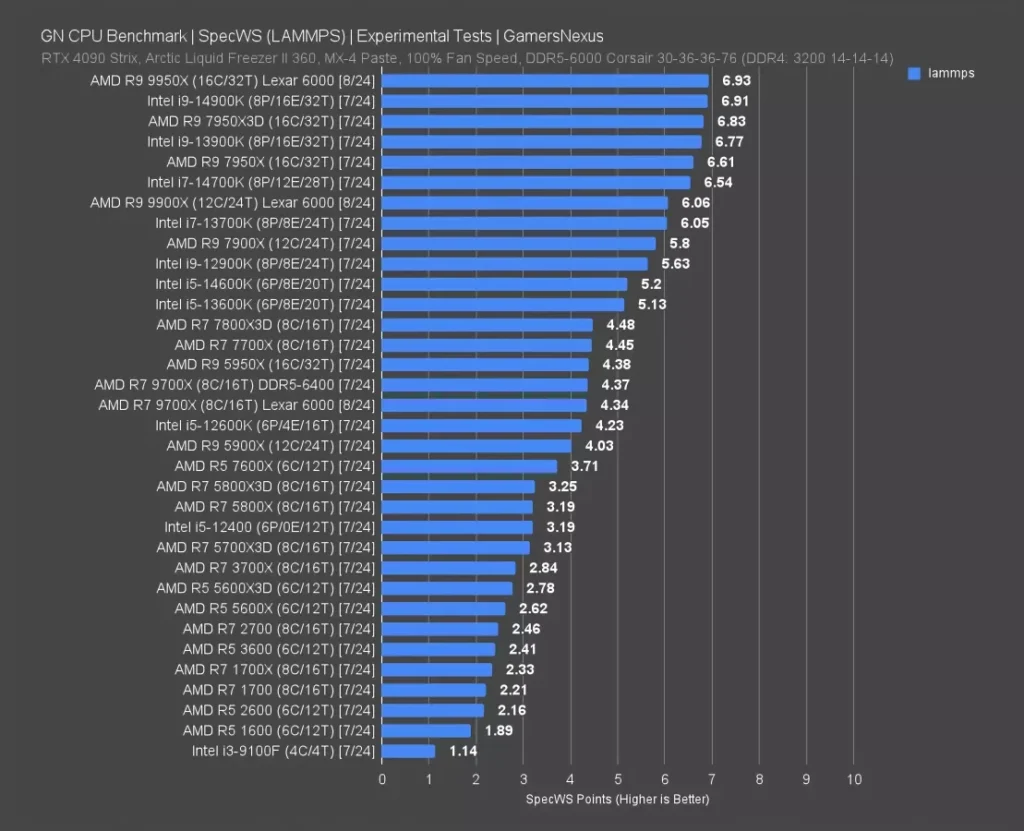
SpecWS: What the Chip Does When Nobody’s Watching a Frame Counter