
Key Takeaways
- 1No CPU benchmark exists for the Steam Machine, and final specs were still unlisted as of June 2026, so any frame-rate claim circulating right now is a guess dressed as data.
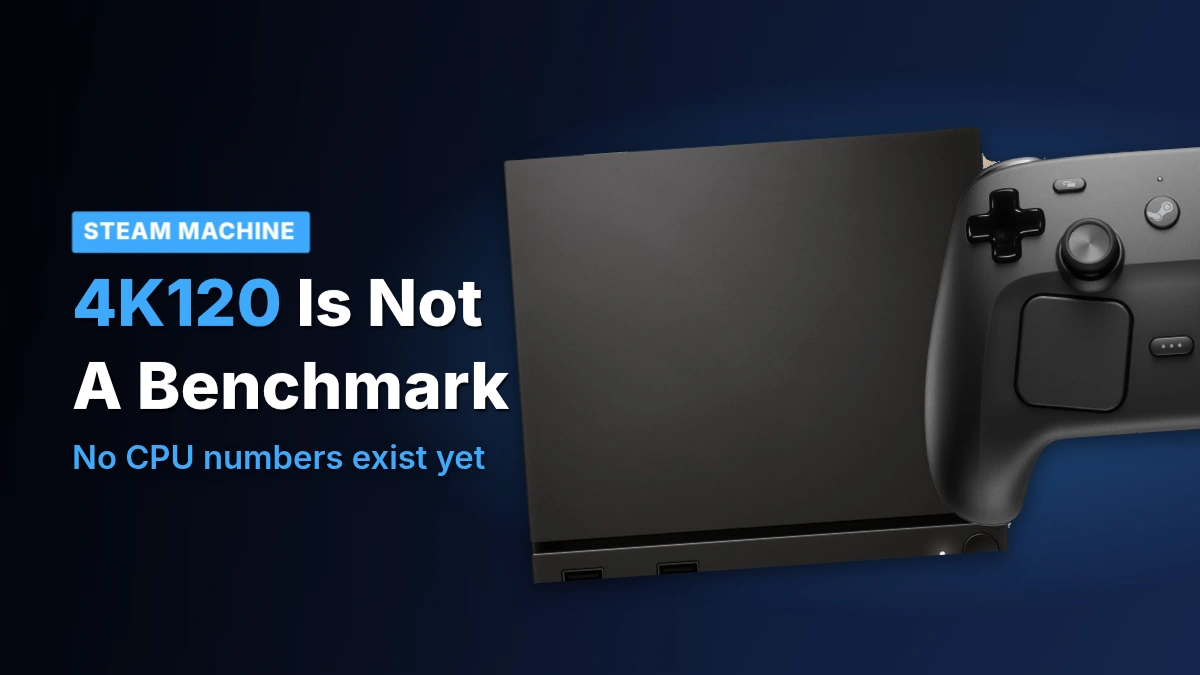
- 2Valve’s 4K120 figure describes what the output port can carry, not what any specific game will run at; don’t read it as a performance promise.
- 3The Steam Frame beats the Quest 3 on latency by a wide margin (46.1ms wireless versus 72.5ms, 57% faster) but loses on battery life in every matched test, including a real played session of Half-Life: Alyx at 115.8 minutes against the Quest 3’s 139.2.
- 4Charging the Frame from empty took 215 minutes against the Quest 3’s 146 minutes, despite the Frame’s 45W charger having nearly three times the Quest 3’s power ceiling available.
- 5At $1,049 to $1,299 against the Quest 3’s $600, and with GamersNexus calling the Frame’s value ‘bad, period,’ buyers weighing either headset on price alone have their answer already.
What the Record Actually Says About the CPU
SteamOS preview and beta builds already carry initial Steam Machine support, and Valve’s release window still points at the first half of 2026. None of that momentum extends to the chip itself: no published CPU benchmark numbers exist for the Steam Machine in this coverage, and the final hardware specs were still unlisted as of June 2026. Anyone trying to judge the processor right now is reading release notes and a shipping date, not a single test result.
- Known: SteamOS preview and beta builds already carry initial Steam Machine support
- Known: the release window still points at the first half of 2026
- Missing: no published CPU benchmark numbers for the Steam Machine
- Missing: final hardware specs, still unlisted in June 2026 coverage
- Missing: pricing, the single biggest open question around the Machine
Pricing is the gap that makes the missing benchmarks matter. A low number invites forgiveness for a chip nobody’s tested; a high one invites the opposite, with buyers digging into performance, features and value far harder than they would at a lower price. Whatever Valve charges has to line up with what the box actually does, and right now there’s no test data to check that line against.
4K120 Is an Output Limit, Not a Frame Rate
The one performance figure floating around the Machine is 4K120, and Valve has discussed it as output of up to that resolution and refresh. That’s a ceiling on what the hardware can send to a display, not a promise about what any given game will actually run at. Real frame rates will swing hard by title: older games and indie titles should reach high frame rates at high resolutions without much trouble, while modern releases are more demanding and will land lower. Treating 4K120 as a benchmark result is reading a spec sheet as a test score.
With no benchmark record to point to, some owners who already have the hardware in hand are judging the CPU and GPU by feel, and a few have concluded the silicon arrived a generation behind. The complaint isn’t abstract; it comes with a price they’d have accepted instead.
For real. I would’ve paid $200 more for more cpu cores with higher clock speeds and a more powerful gpu. In its current form it feels like hardware that should’ve been released a few years ago
Graphics Drivers and Update Speed Ahead of the Machine
Valve doesn’t test a feature on stable SteamOS first. New code goes into preview channels, then beta, and only after that into the release everyone’s Deck pulls automatically, and a run of recent entries in that pipeline happen to line up with the Machine’s window rather than with anything else on Valve’s plate. Valve itself frames much of this as initial Steam Machine support, which is a useful label and an honest one, but it describes software groundwork, not a hardware result. None of it is a benchmark; it’s the paper trail a launch leaves before the hardware shows up to be tested.
The driver work is the real headline here. Valve’s latest graphics driver brings what it calls broad stability improvements, and games that used to stutter and slow down now run smoother, which is the kind of claim a vendor only gets to make because it controls more of the stack than a normal Linux distribution does. Other distros pull Mesa updates faster than SteamOS does; Valve holds them back on purpose so it can tune the driver against its own hardware instead of shipping whatever upstream shipped that week. That tuning isn’t Machine-only. It covers the Steam Deck already in people’s hands, the Machine still waiting on a release date, and the growing set of third-party handhelds running SteamOS, which means anyone running the current driver today is already feeling part of the same work the Machine will ship with. What it still isn’t is a CPU number for the Machine itself.
- Steam Deck
- The upcoming Steam Machine
- Third-party handhelds running SteamOS
The second fix is less exciting and more useful day to day: the step where an update actually gets applied before a restart had been getting steadily slower release after release, and recent preview builds cut that time down a lot, with the biggest gain showing up on faster internet connections. That matters more than it sounds like it should for a brand-new platform, because early on a device like the Machine is going to get patched often, and a slow install is exactly the kind of friction that teaches people to put off updating rather than do it the moment a notification shows up. Faster deployment just means fixes and new features reach people sooner instead of sitting in a queue they’re avoiding.
Why Install Speed Is a Security Question
Recent SteamOS releases carry security patches on a regular basis, which is the other half of why install speed matters: a fix that sits unapplied because the install is slow isn’t protecting anyone. Cut the install time and the patch actually lands when it ships rather than whenever the user finally gets around to it.
VRR Frame Pacing and HDMI Hot-Plugging
Variable refresh rate earns its keep in a specific window, roughly between 48 fps and 60 fps, and that’s precisely the band Valve has spent its recent SteamOS work smoothing out. A card built for raw horsepower can brute-force its way past that range and never need VRR to hide the seams. A box built around balanced performance, which is what the Steam Machine is, will spend a lot of its time right in that band, so getting frame-timing right there isn’t a nice-to-have, it’s the difference between a game that feels steady and one that feels like it’s hitching even when the average frame rate looks fine on paper.
The games people throw at this box split cleanly into two piles. Older titles and most indie games will clear high frame rates without the Steam Machine breaking a sweat, putting them well outside the range where VRR has anything to fix. Newer releases are a different story: modern game design increasingly targets lower frame rates to begin with, landing them right in the 48 to 60 fps band VRR was built for. That split is why reliable VRR could end up mattering more to how the Machine actually feels than any single spec on its sheet, and it’s also why Valve getting the frame-timing work done before launch, rather than patching it in afterward, is worth more than it looks on a feature list.
The other fix is smaller to describe and bigger in practice: displays can now be connected to the Steam Machine while it’s already running, with recent SteamOS updates adding HDMI hot-plugging support so a reboot is no longer required to pick up a new screen. On a desktop that’s a footnote. On a box meant to sit under a TV, where somebody is just as likely to be swapping a cable to a monitor for a quick session or plugging a projector in on the fly, it’s the kind of friction that used to make these machines feel unfinished.
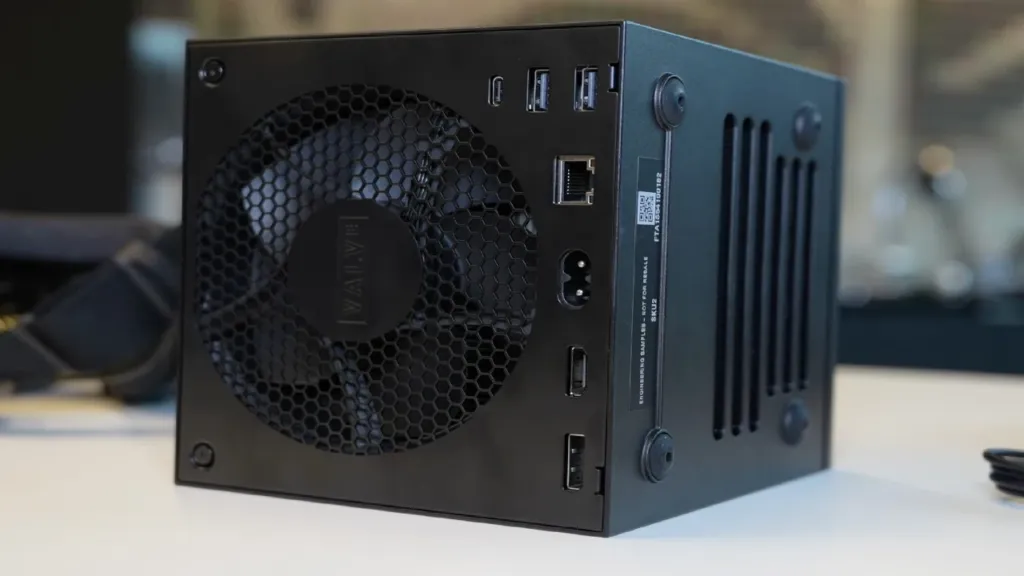
HDMI 2.1 support is the one display question Valve hasn’t closed out. The company has discussed supporting up to 4K120 output, but that figure describes what the port is capable of carrying, not what any particular game will actually run at. A hardware ceiling and a gameplay promise are different things, and until HDMI 2.1 is confirmed, buyers are left knowing what the output can theoretically handle without knowing which games will ever ask it to.
- VRR smooths frame rates roughly between 48 fps and 60 fps
- HDMI hot-plugging works without rebooting the system
- HDMI 2.1 support is still unconfirmed
- Valve has discussed up to 4K120 output
- Older and indie titles should reach high frame rates easily
SteamOS’s Plasma 6.4.3 Upgrade and Desktop Mode
The Steam Machine runs games, but it’s still a PC underneath, and a PC needs a desktop that works for more than just launching Steam. SteamOS’s move from KDE Plasma 6.2.5 to 6.4.3 is the version jump behind most of what changed, and Valve pointed a good chunk of that cycle at desktop mode rather than at the game-mode interface most Deck owners never leave.
The clearest fix is also the one that mattered most: for a long time, the same game at the same settings and the same resolution simply ran worse in desktop mode than it did in game mode, with nothing in the configuration to explain the gap. That penalty is gone now. A Steam Machine owner who drops into the desktop to tweak settings, check a mod, or just browse while a game idles in the background no longer pays a performance tax for being there.
- Rotated display support is better now, which matters to anyone running a monitor vertically for reading, writing, or other content work.
- Per-display scaling means a 1080p monitor and a 1440p monitor sitting side by side can each run at their own native resolution instead of one of them getting stretched to match the other.
- TV scaling is the one part still in progress: Valve wants plugging a Steam Machine into a television to just work, but that plug-and-play experience isn’t finished yet.
None of this is the kind of feature that makes a highlight reel. Windows and macOS users never have to think about whether a rotated display behaves or whether 2 monitors at different resolutions can each look sharp, because somebody solved that for them a long time ago. Valve is building SteamOS from scratch, so it has to solve the same problems itself, and a real share of its current development time is going into exactly that kind of unglamorous plumbing rather than anything that will end up in a trailer.
That plumbing isn’t confined to the Machine. The Steam Frame keeps a desktop mode too, running the same Linux desktop environment as the Deck and the Machine, just rendered in VR instead of on a monitor. Plug in a keyboard and there’s a virtual desktop to work on, though a Frame owner who wants more than one peripheral connected at once runs into the same limitation as the Deck: without a hub, there’s only the one port.
Easy Anti-Cheat on Linux and Epic’s Hiring Push
Anti-cheat has been the single biggest reason a Linux gaming box can’t just promise compatibility, and the Steam Machine inherits that problem whole. Epic’s Easy Anti-Cheat does technically run on Linux, and has for a long time, but NoobFeed’s reporting makes clear that ‘technically runs’ isn’t the same as ‘works’: some of the most popular multiplayer games still ship with anti-cheat that’s unsupported on Linux outright, others get only sporadic updates for it, and even where a developer has turned EAC’s Linux support on, the quality of that implementation varies from game to game. None of that is something a SteamOS buyer can check in advance – it’s a per-game gamble, not a platform guarantee.
Epic has now posted a Senior Game Security Engineer role that puts particular weight on Linux experience, and the listed duties include advocating internally for Linux anti-cheat capabilities – someone whose job is to push for Linux inside a company that controls one of the most widely licensed anti-cheat systems around. That matters past Fortnite and Epic’s own catalog, because Easy Anti-Cheat ships in a large number of third-party games. An internal advocate who can move Linux support forward touches that whole install base, not just the titles Epic publishes itself.
Publishers have historically had little reason to spend engineering time on a platform this small, and Linux is still a minority of PC gamers by any measure. But NoobFeed’s framing of that minority is the part worth sitting with: even a 5% share of PC gaming means millions of players, and SteamOS hardware like the Steam Deck is what’s been growing that number rather than shrinking it. A share too small to bother with on paper stops looking that way once a console-shaped device is putting Linux in front of people who’d never have installed it themselves.
What a hire like this would actually buy owners is narrower than ‘better anti-cheat’ – it’s an end to a specific, recurring failure mode. A game patches, and whatever anti-cheat hooks it uses on Linux break until someone notices and fixes them, sometimes days later. A dedicated Linux engineer is the difference between that breakage being somebody’s full-time job to catch and somebody’s side project to get around to.
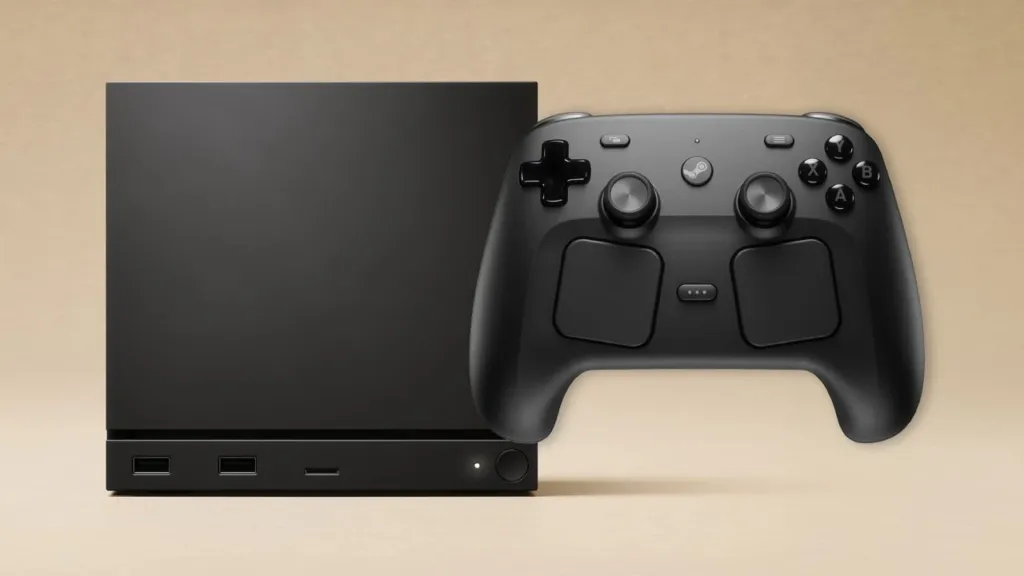
Streaming From the Steam Machine to the Frame
GamersNexus got hold of a Steam Machine during their Frame testing and tried streaming to the headset before Valve had officially switched that feature on. Valve’s own position was that streaming from the Machine wasn’t enabled until after launch, and what GamersNexus found split cleanly along that line: 2D games streamed from the Machine to the Frame without issue, while VR streaming did not work at all. That’s the feature’s state at this moment rather than a performance result, since nobody involved put a frame rate or a latency figure on the Machine doing either kind of streaming.
There’s a second path that sidesteps the streaming gap entirely. GamersNexus downloaded a game on the Steam Machine, moved it onto a microSD card, slotted that card into the Frame, and the game launched fine. For anyone who wants a title on the headset before Valve finishes the Machine’s streaming support, that’s a working way to get it there without touching the network at all.
Every other streaming number published for the Frame, the kind with a millisecond or a frame rate attached, came off a bench built around an RTX 5090 and a 9800X3D, not off the Steam Machine. None of that figure belongs to the Machine as a host; it describes what the Frame can do when the thing feeding it is a desktop built for raw horsepower, which the Machine isn’t claiming to be. And multi-link, the Frame’s two-radio streaming mode, simply doesn’t apply here either way: it doesn’t work with non-VR games, full stop, regardless of what’s doing the streaming.
- Exiting a streamed game from the headset often left it still running on the host, rather than closing cleanly on both ends
- A gamepad produced a ‘not yet supported while streaming VR’ tooltip instead of working controls
- Settings for the setup are split across host Steam, host SteamVR and the headset’s own menus, with no single place to manage them
- Valve had confirmed only 130 games as Stand-Alone Verified at Frame launch, which is why streaming from a Machine or a PC matters as much as it does right now
Steam Frame vs Quest 3: LDAT Latency
GamersNexus wanted a lead soldered straight into a Frame controller button, the cleanest way to time an input end to end, but the controllers are glued shut and the attempt broke the grip button’s function – and with only one Frame unit on hand, that wasn’t a risk they could repeat. Instead they fell back on an LDAT microphone picking up the audible click of the button press to start the clock, stopping it when the display’s luminance changed. That’s a looser method than a soldered lead would have given, and it sets how much precision the numbers below actually carry.
Before touching either headset, GamersNexus ran a wired monitor through the same pipeline: three baseline passes of 100 samples each on a 360Hz monitor landed between 24.3ms and 25.6ms in their own LDAT software, and a Thumper control run on that same monitor measured 24.8ms. Every headset number that follows sits on top of that floor, not at zero.
LDAT Test Software Latency at 120Hz
In GamersNexus’s own LDAT test software, run at 1920×1080 with video quality set to beautiful and inputs coming from a mouse on the host PC rather than either headset’s controllers, the Frame’s two connection methods landed within a millisecond of each other: 46.1ms over the wireless adapter and 47.1ms over WiFi. The Quest 3 on WiFi measured 72.5ms, which is 57% more time than the Frame’s best result. This is control testing on a fixed pipeline rather than VR streaming, and the controllers never enter into it.
Thumper is the more useful test because it runs natively on both headsets as well as streaming to them, and its onscreen actions produce a visible change the LDAT’s sensor can actually catch rather than relying on the microphone trick. GamersNexus kept both headsets at 120Hz where the hardware allowed it and ran every streamed configuration at maxed-out settings, since reliable high-quality streaming is the whole pitch behind the Frame.
Thumper Latency, Steam Frame vs Quest 3
On the Frame itself, local play at 120Hz measured 56.5ms, and dropping to 72Hz – fewer refresh cycles to work with – pushed that to 61.2ms. Streaming over multi-link at 120Hz added 9.2ms on top of the local figure, a 16% increase, landing at 65.7ms, and the wireless adapter running on its own was slower still at 68.4ms. Against the Quest 3’s own local result at 72Hz, 75.2ms, the Frame’s 61.2ms at the same refresh rate leaves the Quest 3 about 23% behind it.
WiFi is the one place the Frame loses its lead. The Quest 3’s USB Steam Link beta, run over the cable that ships with the headset rather than Meta’s untested $80 link cable, measured 82.9ms, barely better than its 83.5ms over WiFi at 120Hz – and the Frame over plain WiFi at 120Hz came in slower than both, at 86.2ms. GamersNexus ran every WiFi test on the same router in the same spot, so these are fixed-hardware results rather than a claim about WiFi performance in general.
One Action, One Game
GamersNexus is upfront that every number here comes from a single action in a single game. The ordering between configurations – adapter ahead of WiFi, local ahead of streaming – is the useful part; treating the millisecond figures themselves as a fixed spec for either headset is not.
Part of why this is hard to measure at all is that neither headset’s display stays lit the way a monitor does. The LDAT depends on a change in luminance, and these panels strobe: Valve locked the Frame’s LCD duty cycle at 8% across every framerate, so at 120Hz the panel is actually lit for roughly 0.67ms of each 8.3ms refresh. That’s deliberate – strobing cuts motion blur, and it’s a real part of why Valve chose LCD over OLED for the Frame in the first place.
Battery Runtimes: Moss and Half-Life: Alyx
On paper, the Frame should hold its own. Valve lists 21.6Wh for the headstrap battery, and while Meta doesn’t publish a capacity for the Quest 3, an iFixit teardown put it at 19.44Wh, with the label in that teardown video reading closer to 19.12Wh; GamersNexus settles on roughly 19-20Wh either way. Valve’s own power figures line up with Meta’s claims too: the company says optimised games and streaming can draw under 10W, and up to 25W peak for unoptimised or higher-spec titles, and a steady 10W draw against a 21.6Wh cell works out to around 2.16 hours, right where Meta’s claimed 2.2 hours overall and 2.4 hours gaming already sit. Nothing in the spec sheets predicts a gap between these two headsets.
GamersNexus tests Moss on a turntable, spinning the headset in continuous circles until the battery dies rather than handing it to a player. It’s nothing like how anyone actually uses either headset, but that’s the point: a human playing introduces variance a battery test can’t afford, and a turntable produces the same run every time. Brightness was matched between the Frame and Quest 3 using LDAT luminance readings, and the Quest 3’s battery saver stayed off for every run so neither headset got a hidden assist.
Battery life running Moss
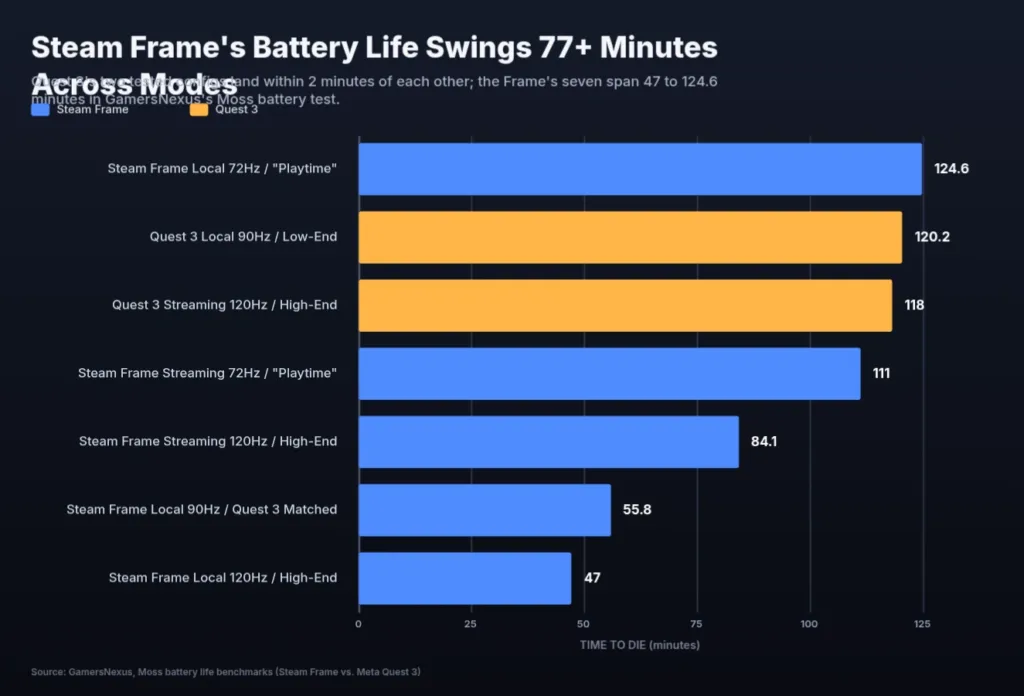
The results split the two headsets into different categories entirely. The Quest 3 barely notices whether it’s running Moss locally or streaming it: 120.2 minutes local, 118 minutes streamed at 120Hz, a gap of 2 minutes. The Frame swings far wider depending on how it’s configured, from 47 minutes locally at high settings up to 124.6 minutes locally in Playtime settings, with 90Hz local landing at 55.8 minutes and streamed Playtime mode reaching 111 minutes. On the closest like-for-like comparison GamersNexus could build, streaming at 120Hz in Performance mode, the Frame died at 84.1 minutes against the Quest 3’s 118, and the Quest lasted 40% longer. The Frame’s best number, 124.6 minutes, comes from local Playtime settings, which isn’t the same workload it just lost to; Playtime mode changes more than refresh rate, so that figure isn’t a rebuttal to the 120Hz loss, it’s a different test.
120Hz on battery is a stress test, not a use case
GamersNexus recommends the 72Hz Playtime profile for anyone playing locally on the Frame, along with sticking to lightweight games off the battery; dropping to that profile more than doubles the Frame’s local runtime compared with running it flat out at 120Hz.
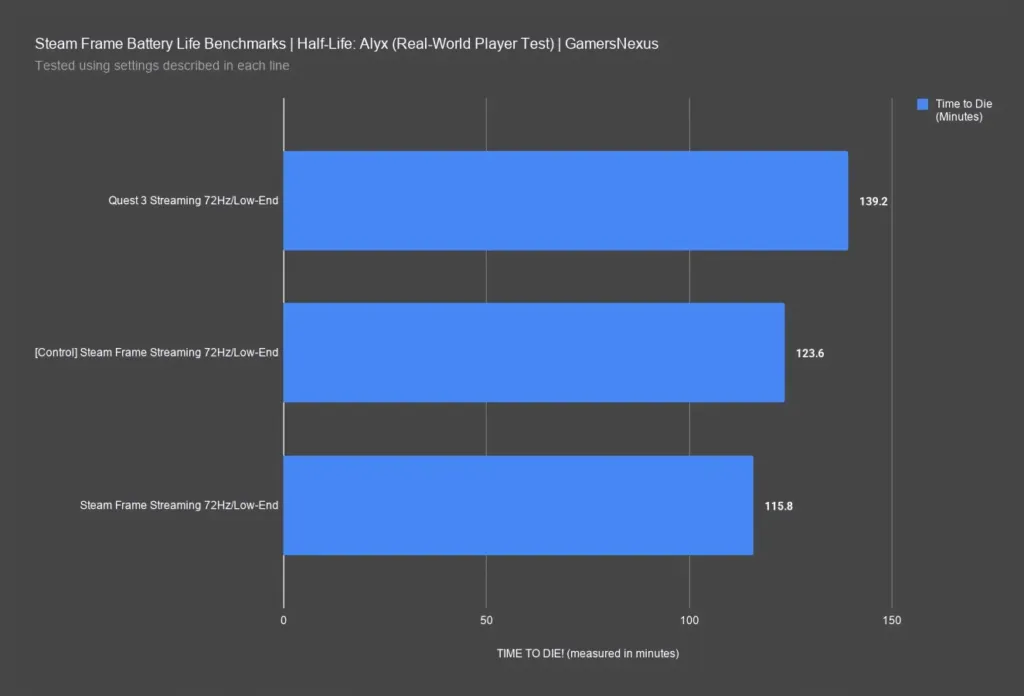
For the second test, GamersNexus paid somebody, Mike, to actually play Half-Life: Alyx streamed to each headset all day rather than relying on the turntable alone. Both headsets were locked to 72Hz, the Frame ran in Playtime mode, target bandwidth was capped at 200Mbps, and resolution per eye stayed at the default 150%, settings picked to give both headsets a fair, matched shot rather than favouring either one.
Battery life streaming Half-Life: Alyx
The played session validates the turntable method rather than undercutting it: a turntable control run on the Frame lasted 123.6 minutes, and Mike’s actual playthrough on the same headset landed at 115.8 minutes, close enough that the artificial test and the real one are measuring the same thing. His Quest 3 session, though, ran 139.2 minutes, 20% longer than the Frame’s real-player number with the same person, the same game, and the same settings. The Frame was on single-link WiFi for Mike’s session, a configuration that would, if anything, have lengthened its battery life rather than shortened it, so the gap isn’t an artefact of how the Frame was connected.
GamersNexus comes away confident the Quest 3 broadly beats the Frame on runtime, though that conclusion rests on the single Frame unit they had to test. Buyers reading the numbers have reacted to what a sub-2-hour battery means for a headset built around streaming games from a PC in another room.
That battery life for streaming games is killer. I’m not sure what I was expecting, but an 1.5 hours of playtime with 2.5-3 hours of charge time isn’t acceptable. Maybe that’s just where battery technology is at right now, but in my eyes, that just means the tech isn’t ready for the vision they have.
Charging Times: Frame vs Quest 3 and Valve’s Numbers
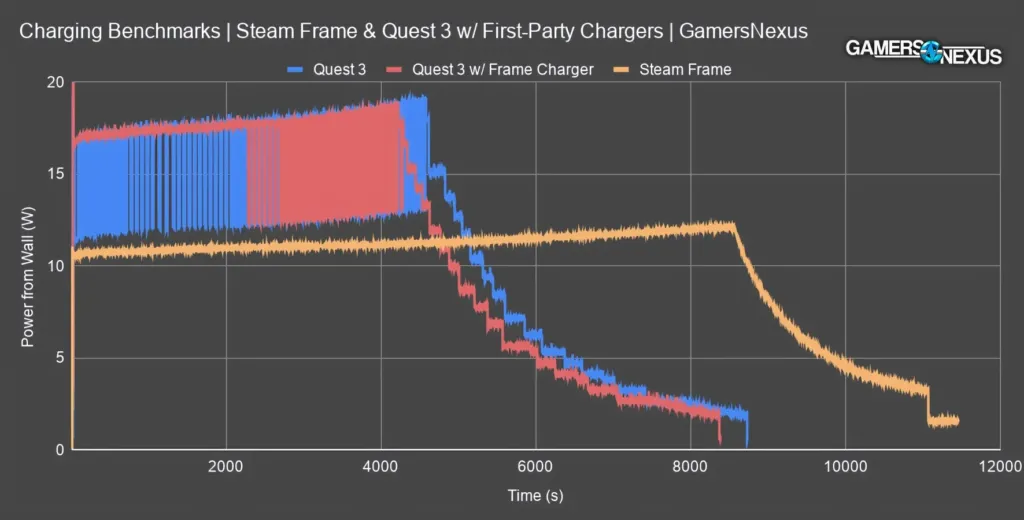
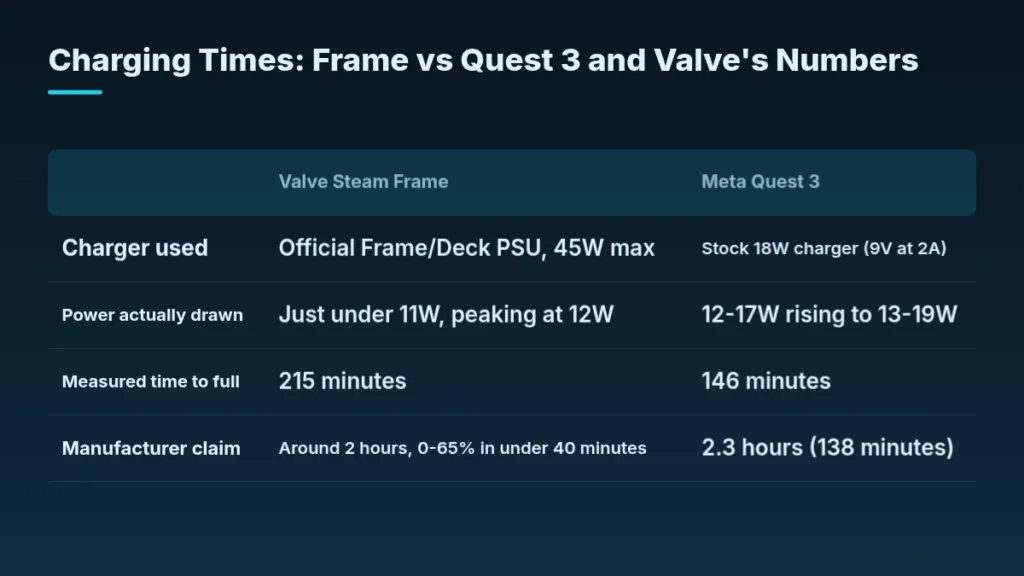
GamersNexus measured the Quest 3 filling from empty in 146 minutes on its stock 18W charger (9V at 2A), a figure that sits close to Meta’s own claimed 2.3 hours. The Steam Frame, plugged into Valve’s official 45W PSU, took 215 minutes to reach full, nearly 70 minutes longer than the Quest 3 despite having almost three times the charger’s power ceiling sitting available to it. The reason shows up in what the Frame actually drew: just under 11W for most of the charge, peaking at only 12W, so the 45W brick spent the whole session mostly idle while the headset charged itself slowly by design rather than by any limit coming from the power supply.
| Valve Steam Frame | Meta Quest 3 | |
|---|---|---|
| Charger used | Official Frame/Deck PSU, 45W max | Stock 18W charger (9V at 2A) |
| Power actually drawn | Just under 11W, peaking at 12W | 12-17W rising to 13-19W |
| Measured time to full | 215 minutes | 146 minutes |
| Manufacturer claim | Around 2 hours, 0-65% in under 40 minutes | 2.3 hours (138 minutes) |
Valve’s own spec sheet says a dead Frame reaches full charge in around 2 hours, with the first 0 to 65% finishing in under 40 minutes, and the company’s own plot shows that fast-charging phase ending at about 35 minutes in. The run GamersNexus measured put the same inflection point at 143 minutes instead. Valve’s internal testing, roughly 100 charge cycles spread across 4 Steam Frame headsets, landed on 90 to 120 minutes to a full charge, and none of those three numbers, Valve’s spec, Valve’s internal data, or the measured 215 minutes, agree with each other.
- Valve floated battery capacity ‘learning’ as one explanation, saying a cell needs a few full cycles before the system can estimate its maximum capacity accurately
- Valve also allowed for a possible regression in its own charging software
- A defect in the single review unit can’t be ruled out, since only one Frame was tested
- The charger itself isn’t the cause: GamersNexus tried a known-good 45W Steam Deck charger and a Quest charger on the Frame and got the same slow-charging behavior either way
This experiment sounds valid, but our results are different. We’re confident this hardware can charge fully in the times we’ve stated.
Controller batteries are the one piece of this charging story nobody could actually push to failure. Both the Frame’s and the Quest 3’s stock disposable AAs lasted the entire review, roughly 2 work weeks of use during working hours, without needing a swap. Valve claims up to 40 hours out of a set depending on which batteries go in, a figure that outlasts every headset charging disagreement above it by enough of a margin that it isn’t worth arguing over.
Steam Frame Pricing and the Memory Spike
The Steam Frame starts at $1,049 for the 256GB model and climbs to $1,299 for the 1TB version, against $600 for Meta’s Quest 3. GamersNexus’s own review carries two sets of numbers for the Valve side: the highlights box up top lists $1,060 and $1,300, while the body text that follows gives $1,049 and $1,299. Both figures sit in the same piece, and neither cancels the other out — the gap is small, but it’s the kind of inconsistency that shows up when a price moves late enough in a review cycle that not every section gets updated to match.
Valve set its own bar here and missed it twice. The company had said the Frame wouldn’t cost more than the Index, which sold for $1,000, and had pointed at an early 2026 launch. The Frame arrived in September 2026 at $1,049, months late and above the price Valve itself promised not to cross.
| Item | Price | Included? |
|---|---|---|
| Steam Frame 256GB | $1,049 | — |
| Steam Frame 1TB | $1,299 | — |
| Meta Quest 3 | $600 | — |
| Ergonomic Accessories Kit | $60 | No |
| Charging cable / AC adapter | $30 | No |
| Cushion, gasket and light blocker replacement | $50 | No |
| Arcturus RGB passthrough camera | $150 | No |
| Meta link cable | $80 | No |
- The Ergonomic Accessories Kit runs $60 and isn’t included with the headset
- That kit holds the controller hand straps, a top strap and a light blocker, and GamersNexus treats the hand straps as effectively mandatory, since they’re what makes Valve’s advertised finger tracking usable in practice
- The charging cable and AC adapter aren’t included either, at $30 extra
- A replacement cushion, gasket and light blocker set adds another $50
- The Arcturus RGB passthrough camera costs $150, and it fixes real complaints reviewers had about the stock passthrough quality
- Meta charges its own add-on fee on the other side: an $80 link cable for the Quest 3, the same kind of unbundled charge Valve is making on the Frame
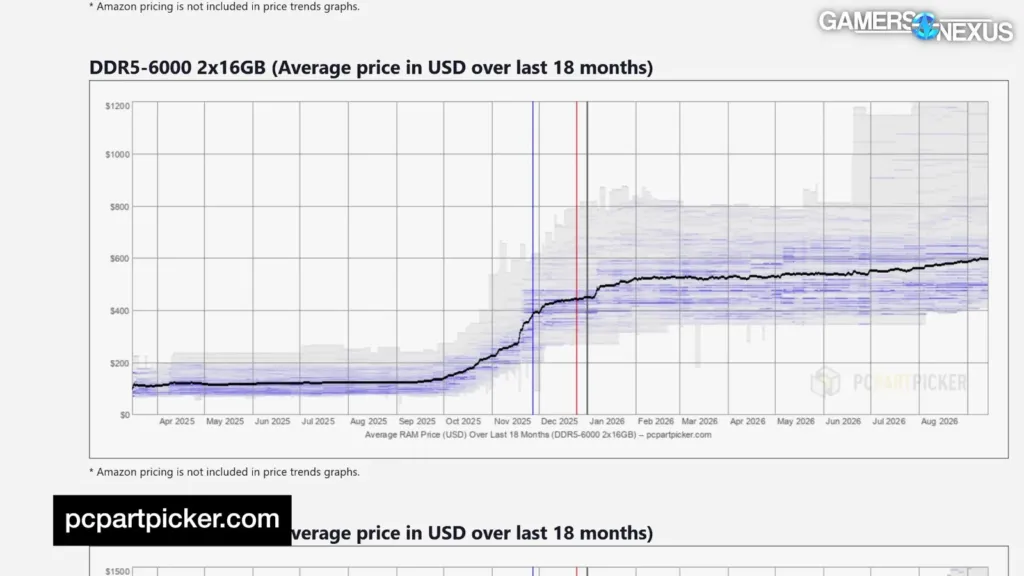
Some of that price gap traces back to a market that moved underneath the product rather than anything Valve chose. Memory prices rose somewhere between 350% and 600% since Valve’s November announcement, depending on which spec you’re pricing, and storage prices more than doubled over that same stretch. The Frame carries 16GB of LPDDR5X and either 256GB or 1TB of storage, which is exactly the kind of component mix that gets hit twice: once on the memory side, once on storage, between the day Valve announced a price and the day it shipped one.
GamersNexus’s conclusion is blunt: the Frame’s value is bad, period. Refusing the Quest 3 on privacy grounds doesn’t flip that math, either — a reader who won’t buy Meta’s headset over data concerns still isn’t getting a $1,000-plus product’s worth of hardware from Valve’s, and GamersNexus says plainly that the Frame still isn’t worth crossing $1,000 for.
The dollar figures above are the easy part of the math. Buyers outside the US have to run their own conversion against whatever their local retailers are actually charging, and that’s where the comparison starts to look different than the US prices suggest.
For UK quick price check. Metaquest 3 is £430 on high street retailer (£550 on their site) while the frame is £900 for 256GM not 512GB of the Q3. I think the Frame is outside of my budget tbh.
Canadian buyers are doing the same conversion on top of the $1,049 starting price, and for someone whose Frame would be a first VR purchase rather than a replacement for gear they already own, the converted number stops being a purchase decision and turns into a savings goal.
Honestly. I really want the steam frame as my first VR set. But 1600 Canadian pesos is very steep for me. It’s gonna take several months to save that up.
Owner Reports Versus the Published Record
Owners posting frame rates in specific games are answering a question the published Steam Machine record never asked. Everything written about the Machine so far describes software getting better – Valve’s graphics driver work chasing stuttering and game-specific fixes, VRR smoothing the 48 fps to 60 fps band, HDMI hot-plug handling, a desktop mode rebuilt around KDE Plasma – and none of it is a game benchmark. Valve has talked about pushing output to 4K120 on the hardware, but frame pacing work like VRR matters just as much as raw silicon for how a game actually feels, and whatever a reviewer or owner reports in one title says little about the next, since the result depends on which game is running. That’s the hole in the record: software progress notes exist, CPU and GPU performance numbers for actual games don’t.
With no measured results to check against, owners are left comparing what they see on their own Steam Machine to the recommended-spec sheet published for a given game, and the two don’t always line up the way the sheet implies they should.
That’s what I’m really confused about. The recommended specs target upscaled 1440P 60fps on a 3060TI. A 3060 is weaker than the 3060ti by about 20%. So 1080p 60fps should in theory, be achievable. Idk how the Steam Machine is performing this drastically worse when it’s not even that far off from the recommended specs.
Not every thread is arguing about frame rates. Some owners are reporting on something the spec sheets don’t cover at all: whether the Steam Machine earns a place next to the console or gaming PC already sitting in the house.
I have a pretty solid gaming pc/xbox series x and I was in the same position but after 2 months I’ve used the SM as my primary. It’s so easy to travel with! It’s usually on my desk connected to my monitor but if I feel like playing on the couch it’s not a hassle at all to move to another room. I do not regret the purchase at all.
A second argument is running alongside the frame rate confusion, and it isn’t about the hardware at all: it’s about whether the people reviewing Valve’s hardware are doing it fairly. Even reviewers who credit Valve with leading the market draw criticism from owners who think the comparisons being made against that hardware are rigged from the start.
This review is a masterclass in a subtle hit job. While he couldn’t deny that it’s the leader in the market, his job was clear: diminish Valve’s accomplishments through unreasonable comparisons.
The only measured numbers that exist anywhere in Valve’s current hardware lineup come from the Steam Frame, not the Machine, and GamersNexus’s own experience running that test is worth weighing before trusting any single owner’s frame rate claim. Pinning down something as simple as a repeatable battery run meant digging through host Steam settings, host SteamVR settings and headset menus all at once – a settings sprawl bad enough that controlling for it took real effort even with the hardware in hand. Valve has only confirmed 130 games as Stand-Alone Verified on the Frame, which is why Valve pitches the headset as a streaming device first: GamersNexus found all 2D games and many VR titles should stream about equally well, precisely because the native catalogue is too thin to carry the pitch on its own. Both findings point the same way for the Machine: a settings stack this tangled and a catalogue this game-dependent mean one owner’s frame rate number, pulled from one title under unknown settings, tells a reader a lot less than it looks like it does.
| What is published | Steam Machine | Steam Frame |
|---|---|---|
| Game frame rate benchmarks | None published | None published |
| End-to-end latency figures | None published | 24.8 ms control, 56.5 ms local at 120 Hz |
| Battery runtime figures | Not applicable | 84.1 to 124.6 minutes in Moss |
| Full charge time measured | None published | 215 minutes on the 45W Valve PSU |
| Software progress notes | Drivers, VRR, HDMI, KDE Plasma 6.4.3 | SteamOS on ARM with FEX emulation |