
Key Takeaways
- 1If your room has windows or overhead lighting left on, that matters more than panel type: OLED’s cathode reflects close to 80% of ambient light, and even with coatings it only manages about 5:1 contrast at 10,000 fc, versus IPS holding 300-400 nits steady regardless of what’s lit on screen.
- 2At $500 to $600, the INNOCN GA27M1Q (refurbished $499.99, new $599.99) puts a 27-inch 500Hz QD-OLED inside the same budget that used to only buy IPS, so the old ‘OLED means four figures’ rule no longer applies to that screen size.
- 3If you read documents or code for 8 hours a day, budget for text fringing: the PG32UCDM’s triangular QD-OLED subpixel layout fights Windows ClearType, while any standard RGB-stripe IPS renders small text cleanly with no extra work.
- 4Don’t buy the PG32UCDM’s 1,000-nit spec sheet number at face value – TFTCentral measured that only on a 2% window, and it falls to roughly 480 nits once 10% of the panel is lit.
- 5If a static HUD, taskbar or spreadsheet sits on your screen all day, that’s the exact burn-in trigger OLED makers are warranting against; even the budget GA27M1Q lists burn-in protection, and premium panels back it with a 3-year warranty IPS has never needed.
- 6For the 32-inch 4K tier, the premium hasn’t moved: the PG32UCDM at $1,359.99 still runs over 4 times the $319.99 VG27AQ, so shoppers comparing flagships are still looking at 2023-era pricing even while 27-inch QD-OLED has gotten cheap.
Pixel Response Time and Clean Motion
TFTCentral measures the PG32UCDM’s QD-OLED panel at 0.03ms GtG, and that number is close enough to instant that it leaves nothing behind a moving object, no trailing smear even running at 240Hz. The VG27AQ’s box says 1ms, but that figure only holds with ELMB backlight strobing switched on; without it, the panel’s actual GtG spec is 4ms. Across IPS monitors generally, GtG figures run anywhere from 1ms to 4ms depending on which mode and which condition a reviewer measured, and that spread is the more honest number than any single figure printed on a spec sheet.
| OLED (PG32UCDM) | IPS (VG27AQ) | |
|---|---|---|
| Panel | QD-OLED | Fast IPS |
| Response (GtG) | ~0.03ms | 4ms (1ms MPRT) |
How IPS Closed the Response Gap
IPS didn’t get fast by accident. Panel makers thinned the liquid crystal layer from 5 micrometres down to 2-3 micrometres, so the molecules have less distance to rotate, and layered overdrive on top, a brief voltage spike that forces the rotation to happen quicker than it would on its own. On one tested panel that combination took the measured response from 2ms down to 1.2ms. It’s still a panel being pushed into speed rather than one that switches state on its own, which is the distinction OLED doesn’t need.
None of that makes the gap decide games for you. A good IPS running 144-165Hz already looks clean while you’re playing, and the OLED advantage only becomes obvious when you put the two side by side in a motion test. It’s visible. It rarely wins you a gunfight.
When Clean Motion Exposes Stutter
The same instant response that kills smear has a cost nobody puts on a spec sheet: with no blur to smooth over an uneven frame, bad frame delivery has nowhere to hide. Blur Busters readers report it’s easier to tell 60Hz from 120Hz from 240Hz on OLED than on an LCD panel, for the same reason. Below roughly 120Hz especially, that means frame delivery needs to be clean and consistent for the image to feel good, where on an IPS panel some of that unevenness would have simply blurred away.
Not everyone rates OLED motion above a strobed-backlight IPS either, and the people who notice the difference tend to be the ones playing competitively rather than everyone else.
oled much slower than my strobed backlight ips.. but I only really notice it in comp. for most everything else. oled is a bit prettier…
Contrast and Dark-Scene Performance
An OLED pixel lights itself; an IPS pixel sits in front of a backlight that never fully turns off, and that one difference decides everything in a dark scene. Switch an OLED pixel off and it is off, producing true black with nothing behind it to leak through. An IPS panel can’t do that: the backlight is always on, some of it always gets past the liquid crystal, and that leakage is why IPS contrast caps out near 1,000:1 no matter how the panel is tuned. There’s no firmware update or calibration pass that changes the physics of a backlight sitting behind glass.
That’s what you’re actually seeing when a bright highlight sits right next to black on an OLED screen with no halo around it: a starfield, a night level, an HDR explosion against a dark sky, all rendered without the glow creeping in from the edges. Look at the same kind of scene on IPS, especially from off to the side, and you get the grey haze people call IPS glow sitting over everything that’s supposed to be black.
| OLED (PG32UCDM) | IPS (VG27AQ) | |
|---|---|---|
| Panel | QD-OLED | Fast IPS |
| Contrast | Effectively infinite | ~1,000:1 |
| Full-field brightness | Limited by ABL | Consistent |
iVadim ran IPS, VA and OLED panels side by side, and the result is the kind of gap you only notice once you’ve actually seen the comparison: next to OLED, both the IPS and VA blacks read as milky and greyish, worst in the darker scenes where there’s nothing else on screen to distract from it. OLED holds absolute black there because every pixel is controlled on its own, with nothing shared between it and its neighbours.
The obvious comeback is local dimming, and it narrows the gap without closing it. A zone-dimmed IPS or VA panel is still dimming in blocks of pixels at a time, however many zones the backlight has; a 4K OLED is controlling over 8 million individual pixels, each one able to go fully dark on its own. Dimming a zone and switching off a pixel are not the same operation, and that gap is why local dimming keeps losing this comparison.
| Model | GA27M1Q |
| Panel Type | OLED |
| Contrast Ratio | 1,500,000:1 (Typical) |
| Brightness | 300 nits (Typical), 240 nits (Minimum) |
| HDR Support | VESA DisplayHDR 500 True Black |
A Big Contrast Number Isn’t the Whole Story
INNOCN rates the GA27M1Q at 1,500,000:1 typical contrast, and a figure that large is really just another way of saying the black level is close to zero, which every OLED can claim once its pixels are fully off. It says nothing about how bright the panel gets, and peak brightness is what actually sets how much dynamic range shows up on screen – it varies from one OLED to the next. A contrast number on a spec sheet doesn’t settle the HDR question by itself.
In a dark room, HDR on OLED is simply the better picture, and IPS has no answer for it. iVadim found OLED keeps its edge on colour vibrancy even once the lights come on, but with the lights on, reflections bouncing off the OLED panel lift its perceived black level, and that’s what shrinks the gap rather than closing it.
What ABL Does to OLED Brightness
Asus’s spec sheet says the PG32UCDM hits 1,000 nits, but TFTCentral only measured that on a 2% window, a bright object no bigger than a coin sitting on an otherwise dark screen. Light up a tenth of the panel instead and the number drops to roughly 480 nits, and it keeps falling from there, because QD-OLED runs an Automatic Brightness Limiter that keeps cutting output as the average picture level climbs to protect the panel. The 1,000-nit figure describes a test pattern, not a desktop.
Measured and rated brightness by window size
Put that against what a 27-inch QD-OLED like the GA27M1Q is actually rated for: 300 nits typical, 240 nits minimum, INNOCN’s own numbers. A mid-range IPS panel doesn’t bother with any of that math; it holds 300 to 400 nits across the whole screen and stays there whether 2% of it is lit or all of it is. Open a full white browser window under a window and that steadiness is what makes the cheaper IPS look like the brighter screen.
| Brightness measure | OLED | Mid-range IPS |
|---|---|---|
| Peak on 2% window | ~1,000 nits (PG32UCDM) | 300-400 nits |
| 10% window | ~480 nits (PG32UCDM) | 300-400 nits |
| Rated typical | 300 nits (GA27M1Q) | 300-400 nits |
| Rated minimum | 240 nits (GA27M1Q) | 300-400 nits |
| Behaviour as more screen lights up | Falls, limited by ABL | Consistent |
Reflections and the Mirror Behind the Pixels
Put the two side by side with the lights on and most of the black-level gap from the dark room closes up, because the OLED is lifting its own blacks. Behind every self-emissive pixel sits a metal cathode, and that cathode works like a mirror, reflecting close to 80% of whatever ambient light hits it. Most LCDs are reflective to some degree too, but OLED has nothing else to fall back on in a bright room: it relies entirely on converting electricity into light, with no alternative path to readability once ambient light is bouncing straight back at the viewer.
Panel makers fight this with a circular polarizer and antireflective coatings that pull diffuse reflectance below 0.1%. It helps, but at 10,000 fc of incident light, the usual stand-in for simulating outdoor brightness, that engineering still only buys about 5:1 photopic contrast. A panel that claims infinite contrast in a dark room is down to single digits once you take it outside.
A White Background Costs OLED Three Times Over
Showing a document or a website with a white background can push an OLED past 300% of an LCD’s power draw, because every one of those pixels has to light itself to produce white. An inactive OLED pixel makes no light and draws no power at all, which is exactly backwards from what a desktop needs: the same mechanism that gives you perfect blacks for free makes a white page expensive.
The Burn-In Clock IPS Doesn’t Run
Burn-in is the one failure mode that doesn’t exist on an IPS panel at all: wear a static element into an OLED screen for long enough and the pixels underneath it degrade faster than the pixels around them, leaving a ghost that’s still visible once the content is gone. It takes thousands of hours of the same static element sitting in the same place, and once that uneven wear has happened there’s no fix for it – the image is burned into the panel’s response, not sitting on top of it. The triggers aren’t exotic. A game HUD, a Windows taskbar, a stream chat panel, a spreadsheet grid left open all day: ordinary desktop furniture, not fringe use cases. IPS has no equivalent clock running in the background, because a backlight-lit panel has no pixel-level wear mechanism to suffer from in the first place.
- A game HUD held in the same corner of the screen for hours
- The Windows taskbar, which never moves
- A stream chat panel pinned in one spot
- A spreadsheet grid sitting static for a whole working day
Modern OLED monitors fight this with pixel-refresh cycles running in the background and automatic dimming on static logos, and premium models back that up with hardware cover: RTINGS notes a 3-year burn-in warranty on top-tier OLED panels, a clause LCD monitors have never needed because there’s nothing to warranty against. Read that warranty the way a maker had to write it and the reassurance cuts the other way – nobody underwrites a failure mode for 3 years unless it happens often enough to budget for. Even the $599 GA27M1Q from INNOCN lists burn-in protection among its specific features, which tells you this is a standard line on OLED spec sheets now, not a problem confined to flagship panels.
The Warranty Is the Admission
A 3-year burn-in warranty on a premium OLED monitor isn’t a marketing flourish, it’s a cost a maker has already worked out it will have to pay. No IPS monitor carries that clause, because no IPS panel has a burn-in clock for a warranty to cover.
Degradation and Lifetime, By the Numbers
A 2008 OLED TV panel tracked by researchers lost 12% of its blue luminance over the first 1,000 hours, against 7% for red and 8% for green – the imbalance matters more than the overall dimming, because a panel losing blue faster than red and green drifts in colour balance as it ages rather than just going dim evenly. Those blue OLEDs were rated to last about 14,000 hours before reaching half brightness, against 25,000 to 40,000 hours for LCD, LED and PDP panels of the same era, a real gap on panels nobody would sell today. The claimed lifetime has moved a long way since: LG’s own figure went from 36,000 hours in 2013 to 100,000 hours in 2016, a jump that reflects a different generation of panel rather than the same part suddenly living three times as long.
| Lifetime claim | Hours to half brightness |
|---|---|
| Blue OLED, 2008-era panels | ~14,000 hours |
| LCD / LED / PDP, same era | 25,000–40,000 hours |
| LG expected OLED lifetime, 2013 | 36,000 hours |
| LG expected OLED lifetime, 2016 | 100,000 hours |
| OLED lighting at 25% brightness | 40,000 hours |
| OLED lighting at 100% brightness | 10,000 hours |
None of that lifetime is fixed – it moves with how hard the panel gets driven. A U.S. Department of Energy paper on OLED lighting puts expected life at 40,000 hours when run at 25% brightness, dropping to 10,000 hours at full brightness. That’s the lever an owner actually controls: run an OLED bright all day, every day, and panel life gets spent down faster than running it dim.
Whether the Risk Is Solved Depends on the Owner
Owners who’ve lived with a modern OLED for a while point to the protections built into the panel itself – automatic idle shutoff and a pixel-shift cleaning cycle that runs on every power-down – as reason the worry is mostly behind the technology now.
Newer OLED don’t really have much issues with burn in anymore anyway because of how much the technology has improved. My monitors turn off automatically after 5 minutes of inactivity, and perform a screen cleaning/pixel shift on every shut down of the monitor to prevent burn in.
Other owners say the split isn’t really about what the panel can do, it’s about what the person in front of it does: whether you’re someone who steps away from a desk and leaves a static window up, because that’s the behavior that actually produces burn-in regardless of how good the pixel-refresh cycle is.
I will never get an OLED because too many times I will walk away for some time and leave a static image up on my computer, so I am the most at risk for burn in.
Subpixel Layout and Desktop Text
Windows ClearType font rendering was built around one assumption: that a display’s subpixels sit in a standard RGB stripe, each pixel split into a red, green and blue column side by side. IPS panels are exactly that layout, which is why text on an IPS monitor looks crisp without any extra work. The PG32UCDM’s QD-OLED panel isn’t built that way; it uses a triangular subpixel layout, and ClearType’s anti-aliasing, written for a stripe it’s never actually seeing, can leave faint colour fringing at the edges of small black-on-white text.
Where Fringing Actually Shows Up
Open a game or play a video and this never surfaces at all — motion and full-colour content bury it. Spend 8 hours a day reading documents, reviewing code or scrolling a browser instead, and the fringing on small dark text against a white background is the first thing you notice. Whether that matters to you comes down to how much of the monitor’s day is spent on text rather than content.
Samsung has started shipping a vertical V-Stripe QD-OLED layout built specifically to fix this, replacing the triangular arrangement with one ClearType can actually render correctly. Tom’s Hardware reports it hasn’t reached most panels currently on sale, though, so a QD-OLED monitor bought today most likely still runs the triangular layout, and the fringing that comes with it.
What OLED and IPS Actually Cost Today
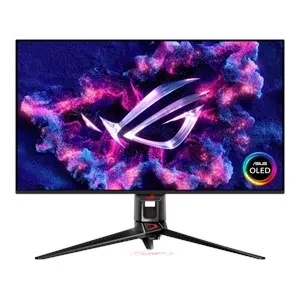
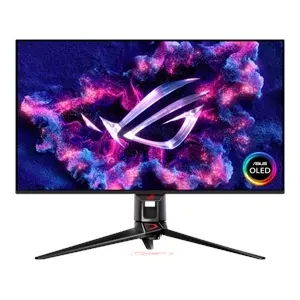
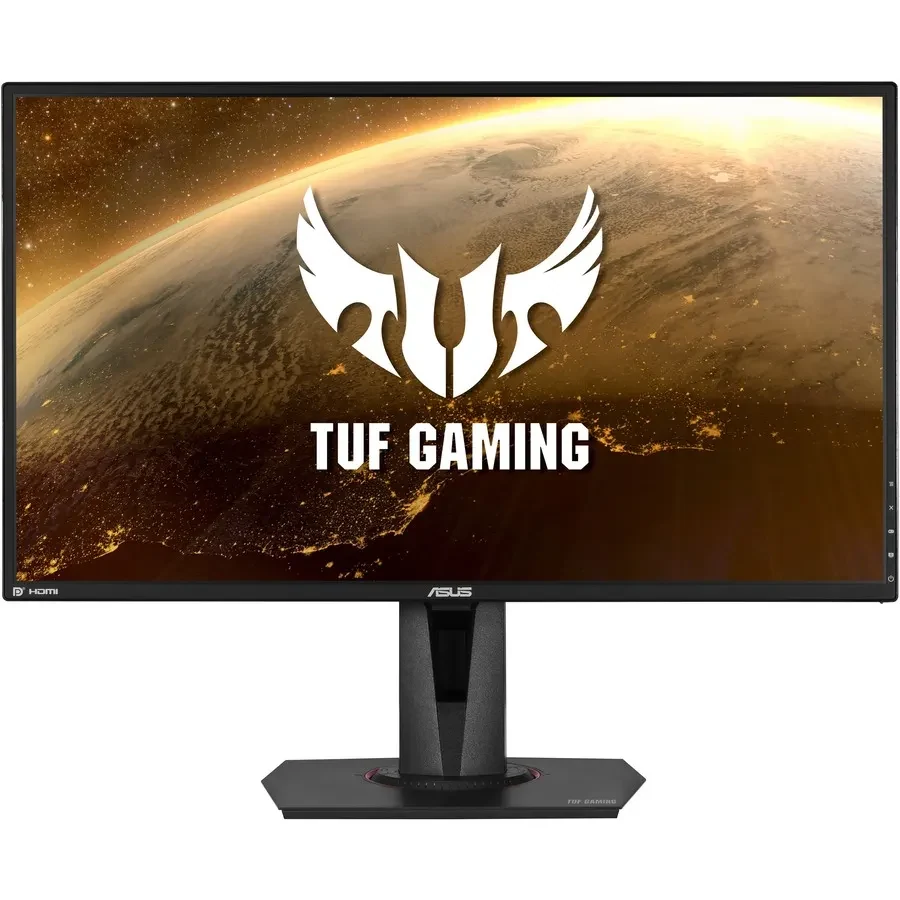
The catalog OLED pick, the PG32UCDM, lists at $1,359.99, and the 1440p 165Hz TUF VG27AQ sits at $319.99 – the full weight of the premium everybody argues about sits in that gap. It isn’t a clean swap of one panel technology for another, though: the PG32UCDM is a 32-inch 4K QD-OLED panel running 240Hz, which puts it ahead of the IPS on size, resolution and refresh rate before panel type even enters the conversation. Some of what that price difference is paying for is tier, not technology.
| Monitor | Panel | Spec | Price |
|---|---|---|---|
| Asus ROG Swift PG32UCDM | QD-OLED | 32″ 4K 240Hz | $1,359.99 |
| INNOCN GA27M1Q | QD-OLED | 27″ 1440p 500Hz | $599.99 (list $774.99) |
| Asus TUF VG27AQ | Fast IPS | 27″ 1440p 165Hz | $319.99 |
The GA27M1Q is a different number entirely. It launched earlier this year at around $999, carries a $774.99 list price today, and INNOCN sells it direct for $599.99 – a figure the same review also quotes as $649. Amazon has had it at $599, and a refurbished unit runs $499.99. Rival 27-inch QD-OLEDs, meanwhile, sit between $700 and $900, which makes the GA27M1Q the outlier pulling the whole category’s floor down rather than the norm.
INNOCN GA27M1Q asking price by channel
Spend under roughly $500 and the choice stops being between OLED and IPS at all – it’s a choice between IPS panels, full stop, with $319.99 buying a capable 1440p 165Hz one like the VG27AQ. The cheapest route into QD-OLED is a $499.99 refurbished GA27M1Q, so the two tiers do overlap, just barely, at one specific price point rather than across the board.
A separate video comparison priced its OLED pick at $1200 against $400 for IPS and $260 for VA, the same shape of gap showing up again with an entirely different set of monitors on the table.
Shoppers watching sale prices have started to call the premium dead. One commenter pointed to Amazon listings putting OLED and IPS monitors at the same number, and to a personal purchase that got cheaper after the fact.
OLED actually got so much cheaper that they cost about the same as IPS. I looked at Amazon lately and just see OLED at around $300.. Which is the same price as an IPS. I bought my OLED on sale for $600 from $900 and now its even significantly cheaper
Others are still pricing OLED off the flagship end, where the PG32UCDM at $1,359.99 runs over 4 times the $319.99 IPS, and a multiple that size is enough to keep plenty of buyers out of the category entirely.
For the last time, no casual being is dropping 3x the price on an OLED monitor.
Two Premiums, Two Truths
Both camps in that argument are reading real numbers, just off different monitors. On 27-inch 1440p QD-OLED the premium has mostly collapsed: $499.99 refurbished or $599.99 new gets you one, within shouting distance of a $319.99 IPS. On 32-inch 4K, it hasn’t moved – the PG32UCDM still costs over four times a good IPS. Shop the smaller panel and OLED looks solved; shop the flagship and it looks like 2023.
INNOCN GA27M1Q: 27-Inch QD-OLED at 500Hz
INNOCN GA27M1Q
OLED speed dropped into a much cheaper bracketINNOCN builds the GA27M1Q around a 27-inch QD-OLED panel at 1440p, 110.8 PPI, and rates it for 500Hz with a 0.03ms GtG response figure, the same number the pricier OLEDs in this piece carry. It also ships VESA DisplayHDR 500 True Black. None of that is new territory for QD-OLED on its own; what’s new is finding those numbers on a panel that doesn’t cost anywhere near what the catalog OLED picks do.
| Panel Size | 27-inch |
| Panel Type | QD-OLED |
| Resolution | 2560 x 1440 (QHD) |
| Refresh Rate | 500Hz |
| Response Time | 0.03ms (GtG) |
| Pixels Per Inch | 110.8 PPI |
| Brightness | 300 nits (Typical), 240 nits (Minimum) |
| HDR Support | VESA DisplayHDR 500 True Black |
| DCI-P3 Color Gamut | 98% Coverage |
| sRGB Color Gamut | 99% Coverage |
| HDMI | 2x HDMI 2.1 (48-500Hz FreeSync Range) |
| DisplayPort | 2x DP 1.4 (48-500Hz FreeSync Range) |
| Display Surface | Non-glare |
| VESA Wall Mount | 100 x 100 mm |
| Warranty | 1-year limited |
INNOCN lists 98% DCI-P3 and 99% sRGB coverage, numbers that sit in line with what QD-OLED panels usually claim. The port count is where this monitor stops acting like a budget pick: two HDMI 2.1 and two DisplayPort 1.4 inputs, four in total on a 27-inch screen, and the 48-500Hz FreeSync range runs across every one of them rather than being reserved for whichever port the box photo shows first. Cheaper monitors routinely cut that corner, locking the full refresh window to one input and leaving the rest running a lower ceiling.
Non-Glare on the Spec Sheet, Glossy in the Room
INNOCN’s own spec sheet calls the display surface non-glare. The reviewer who lived with it for 2 months calls the finish glossy, and says he prefers it to the matte coating on his other screens. Those two descriptions aren’t a rounding difference: glossy and matte decide whether a panel holds up in a room with windows or overhead lighting, and the spec sheet and the hands-on account land on opposite sides of that line.
The 2 months of testing came with no calibration run and no picture mode changed: box open, stand attached, cable plugged in, and left to run on whatever INNOCN sets as default. That’s a real answer to what a cheap QD-OLED looks like for the buyer who will never open a calibration tool, and it’s a harder test than a review built around a profiled, tuned-up unit. The OSD still has plenty on offer if somebody wants to go digging, menu options deep enough that a PC companion app isn’t required to reach them.
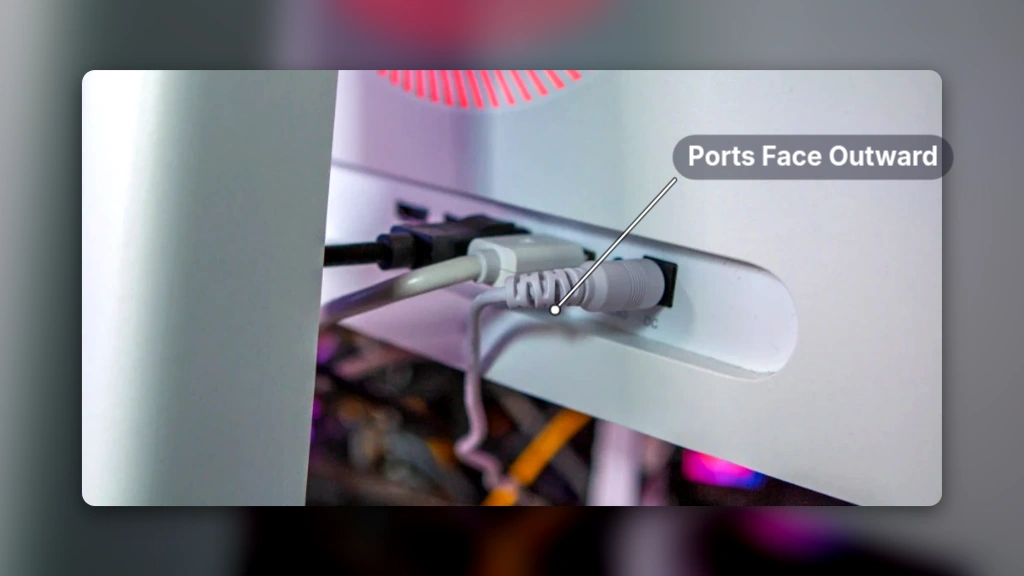
- Ports face outward instead of down, so plugging in and swapping devices is quick rather than a reach-around-the-desk job
- A 100 x 100mm VESA mount is built in, just hidden behind the included stand
- There’s no remote; the only way into the OSD is a nub on the back of the panel
- The reviewer calls that rear nub a bit archaic
The 500Hz number doesn’t survive contact with the reviewer’s reflexes. His main display is a 240Hz Samsung Odyssey OLED G95SC, and against that screen he says the extra Hertz on the GA27M1Q just get lost; the only refresh changes he actually notices happen when a panel drops below 60Hz to 90Hz, nowhere near either monitor’s ceiling. The spec sheet’s headline figure turns out to be the part of this monitor doing the least for him.
Pros
- QD-OLED panel at 500Hz with a 0.03ms GtG response figure
- Four video inputs, all facing outward for easy access
- A 100 x 100mm VESA mount included behind the stand
Cons
- OSD access limited to a rear nub, no remote included
- 500Hz is more refresh rate than the reviewer can use
- Only a 1-year limited warranty, short next to the 3-year burn-in cover premium OLED panels ship with
- The reviewer wouldn’t pay full retail for it even as a primary monitor
INNOCN backs the GA27M1Q with a 1-year limited warranty, covering manufacturing defects and hardware issues. The spec sheet also lists OLED burn-in protection as a feature. Those two facts sit awkwardly next to each other: the protection measures are advertised, but the warranty standing behind the panel they’re protecting runs out after a single year on a display technology whose wear clock, as covered earlier in this piece, counts in the thousands of hours.
Here’s where the math gets uncomfortable. The same reviewer who calls a 27-inch 500Hz QD-OLED at $500 to $600 a no-brainer main screen also says he wouldn’t pay full retail for it, even as his primary monitor. Alternatives in the same class run $700 to $900. The panel earns the first verdict; the sticker price earns the second.
The Colour and Viewing-Angle Case for IPS
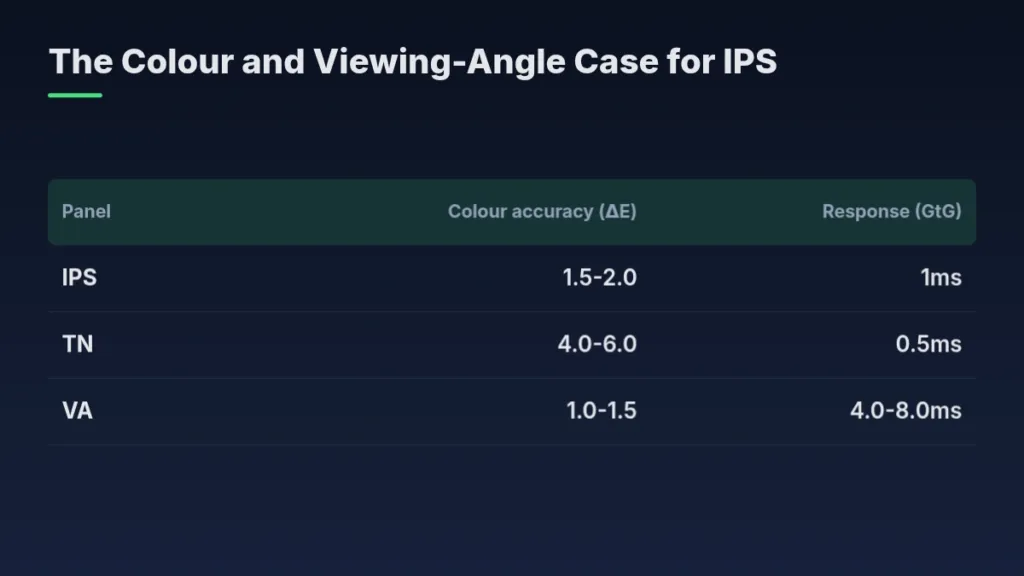
Mainstream IPS panels measure ΔE 1.5-2.0, and the eye doesn’t reliably catch a colour error until it crosses ΔE 3, so IPS colour sits comfortably inside the range nobody can actually see. TN runs ΔE 4.0-6.0, visibly off by that same standard. VA edges IPS on paper at ΔE 1.0-1.5, but it pays for that half-point of extra accuracy with a 4ms to 8ms response time, which is the trade IPS buyers point to when they call it the balance of the three.
| Panel | Colour accuracy (ΔE) | Response (GtG) |
|---|---|---|
| IPS | 1.5-2.0 | 1ms |
| TN | 4.0-6.0 | 0.5ms |
| VA | 1.0-1.5 | 4.0-8.0ms |
IPS holds a full 178 degrees horizontally and vertically, and that spec shows up in how little the picture moves once you stop looking at it head-on. Tilt 45 degrees off-centre and an IPS panel’s red shifts just ΔE 1.5; a VA panel’s red shifts to ΔE 4.1 over that same angle, more than double. The edges of the screen tell the same story at a shallower 20 degrees: IPS holds 95% of centre brightness there, VA drops to 82%. Anyone who leans back, tilts their head to check a minimap, or has somebody looking over their shoulder is the person this spec line is written for.
Edge brightness uniformity at 20 degrees off-centre
This is where IPS advocates move from spec sheets to scoreboards. Testers logged 42 headshots per 100 rounds of CS2 on IPS against 36 on VA, 1.2 wall hits per lap in Forza Horizon 5 on IPS against 3.1 on VA, and a 68% dodge success rate in Elden Ring on IPS against 62% on VA. IPS leads in all 3 games, and the gap in Forza, nearly triple the wall hits logged on VA, is the widest of the three.
| Test | IPS | VA |
|---|---|---|
| CS2 headshots per 100 rounds | 42 | 36 |
| Forza Horizon 5 wall hits per lap | 1.2 | 3.1 |
| Elden Ring dodge success | 68% | 62% |
Reviewers at DisplayModule ran a longer test to see whether that gap holds up over a full session: 5 hours of Naraka: Bladepoint. VA’s motion blur grew from 2.8mm to 4.1mm across that stretch, nearly half again what it started at, while IPS’s blur stayed inside 1.3mm the entire session.
What These Numbers Actually Prove
Every comparison above pits IPS against VA and TN. None of them put OLED on the chart. A mainstream IPS panel’s ΔE 1.5-2.0 beats TN and loses narrowly to VA, which makes it the best-balanced LCD technology, not a panel that’s been tested against OLED and held its ground. The headshots, wall hits, dodge rates and blur numbers settle an argument among liquid-crystal panels; they don’t touch the one this article is actually about.
Not everyone shopping a monitor is weighing OLED against IPS at all. Somebody coming from a lifetime on 60Hz, buying one of the cheapest AOC IPS monitors on the market at 144Hz, gets a jump big enough that panel technology never enters the conversation.
I got one of the cheapest AOC IPS monitor and it’s 144Hz, first time after lifetime of being used to 60Hz. Holy moly even if it’s cheap, the improvement is INSANE. I recommend.
The other satisfied buyer runs the opposite hardware. A mini LED VA owner with thousands of local dimming zones got a dark-scene picture that leans on backlight segmentation rather than self-emissive pixels, at a price they describe as far below OLED, and they aren’t shopping for anything else.
I have a mini LED VA panel with thousands of dimming zones, far cheaper than OLED and I couldn’t be any happier!
Stutter and PWM Dimming on OLED
An owner of the Sony A95L switched over from a 4K 120Hz IPS monitor and, writing on the Blur Busters forum, reported seeing more stutter on the OLED than he ever had on the IPS he was replacing, VRR switched on the whole time. The same scenes that read as microstutter on the IPS turned into full, visible stutter on the A95L, and the gap grew wider in the demanding parts of a game where the framerate dropped to 55-65fps – still comfortably inside the display’s VRR range, which is the part worth sitting with: VRR being active didn’t make the stutter go away.
A reply on the same thread put the blame on the game and the PC rather than the panel: blur on the old IPS monitor had been smoothing over uneven frame delivery the whole time, and OLED’s near-instant pixel response strips that cover away, so stutter that was always there finally shows up. Below 120Hz, the reply noted, frame delivery has to stay clean and consistent or the display will show every gap in it. That makes it a PC-side problem to chase down, not a reason to send the monitor back.
OLED Shows You Your Frame Pacing
An OLED panel doesn’t create stutter, it just stops hiding it. The blur an IPS panel smears across a moving frame was covering for inconsistent frame delivery all along, and take that blur away and every uneven frame interval becomes visible instead of blended – especially below 120Hz, where there’s no blur left to paper over the gaps.
Stutter isn’t the only complaint a spec sheet never lists. VRR flicker comes up just as often among OLED owners, and it’s absent from every panel comparison the same way.
Vrr flicker. Everyone forgets about oled vrr flicker!
Many OLED panels control brightness and gray levels with pulse width modulation: a pixel told to show gray doesn’t hold at a steady partial output, it flicks on and off rapidly, and that rapid cycling produces a subtle strobe effect across the screen. Many LCDs dim a different way, cutting direct current to the backlight instead of pulsing it, which avoids that strobe. The flicker on the OLED side may be more than a comfort issue – PWM gradations may be more harmful for eye health – and that’s the quiet case for staying on IPS if you’re already sensitive to flicker and sit in front of the screen all day.
| Many OLEDs | Many LCDs | |
|---|---|---|
| Dimming method | Pulse width modulation | Direct current |
| Visible side effect | Subtle strobe effect | None from dimming |
| Eye health note | PWM gradations may be more harmful | — |
The Games ROG Picked to Demo the Ally X20’s OLED
ROG didn’t pick these games at random for the Ally X20’s screen. The handheld carries a 7.4-inch Nebula HDR panel rated at 1400 nits, and every title on ROG’s demo list exists to put that self-emissive brightness somewhere a backlit panel couldn’t follow it. The same logic carries straight over to a desktop OLED monitor: what a vendor chooses to show off on a 1400-nit panel is a map of what per-pixel dimming is actually for.
Dark Scenes Built for Per-Pixel Dimming
- Dead Space’s flashlight beams cut through a pitch-black station, the kind of single bright cone against total black that only a self-emissive pixel can render without a halo around it.
- Sparking electrical fires light the same dark Dead Space station, another small bright source with nothing lit around it.
- Gears of War E-Day sets its early hours at night, and muzzle flashes burst with light against that darkness.
- Police cruisers and fires pop against E-Day’s city shadows, hard highlights sitting directly next to black.
- Elden Ring’s world is built from muted colours and gloom, which is exactly what makes its bright spells stand out harder.
- Black Ops 6 gains from flashbangs and explosions landing in otherwise dark scenes.
- DOOM: The Dark Ages glows from weapon highlights to explosions, stacking bright effects onto a dark battlefield.
Colour Range and Reflections Over Darkness
- Horizon’s forests and snowy mountains lean on wide colour, with Horizon Zero Dawn adding highlights in machine eyes and sparks on top of that range.
- Forza Horizon 6’s Tokyo reflections suit an OLED panel, and the same game’s Tateyama Snow Corridor, set in Japan, pushes the colour range in the opposite direction.
- Ratchet & Clank: Rift Apart shows the colour range best of the group, its dimensional rifts carrying dazzling HDR highlights on top of that colour.
- Tetris Effect: Connected is the purest case of the lot: bright particles against a black field, which is pixel-level dimming and nothing else.
Every scene on that list is one where per-pixel light changes what’s on screen, not a nicer version of what a backlit panel already shows. That’s the same case a desktop OLED monitor makes with its own demo reels, just run here on a 7.4-inch Nebula HDR panel at 1400 nits instead of a 32-inch one. DOOM: The Dark Ages ships with its Handheld graphics preset turned on by default, a small practical note for anyone picking it up on the Ally X20 rather than a desktop screen, and Dead Space is available on Game Pass via EA Play if none of this is already sitting in a library.
The Panel You’re Stuck With
Every spec sheet in this pile leads with the number that flatters it and buries the one that doesn’t. The 0.03ms GtG headline is real, but the Automatic Brightness Limiter curve that drags the PG32UCDM from roughly 1,000 nits on a 2% window down to about 480 nits once 10% of the panel lights up never makes it onto the box. IPS runs the opposite trick: nothing on its spec sheet looks exciting, and it quietly does everything else – brightness, colour, text – well enough that nobody writes a paragraph about it. Resolution and refresh rate are line items you can change next time you buy a monitor. The panel sitting behind them is not; whichever one you pick is the one you live with for as long as you own the thing.
Pros
- Buy OLED for dark rooms, HDR content and short ownership spans
- Buy OLED if your budget clears roughly $1,000
Cons
- Buy IPS for bright rooms and desks carrying a lot of static UI and text
- Buy IPS if you want zero burn-in worry
- A $300 to $500 budget keeps you in IPS territory
- IPS gives up perfect blacks in exchange for brightness, longevity and clean text
At $300 to $500 you’re choosing between IPS panels, and TechCortex calls that a perfectly fine place to land. The Asus TUF VG27AQ, a 1440p 165Hz IPS, costs $319.99 against the Asus ROG Swift PG32UCDM’s $1,359.99, over $1,000 apart. That gap isn’t one panel type priced against the same monitor twice, though: the PG32UCDM is bigger, sharper and runs at 240Hz rather than 165Hz, so part of what you’re paying there has nothing to do with OLED versus IPS at all.
A separate comparison lands on the same conclusion from the other direction. Its pick for the best gaming and movie-watching experience is the MSI 321 URX, a 4K 32-inch 240Hz OLED, and it found OLED’s colour vibrancy still ahead of the alternatives even with the room lights up. Its own caveat is the honest part of the recommendation: IPS and VA remain good options for anyone on a budget, and they stay perfectly enjoyable for anyone who’s never put one next to an OLED panel directly.
A $500 QD-OLED Changes the Math
The INNOCN GA27M1Q launched at around $999 earlier this year and has already fallen to $774.99 at retail. Amazon and INNOCN’s own store both sell it for $599.99, and INNOCN’s refurbished stock goes for $499.99, all for a 27-inch QD-OLED running 500Hz at 0.03ms GtG. Retro Handhelds wouldn’t pay the $999 launch price, but calls $500 to $600 a sure bet for a main screen. That range is the figure that actually moves this whole argument: it drops a QD-OLED panel out of the four-figure bracket that framed every piece of buy-IPS-on-a-budget advice above.
| Monitor | Panel | Size / refresh | Price |
|---|---|---|---|
| Asus ROG Swift PG32UCDM | QD-OLED | 32-inch 4K, 240Hz | $1,359.99 |
| INNOCN GA27M1Q | QD-OLED | 27-inch 1440p, 500Hz | $599.99 |
| INNOCN GA27M1Q (refurbished) | QD-OLED | 27-inch 1440p, 500Hz | $499.99 |
| Asus TUF VG27AQ | Fast IPS | 27-inch 1440p, 165Hz | $319.99 |