
Key Takeaways
- 1A Ryzen 7 5800X3D dropped into an existing AM4 board gained 16-23% in three of four tested games thanks to its 96MB of 3D V-cache, but Horizon Zero Dawn barely moved at all, 127 fps to 130 fps, so check whether your own games are CPU-starved before paying $450 for it.
- 2If your GPU is the bottleneck, DDR4 costs you almost nothing: the Ryzen 7 5700X on DDR4 and Ryzen 7 9700X on DDR5 scored within 1% of each other in 3DMark Steel Nomad at 4K, 5,222 against 5,253.
- 3For CPU-bound esports, DDR4 falls apart fast. The same two rigs split 132-135% apart in Rainbow Six Siege X at Medium settings, so competitive players should look at a Ryzen 7 5700X3D or move to AM5 rather than lean on DDR4 tuning.
- 4Buy memory in matched pairs, not single sticks. Dave’s Computers measures an 8-10% gaming penalty for running single channel on most CPUs, and going with a single 32GB DIMM instead of a 2x16GB kit is exactly what PCSpecialist has had to do amid the current DRAM shortage.
- 532GB is the capacity that actually matters for gaming; TechSpot’s 30-plus-game test found 64GB bought nothing extra, so put the money DDR5 would have cost you into a graphics card instead if you’re staying on DDR4.
Ryzen 7 5800X3D: The AM4 Upgrade
The Ryzen 7 5800X3D is where AM4 stopped: it’s the last CPU AMD built for the socket, and the one both shops point people at when the plan is to keep an old board and old DDR4 rather than start over. What sets it apart from everything else that ever slotted into AM4 is the 3D V-cache stacked on top of the die, which takes its L3 cache to 96MB. Dave’s still specs its budget AM4 gaming builds around either the Ryzen 5 5600 or the 5800X3D, the two sitting side by side as the socket’s remaining answer for anyone not moving to DDR5.
Why cache size matters more than memory speed here
A cache that large keeps more of what the CPU needs close by, so it doesn’t have to go out to memory as often. That’s why X3D chips largely mask the penalty of slower memory, and it’s the whole reason bolting one onto an old DDR4 board makes sense in the first place: the chip is built to care less about the memory behind it.
The clearest evidence for what the swap actually does comes from one owner who changed nothing but the CPU: same board, same BIOS, same RTX 3090, a Ryzen 5 5600X pulled out and a 5800X3D dropped in. With a card that powerful holding steady, whatever moved at Ultra settings and 3440×1440 moved because of the chip alone. Three of the four games tested gained 16-23%.
| Game | Ryzen 5 5600x + RTX 3090 | Ryzen 7 5800X3D + RTX 3090 |
|---|---|---|
| Valheim | 96 fps avg, 90 fps low | 116 fps avg, 105 fps low |
| Horizon Zero Dawn | 127 fps avg, 120 fps low | 130 fps avg, 122 fps low |
| Jedi Fallen Order | 114 fps avg, 106 fps low | 133 fps avg, 120 fps low |
| Battlefield 5 | 130 fps avg, 110 fps low | 160 fps avg, 144 fps low |
Average frame rate, Ultra at 3440×1440
Battlefield 5 shows the biggest swing, going from 130 fps to 160 fps average, and its 1% lows matter more than that headline number: they climbed from 110 fps to 144 fps, which is the difference between occasional stutter and a genuinely smooth frame-time floor. Valheim moved from 96 fps to 116 fps and Jedi Fallen Order from 114 fps to 133 fps, both comfortably inside that 16-23% band. Horizon Zero Dawn is the warning sitting in the same table: 127 fps to 130 fps is nothing, and it says plainly that this upgrade only pays out in games that were actually waiting on the CPU.
| 3DMark | Ryzen 5 5600x + RTX 3090 | Ryzen 7 5800X3D + RTX 3090 |
|---|---|---|
| Time Spy total | 15504 | 17196 |
| Time Spy graphics | 19392 | 19482 |
| Time Spy physics | 7258 | 10330 |
| Fire Strike total | 32585 | 37642 |
| Fire Strike graphics | 48563 | 48573 |
| Fire Strike physics | 22262 | 28725 |
The synthetic scores isolate the gain cleanly. Time Spy’s physics score, the part of the test that leans on the CPU, jumped from 7258 to 10330, and Fire Strike’s physics score climbed from 22262 to 28725 the same way. Time Spy’s graphics score barely moved at all, 19392 to 19482, because the RTX 3090 doing that work never changed. Put the two side by side and the totals, Time Spy’s 15504 rising to 17196 and Fire Strike’s 32585 rising to 37642, are entirely down to the CPU swap.
Pros
- 96MB of L3 cache from 3D V-cache, real enough to gain 16-23% in three of four tested games
- Largely masks the penalty of running on slower DDR4
- The obvious ceiling for anyone keeping an AM4 board
Cons
- Launched at $450 against $340 for the plain 5800X
- Went out of stock almost immediately at launch
- Runs hotter than a 5600X and needs a fan curve tweak to manage it
- Games like Horizon Zero Dawn barely move, 127 fps to 130 fps
- The last AM4 chip AMD will make, so there’s nowhere further to go on this socket
None of this came cheap or smooth. The 5800X3D launched at $450, against a plain 5800X that was on sale at $340, and it sold out almost immediately anyway. It also runs hotter than the 5600X it’s replacing, enough that the swap needed a fan curve tweak to keep it in check.
The chip is still getting paired with current GPUs years after launch. One owner is running a 5800X3D with an RX 7900 XTX and 64GB of RAM for 4K gaming, well past when most would expect an AM4 CPU to be sidelined.
Still rocking my 5800x3D + RX 7900 XTX + 64GB RAM combo for 4K gaming. AM4 is still a beast.
Not every owner sees it that way, and used prices haven’t caught up with the doubters. A 5900X on the second-hand market has come down a long way, while the 5800X3D hasn’t, and at least one person who moved from a 5900X to a 5800X3D says the upgrade did nothing for them.
Sucks 5800x 3d’s are so expensive used. 5900x’s aren’t to bad though, I had one and loved it switched eventually to a 5800x 3d and really saw no improvement.
Ryzen 7 5700X and the B550 Board Under It
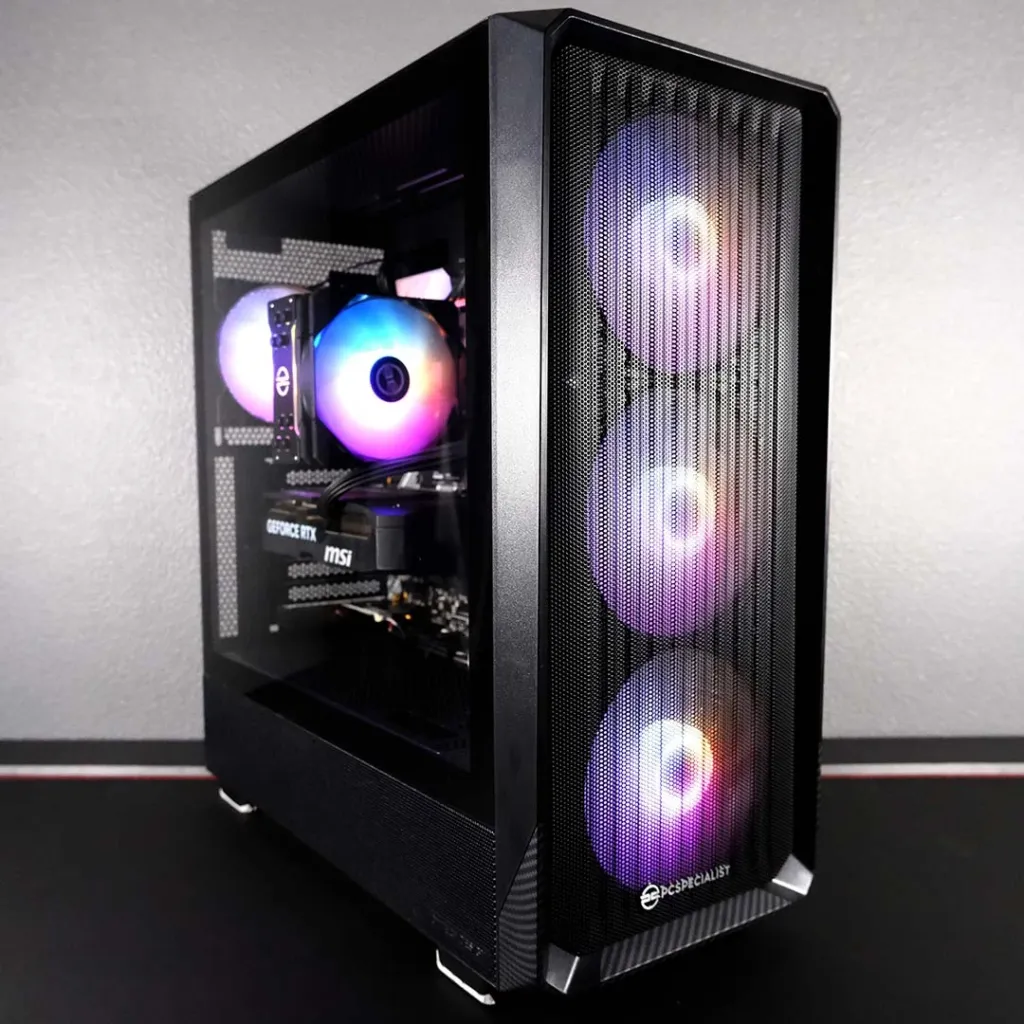
On AMD’s side there’s no picking memory type independently of socket: AM4 boards run DDR4 and nothing else, AM5 boards run DDR5 and nothing else, so choosing to stay on DDR4 means choosing AM4 too. That’s what puts a Ryzen 7 5700X up against a Ryzen 7 9700X in Club386’s test, with the 5700X sitting inside PCSpecialist’s Spectrum Elite, the DDR4 half of the pairing.
AMD Ryzen 7 5700X
Eight Zen 3 cores, two generations behind the chip it’s compared againstThe 5700X matches its AM5 rival core for core and thread for thread, eight and 16 respectively, so the gap between them isn’t a bigger chip doing more work. It’s Zen 3 against Zen 5, two architecture generations of IPC gains the 5700X never got, and a boost clock that tops out at 4.6GHz against the 9700X’s 5.5GHz, according to Club386. Both chips ship at a 65W default TDP, which rules out the simplest explanation: AMD isn’t giving the 9700X a bigger power budget to work with, it’s giving it a newer core. Club386 ran the 5700X with 32GB of 3,200MT/s DDR4 CL16, the memory side of the same story.
| Ryzen 7 5700X | Ryzen 7 9700X | |
|---|---|---|
| Cores / threads | 8 / 16 | 8 / 16 |
| Architecture | Zen 3 | Zen 5 |
| Max boost clock | 4.6GHz | 5.5GHz |
| Default TDP | 65W | 65W |
| Memory fitted by Club386 | 32GB (2x16GB) 3,200MT/s DDR4 CL16 | 32GB (2x16GB) 6,000MT/s DDR5 CL30 |
| Motherboard | Asus Prime B550-Plus | Asus Prime B850-Plus WiFi |
The Asus Prime B550-Plus underneath the 5700X is an entry-level board, and it shows in what’s missing rather than in anything it gets wrong. There’s no PCIe Gen 5 on it at all, and no onboard Wi-Fi either, so PCSpecialist has to fit a separate PCIe Wi-Fi 6E card to give the Spectrum Elite wireless networking the B850-Plus WiFi gets built in. Wired networking is capped at 1Gb Ethernet, against 2.5Gb on the AM5 board, according to Club386.
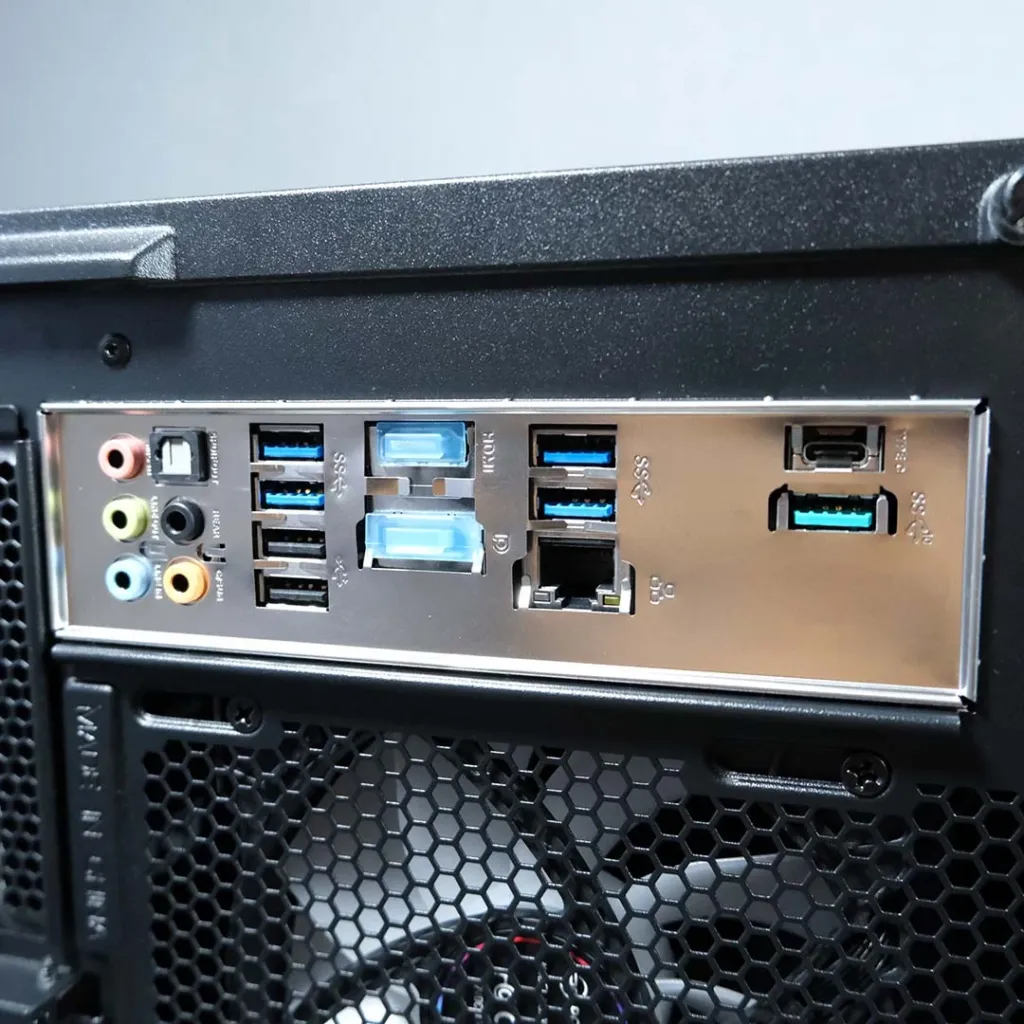
- Rear USB: one 10Gb Type-C
- Rear USB: four 5Gb Type-A
- Rear USB: two 480Mb Type-A
- Ethernet: 1Gb (Club386)
- PCIe: no Gen 5 support
- Wi-Fi 6E: added via separate PCIe card
The storage catch
The B550-Plus’s M.2 ports top out at PCIe Gen 4, so a Gen 5 drive would still boot and run in this board, just at half its rated throughput. It doesn’t matter here: Club386 fitted the same 1TB Crucial P310 to both machines, and the P310 is itself a Gen 4 drive, so neither system was ever waiting on storage in this test.
Everything else in the two boxes is identical. Both ran the same MSI GeForce RTX 5070 Shadow 2X OC, the same 1TB Crucial P310 SSD and the same Corsair RM750e power supply, on the same Windows 11 Home 25H2 build 26200.7623 with the same GeForce Game Ready Driver 591.86, tested at 1080p on both medium and maximum settings. Strip out the CPU, the board and the memory and there’s nothing left to explain a difference in the numbers, which is exactly what makes the results that follow worth trusting.
| CPU | AMD Ryzen 7 5700X |
| Motherboard | Asus Prime B550-Plus |
| RAM | 32GB (2x16GB) 3,200MT/s DDR4 CL16 |
| CPU cooler | PCS FrostGlow 100 ARGB V3 |
| GPU | MSI GeForce RTX 5070 Shadow 2X OC |
| SSD | 1TB Crucial P310 |
| PSU | Corsair RM750e |
| Other features | 1Gb Ethernet, Bluetooth 5.3, PCIe Gen 4, Wi-Fi 6E |
| Case | PCS Spectrum III Black ARGB |
| Operating system | Windows 11 Home |
| Warranty | Three-years |
| Price | £1,399 |
PCSpecialist prices the whole Spectrum Elite at £1,399, backed by a three-year warranty. Club386 priced an equivalent DDR4 build from the same parts itself and landed at around £1,420, so buying the prebuilt machine came out cheaper than assembling the same components DIY.
LGA1700: Intel’s 12th to 14th Gen Socket, Either Memory
AM4 and AM5 don’t leave room for debate: one runs DDR4, the other runs DDR5, and the socket itself makes the call. LGA1700 is the odd one out. The same 12th, 13th or 14th Gen chip will run on a DDR4 board or a DDR5 board, but which one is a property of the motherboard, not the CPU, and MSI is blunt that support depends on the specific board model you buy. That choice gets made once. There’s no DDR4 slot that becomes a DDR5 slot later, so picking a DDR4 LGA1700 board sets the memory standard for as long as that machine exists.
These are the chips people actually reach for when they want that flexibility. TechSpot retested the 14900K, 14600K, 12900K and 12600K, all four on a DDR4-3600 CL14 kit, and Tech4Gamers’ spec sheet for the i5-14600K shows why the retest was even possible: the chip is rated for DDR4 as low as 3,200MHz on one side, and caps out at 5,600MT/s on DDR5 without XMP on the other. One chip, two entirely separate memory controllers worth of official support.
| Socket | LGA1700 |
| Memory support | Either DDR4 or DDR5, depending on the specific motherboard model |
| Chips TechSpot retested on DDR4 | 14900K, 14600K, 12900K, 12600K |
| DDR4 kit used in TechSpot’s retest | DDR4-3600 CL14 |
| i5-14600K minimum DDR4 speed | 3,200MHz |
| i5-14600K max non-XMP DDR5 speed | 5,600MT/s |
LGA1700’s Last Lap
Intel is retiring LGA1700, and Arrow Lake, the chip that replaces it, drops DDR4 entirely in favor of DDR5 only. AMD already closed the same door with AM5. Tom’s Hardware’s own tracker now says building on DDR4 makes little sense, and pins that on availability: the CPUs and motherboards worth buying new are drying up. That leaves the LGA1700 DDR4 route as something you keep, not something you start; a board and chip you already own can keep running DDR4 for years, but shopping for that combination fresh in 2026 means shopping for parts the market is actively walking away from.
| Spec | DDR4 | DDR5 |
|---|---|---|
| Peak overclocked speed | ~5333 MT/s (OC) | 9200+ MT/s (OC) |
| Max module capacity | 32GB | 64GB+ |
| Max system capacity | 128GB | 256GB |
MSI’s own figures show what a DDR4 LGA1700 board asks you to give up as a ceiling rather than a day-one loss. Push DDR4 as far as it goes and overclocking gets you to roughly 5333 MT/s; high-end DDR5 kits clear 9200 MT/s. MSI caps a single DDR4 module at 32GB, which puts a full system at 128GB against DDR5’s 256GB. None of that touches gaming frame rates today, but it’s the wall a DDR4 board hits the moment a workload wants more memory or more bandwidth than that.
MSI’s Line on DDR4
MSI draws this one plainly: DDR4 is fine on a stable AM4 or LGA1700 box you already have, provided a 5% gap in gaming FPS doesn’t bother you. Step onto AM5 or LGA1851 and the question disappears anyway, since MSI calls DDR5 mandatory there. The choice only exists on the machine you’re not replacing.
What DDR4 Actually Costs You: 5% to 22%
Ask how much DDR5 is worth on LGA1700 and you get three different answers depending on who ran the test. Tom’s Hardware ran 15 games on LGA1700 in July 2026 and came back with DDR4 running 14% slower on average, up to 25% in the worst cases. TechSpot’s own 13-game suite landed at 16% for 14th-gen chips and 20-22% for 12th-gen parts on the same games. MSI, which sells the motherboards on both sides of this argument, says the gap is just 5% and that DDR4 is fine if that number doesn’t bother you. Two review outlets running independent test suites and a board maker with skin in the DDR5 game aren’t measuring the same thing the same way, and the spread between 5% and 22% is the proof of it.
| Source | DDR4 penalty measured | Test basis |
|---|---|---|
| Tom’s Hardware | 14% slower on average, up to 25% | 15 games on Intel LGA1700, July 2026 |
| TechSpot | 16% (14th-gen), 20-22% (12th-gen) | 13-game average, DDR4-3600 CL14 |
| MSI | 5% | Stated in its DDR4 vs DDR5 guidance |
Part of that spread has nothing to do with methodology and everything to do with cache. Raptor Lake’s 14th-gen chips carry a bigger L2 and L3 than Alder Lake’s 12th-gen parts, and that extra cache catches data before it ever needs to leave the die and go looking for it in memory. Run the exact same 13-game suite on both, and the 12th-gen chips gain 20-22% from swapping in DDR5 while the 14th-gen chips gain only 16%, because the newer chip’s cache was already covering some of the ground DDR5 makes up for on the older one. A bigger cache is a hedge against slow memory, and Raptor Lake had more of that hedge built in.
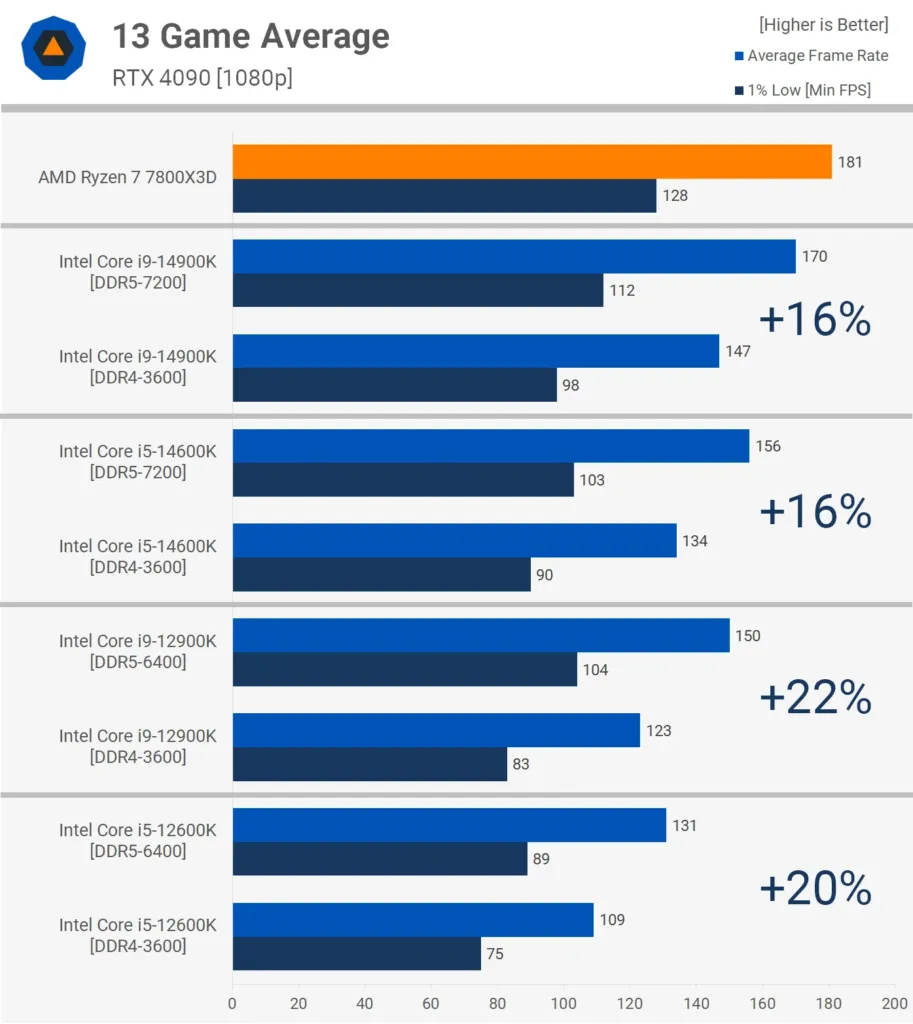
The chip only accounts for part of the swing. Which game you’re running matters at least as much: Assetto Corsa Competizione barely moved on the 14900K, gaining just 10% from DDR5, while Starfield handed the 12900K and 12600K 33-34%. That’s a wider gap than the one separating 12th-gen from 14th-gen on the same suite, and it means the 16% or 20% averages above are hiding a per-game range that runs from single digits into the mid-thirties. An average is a fine number for comparing test suites; it’s a poor one for predicting what happens in the game you’re about to launch.
| Game | DDR5 gain over DDR4 (TechSpot) |
|---|---|
| Baldur’s Gate 3 | 14900K up 23%, 12600K up 35% |
| The Last of Us Part I | 14900K up 15%, 12900K up 22% |
| Cyberpunk 2077: Phantom Liberty | 12900K and 12600K both 29% |
| Hogwarts Legacy | 14900K 1% lows up 35% |
| Assetto Corsa Competizione | 10% on the 14900K |
| Spider-Man Remastered (no RT) | 9% on 14th-gen |
| Homeworld 3 | Around 10% on average frame rates |
| A Plague Tale: Requiem | 16-17%, 12900K at 22% |
| Counter-Strike 2 | 12900K 6%, 12600K 9% |
| Starfield | 12900K and 12600K 33-34% |
| Horizon Forbidden West | 16% on 12th-gen chips |
| Hitman 3 | 22-26% across the chips |
| Watch Dogs: Legion | 28% on 12th-gen, 31% on 14th-gen |
DDR5 gain over DDR4 on the 12900K
The Penalty Is Growing, Not Fixed
The same 12900K that gains 20-22% from DDR5 in TechSpot’s current 13-game suite gained only 10% in the outlet’s own earlier testing on the same chip. Newer games are simply asking more of memory than older ones did, and the DDR4 penalty has grown alongside them rather than sitting still. Some of that gap is also down to how the chip was run: the newer numbers come from Intel’s Extreme power profile, while the older test allowed no power limits at all, so the two results aren’t a clean before-and-after on memory speed alone. Either way, a DDR4 penalty measured today tells you nothing certain about the penalty two years from now, except that the trend so far has been upward.
MSI’s own guidance contains both the smallest and one of the largest numbers in this whole picture. It’s the source of the 5% figure telling people DDR4 is fine to keep, but the same document claims up to 21% from DDR5-7200 paired with MSI’s own Memory Extension Mode. That 21% isn’t measuring the same thing the 5% is: it’s a board maker’s own testing of its own BIOS feature, run at a memory speed well above what most DDR5 buyers actually install, against a company that has every reason to want DDR5 boards selling. Neither number cancels the other out, but they aren’t answering the same question either.
Where the RTX 5070 Sets the Ceiling
Not every test in Club386’s suite cares which platform it’s running on. Both rigs carried the same MSI GeForce RTX 5070 Shadow 2X OC, and in 3DMark’s Steel Nomad at 4K the Ryzen 7 5700X on 3,200MT/s DDR4 scored 5,222 points against 5,253 for the Ryzen 7 9700X on 6,000MT/s DDR5. Speed Way told the same story: 5,938 against 5,954. A newer core architecture and nearly double the memory bandwidth bought the DDR5 rig less than 1% in either test, because at 4K the graphics card is doing all the work and the CPU is left waiting on it either way.
3DMark: DDR4 rig against DDR5 rig
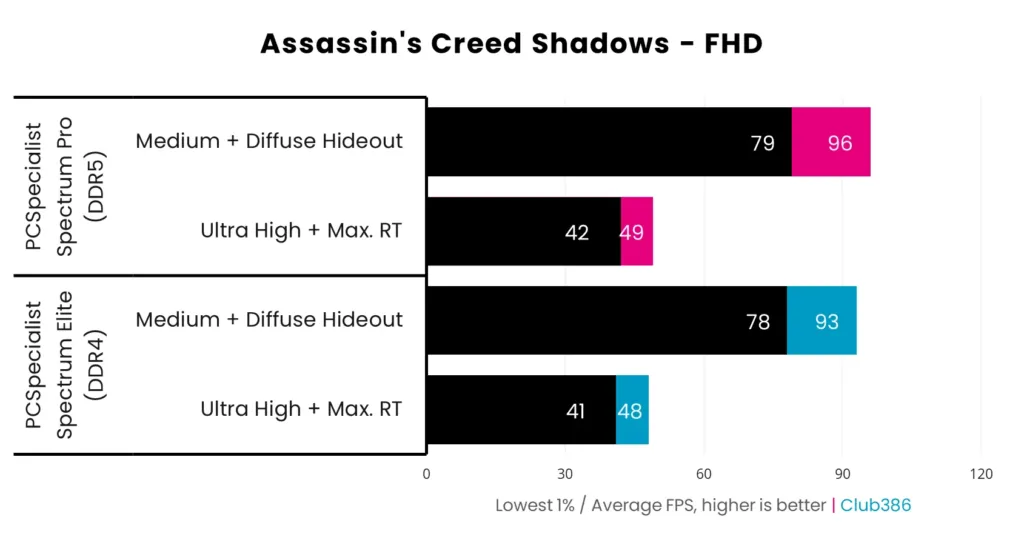
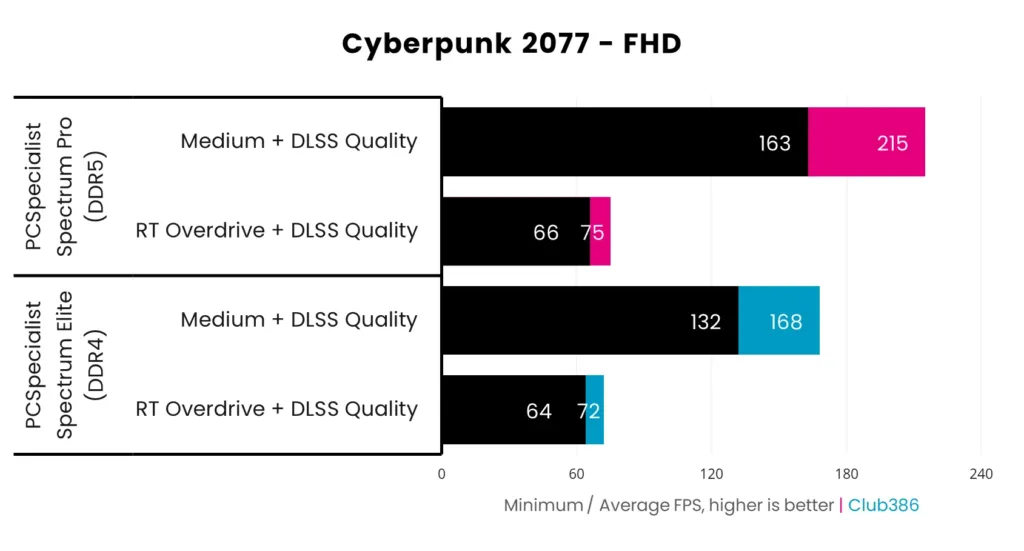
Ray-traced games close the gap the same way. Assassin’s Creed Shadows forces ray tracing on regardless of settings, and the two rigs land within 1-3% of each other whether they’re pushed to Ultra or dropped to Medium; the DDR4 machine manages 41/48fps minimum/average at Ultra and 78/93fps at Medium, numbers a 5700X owner can take at face value. Cyberpunk 2077 at RT Overdrive spreads the rigs a touch further, 64/72fps against 66/75fps, a 3-4% gap that ray tracing’s own GPU demands are responsible for holding down. In both games the path tracing and denoising work is heavy enough on the RTX 5070 that the memory feeding either CPU barely gets a say.
| Test | DDR4 rig (Ryzen 7 5700X) | DDR5 rig (Ryzen 7 9700X) |
|---|---|---|
| Assassin’s Creed Shadows, Ultra (min/avg) | 41/48fps | 42/49fps |
| Cyberpunk 2077, RT Overdrive (min/avg) | 64/72fps | 66/75fps |
It isn’t just games. Blender’s GPU render pass hit 6,216 total samples per minute on the DDR4 rig and 6,254 on the DDR5 one, a gap so small it’s noise rather than an advantage. Any workload that leans on the graphics card this heavily treats the CPU and its memory as bystanders, which matters for anyone who renders as well as plays: the platform underneath stops being a factor the moment the GPU takes over the job.
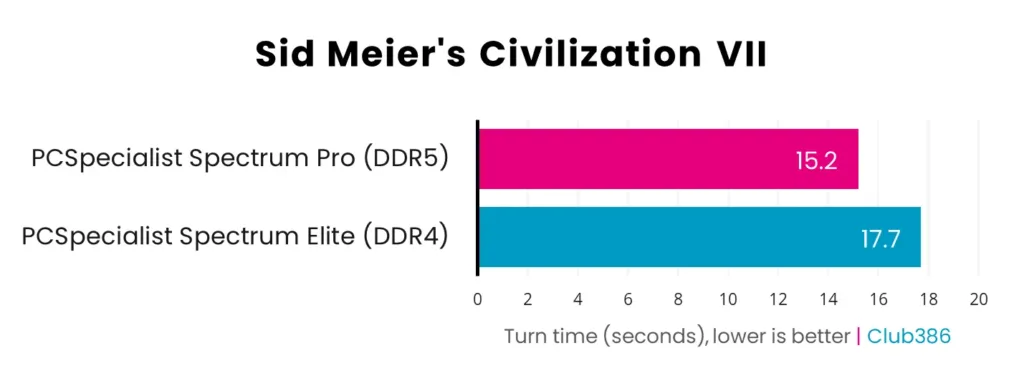
Civilization VII is the one place here where the newer platform is genuinely, measurably faster, and it still doesn’t matter. Turns averaged 17.7 seconds on the DDR4 rig against 15.2 seconds on DDR5, a real 2.5-second gap per turn that comes from turn processing actually taxing the CPU rather than the GPU. Run that out over a full 100-turn game and it adds up to four minutes total, a difference nobody sat playing a 4X game is going to notice or care about.
These ties depend on the graphics card
Every result in this section rests on the same MSI GeForce RTX 5070 Shadow 2X OC sitting in both rigs and acting as the bottleneck. Club386 is upfront that a more powerful graphics card would widen these gaps, since a faster GPU hands more frames back to the CPU and memory to fight over. Anyone reading these ties as a reason DDR4 and DDR5 are interchangeable long-term should factor in whatever card they plan to upgrade to next, not just the one in the test bench today.
Where the RTX 5070 Sits Waiting on the CPU
Rainbow Six Siege X is where the 5700X stops being a graphics test at all. At Medium, Club386 clocked 183fps minimum and 209fps average on the DDR4 rig against 425fps minimum and 491fps average on the DDR5 one, a gap of 132-135%. Drop the DDR4 machine to Ultra+ and it manages 169/202fps, barely below its own Medium result, because the setting change never touched the part that was actually limiting it. Turning detail down bought the DDR4 rig almost nothing; the RTX 5070 had frames to spare either way, and the 5700X wasn’t going to hand them over.
Rainbow Six Siege X: DDR4 rig vs DDR5 rig at 1080p
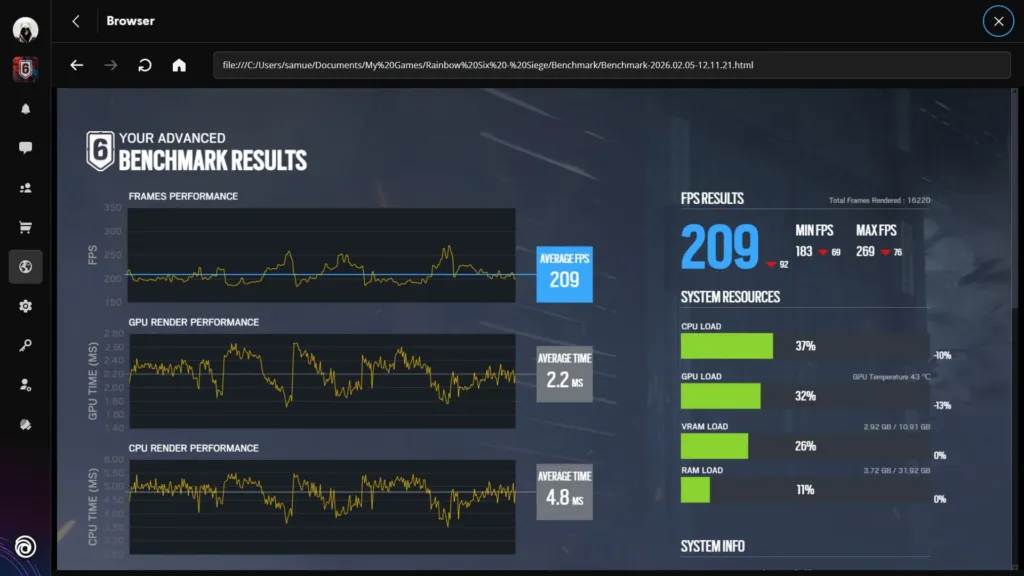
- CPU Load: The CPU load bar sits above the GPU load bar on this screen, marking the 5700X as the component running out of headroom, not the graphics card.
- GPU Load: GPU load reads lower than CPU load throughout the run, showing the RTX 5070 isn’t the part holding the frame rate back.
- GPU temperature: 43°C is a temperature you’d expect from a card sitting idle, not one running a benchmark. The RTX 5070 is waiting on the 5700X to feed it work.
Club386’s advice for esports players
Staying on AM4 for a game like Siege X only makes sense with 3D V-cache in the socket, so Club386 points esports players toward a Ryzen 7 5700X3D. Can’t find one? Their advice is to move to AM5 instead: even a plain Ryzen 7 9700X posts far higher frame rates than the 5700X, and AM5 leaves the door open to a 9800X3D down the line, which AM4 no longer does.
Mount & Blade II: Bannerlord shows the same pattern on a smaller scale. At Very High, the DDR5 rig’s averages come in 27% ahead, a gain of 71fps, and its minimums pull further clear still at 51%, or 79fps. None of that makes the DDR4 machine unplayable; it never drops under 150fps at any setting in Bannerlord. What it does mean is a trade-off in detail: to get near the DDR5 rig’s Very High numbers, the DDR4 box has to be run at Medium instead.
| Game and setting | DDR4 gap in minimum fps | DDR4 gap in average fps |
|---|---|---|
| Mount & Blade II: Bannerlord, Very High | 51% (+79fps) | 27% (+71fps) |
| Forza Motorsport, Medium | 38% (+46fps) | 34% (+57fps) |
| Forza Motorsport, Ultra | 23% (+21fps) | 14% (+17fps) |
| Total War: Warhammer III, Ultra | 51% (+27fps) | 38% (+30fps) |
Forza Motorsport shows the gap moving the other way as the settings climb. At Medium the two rigs sit 38% apart on minimums and 34% apart on averages, gaps of 46 and 57fps. Push the same two machines to Ultra and the gap shrinks to 23% on minimums and 14% on averages, 21 and 17fps. Nothing about the hardware changed between those two runs; only the amount of work handed to the RTX 5070 did, and the more of it the GPU had to do, the less the 5700X mattered.
Total War: Warhammer III runs the opposite way to Forza: at Ultra its minimums come in 51% ahead on the DDR5 rig, 27fps, and its averages 38% ahead, 30fps, the gap widening rather than narrowing as detail goes up. Final Fantasy XIV: Dawntrail and Cyberpunk 2077 in raster mode without ray tracing both land in familiar territory, averages 16-18% and 23-28% apart respectively, with minimums pulling further ahead still, 23-33% on Dawntrail. Across every one of these, the shape repeats: minimums suffer more than averages on the 5700X.
How far the DDR5 rig leads in CPU-limited games
DDR4 Kits and How Many Slots to Fill
Dave’s Computers builds its AM4 machines around DDR4-3200 or DDR4-3600, sold as a 2x8GB or 2x16GB kit, and the pairing is the part that matters, not the total on the box. A matched pair means both sticks came from the same kit, same timings, same batch, and both appear on the motherboard’s qualified memory list rather than just carrying a compatible label. That’s also why the right move when 16GB feels tight is to pull the old kit and drop in a new 32GB matched pair, not to add a spare stick alongside what’s already there and hope the controller sorts it out.
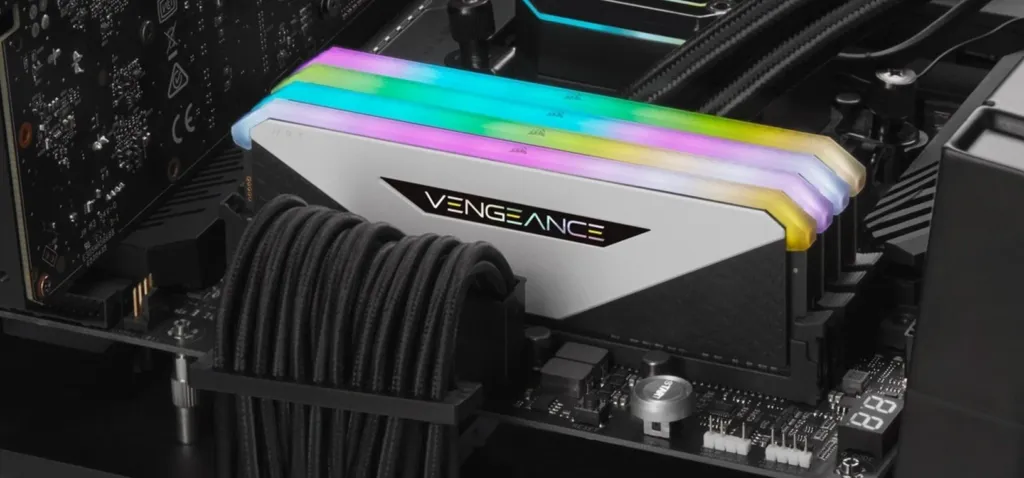
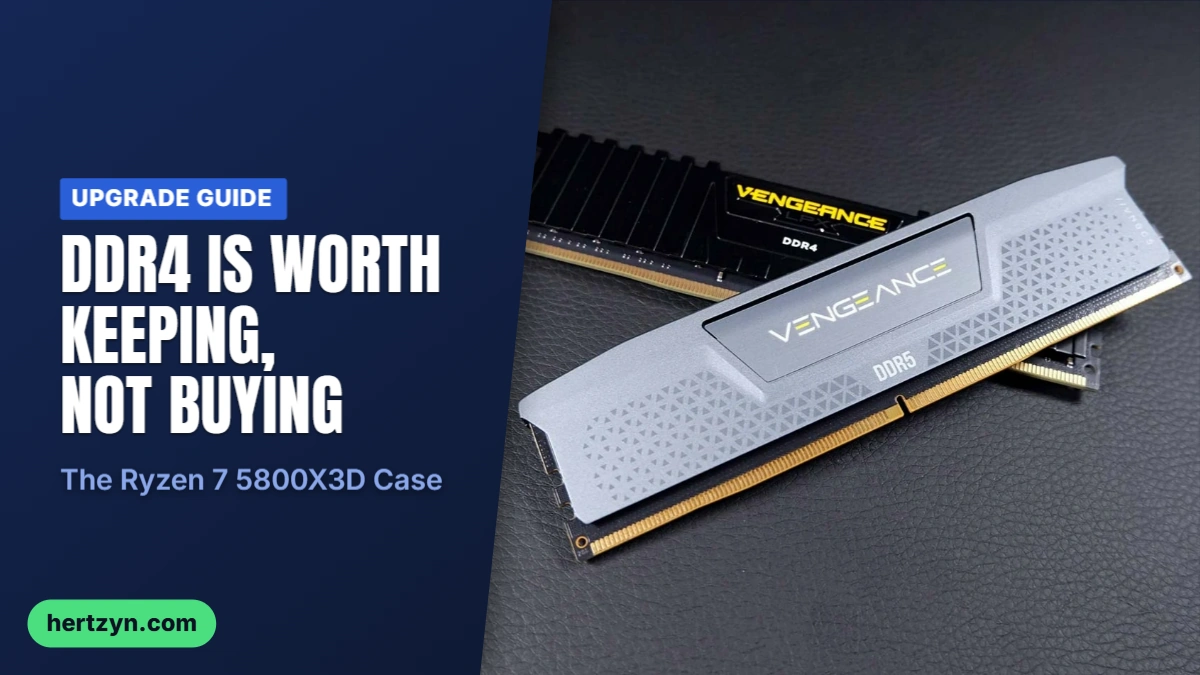
Corsair Vengeance RGB RT DDR4 32GB
Tech4Gamers’ pick for a 14600K buildThis is the kit Tech4Gamers actually landed on for a Core i5-14600K DDR4 build, and the case for it comes down to two numbers most kits at this speed don’t hit: CL16 timings that work out to 8.8ns of real latency, and a heatsink low enough that a tower air cooler still clears it without a fight over socket clearance. At 3,600MHz and 1.35V it sits at the fast end of what DDR4 does on stock JEDEC-adjacent voltage, which is about as much headroom as the standard has left to give.
Pros
- Good gaming performance straight out of the box on DDR4
- Low-profile heatsink fits under giant air coolers without interference
Cons
- Tech4Gamers found it went unstable after just a 200MHz bump at 1.40V, so there’s almost nothing left to chase
- DDR4’s ceiling stretches render times out for anyone doing editing work
- Stuck on XMP 2.0 with no XMP 3.0 or EXPO profile to fall back on
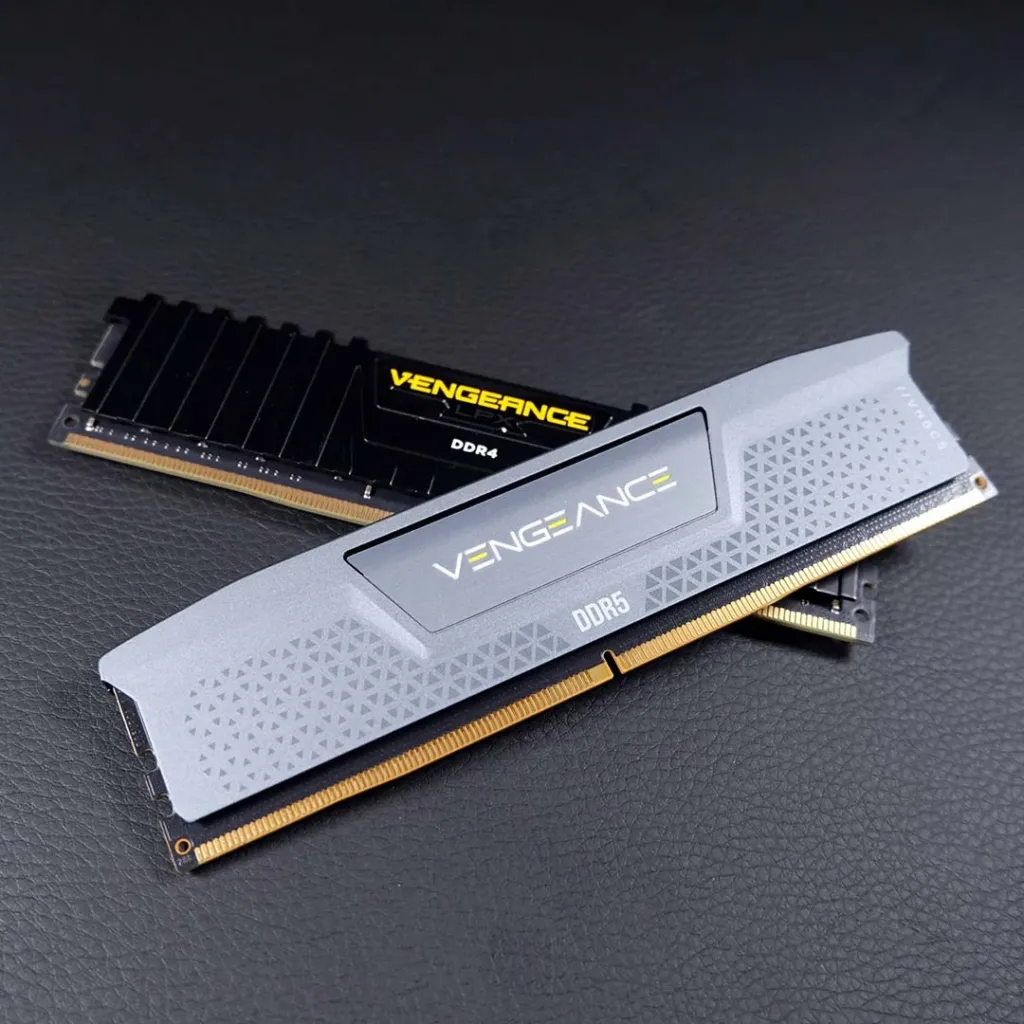
Tech4Gamers also looked at the Corsair Vengeance LPX 32GB DDR4 and passed on it, not because it’s a bad kit but because other options at similar money ran faster at stock and had more room left to push once XMP was dialed in. A near miss like that is worth knowing about mainly so nobody assumes every Vengeance-branded kit clears the same bar.
One Stick or Two: Why Dual Channel Matters
Gaming loss on a single DIMM versus a matched pair
One big stick instead of two smaller ones sounds like the same 32GB either way, but it isn’t: a single DIMM runs the memory controller in single channel, halving the bandwidth on tap, and Dave’s Computers puts the cost of that at 8 to 10% in games for most CPUs. The Ryzen 7 9800X3D barely notices, dropping under 3% on one stick, because its 3D V-Cache absorbs a lot of what would otherwise be a bandwidth-starved cache miss. None of that changes the harder fact sitting underneath it, though: even a single DDR5 stick running single channel still beats a proper dual-channel DDR4 pair, which is the whole DDR4-versus-DDR5 argument in miniature. Buy two sticks, not one, and check the board’s support list before either goes in.
DDR4 and DDR5 Don’t Mix
DDR4 and DDR5 use physically different slots, so there’s no accidentally combining the two even if somebody wanted to. The subtler trap is mixing two different DDR4 kits that both claim the same speed: different batches, different timings underneath the label, and the board can refuse to boot or crash at random once it’s running. Stick to one matched kit.
On capacity, TechSpot ran more than 30 games to settle it and landed on 32GB as the sweet spot. Going to 64GB bought nothing in the same test, so unless the machine is also doing heavy multitasking or content work alongside gaming, that second jump in capacity is money spent on headroom the games never use.
DDR4 Versus DDR5: The Spec Fence
| Spec | DDR4 | DDR5 |
|---|---|---|
| Base JEDEC speed | 2133 to 3200 MT/s | 4800 MT/s and up |
| Voltage | 1.2 V | 1.1 V |
| Channel layout | One 64-bit channel per stick | Two independent 32-bit sub-channels per stick |
| On-die ECC | No | Yes, inside the chip |
| Capacity per stick | Commonly 8 GB to 32 GB | 16 GB to 64 GB is normal; higher exists |
| Overclocking tech | Intel XMP 2.0 | XMP 3.0 / AMD EXPO |
Line the two standards up and the fence around DDR4 is easy to see: its JEDEC base speeds run 2133 to 3200 MT/s, which is the floor DDR5 starts from at 4800 MT/s and up. DDR4 tops out at 32GB a stick where DDR5 normally reaches 64GB, needs more voltage to get there at 1.2V against DDR5’s 1.1V, and has no on-die error correction built into the chip the way DDR5 does. The channel layout is the one that actually shapes how a CPU feels in use: a DDR4 stick hands the memory controller one 64-bit channel, while a DDR5 stick splits into two independent 32-bit sub-channels, so the controller can service two separate small requests at once instead of queuing them behind each other. That’s a big part of why DDR5 handles the kind of scattered, bursty memory traffic games generate better than a wider single channel does, even before either kit’s raw speed enters the picture.
If You Do Jump to AM5
For anyone who reads all of this and decides DDR4 isn’t worth fencing themselves into, the kit to land on is a two-stick DDR5-6000 CL30 set on an AM5 board. Just remember to turn the EXPO profile on in the BIOS; leave it off and the kit runs at a fraction of its rated speed, which defeats the point of buying it.
None of these numbers settle the decision by themselves, because the decision most people are actually weighing isn’t DDR4 spec sheet versus DDR5 spec sheet, it’s a bit more cheap DDR4 for the machine they already own against tearing the whole platform out. An old Ryzen chip with a new GPU and a memory top-up still adds up to a usable mid-range build, which is exactly the math one Reddit user laid out answering somebody asking whether to upgrade just the GPU or start over.
See if you can find a bit more DDR4 that’s not too expensive like DDR5. Ryzen 3600 still isn’t too bad. You’re not going to build a high end powerhouse out of it but you could her a decent mid ranger with a new GPU and maybe a bit more RAM.
What DDR4 and DDR5 Cost in 2026
Dave’s Computers tracks the cheapest kit going at each capacity, and DDR5 costs more than double DDR4 at both of them. A 16GB DDR4-3200 kit is $94 against $214 for DDR5-5600, and the same ratio holds at 32GB: $179 for DDR4-3200 against $404 for DDR5-6000. Double the capacity and the absolute gap doesn’t just double along with it, it grows faster than that, going from roughly $120 to roughly $225 – the more memory a build needs, the harder DDR5 punishes the buyer for choosing it.
| Kit | DDR4 (cheapest tracked) | DDR5 (cheapest tracked) | Gap |
|---|---|---|---|
| 16 GB (2 x 8 GB) | $94 (DDR4-3200) | $214 (DDR5-5600) | About $120 |
| 32 GB (2 x 16 GB) | $179 (DDR4-3200) | $404 (DDR5-6000) | About $225 |
Tom’s Hardware puts DDR5 pricing up three times over, and in places four, from where it stood before. DDR4 hasn’t stayed flat either, but its climb has been far gentler, which is why the gap between the two keeps widening rather than closing as DDR5 matures. Memory makers are steering their production at AI data centres, and a desktop buyer picking between DDR4 and DDR5 is competing for capacity that’s being allocated somewhere else entirely.
None of that is only a price story. PCSpecialist has stopped shipping the dual-channel 2x16GB configuration Club386 tested altogether, substituting a single 32GB stick at the same speed and timings – same total capacity on the spec sheet, but single-channel rather than dual, because that’s what the supply chain will actually deliver right now.
The global DRAM shortage is making consistent supply difficult across the industry, and we’re working closely with our partners to limit the disruption this causes our customers.
Scale that up to a whole machine and PCSpecialist’s two prebuilds sit £500 apart: £1,399 for the DDR4 Spectrum Elite against £1,900 for the DDR5 Spectrum Pro. Club386 priced out the same parts bought separately and built at home, and landed at roughly £1,420 for the DDR4 machine and roughly £1,750 for the DDR5 one – close enough to what PCSpecialist charges that the markup looks less like profit-taking and more like what assembly, testing and a warranty are actually worth, which Club386 puts at around £150.
| Route | DDR4 | DDR5 |
|---|---|---|
| PCSpecialist prebuild | £1,399 (Spectrum Elite) | £1,900 (Spectrum Pro) |
| Club386 DIY equivalent | ~£1,420 | ~£1,750 |
What that saving is worth changes with the size of the build. Dave’s Computers reckons staying on DDR4 saves $150 to $200 on its cheapest boxes, and on an $800 machine that’s not pocket change, it’s the difference between one graphics card tier and the next – the only reason the older platform still gets specced at all on a budget build. On a $1,500 machine the same $225 gap reads differently: it’s not a GPU upgrade anymore, it’s the price of a platform that keeps working for longer before it needs replacing.
The Shop-Floor Workaround
With 32GB DDR5 kits sitting around $400 this month, Dave’s Computers now ships gaming builds with 16GB in two sticks and two slots left empty rather than spending the difference on capacity a buyer might not use yet. Dave’s calls it reversible: fill the empty slots once memory prices come back down, and the money saved today went toward the graphics card instead.
For anyone weighing a DDR4 upgrade against a jump to DDR5, this isn’t an abstract argument, a new chip and a stick of memory are drawing from the same budget.
Yea, the cost of this cpu is what you’d pay for ddr5 ram just to play
Apps, Rendering, Memory and Power
Step outside games and the 5700X’s DDR4 rig keeps losing, and by more than the gaming numbers suggested. 7-Zip compression puts it 26 percent behind at 93,251MIPS against 117,199MIPS, and Geekbench 6 opens the gap further still: 2,214 points against 3,388 single-core, a 1,174-point gulf that is the plainest single number for what four years of architecture change buys. Both chips carry the same eight cores and sixteen threads, so that 53 percent single-core deficit can’t be explained by thread count, and multi-core makes the point again in a different way. The gap there widens to 67 percent, 10,118 against 16,855, which means the 9700X isn’t just faster per core, it scales what those cores do together better too.
Geekbench 6 single-core and multi-core
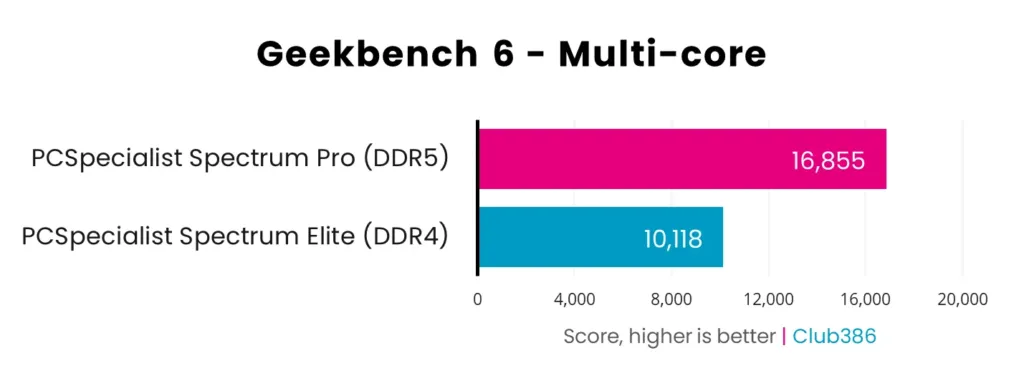
Computing five billion digits of Pi in y-cruncher took 258.8 seconds on the DDR4 rig against 130.6 seconds on DDR5, almost exactly double. Both systems carried 32GB, so capacity isn’t the variable here; what changed was the transfer rate, 3,200MT/s against 6,000MT/s, working alongside the newer chip. This is the one workload in the whole set where the memory speed itself is visibly part of the story rather than just the CPU sitting behind it.
Rendering is where the DDR4 box costs the most time, not frames. Cinebench 2026 has the 5700X at 382 points single-core against 551 for the 9700X, and 3,281 against 4,855 across all threads, a 48 percent multi-thread gap that’s wider than anything in the earlier app tests. Corona 10’s ray-tracing benchmark goes further still: 4.35 million rays per second against 7.03 million, 62 percent apart. For anyone who exports video or renders scenes rather than just plays games on the machine, that’s the number that matters, because a render job that takes an hour on the 9700X runs closer to an hour and forty minutes on the 5700X.
| Test | Ryzen 7 5700X + DDR4 | Ryzen 7 9700X + DDR5 | Gap |
|---|---|---|---|
| 7-Zip compression | 93,251MIPS | 117,199MIPS | 26% |
| Geekbench 6 single-core | 2,214pts | 3,388pts | 53% |
| Geekbench 6 multi-core | 10,118pts | 16,855pts | 67% |
| y-cruncher, 5b digits of Pi | 258.8s | 130.6s | — |
| Cinebench 2026 single-core | 382pts | 551pts | 54% |
| Cinebench 2026 single-thread | 479pts | 738pts | 44% |
| Cinebench 2026 multi-thread | 3,281pts | 4,855pts | 48% |
| Corona 10 Render | 4.35 MRPS | 7.03 MRPS | 62% |
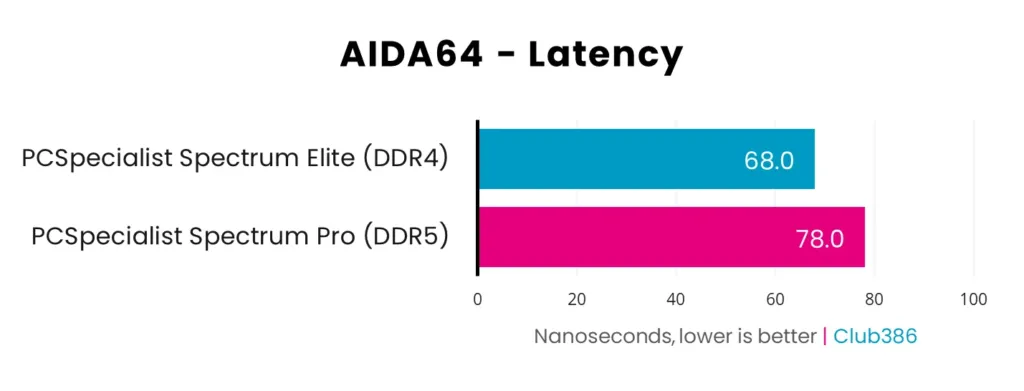
AIDA64’s bandwidth numbers aren’t close at all: reads run 25,599MB/s on DDR4 against 59,567MB/s on DDR5, 2.33 times faster, and writes come in 1.78 times faster at 79,992MB/s against 44,981MB/s. But latency flips the result. The DDR4 kit’s tighter CL16 timings measure 68.0ns against 78.0ns on the CL30 DDR5 kit, the one test in this whole set where the older standard wins outright. Club386 calls the 10ns difference blink-and-miss-it, and that’s fair; it’s a real win for DDR4, but a small one, and each chip’s own memory controller is doing some of that work alongside the timings themselves.
DDR4’s one clean win
Tighter CL16 timings get the DDR4 kit to 68.0ns against 78.0ns for DDR5, a genuine latency win, and it’s the only memory metric here that goes DDR4’s way. Bandwidth is a rout in the other direction: DDR5 reads 2.33 times faster and writes 1.78 times faster.
At the wall, the DDR4 box draws 72W idle and 135W under Cinebench load; the DDR5 rig draws 70W idle and 161W loaded, 19 percent more. That’s a real gap, but it’s a modest 26W, and both chips are rated at the same 65W default TDP, so the difference isn’t coming from the processors themselves. Club386 says the RAM barely moves the number either way; it’s the chipset and the rest of the platform around it doing most of the pulling.
System power draw idle and under Cinebench load
Drawing less power only helps if you’re getting work done with it, and on that measure the DDR4 box loses badly. Club386’s efficiency rating, Cinebench 2026’s multi-thread score divided by peak draw, comes out at 20.38 for the 5700X against 30.16 for the 9700X, 48 percent apart, so the newer platform is both faster and doing more with every watt it pulls. Temperatures run the other way: the DDR4 rig peaks at 57°C under load against 65°C for DDR5, 8°C cooler, though neither comes anywhere near thermal throttling. That makes heat a non-issue for either platform, not a reason to pick one over the other.
Pros
- Lower memory latency: 68.0ns against 78.0ns
- Draws less power under load: 135W against 161W
- Runs 8°C cooler under load: 57°C against 65°C
Cons
- 48 percent worse points per watt on Club386’s efficiency rating
- Corona 10 Render 62 percent slower
- Geekbench 6 multi-core 67 percent behind on matching core counts
A 5700G Swap Locks Out BIOS on a Gigabyte B550
One Tom’s Hardware forum poster found his Ryzen 5 wasn’t asking much of a Gigabyte B550 Gaming X V2 Rev 1.4, decided a Ryzen 7 5700G was the obvious step up for what it cost, and bought one. It sat in its box from June 2024 until he finally got around to fitting it, which is the same bet a lot of AM4 owners are making right now: keep the board, keep the DDR4, buy the biggest chip the socket will still take rather than start over on DDR5.
- The board posts as far as the AMI logo, so it isn’t dead
- Pressing the BIOS key does nothing once it gets there
- Gigabyte’s own support page lists the 5700G as covered by the factory FB BIOS the board already shipped with, so a flash shouldn’t be the fix
- Only one of the two 16GB Corsair sticks reports to the system
- Both sticks sat in slots 2 and 4, exactly where the manual says to put a two-stick kit
- Swapping the sticks between those slots changed nothing, which rules out a dead stick and leaves the socket or the board itself as the suspect
Partway through the thread he asks what XMP even is and whether it has anything to do with what’s going wrong. It doesn’t, at least not directly: the speed printed on a kit’s box only shows up once XMP or its AMD equivalent, EXPO, gets switched on in the BIOS, and a kit left alone just runs at a default of 4800 or 5600MT/s instead. That’s a separate problem from a stick not showing up in the system at all, and it’s worth keeping the two apart before spending money chasing the wrong one.
Two Memory Mistakes Dave’s Sees Most
Dave’s Computers says the two memory faults that turn up most at the bench are a machine running its RAM with the profile never switched on, and two different kits mixed into the same board. Their fix for the second one is to replace the whole kit rather than add sticks to it, since a mismatched pair can refuse to boot outright or crash at random once it does.
When trouble starts right after a RAM change and a BIOS update land at the same time, the temptation is to blame whatever software was running at the time. One reply in a related Reddit thread pushes back on that instinct and lays out the order to actually work through instead.
since it also freezes when booting the windows installer from USB with the SSD disconnected, stop focusing on windows or the SSD and look at the hardware. given the crashes started around the RAM upgrade and the BIOS update, test with one known good RAM stick at a time and run a memory test, then check the psu and motherboard for issues before spending money on replacements
- Check the board’s CPU support list against the BIOS version it already shipped with, since Gigabyte’s own listing can rule out a flash before anyone attempts one
- Boot with one stick at a time to find out whether the fault sits in a stick or in a slot, the way swapping sticks between slots 2 and 4 ruled out a dead stick here
- Once the system is stable, turn on XMP or EXPO so the kit actually runs at its rated speed rather than the 4800 or 5600MT/s default
- If memory turns out to be the problem, replace the whole kit rather than adding sticks to it, since a mismatched pair is what causes refusals to boot or random crashes in the first place
Club386’s Pound-Per-Frame and Pound-Per-Point Maths
Divide the frame rates Club386 already measured by what each machine costs and the Spectrum Elite comes out ahead: 0.68 frames per pound against 0.62 for the Spectrum Pro at Maximum settings, and 0.98 against 0.96 at Medium. That’s despite Rainbow Six Siege X sitting inside both totals, a game where the DDR5 rig ran away by 132-135%. Pull Siege X back out and the gap barely moves, 0.06p at Maximum and widening slightly to 0.08p at Medium, which means that single lopsided result wasn’t propping up the DDR4 machine’s case. The Elite loses on raw frames in almost every other test in the suite and still comes out ahead once price enters the sum.
| Club386 value rating | Spectrum Elite (DDR4) | Spectrum Pro (DDR5) |
|---|---|---|
| Gaming value, Maximum settings | 0.68 | 0.62 |
| Gaming value, Medium settings | 0.98 | 0.96 |
| Productivity value | 2.35 | 2.56 |
| Price | £1,399 | £1,900 |
Productivity flips the result: the Spectrum Pro scores 2.56 against the Elite’s 2.35, a 9% edge in points per pound despite costing £500 more to begin with. That’s the one number in Club386’s whole value table where the more expensive machine actually wins on the maths rather than just on raw output, and it’s a large enough gap that Club386 still comes down in favour of the DDR5 rig overall.
None of those ratios capture where each socket goes next, and that’s the part the price tag doesn’t show you. AM4 has nowhere left to climb: the chip in the Spectrum Elite is close to the end of what the socket will ever run. Whoever buys the Spectrum Pro can drop in a 9800X3D later and get a second CPU generation out of the same board, which is the real argument for the extra £500 rather than anything in the productivity column. None of that makes the DDR4 rig a bad buy on its own terms, Club386 still calls it a fair pick for someone building their first gaming PC or replacing something old.
- TechSpot says DDR4 stopped making sense in a new build except on AM4, and calls the whole comparison more for science at this point than buying advice
- Dave’s Computers keeps DDR4 alive for two specific jobs: upgrading a machine that already runs it, and building the cheapest gaming box that will still run current games
- For a 2019 to 2022 machine already on DDR4, a matched memory upgrade is often the cheapest fix left that actually does something
Sell one of these machines on and the platform is what buyers price down, whatever’s actually sitting in the case. An ITX build normally carries a premium for the engineering that goes into fitting full-size parts into a small box, and a DDR4 label can wipe that premium out on its own.
I think its too exensive, I am not trying to lowball but you have a ddr4 system, and yeah I understand ITX is premium but I dont think you understand that not so many people care
The case for paying more up front was never today’s frame rate, it’s how many graphics cards the chip outlasts before it becomes the bottleneck again. That’s the argument one commenter lays out plainly when asked whether the upgrade is worth it.
9800X3D under $300 is excellent value. I would make that upgrade, your immediate benefit will be fairly small but it should carry you through 2-3 future GPU upgrades.