
Key Takeaways
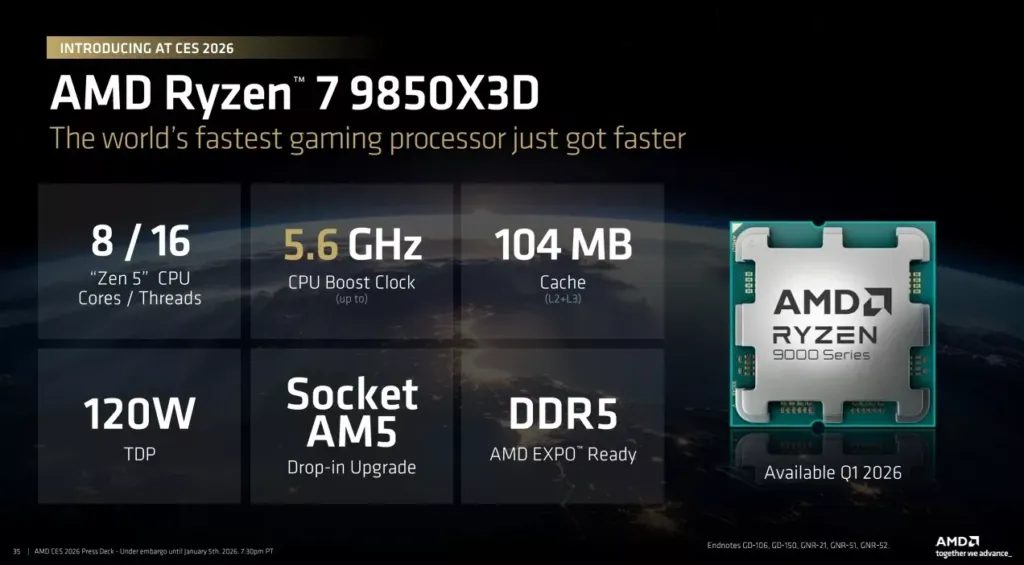
- 1The 9850X3D’s entire advantage is 400MHz of boost clock, 5.6GHz versus the 9800X3D’s 5.2GHz; every other spec, including the 96MB of L3 cache, is identical between the two chips.
- 2Across four outlets, gaming gains average around 5%, and Back2Gaming’s own aggregate score puts the 9850X3D at 109.9% against the 9800X3D’s 106.1% with a 9950X baseline of 100%.
- 3That clock advantage costs power: Back2Gaming measured 149.87W on the 9850X3D against 128.48W on the 9800X3D under identical render load, a nearly 21W gap for the same work.
- 4Temperatures follow the power draw directly. The 9850X3D hit 85.9°C under render load against the 9800X3D’s 71.2°C on the same cooler.
- 5AMD’s MSRP gap is $20, $499 for the 9850X3D against $479 for the 9800X3D, which only makes sense as an upgrade case while that specific gap holds at retail.
- 6RAM speed barely matters on either X3D chip. AMD’s own figures, backed independently by Phoronix, put the gap between DDR5-4800 and DDR5-6000 kits under 1% across games.
- 7In pure multi-core work the 9850X3D actually trails its cheaper sibling, scoring 5562 in Cinebench 2026’s multi-core test against the 9800X3D’s 5687, and both sit far behind the 9950X’s 9612.
- 8Existing 9800X3D or 7800X3D owners have no upgrade case here at all; the gap shrinks further at 1440p and 4K once the graphics card becomes the bottleneck instead of the CPU.
- 9Anyone shopping fresh on AM5 should check the live price gap first: Back2Gaming’s Philippine pricing shows the 9850X3D running PHP 2,000 to PHP 4,000 above the 9800X3D, and Gaming PC Advice notes that any 9800X3D clearance discount flips the value case entirely.
The 9850X3D vs 9800X3D Spec Sheet
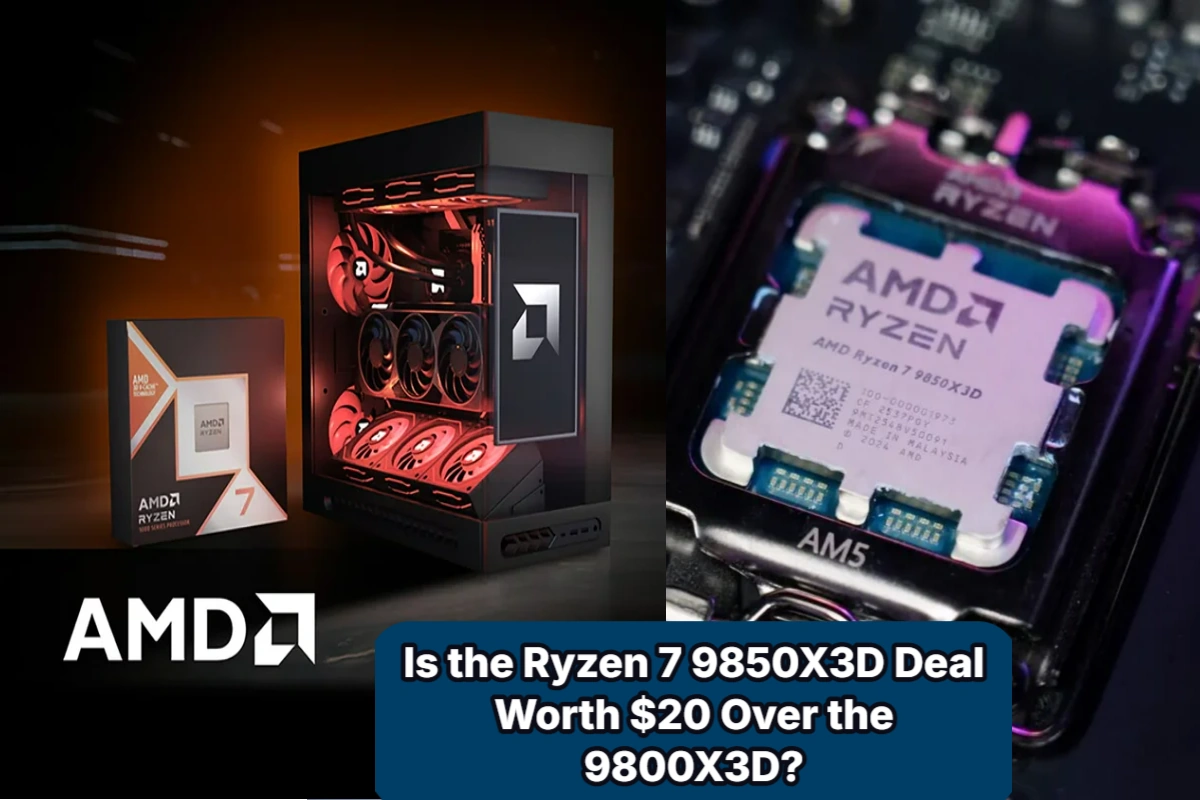
Eight cores, sixteen threads, 96 MB of L3 cache stacked with 8 MB of L2 for 104 MB total, and a 120W TDP ceiling: the 9850X3D and 9800X3D match on every one of those lines. The one spec that actually separates them is clock speed. The 9850X3D boosts to 5.6 GHz where the 9800X3D stops at 5.2 GHz, and that 400 MHz is the whole case for the newer chip existing at all. AMD priced that gap at $20, setting the 9850X3D’s MSRP at $499 against the $479 the 9800X3D launched at, and Gaming PC Advice puts the two figures side by side to make the same point: twenty dollars for 400 MHz. Back2Gaming reads the relationship between the chips more bluntly, calling the 9850X3D a tighter bin of the 9800X3D rather than a new design, meaning the extra clock headroom comes from sorting the same silicon more carefully rather than changing anything about it.
| Spec | Ryzen 7 9850X3D | Ryzen 7 9800X3D |
|---|---|---|
| Cores / Threads | 8 / 16 | 8 / 16 |
| Base Clock | 4.7 GHz | 4.7 GHz |
| Max Boost Clock | 5.6 GHz | 5.2 GHz |
| L2 Cache | 8 MB | 8 MB |
| L3 Cache | 96 MB | 96 MB |
| Total Cache (L2+L3) | 104 MB | 104 MB |
| Architecture | Zen 5, second-gen 3D V-Cache | Zen 5, second-gen 3D V-Cache |
| Socket | AM5 | AM5 |
| Default TDP | 120W | 120W |
| Max Memory Speed | DDR5-5600 | DDR5-5600 |
| Max Memory Capacity | 192 GB | 192 GB |
| MSRP | $499 | $479 |
Base Clock: Two Numbers in the Record
CORSAIR, Gaming PC Advice and Tech Guided all list the 9850X3D’s base clock at 4.7 GHz, matching the 9800X3D exactly, and cpu-monkey’s own listing of 4.70 GHz backs them up. Back2Gaming’s product table breaks from the rest, putting the base clock at 4.4 GHz instead. Four sources against one would normally settle it, but nobody’s explained the gap, so the record stands as it is: most of it says 4.7 GHz, and one table says 4.4 GHz.
Where the V-Cache Actually Sits
The 400 MHz gap between these two chips isn’t a software tweak or a lucky bin alone; it comes from where AMD physically put the cache. On the 9850X3D, the V-Cache sits under the core complex die rather than stacked on top of it the way first-generation X3D parts built it. That arrangement means the cores themselves contact the heat spreader directly instead of sitting beneath a slab of cache, and heat gets out of the package far more easily as a result. Back2Gaming points to exactly that thermal headroom as what lets the 9850X3D reach 5.6 GHz, a clock the earlier top-down layout couldn’t support because those chips had to trade frequency away in exchange for the cache sitting on top. The compute die itself is built on TSMC’s 4nm process, Back2Gaming notes, while the I/O die runs a generation behind on 6nm.
Platform, Memory and Tuning Limits
- Drops into Socket AM5, same as the 9800X3D
- Rated for DDR5-5600 memory, up to 192 GB total capacity
- ECC memory support works, provided the motherboard offers it
- The multiplier stays locked, a deliberate limit to keep the V-Cache from being damaged by overclocking
- Precision Boost Overdrive and Curve Optimizer both remain open for tuning despite the locked multiplier
- Listed as AMD EXPO Ready for memory profile support
- cpu-monkey lists PL2 at 162W and Tjunction max at 95 °C
- AMD gave it the enthusiast-tier reveal at CES 2026, with cpu-monkey listing the release date as Q1 2026
Gaming Frame Rates: Four Outlets, One Small Gap
Four outlets put the 9850X3D and 9800X3D through the same games, and none of them found much daylight between the chips. Corsair’s own figure lands at roughly 5% on average at medium settings, with the caveat that this only shows up when the CPU itself is the bottleneck rather than the graphics card. That 5% is what 400MHz of extra boost clock buys over the 9800X3D. Against the older 7800X3D, though, Corsair claims something closer to 15%, and that’s the comparison that actually reads like an upgrade worth having.
Two more outlets, Testing Games and Benchmarks for Gamers, both reported via Gaming PC Advice, arrived at the same 1% to 6% range for average FPS, and both ran their numbers at high settings and native 1080p, the resolution least likely to hand the work off to the GPU. Starfield is the title that shows what the bottom of that range actually looks like: the two chips came out virtually tied, which means in at least one game the gap is zero.
Back2Gaming’s per-title results sit in the same neighborhood as everyone else’s. Running an RTX 5080 at 1080p, so the card isn’t the thing holding scores back, Back2Gaming measured 4-5% gains for the 9850X3D in both Cyberpunk 2077 and Battlefield 6, and the newer chip consistently took the top spot in both.
Cyberpunk 2077, 1080p, RTX 5080
Battlefield 6, 1080p, RTX 5080
Counter-Strike 2, 1080p, RTX 5080
Counter-Strike 2 is where the ranking actually gets interesting. Stock for stock, the 9850X3D’s 523.5 FPS beats the 9800X3D’s 509.2, but a 9800X3D with PBO turned on hit 528 FPS, pulling ahead of the stock 9850X3D entirely. Meanwhile the 16-core Ryzen 9 9950X manages only 468.7 FPS, trailing both eight-core X3D chips by a wide margin. Back2Gaming’s read is the one the numbers support: in a game like this, the stacked cache is doing more work than any amount of extra core count.
Two caveats worth carrying from Back2Gaming’s testing. PBO behaved inconsistently across the X3D chips, with results varying board to board, and at stock XMP settings the ASRock board came out a bit ahead of the ASUS board even though both hit identical boost clocks. The motherboard and the settings you leave it at move the result by about as much as swapping the chip does.
Gaming aggregate at 1080p, relative performance
Pulled together across Back2Gaming’s whole test suite at 1080p, with the 9950X set as the 100% baseline, the 9850X3D comes out at 109.9% against the 9800X3D’s 106.1%. That does make the 9850X3D the fastest gaming CPU in this aggregate, but the margin over the 9800X3D is under four points, and it only gets smaller once you move up to 1440p ultrawide and 4K, where the graphics card starts doing the waiting instead of the processor.
Builders reading these same charts on their own have landed in roughly the same place the reviewers did.
There is no real difference between the two. Maybe 2-5% at the most and you’d never notice it.
9850X3D is just the tuned version of the 9800X3D. It runs hotter & draws more power for roughly 4 – 10% stock improvement (system build dependant).
What the Extra 400MHz Costs in Watts and Degrees
Back2Gaming captured these numbers off a Powenetics rig rather than reading them from software sensors, which is the only way to trust a figure like this: under the same render workload, the 9850X3D pulls 149.87 W against the 9800X3D’s 128.48 W, a gap of nearly 21 watts for doing identical work. Back2Gaming’s read on that gap is straightforward — AMD got the extra clock by pushing the silicon close to its thermal limit, and the power draw is the bill for that decision.
Power Draw, Render Load
That stock figure isn’t fixed, either. Flip on PBO and the 9850X3D’s render-load draw drops to 119.82 W, which sits below the 128.48 W the 9800X3D pulls at stock, the Curve Optimizer undervolt is doing enough work that the newer chip, tuned, can draw less than the older one untouched.
The gaming numbers open up wider than render ever did. In Battlefield 6 at 720p the 9850X3D draws 155 W against the 9800X3D’s 104 W, and in Cyberpunk 2077 at 1080p it’s 145 W against 89 W, in both cases the newer chip is burning roughly half again as much power to play the same game. Run PBO on the 9850X3D in Battlefield 6 and that draw falls to 105 W, landing right back on the 9800X3D’s own stock figure.
| Load | Ryzen 7 9850X3D | Ryzen 7 9800X3D | Ryzen 7 9850X3D PBO |
|---|---|---|---|
| Render load | 149.87 W | 128.48 W | 119.82 W |
| Battlefield 6 720p | 155 W | 104 W | 105 W |
| Cyberpunk 2077 1080p | 145 W | 89 W | 109 W |
The heat follows the watts exactly where you’d expect. Under render the 9850X3D hits 85.9 °C where the 9800X3D sits at 71.2 °C, and in Battlefield 6 at 720p it’s 83 °C against 65 °C, on the same cooler, doing the same job, the newer chip is running 15 to 18 degrees hotter.
CPU Temperature, Render and Battlefield 6 720p
Two other outfits ran the same comparison in percentage terms rather than watts, and landed apart from each other too. Testing Games logged about 18% more power on average, while Benchmarks for Gamers averaged 28% higher power use, with some games pushing that to 40%. Either number sits well above the single-digit frame-rate gains this chip offers, which is why Gaming PC Advice calls the extra consumption hard to justify.
Corsair’s expectation versus the bench
Corsair, writing from the fact that both chips carry the same 120W TDP label, expects only a slightly higher real-world draw from the 9850X3D and nothing dramatic enough to cause concern. That expectation sits outside every measured result in this section. Back2Gaming’s gaming figures are roughly 50W apart, and the two percentage-based outlets put the gap at 18% to 40%. The TDP label is identical on both chips; what they actually pull from the wall is not.
A reader pointed to a fourth data point in the same thread, this time from Gamers Nexus running an all-core Blender workload, and did the arithmetic themselves.
gamer’s nexus found it drew 20w more than 9800x3d in all core blender workload https://gamersnexus.net/cpus/amd-ryzen-7-9850x3d-cpu-review-benchmarks-gaming-power-thermals-ft-ddr5-4800, so a 14% increase in power for about a 1-2% increase in performance in blender, this was at 160w for the 9850x3d
Cooling and Powering the 9850X3D
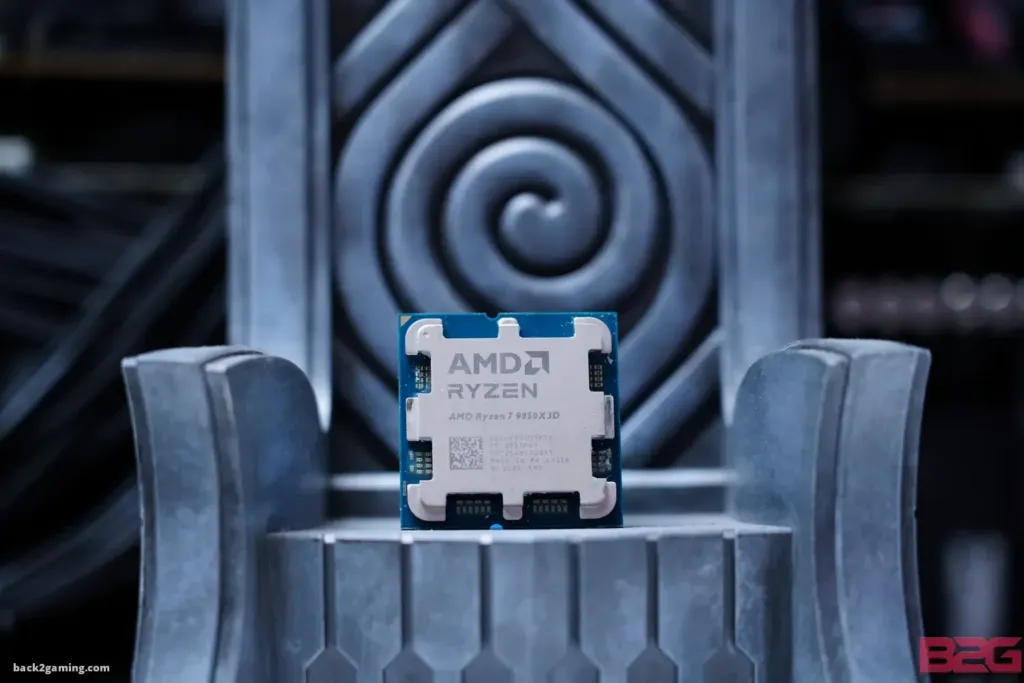
Nobody disagrees on why this chip runs hot for its TDP: the 3D V-Cache layer sits stacked on top of the compute die, concentrating heat in a smaller area than a plain Ryzen part dissipating the same wattage has to deal with. Where the guides split is what that means you need to buy. Back2Gaming, running its own tests, calls a 360mm AIO mandatory for the 9850X3D specifically, while noting the 9800X3D was forgiving enough to run on high-end air. pctalktalk and Corsair both push back on that line for the 9850X3D itself: pctalktalk says a premium dual-tower air cooler handles it fine, and Corsair’s own guidance is simply a strong, efficient air cooler keeps temperatures in check. Nobody is disputing the thermal density, just how much cooler it takes to manage it.
Whichever side of that argument you land on, the cooler is a separate line item either way: neither the 9850X3D nor the 9800X3D ships with one in the box, so it goes on top of the CPU price no matter which chip you buy.
Air Cooler Picks
pctalktalk’s top air pick is the Thermalright Peerless Assassin 120 SE, built around six 6mm heatpipes, and its wide dual-tower footprint is the thing to measure against your motherboard before buying — tall RAM modules can run straight into it. The value pick is the Noctua NH-D15 chromax.Black, running two 140mm fans for the quietest result of the three, at the cost of a footprint large enough to block a PCIe slot on some boards. The be quiet! Pure Rock Pro 3 carries seven heatpipes and sits between the two on cooling, but pctalktalk flags it as harder to actually install than either rival.
Pros
- Peerless Assassin 120 SE: six 6mm heatpipes and a dense fin stack in a roughly 200W cooling class
- NH-D15 chromax.Black: dual 140mm fans for quieter running in the same ~200W class
- Pure Rock Pro 3: seven heatpipes, also rated to ~200W
Cons
- Peerless Assassin 120 SE can foul tall RAM modules
- NH-D15’s very large footprint may block PCIe slots
- Pure Rock Pro 3 is slightly harder to install than the other two
Liquid Cooling Picks
pctalktalk’s top liquid pick is the ARCTIC Liquid Freezer III Pro 360, which carries a 38mm radiator, thicker than a standard 360mm unit, and a built-in VRM fan that cools the motherboard components around the socket rather than just the CPU. That thickness is the catch: it can cause clearance problems in cases built around standard radiator depth, and its tubing runs stiffer than most, so routing it takes more care. The value pick, the CORSAIR NAUTILUS 360 RS, gets loud at maximum fan speed. Of all six coolers named across both guides, the plain Arctic Liquid Freezer III 360 is the only one rated to roughly 300W rather than the ~200W class the rest sit in, and it’s the specific cooler Back2Gaming used to generate its 9850X3D temperature numbers — worth keeping in mind when reading those figures, since a 200W-class cooler would run hotter still. Corsair’s own list also includes the iCUE LINK TITAN 360 RX as a further option.
| Cooler | Type | Cooling class | Radiator |
|---|---|---|---|
| Thermalright Peerless Assassin 120 SE | Air | ~200W | — |
| Noctua NH-D15 chromax.Black | Air | ~200W | — |
| be quiet! Pure Rock Pro 3 | Air | ~200W | — |
| ARCTIC Liquid Freezer III Pro 360 | AIO | ~200W | 360mm |
| CORSAIR Nautilus 360 RS | AIO | ~200W | 360mm |
| Arctic Liquid Freezer III 360 | AIO | ~300W | 360mm |
Check Your Case Before You Check the Benchmarks
None of the cooling arguments above matter if the part doesn’t fit. A 360mm AIO needs 360mm of radiator mounting room, and the air towers here need 160mm or more of case height clearance, the Liquid Freezer III Pro 360’s extra-thick radiator makes this tighter still. pctalktalk also flags checking AM5 bracket mounting pressure at install, since contact quality there decides whether any of these coolers hit their rated numbers at all.
The Power Supply Floor
Corsair sets the power supply floor at 750W, with 80 PLUS Gold or Platinum certification, and that headroom is there for overclocking and future upgrades rather than for the CPU itself. Both chips are rated at the same 120W TDP, so a 750W supply covers either one without distinction, the number that actually moves is total system draw, and the graphics card, storage and cooling attached decide that far more than which of these two CPUs sits in the socket.
Back2Gaming measured 85.9°C on the 9850X3D under render load against 71.2°C on the 9800X3D doing the same work, a gap that lands exactly where the air-versus-AIO argument above is actually fought out. It’s also the gap behind a question that keeps coming up from people already running a cooler bought years before this chip existed.
They are 85C under load which is what I capped it at. I bought the cooler 3 years ago. Should I upgrade?
RAM Speed Scaling on 104MB of Cache
AMD’s own claim, carried by Videocardz, is that the gap between a DDR5-4800 kit and a DDR5-6000 kit averages under 1% across games on this chip. Phoronix ran its own benchmarks afterward and landed on the same conclusion, which matters because a vendor slide and an independent bench agreeing is a different thing than a vendor slide standing alone. The mechanism behind it is straightforward: 96MB of that 104MB total comes from the 3D V-Cache die stacked on top of the compute cores, and when the data a game keeps reaching for already sits in that pool, the CPU simply asks main memory for less, which means the speed of that memory matters less too.
Counter-Strike 2, 1080p average FPS by memory kit (Back2Gaming, Ryzen 7 9850X3D + RTX 5080)
Back2Gaming’s own Counter-Strike 2 numbers, run at 1080p behind an RTX 5080, make the strongest case for AMD’s claim of any game it tested. The DDR5-6000 C26 kit hit 483.5 FPS and the far cheaper DDR5-5200 C40 kit hit 482.5 FPS, a one-frame difference across both kits. Even the slowest kit in the lineup, a DDR5-4800 C40 set, managed 457.4 FPS, under 6% off the top result in a title that has historically lived and died on cache size and memory latency.
Battlefield 6, 1080p average FPS by memory kit (Back2Gaming, Ryzen 7 9850X3D + RTX 5080)
Battlefield 6, 1080p 0.1% low FPS by memory kit (Back2Gaming, Ryzen 7 9850X3D + RTX 5080)
Battlefield 6 keeps the averages close: 226.1 FPS on the DDR5-6000 C26 kit, 218.1 FPS on the DDR5-4800 C40 kit, and 216.9 FPS on the DDR5-5200 C40 kit, an eight-frame spread across the whole range. The 0.1% lows do not hold up the same way. The DDR5-6000 kit’s worst frames average 142.9 FPS, the DDR5-5200 kit falls to 128.3 FPS, and the DDR5-4800 kit drops all the way to 100.1 FPS, a 40-frame gap between the fastest and slowest kit on the number that corresponds to stutter you actually feel rather than the average you glance at. The cache is big enough to hide memory speed from the average frame rate; it is not big enough to hide it from the worst ones.
Cyberpunk 2077, 1080p average FPS by memory kit (Back2Gaming, Ryzen 7 9850X3D + RTX 5080)
Cyberpunk 2077 flips the order entirely. The DDR5-5200 C40 kit posted the highest average at 218.9 FPS, the DDR5-4800 C40 kit came in at 214.8 FPS, and the DDR5-6000 C26 kit, the most expensive of the three, finished last at 209.7 FPS. Paying more for faster RAM produced the slowest result in this game, which is about as blunt a demonstration of cache insulation as a chart can give you.
Back2Gaming’s AIDA64 numbers explain why none of this costs much. Memory latency measured 73.4 ns on the 9850X3D and 74.1 ns on the 9800X3D, effectively the same chip by this metric, and raw memory read bandwidth on the 9850X3D came in at 63793 MB/s, well behind the dual-CCD Ryzen 9 9950X’s 80946 MB/s. The 9850X3D is not winning games on memory throughput in the first place, which is exactly why a slower kit barely shows up on the frame counter.
With RAM prices high right now and fast kits hit hardest, that insensitivity to memory speed is worth money rather than just an interesting result. A plain JEDEC DDR5-4800 or DDR5-5200 kit costs far less than a tuned enthusiast set and loses almost nothing in these games, and the difference can go toward offsetting the 9850X3D’s premium over the 9800X3D. The catch is that the 9800X3D carries the same 96MB of L3 cache and almost certainly behaves the same way with cheap RAM, so this is not a reason to pick the 9850X3D specifically. It is a reason to pick either X3D chip over something without the cache to cushion it.
Switch On EXPO or XMP Before You Blame the CPU
Buying a slow kit costs you almost nothing on this chip; leaving it at its firmware default does. Without EXPO or XMP enabled in the motherboard’s firmware, the kit runs below its rated speed, and CPU-limited performance drops for no reason beyond a setting nobody flipped. Stability still matters more than the number on the box, though: an unstable overclock on top of that profile produces crashes and frame-time spikes, which erase any of the gains a faster kit might have bought in the first place.
The Intel Side: Core Ultra 7 270K Plus on LGA 1851
Intel’s answer is built on a completely different premise. The Core Ultra 7 270K Plus packs 24 cores and 24 threads, split eight performance cores and sixteen efficiency cores, boosting to 5.5 GHz with a PBP Tech Guided lists at 125W. That’s three times the core count of either X3D chip on a socket, LGA 1851, that has nothing to do with AM5.
| Socket | LGA 1851 |
| Architecture | Arrow Lake Refresh |
| Cores | 24 |
| Threads | 24 |
| Base | 3.7GHz |
| Boost | 5.5GHz |
| PBP | 125W |
Intel closed a lot of the gap that dogged the original Core Ultra 200S lineup, but the 270K Plus still trails both the 9800X3D and the 9850X3D in any game where the CPU itself sets the ceiling. Push the resolution to 1440p with higher settings and that gap narrows, because the graphics card takes over as the bottleneck and the CPU underneath it stops mattering as much.
Pros
- The 24-core design pulls ahead in rendering, compression and compiling work
- Quick Sync speeds up supported video production and streaming workflows
Cons
- Slower than AMD’s top X3D chips in CPU-limited games
- LGA 1851 carries no AM5-style long-term upgrade story
- The real comparison is the whole platform cost, not the chip price alone
That’s the trade builders on this shortlist are actually weighing: a few percent of frames against real gains in rendering and encoding work, with the gaming gap itself fading once the resolution climbs to 4K or 5K2K. Here’s how one buyer on the shortlist read it.
The 270K Plus beats the 9850x3d in literally every task you listed except gaming, but it’s not that far behind. And if you move to 4k or 5k2k, then you won’t even notice the gaming performance difference. Intel wins this one.

Intel’s Flagship: Core Ultra 9 285K
Back2Gaming’s numbers on the Core Ultra 9 285K show a chip that out-clocks both X3D parts, boosting to 5.7 GHz against 76 MB of combined L2 and L3, rated 125W with a 250W maximum turbo power. None of that mattered against the 9800X3D, which was already beating the 285K in games before the 9850X3D ever launched. Back2Gaming ran that 285K on DDR5-8200 C40, about as fast as memory gets, on a ROG Strix Z890-F GAMING WIFI board, and it still lost the frames — so whatever is holding the 285K back in games, it isn’t the memory kit.
| Feature | Ryzen 7 9850X3D | Ryzen 7 9800X3D | Core Ultra 9 285K |
|---|---|---|---|
| Cores/Threads | 8 / 16 | 8 / 16 | 24 (8P+16E) / 24 |
| Boost Clock | 5.6 GHz | 5.2 GHz | 5.7 GHz |
| Total Cache | 104 MB | 104 MB | 76 MB (L2+L3) |
| TDP | 120W | 120W | 125W (250W MTP) |
| Socket | AM5 | AM5 | LGA 1851 |
| Memory Support | DDR5 | DDR5 | DDR5 |
Multi-Core Work: 9950X, 9950X3D and PRO 9945
Back2Gaming ran all three chips through Cinebench 2026’s multi-core test and the 9850X3D came out at 5562 points, the 9950X at 9612, and the 9800X3D at 5687. Two things sit in that spread: the eight-core chip trails the sixteen-core 9950X by a wide margin, and it also lands below its own cheaper sibling. The extra 400MHz of boost clock that defines this chip simply doesn’t show up when all eight cores are loaded at once, which is why Back2Gaming keeps the 9950X as the pick for anyone doing heavy rendering or export work.
Cinebench 2026 CPU Multi
Switch to single-core and the 400MHz finally earns its keep: 769 points against 747 in Cinebench 2026, 140 against 134 in Cinebench 2024. Both gaps are real and both are small, and neither touches the problem a render queue actually has, which is how many threads it can keep busy rather than how fast any one of them runs.
Cinebench single-core, 9850X3D vs 9800X3D
Real creator software draws the same line Cinebench does. In PugetBench’s Premiere Pro Extended test the 9950X scores 140092 against the 9850X3D’s 133040, and in DaVinci Resolve it’s 12901 to 11931: both applications reward the extra cores. Photoshop runs the other way, because Photoshop leans on single-core frequency rather than thread count, and with PBO applied the 9850X3D posts 14345 points, enough to top that chart outright.
| Creator benchmark | Ryzen 7 9850X3D | Ryzen 9 9950X |
|---|---|---|
| PugetBench Premiere Pro Extended | 133040 pts | 140092 pts |
| PugetBench DaVinci Resolve | 11931 pts | 12901 pts |
| PugetBench Photoshop (9850X3D with PBO) | 14345 pts | 14173 pts |
Pull back to general-purpose synthetics and the two chips stop separating at all. 3DMark Steel Nomad gives the 9850X3D 8497 points against the 9800X3D’s 8481, but PCMark 10 flips it, 12962 to 13131, and Procyon Office flips it again, 9507 to 9528. Back2Gaming calls the whole spread margin of error, and for anything that isn’t a game, the premium this chip charges buys nothing a benchmark can find.
| Synthetic benchmark | Ryzen 7 9850X3D | Ryzen 7 9800X3D |
|---|---|---|
| 3DMark Steel Nomad | 8497 pts | 8481 pts |
| PCMark 10 | 12962 pts | 13131 pts |
| Procyon Office | 9507 pts | 9528 pts |
cpu-monkey’s numbers against the Ryzen 9 PRO 9945 make the core-count argument even plainer. The 9850X3D is 8% ahead in single-core, but multi-core comes out level between the two, and the PRO 9945 gets there with 12 cores to the 9850X3D’s eight, a 65W TDP rating against 120W, and 64 MB of L3 to the 9850X3D’s 96 MB. The eight-core chip’s only real win here is single-thread, and it spends nearly double the power to tie a part rated at barely half of it.
| AMD Ryzen 7 9850X3D | AMD Ryzen 9 PRO 9945 | |
|---|---|---|
| Cores / threads | 8 / 16 | 12 / 24 |
| Turbo frequency | 5.60 GHz | 5.40 GHz |
| L3 cache | 96.00 MB | 64.00 MB |
| TDP | 120 W | 65 W |
| Single-core | +8% | — |
| Multi-core | tied | tied |
This is the shape of problem AMD’s own Ryzen 9 9950X3D is built to solve. It carries 16 cores and 32 threads, boosts to 5.7 GHz, and splits its two compute dies so only one of them carries V-Cache: games route to that cache-equipped half, while threaded applications spread across all sixteen cores. Back2Gaming lists its L3 at 144 MB and its TDP at 120W; Tech Guided lists 128 MB and 170W instead, and with both sources disagreeing on the chip’s own cache size and power ceiling, there’s no single figure to hand a reader here, only the range. Tech Guided’s framing is that this is the chip for a PC that both games and earns, which the core split is built around rather than something either workload has to compromise on.
Two outlets arrive at the same spot from opposite ends. Tech Guided’s position is that the 9800X3D games close enough to the 9950X3D that extra cores are not a reason to buy for gaming alone, which means the 9850X3D’s 400MHz isn’t buying a gaming upgrade over its cheaper sibling either. Back2Gaming’s position, built on the Cinebench and PugetBench numbers above, is that the 9850X3D’s eight-core design lags the 9950X too far in heavy multithreaded work to recommend it to hybrid creators, who should pass on it entirely.
- Render and export work, measured in minutes off a timeline: Back2Gaming puts the 9950X ahead, and tells hybrid creators to pass on the 9850X3D outright.
- A PC that has to game and earn in the same build: Tech Guided points that buyer at the 9950X3D, which gives up neither side of the split.
- Frequency-bound work like Photoshop: the 9850X3D with PBO applied actually topped the PugetBench chart at 14345 points, the one creator result where it wins outright.
- Gaming only: Tech Guided’s own case is that the 9800X3D games close enough to the 9950X3D for much less money, so neither extra cores nor the 9850X3D’s extra clock is a gaming argument worth paying for.
AM5 Compatibility and the Socket’s Long Runway
Buying a 9850X3D does not mean buying a new motherboard. It drops straight into X670, X670E, B650, B650E and X870 boards, and AMD has committed to keeping AM5 alive through 2027 and beyond, which makes this socket a platform to plan around rather than one to worry about outgrowing. Back2Gaming found that a 2023-era X670E or B650E board already has the VRM headroom to feed the chip’s 120W without strain, so there is no technical case for anyone on one of those boards to swap it out. For a fresh build, Back2Gaming points toward X870, but adds the caveat that matters most for a buyer deciding where to spend: the gaming difference between a flagship X870E board and a mid-range B650 is effectively zero.
Flash the BIOS First
Flash the BIOS before the chip goes in the socket, not after. Skip that step on an existing board and the system is likely to fail to post entirely, which turns a straightforward upgrade into a troubleshooting session.
What the 800-series chipsets actually guarantee over the older boards is spelled out in the standard rather than left to each vendor: both X870 and X870E mandate 40Gbps USB4 on every board that carries the name, along with PCIe 5.0 on the GPU slot and the primary M.2 slot. X870E reaches that with two Promontory 21 chips for extra lanes and I/O headroom, while X870 is a single-chipset design with slightly fewer total lanes to hand out.
| Feature | X870E | X870 | X670E | X670 | B650E | B650 |
|---|---|---|---|---|---|---|
| Graphics Slot | PCIe 5.0 | PCIe 5.0 | PCIe 5.0 | PCIe 4.0 | PCIe 5.0 | PCIe 4.0 |
| M.2 Storage | PCIe 5.0 | PCIe 5.0 | PCIe 5.0 | PCIe 5.0 | PCIe 5.0 | PCIe 5.0 |
| USB4 (40Gbps) | Mandatory | Mandatory | Optional | Optional | Optional | Optional |
| CPU Overclocking | Yes | Yes | Yes | Yes | Yes | Yes |
| Target Audience | Workstation / Enthusiast | High-End Gaming | Enthusiast Legacy | Mainstream High-End | Future-Proof Value | Mainstream Value |
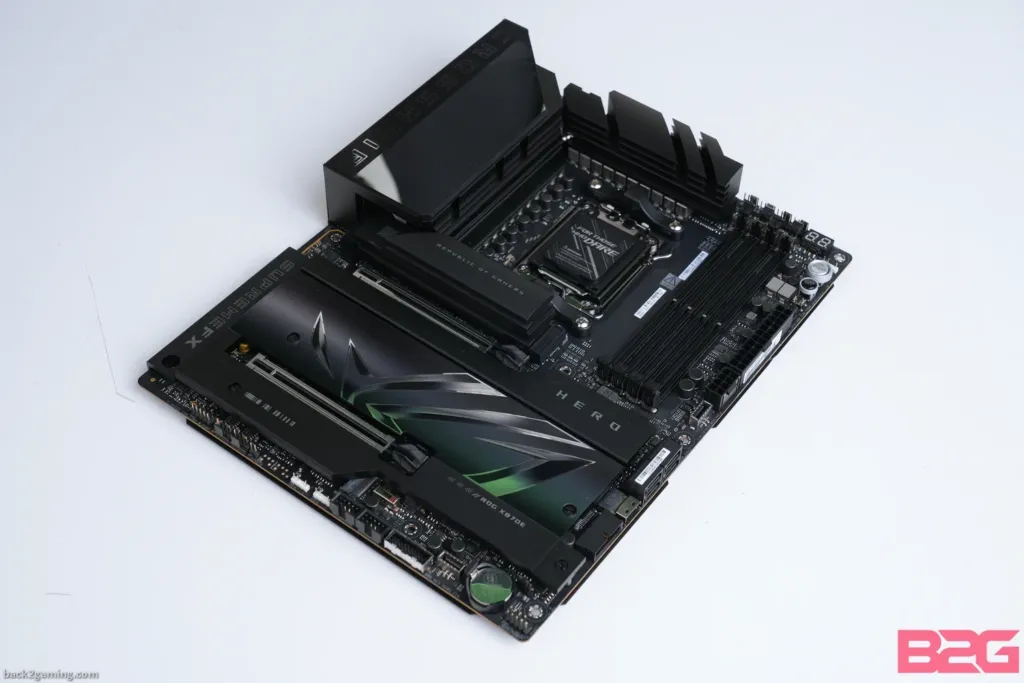
On the bench, every board Back2Gaming tested already carried a BIOS that booted the chip, even though most of those versions dated back to December and there was no January launch BIOS to speak of for these parts. Both ASUS and ASRock boards cleared the initial stability load test without issue.
One habit says more than any spec sheet about where builders’ heads are right now: every time Back2Gaming’s rig hit a random freeze during testing, the reviewer pulled the chip and checked the socket for burn marks. He found none, but the fact that checking became routine tells you how far the failure reports have traveled.
The 9800X3D Failure Reports and the ASRock Angle
Around three hundred AM5 systems have been reported as affected so far, and the failures are not confined to one motherboard vendor. Gamers Nexus counted over 80% of them on ASRock boards specifically, most of those B850 and X870, while Asus, Gigabyte and MSI boards have turned up in the reports too, just in far smaller numbers.
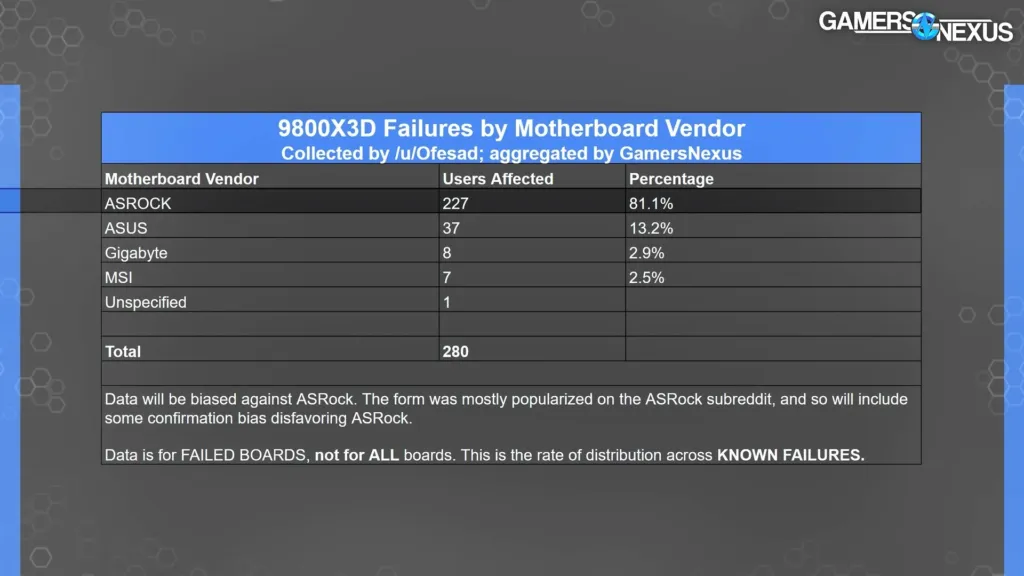
There is a reason to read that 80% figure carefully: the reports clustered on ASRock partly because discussion of the problem was coordinated through the /r/ASRock subreddit, which meant ASRock owners were the ones showing up to file them. No direct link between any motherboard and the dead CPUs has actually been proven.
- ASRock pointed to AMD’s Precision Boost Overdrive as the cause
- Some affected users report their failures happened with PBO turned off entirely
- The one concrete change Tom’s Hardware found: ASRock dropped a 1,000-watt power cap to 270W
- A Ryzen 7 9800X3D is unlikely to reach either limit during normal use
- ASRock is still the only board vendor taking any active steps on this
ASRock has made one concrete move since the Gamers Nexus video went up: in Japan, it bumped warranties on eligible Z890/B860 and X870/B850 boards from two years to three. Getting it means signing up for ASRock’s Fan Club mailing list between September 29 and December 31, and purchase date does not factor into eligibility at all. ASRock has said nothing about offering the same extension anywhere outside Japan.
Whether or not a direct cause is ever proven, the reports have already done damage to how builders talk about the brand. One Reddit user summed up the mood that has settled over discussions of ASRock boards since:
ASRock has pretty much destroyed their reputation from this. I’ll personally never buy an ASRock mobo again
Cheaper X3D Options on the Same AM5 Socket
The chip the 9850X3D actually has to beat is its own predecessor, and Tech Guided names the 9800X3D best overall for 240Hz gaming, calling it the safest choice for feeding a fast GPU. The case isn’t built around chasing an extra 400MHz anywhere; it’s that eight fast cores and 96MB of L3 cache, with the 9800X3D boosting to 5.2GHz, give the game room to run alongside voice chat, anti-cheat and capture software without anything fighting for cycles.
AMD Ryzen 5 7600X3D
The value pick: eight-core cache on six Zen 4 coresThe 7600X3D carries the same 96MB of L3 cache as the eight-core X3D chips, just spread across six Zen 4 cores at a 65W TDP with a 4.7GHz boost. Tech Guided calls it the best-value CPU for competitive gaming, and in cache-friendly titles it can beat newer non-X3D chips outright. The money it saves over an eight-core X3D part is often enough to move up a whole GPU tier.
Drop the 3D V-Cache entirely and the cheapest sensible AM5 starting point is the 9600X, which boosts to 5.4GHz at 65W on raw per-core speed alone. That’s enough to clear 240 FPS in lighter esports titles like Valorant and Rocket League, where the engine barely touches the cache hierarchy. The gap shows up the moment a game gets CPU-heavy: 1% lows sag in big battle royale lobbies, exactly where the 96MB the X3D chips carry would have kept frame times steady.
| Spec | Ryzen 7 9850X3D | Ryzen 7 9800X3D | Ryzen 7 7800X3D |
|---|---|---|---|
| CPU Cores | 8 | 8 | 8 |
| Threads | 16 | 16 | 16 |
| Max. Boost Clock | 5.6 GHz | 5.2 GHz | 5.0 GHz |
| Base Clock | 4.7 GHz | 4.7 GHz | 4.2 GHz |
| Architecture | Zen 5, second-gen 3D V-Cache | Zen 5, second-gen 3D V-Cache | Zen 4, first-gen 3D V-Cache |
| L1 Cache | 640 KB | 640 KB | 512 KB |
| L3 Cache | 96 MB | 96 MB | 96 MB |
| Default TDP | 120W | 120W | 120W |
| Max. Memory Capacity | 192 GB | 192 GB | 128 GB |
| Max Memory Speed | DDR5-5600 | DDR5-5600 | DDR5-5200 |
The 7800X3D is where the lineup starts giving up spec-sheet ground. Its boost tops out at 5.0GHz, well under the newer chips’ numbers, and it’s built on Zen 4 with first-generation 3D V-Cache rather than the second-gen layout the 9800X3D and 9850X3D both use. Memory support falls off too: DDR5-5200 instead of DDR5-5600, and a 128GB capacity ceiling against the 192GB the table credits to both newer chips. What hasn’t moved is the cache pool itself, still 96MB of L3, and that’s the only reason the 7800X3D stays part of this conversation at all.
If You Already Own an X3D Chip, Stop Here
Every guide converges on the same flat advice: anyone running a 9800X3D or 7800X3D already has no business upgrading to the 9850X3D. Whatever gap exists at 1080p shrinks further at QHD and 4K, where the graphics card takes over the workload and the CPU stops mattering as much. A 9850X3D is not a sensible replacement for either chip you already own.
How much that 400MHz is worth comes down to a price gap most builders can name to the dollar, and two threads on Reddit argue it from opposite directions.
For $30 I’d probably just get the 9850X3D assuming I had a case with good airflow and a high end cooler.
a 9850x3d is massive overkill for a £500 gpu…..a little extra money and you could have a 9070xt that would go perfectly with a 9800x3d or even a 7800x3d(and that’s where your extra money comes from)
What the Reviews Add Up To
Back2Gaming calls the 9850X3D a flex nobody asked for, and Gaming PC Advice reaches for a softer word, somewhat underwhelming, to describe the same gap. Both are describing the same math: a single-digit percentage gain in games that costs real watts and real heat, and Back2Gaming’s own thermal run put the chip at nearly 86°C under load to get there. The 400MHz wins. It just doesn’t win by much, and it runs hot doing it.
cpu-monkey takes the kinder line, calling the 9850X3D the ideal choice for a pure gaming system and pointing to the 96 MB of L3 cache as the reason gaming latencies come down. The 99 readers who rated the chip underneath that same write-up gave it 3.0 stars, which is the gap between what a reviewer’s framing says and what the people reading it actually scored.
Who Back2Gaming Says Should Actually Buy It
- Max-FPS players running at 360Hz and above, the one group where every extra frame matters
- New AM5 builders starting from scratch, who can pair the 9850X3D with a cheaper B650 motherboard and budget memory to offset the CPU premium
- 7800X3D and 9800X3D owners, who Back2Gaming says should skip it entirely
Where the Price Gap Settles the Argument
Tech Guided’s position is that price, not performance, should settle this, and Back2Gaming’s Philippine numbers show exactly what that looks like in practice. The 9850X3D lists at PHP 34,995 there, against PHP 30,000 to PHP 33,000 for the 9800X3D, a premium of PHP 2,000 to PHP 4,000. Back2Gaming calls that gap a manageable flex tax. Widen it and the case falls apart fast: paying a lot more for +400MHz on a chip that already wins by only a few percent is a tough sell at any price beyond this one.
| CPU | Boost Clock | US MSRP | Philippine price |
|---|---|---|---|
| Ryzen 7 9850X3D | 5.6 GHz | $499 | PHP 34,995 |
| Ryzen 7 9800X3D | 5.2 GHz | $479 | PHP 30,000 – PHP 33,000 |
When a Discount Flips the Math
The $20 US MSRP gap between the two chips makes the 9850X3D look like the easy upgrade. Gaming PC Advice points out that this only holds while list prices hold: if retailers cut the 9800X3D hard to clear inventory as the newer chip takes shelf space, that $20 stops being trivial and the older chip becomes the outright winner on value.
What a 240Hz Target Actually Needs
Tech Guided’s framing is that no CPU, this one included, guarantees 240 FPS in every game. A 240Hz monitor refreshes once every 4.17 milliseconds, and hitting that window consistently is a job for the whole pipeline, not just the chip on the socket. Move from 1080p to 1440p and the GPU is rendering about 78% more pixels, which shifts the bottleneck away from the CPU entirely. Tech Guided’s advice is to judge any chip on average FPS, 1% lows, and frame times together, not on one number picked out of a benchmark run.”
AMD currently holds the top of the desktop gaming CPU hierarchy, and the 9850X3D took that spot from its own predecessor, the 9800X3D, rather than from anything Intel built. Gaming PC Advice points to Intel’s Nova Lake desktop CPUs, due later this year, as the first challenge to that crown from outside AMD’s own lineup.