
Key Takeaways
- 1Nothing is buyable yet: Hallock’s comments to PC Games Hardware named no chip generation and no date, only a long-term roadmap.
- 2If overclocking on a budget board matters to you today, AMD is the only platform that delivers it right now, letting nearly the whole Ryzen lineup overclock on a B-series board rather than Intel’s required Z890.
- 3Intel’s K-series floor has sat at Core i5 or Ultra 5 for over 10 years, with only the Pentium G3258 and Core i3-9350K ever breaking below it, so treat any cheaper unlocked chip as a rare exception until proven otherwise.
- 4Watch for confirmation on B-series boards specifically. Tom’s Hardware asked Intel directly whether B-series chipsets would ever get multiplier overclocking and got no answer, and without that, a cheap unlocked chip still forces a buyer onto a Z-series board.
- 5AMD has committed to AM5 until at least 2027; Intel has made no equivalent promise for LGA 1851, so factor platform longevity into any near-term build decision.
- 6Nova Lake, the generation expected to carry this change, may be built on TSMC’s 2nm process rather than Intel’s own 18A, or split between the two – a sourcing question still unresolved.
- 7If you own a 13th or 14th Gen Intel chip, flash the BIOS carrying microcode 0x12B before first boot rather than troubleshooting crashes afterward, since a clean OCCT or Cinebench pass does not rule out Vmin degradation.
- 8Don’t let the promise talk you out of a purchase today: one forum poster already prices a locked 273PQE at around 600 USD and calls it poor value, a complaint that exists independent of anything Hallock has said about the future.
Robert Hallock’s Promise of More Unlocked Chips
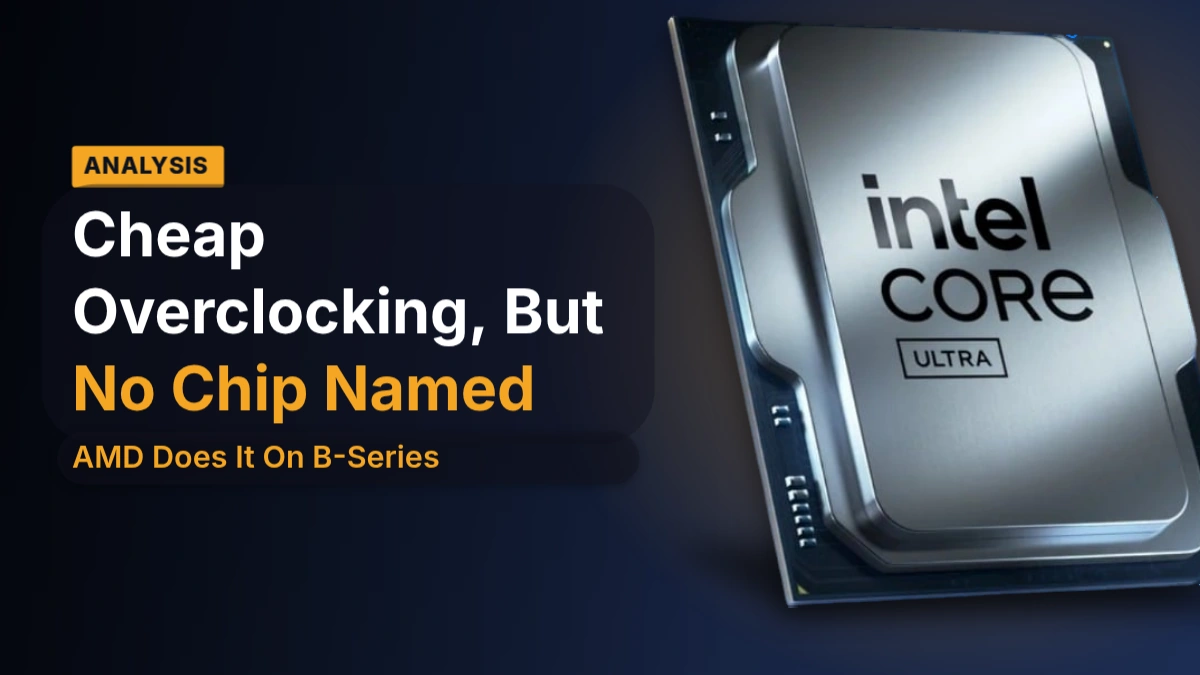
Robert Hallock is Intel’s VP and general manager of its enthusiast channel business, and the comments driving this story came from a single interview with the German reviewer PC Games Hardware. In it, Hallock said Intel will ship more and more unlocked SKUs over time, extending overclocking support to chips outside the expensive end of the stack rather than keeping it penned in at the top.
Hallock’s framing is about fairness of features, not about squeezing out more performance. He points to buyers who can spend $500 on a CPU and argues that someone spending less isn’t any less of an enthusiast, and deserves the same level of features.
More and more unlocked SKUs over time is the goal. Not everyone can afford the most money, but they deserve the same level of features. Intel intends to deliver this as part of its roadmap.
What sits behind that quote is a direction, not a product. Intel named no dates and no CPUs, and Hallock himself calls it a long-term roadmap rather than something tied to the next launch. The one concrete shape he gives it is that future Core Ultra chips will carry more overclockable models than the generations that came before them.
No Date, No SKUs Yet
Everything here is a promise and nothing more: Intel hasn’t named a date or a processor generation for cheaper unlocked chips, only pointed to a long-term roadmap. Hallock’s line that overclocking shouldn’t be exclusive to top payers is the whole commitment on the table right now, so anyone planning a build around it is planning around a direction, not a part number.

A decade of K-series starting at Core i5
If you wanted a multiplier on an Intel chip, you started shopping at Core i5 or Ultra 5 and went up from there. That floor hasn’t moved in over 10 years: nothing below the i5/Ultra 5 tier has carried an unlocked multiplier, generation after generation, which is exactly the habit Hallock’s comments are being measured against.
Tom’s Hardware points to 2 chips that broke that pattern: the Pentium G3258 and the Core i3-9350K. Both are old news at this point, and that’s the real story. A cheap unlocked Intel chip has shown up maybe twice in a decade, which makes it a novelty Intel trots out occasionally rather than anything resembling a product line.
- An unlocked Core i5 or Ultra 5 chip, at minimum
- A Z-series motherboard to go with it
- That pairing, and only that pairing, unlocks multiplier-based overclocking
- The naming tells you which chips qualify: unlocked Intel parts end in K
- The Core Ultra 5 265K is unlocked; the 265 isn’t
Tom’s Hardware calls Intel notorious for a high overclocking barrier to entry, and that two-part gate is why: a K chip buys you nothing without a Z-series board sitting underneath it, so even a buyer who only wants to raise a multiplier gets pushed into the priciest chipset tier Intel sells. The DIY community has been complaining about exactly this for years.
Overclocking Rights Across Z890, B860 and H810
Z890 is the only one of the three that touches the CPU itself, handling IA, BCLK and memory overclocking all at once. B860 drops straight to memory only, and Velocity Micro adds that even that much is board-dependent – buy the wrong B860 board and you don’t get it either. H810 does none of it. The split that matters most sits between Z890 and B860, because that’s the line where CPU overclocking disappears entirely and never comes back further down the stack.
| Chipset | Overclocking |
|---|---|
| Z890 | IA, BCLK, RAM |
| B860 | RAM |
| H810 | – |
| W880 | Memory only |
| Q870 | None |
The Board Isn’t the Whole Ticket
Puget’s point is that Z890 on its own gets you nothing. The chipset opens the door to IA, BCLK and memory overclocking, but the chip still has to be unlocked to walk through it – Intel marks those with a K, so a 265K overclocks and a 265, on the same board, doesn’t.
H810 gives you one RAM slot per channel, 2 modules total – normally the layout that tunes memory the best, since fewer modules on a channel means less signal noise to fight. The chipset throws that advantage away anyway: XMP is switched off entirely, so there’s no profile to load no matter how good the board’s wiring is. The better move for a shopper stuck on H810 is to buy a kit natively rated at 5600 Mbps rather than pay for an XMP speed the board will never run, and to skip K-series chips on these boards altogether – the unlock costs money and H810 won’t let you spend it.
- Z890 boards usually ship with higher-end VRMs, built for the overclocking the chipset actually allows
- H810 boards often drop the 7-segment POST code display that tells you what failed
- H810 boards frequently skip BIOS flashback or rollback, so a bad flash has no easy way back
- H810 boards can lack onboard power buttons, cutting the recovery tools that go with CPU and memory overclocking right along with the overclocking itself
The two workstation chipsets are really the consumer pair with the overclocking stripped back out. W880 keeps Z890’s connectivity but only memory overclocking survives; Q870 keeps B860’s connectivity and loses overclocking entirely. In its place, both pick up ECC memory support and business management features the consumer boards don’t carry.
None of that guarantees results, either. Paying for Z890 buys you the permission to overclock memory, not a good outcome from it – the board underneath still decides how far that permission gets you, as one overclocker found out the hard way on a high-end model.
The Z890 Hero is one of the worst boards I’ve hard to ever had the privilege of overclocking on. Both Asus’s and Asrock’s lowest end z890 both OC memory better than the hero. There is something clearly wrong with that board.
The Other Gaps Below Z890
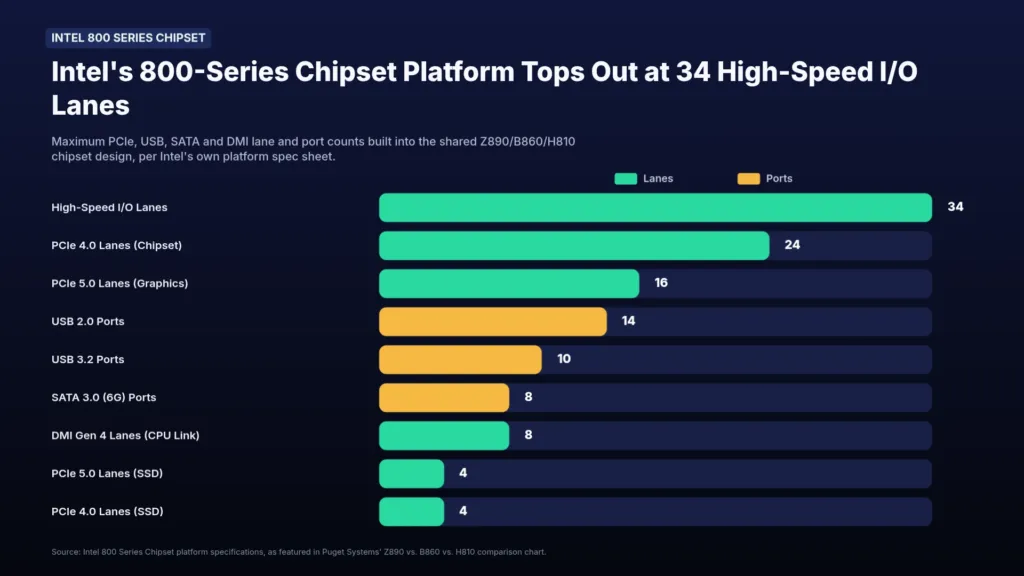
Z890 carries 48 PCIe lanes in total against H810’s 24, and the chipset itself tells the same story in miniature: H810 contributes just 8 lanes of PCIe 4.0 to that total. Storage ports follow the same halving, 8 SATA ports on Z890 against 4 on both B860 and H810, and H810 skips motherboard-based SATA RAID entirely – a problem if you were eyeing it as a cheap media server.
The two reviews don’t even count the same thing when they put numbers to this. Puget counts lanes hanging directly off the chipset: 24 on Z890, 14 on B860. Velocity Micro counts PCIe lanes as a whole and also lands on 24 for Z890, but drops to ’16 or fewer’ for B860 – the same hardware, two different accounting methods, and a reader holding both articles side by side could swear they contradict each other.
| Spec | Z890 | B860 | H810 |
|---|---|---|---|
| Chipset PCIe lanes (4.0), Puget | 24 | 14 | 8 |
| PCIe lanes, Velocity | 24 | 16 or fewer | — |
| Total PCIe lanes, Puget | 48 | — | 24 |
| SATA ports | 8 | 4 | 4 |
| USB 3.2 20 Gbps ports, max | 5 | 2 | Not supported natively |
| DMI connection to CPU | 8×4.0 | 4×4.0 | 4×4.0 |
| Thunderbolt 4, Puget | Yes | Yes | Yes |
| Thunderbolt, Velocity | Thunderbolt 4 often integrated | Typically lacks Thunderbolt support | — |
| Networking, Velocity | WiFi 7, 2.5GbE/5GbE Ethernet | WiFi 6, Gigabit Ethernet | — |
The CPU’s own lane budget shrinks on the cheaper boards too. Z890 lets a board split the x16 slot into two 5.0 x8 slots; B860 and H810 won’t bifurcate the PEG slot at all. A Core Ultra 285K nominally hands out 20 5.0 lanes plus four 4.0 lanes, but drop it into a B860 board and those four 4.0 lanes disappear – only the 20 5.0 lanes show up. H810 is worse still, exposing just 16 of those 5.0 lanes. Multi-GPU setups and stacks of add-in cards are off the table below Z890.
USB tells the same story. Z890 tops out at 5 ports running 20 Gbps, B860 allows 2, and H810 doesn’t support 20 Gbps USB natively at all. Board makers can bolt on extra USB controllers of their own, so these numbers set a chipset’s potential rather than a final port count on any specific board.
Thunderbolt is the one item that doesn’t automatically disappear with the chipset, because Intel’s 200S Series CPUs carry 2 Thunderbolt 4 ports at 40 Gbps themselves – wire them up and even an H810 board can offer them. Puget lists Thunderbolt 4 as present across Z890, B860 and H810; Velocity Micro says B860 typically lacks it. Thunderbolt 5 is a different matter, needing its own chip and its own PCIe lanes, which is why Puget expects it to stay on Z890 only.
The DMI link from chipset to CPU looks like a bigger gap on paper: 8 lanes of DMI 4.0 on Z890 against 4 on both B860 and H810. One review doesn’t rate that as a meaningful distinction, since AMD’s chipsets manage fine on a 4-lane bus of their own. Where it could show up is a board loaded with high-speed PCIe devices and not much else competing for that link.
Velocity Micro’s read on the rest of the board stretches to networking and expansion: Z890 boards tend to carry WiFi 7 and 2.5GbE or 5GbE Ethernet, B860 boards stay on WiFi 6 and gigabit, and B860 boards typically carry fewer M.2 slots too. None of that is a hard chipset limit – it’s a choice board makers are making with the money a Z890 design leaves them versus a B860 one.
That math points toward a plain buying call: on a small board there’s no room for the extra slots, SATA ports and USB headers Z890’s larger lane budget unlocks, so a Z890 ITX board is paying for features it has nowhere to put. B860 is the sensible fit for mATX and ITX builds unless CPU overclocking specifically is the point.
AMD’s Ryzen Overclocking Rules and AM5 Promise
AMD lets full overclocking run across nearly the whole Ryzen lineup, and a mid-range B-series board is enough to turn that multiplier loose – no need to step up to the flagship chipset. Intel’s cheapest route in has required an unlocked Core i5 or Ultra 5 paired with a Z-series board, the pricier tier on both sides of that equation. AMD has been eating into Intel’s budget and enthusiast business on that gap for over a decade, and it’s the bar Hallock’s promise of more unlocked Intel chips now has to clear.
| AMD | Intel | |
|---|---|---|
| Unlocked CPUs | Vast majority of Ryzen | K-series, mid-range and high-end only |
| Mid-range chipset multiplier OC | Unrestricted on B-series | B860 supports RAM overclocking only |
| Cheapest OC-capable CPU tier | Most of the stack | Unlocked Core i5 / Ultra 5 |
| Chipset-to-CPU link | 4x PCIe 4.0 | DMI 8×4.0 on Z890, 4×4.0 on B860 and H810 |
| Socket commitment | AM5 until at least 2027 | LGA 1851 in-socket refresh not confirmed |
AMD has put a date on how long AM5 sticks around, committing to the socket until at least 2027 and leaving room for longer. Intel hasn’t confirmed any equivalent in-socket refresh for its 800-series boards, which stands out given Intel sockets have historically carried 2 CPU generations rather than one. Rumours of an Arrow Lake refresh are circulating anyway, but until Intel says so, a cheap unlocked chip dropped into LGA 1851 carries more uncertainty about how long the board underneath it stays current.
None of this comes down to bandwidth. AMD’s chipsets reserve 4 PCIe 4.0 lanes for the link back to the CPU, functionally the same arrangement as Intel’s DMI 4.0, and AMD’s boards run fine on it. Z890 gets a wider DMI 8×4.0 connection to the CPU while B860 and H810 settle for 4×4.0, but that link is rarely what limits a build. The gap between AMD and Intel here is about what each company allows, not what the hardware can carry.
The person making Intel’s promise spent years on the other side of this exact gap. Robert Hallock, now Intel’s VP and GM of its enthusiast channel business, was in the trenches at AMD through the Ryzen resurgence, which means he watched firsthand which permissions made that platform click with budget and enthusiast buyers alike. Reading his comments as Intel chasing more of the entry-level and budget CPU market makes sense, and copying the feature set that worked for the competitor he used to work for is the obvious way to go after it.
Even with the rules stacked this far in AMD’s favour, plenty of buyers aren’t deciding on overclocking permissions alone – they’re pricing out the whole bundle, and Intel’s 250K and 270K bundles keep surfacing as the value pick in build-advice threads.
Price to performance for this deal beats anything AMD can offer. I would absolutely be using a 250k or 270k plus bundle if I were building today.
- AMD allows full overclocking on nearly the entire Ryzen lineup
- AMD permits unrestricted multiplier overclocking on B-series chipsets
- AMD has committed to keeping AM5 until at least 2027
- Intel has not confirmed an in-socket refresh for LGA 1851
- Intel still ties multiplier overclocking to Z-series boards
A Separate DIY Desktop Business Inside Intel
Behind the promise sits a reorganisation rather than a product. Hallock describes Intel’s DIY self-builder segment as now managed separately from the OEM desktop business, where it used to sit folded in alongside the machines Dell and HP buy by the pallet. Intel has fully separated that desktop DIY division from its corporate OEM business, and Hallock points to that split, not any chip already on a roadmap, as the thing that is supposed to make more enthusiast-friendly options possible. What changed is an org chart, and an org chart is not a part number.
Hallock’s own wording treats this as a long game rather than a switch that flips before the next product cycle. Results of the reorganisation should start showing up in Intel’s next-generation CPUs, but Intel’s roadmap for the enthusiast desktop runs long-term, and Hallock was clear this isn’t happening overnight. Budget unlocked chips may not land until after Nova Lake ships, which means the generation most people would assume is the test case might not be the one that actually carries this.
- Intel has given no specific dates for when the change takes effect
- Intel has named no processor generation as the one that will carry it
- Intel has not answered questions about whether motherboard support, including on B-series boards, comes along with it
- Intel has not said which specific chips would get unlocked multipliers
The reason Intel is doing any of this traces back to its own recent record. A long run of incremental refreshes left Intel shipping relatively uncompetitive products, and that stretch cost Intel standing with the enthusiast buyers who used to default to a K-series Core chip without thinking twice. Intel is now reassessing its whole strategy for the enthusiast desktop CPU market, and Hallock’s remarks point to Intel competing harder specifically in budget CPUs, the segment where AMD has spent years letting nearly its entire Ryzen lineup overclock on boards that cost less than Intel’s cheapest unlocked-capable pairing.
TSMC 2nm or Intel 18A for Nova Lake
Nova Lake is the generation that’s supposed to carry those cheaper unlocked chips, and reports say Intel has gone to TSMC’s 2nm process to build it. That sits oddly against years of Intel telling anyone who’d listen that its own 18A node beats TSMC 2nm outright, especially with 18A already past the talking stage and into trial production of its own.
- The industry read is that capacity is the constraint here, not 18A falling short on yield or performance
- Intel’s own line is that it wants to give customers the best products, wherever those products get built
- One rumour has Intel dual-sourcing: TSMC’s 2nm for flagship Nova Lake parts, 18A for everything below them
- Intel is running trial production at TSMC’s Hsinchu plant right now
- TSMC wants 2nm in mass production in the second half of this year
Intel would be queuing alongside chipmakers who already have a claim on that node. AMD has confirmed its Zen 6 Venice server chips for TSMC 2nm, and Apple is in early too, so whatever capacity Intel wants is capacity its rivals already booked.
None of this is new behaviour from Intel. Pat Gelsinger started sending compute tiles for Lunar Lake and Arrow Lake out to TSMC back at the start of 2024, Arrow Lake ended up leaning mainly on TSMC’s N3B node, and Lunar Lake’s compute tile was the one that had originally been expected to land on 18A instead. Every chip Intel hands to TSMC costs Intel more than building it at home, and that’s the trade Intel keeps making for getting products out the door faster.
18A hasn’t been written off. Reports still put Clearwater Forest and Diamond Rapids on it, though Clearwater Forest’s own launch has already slipped to the first half of 2026 over packaging problems – not the kind of delay that helps the pitch that 18A is the node that’s ready right now.
Some people shopping for a CPU right now are being told to just sit it out.
Wait 3-4 months and do a Intel Nova Lake build with the Microcenter bundles that will exist then. You’ll have the Intel X3D equivalents as an option then (so, way better for gaming), and per-core performance should be much better than Arrow Lake (270K+) as well.
Not everyone reading the TSMC order is willing to take Intel’s reasoning on faith.
Let’s see if management can answer rational behind it in earnings call.. Intel continues with sub-par execution..
The Software Half of Hallock’s Argument
In the same interview, Hallock turned from chipsets to code, telling PC Games Hardware that enthusiasts seriously underestimate how much software decides what a PC gaming CPU can actually show on screen. He flagged the line himself before he said it – this might get me in trouble, from Intel’s own VP and GM of its enthusiast channel business, which is as good as saying he already knew how it would read coming from him.
10, 20, 30% hides behind a game not optimised for your CPU, and faster hardware alone does not recover that performance.
Hallock doesn’t say outright that developers tune for AMD and Ryzen first, but the number only means something if that’s what’s happening underneath it. Follow the logic and the Core Ultra 200 Series benchmarks sitting in review charts right now would be reading lower than the silicon itself deserves, dragged down by code written with somebody else’s architecture in mind rather than by anything Intel’s hardware is failing to do.
- Call of Duty favours AMD hardware, because consoles have run on AMD silicon for multiple generations and developers build around that platform first
- GeForce RTX cards see the same effect on the GPU side: the time developers spend on mainstream RTX hardware makes games run faster there than on less-tested alternatives
The backdrop makes the claim read two ways at once. AMD keeps taking consumer CPU market share, and its X3D line is where PC gaming enthusiasts go first when they want the best performance money can buy – but that reputation is only a couple of generations old, newer than the market’s current mood around it would suggest. Whether optimisation habits are catching up to that shift or Intel is reaching for an explanation that fits the moment is exactly the question Hallock’s number doesn’t settle on its own.
Raptor Lake’s Vmin Degradation and the 0x12B Fix
A microcode update is supposed to close a chapter, and for Intel’s 13th and 14th Gen chips, August’s 0x129 update didn’t. Intel has since shipped 0x12B for the affected parts, aimed squarely at the root cause rather than the symptom: a clock tree circuit inside the IA core, the piece that manages both the performance and efficiency cores, was asking for elevated voltage at idle or under light load. Each of those voltage spikes nudges the chip’s minimum operating voltage, its Vmin, a little higher, and a Vmin that keeps climbing is a chip sliding toward instability it didn’t ship with.
- Motherboards drawing more power than Intel recommends
- An i9-specific algorithm that holds performance at high temperatures
- High voltage demands coming from the processor itself
- Microcode raising core voltage during idle or light activity
Intel’s own early testing found no performance loss from 0x12B, with the caveat that results can vary by configuration – a hedge that matters once you remember the fix doesn’t reach anyone until their motherboard maker packages it into a BIOS. Until that update ships for a given board, the chip underneath is still running the microcode that got it into this mess.
A 13600K Owner’s System After 0x12B
One 13600K owner’s build had run stable since December 2023, 1.5 years without a hiccup, until the BIOS carrying 0x12B went on and the crashes started. Games ended in ACCESS_VIOLATION (c0000005), and the BSODs that followed mostly read CDFS_FILE_SYSTEM (0x61941). He tried moving the microcode in both directions on his ASRock B760M Steel Legend WiFi board, back to 0x125 and forward to 0x12F, and neither changed anything, which ruled out a setting he could simply undo his way out of.
He had reason to expect Intel would make this right: the 13600K sits on Intel’s own list of affected CPUs, and the extended warranty exists specifically to cover this kind of degradation, which Intel has acknowledged outright.
The warranty service ran 4 passes of OCCT and 2 of CineBench24, checked the chip in-game, found no errors, and sent it back blaming RAM compatibility and settings instead. His counter-argument is the one worth keeping in mind: those are steady, predictable loads, and Vmin degradation doesn’t show up under steady load. It shows up during shader compilation, GPU driver installs, and compression and compilation work, the irregular bursts that stress the voltage transitions the degraded circuit can no longer handle cleanly. A test suite that can’t reproduce the fault isn’t evidence the fault isn’t there.
Passing OCCT Doesn’t Clear a 13th or 14th Gen Chip
If a warranty check runs OCCT and Cinebench and comes back clean, that result says nothing about Vmin degradation. The workloads that expose it are shader compilation, driver installs, and compilation tasks, not sustained synthetic load, so don’t take a clean stress-test pass as proof the chip is fine – and don’t accept RAM compatibility or settings as the explanation without ruling that out first.
The advice that’s settled in among builders putting together new systems is simpler than any of that troubleshooting: flash the BIOS before the chip ever boots, especially on the 13th and 14th Gen i7 and i9 parts that worry buyers most.
If you do go with Intel absolutely update the bios before using the cpu or the instability issues of the 13th and 14th gen intel cpus (especially i7s and i9s) are gonna fry your cpu.
One Interview, Five Write-ups, One Open Question
Overclock3D, Tom’s Hardware, TweakTown, GameGPU and TekHeads all ran a version of this story, and every one of them is quoting the same German reviewer’s conversation with Robert Hallock, Intel’s VP and GM of its enthusiast channel business. That’s why the line about more and more unlocked SKUs coming over time reads the same in five places: it’s one quote passed through five newsrooms, and not one of them attaches a chip name or a date to it, because PC Games Hardware never got one either.
The Motherboard Question Nobody Answered
Tom’s Hardware put the motherboard question to Intel directly and got nothing back. That silence matters more than the chip promise it sits under: without multiplier overclocking on B-series boards, a buyer with an unlocked budget chip still has to pay for a Z-series motherboard to actually use it, which is the exact extra cost AMD doesn’t charge its own customers. Tom’s Hardware calls B-series multiplier overclocking the piece Intel needs if it wants to compete with AMD on this specific point, and GameGPU reaches the same conclusion from a different angle, arguing that opening overclocking below the top tier takes changes across the whole platform rather than a new chip on its own. Overclocking has lived on Intel’s most expensive chipsets for as long as the K-series floor has existed, and nothing Hallock said moves that line by itself.
- Intel has given no answer on whether B-series boards will ever support multiplier overclocking
- Z-series motherboards remain the only route to multiplier overclocking today
- Intel has historically tied overclocking support to its highest-end chipsets
- Opening up the budget segment calls for changes across the whole platform, not just a new chip
Tom’s Hardware reads Hallock’s own history as grounds for optimism, pointing out he spent time inside AMD during the Ryzen resurgence and so understands firsthand what a competitive platform ecosystem needs. Overclock3D takes the plainer position: nothing about this gets any clearer until Nova Lake desktop chips actually ship. Both are judgements about a promise that still has no product attached to it.
While Intel talks in terms of a roadmap, builders are already doing this math on chips that exist right now. One forum poster prices a fully locked 273PQE at around 600 USD and calls it poor value for what it is – the exact complaint Hallock’s plan is supposedly aimed at fixing, except this one is about a chip already for sale today.
Also note that according to the overclock.net thread where they did the initial Bartlett Lake modding, they weren’t impressed with the 273PQE being fully locked down even if it can score some wins at stock. You may be wasting time and money, it is a 600 U$D or so CPU which is stupidly expensive for what it is.