

Key Takeaways
- 1At 1080p the GTX 1080 Ti still clears 60 FPS in AAA titles and 120-200 FPS in esports games, so it remains a legitimate 1080p card in 2026, not a museum piece.
- 2It has zero ray tracing hardware, and with RT switched on it drops behind even the RTX 2060 – a card it otherwise beats in raster. If a game you care about leans on ray tracing, this isn’t your card.
- 3Pascal has no mesh shader support, and Alan Wake 2 proves it: the game doesn’t run badly, it runs broken, because the pipeline it needs doesn’t exist on this silicon.
- 4The RTX 3060 Ti beats the 1080 Ti by 8.0% on G3D Mark at nearly identical PassMark pricing ($450 versus $445), on 200W instead of 250W. If you’re paying full retail-equivalent money, the 3060 Ti is the better buy.
- 511GB of GDDR5X at 484 GB/s outruns the memory bandwidth on the RTX 4060, RX 6600 XT, and both RTX 3050 configurations – only the RTX 3060’s 12GB actually beats it on capacity, and even then at just 360 GB/s.
- 6Used units run $100 to $200 depending on condition, against PassMark’s $445 retail-adjacent listing, so don’t let that higher figure anchor what you’re willing to pay on the secondhand market.
The Pascal silicon inside the GTX 1080 Ti
The GTX 1080 Ti is built around 3584 CUDA cores on Nvidia’s Pascal architecture, running a 1480 MHz base clock and boosting to 1582 MHz. All of that draws 250W, and that number is worth sitting with: it’s a lot of power for where this card sits in 2026, well above what current mid-range silicon pulls for similar or better output. Anyone pulling a 1080 Ti out of a drawer for an older build needs to check the PSU can still cover it, because a tired decade-old power supply wasn’t sized with this draw as a bare minimum, it was sized with it as the whole budget.
| Architecture | Pascal |
| CUDA Cores | 3584 |
| Base Clock | 1480 MHz |
| Boost Clock | 1582 MHz |
| Memory | 11GB GDDR5X |
| Memory Speed | 11 Gbps |
| Memory Bus | 352-bit |
| Memory Bandwidth | 484 GB/s |
| TDP | 250W |
| Bus Interface | PCIe 3.0 x16 |
| DirectX | 12.0 |
| OpenGL | 4.5 |
| Maximum Memory Supported | 11264 MB |
The memory side is 11GB of GDDR5X at 11 Gbps, moving across a 352-bit bus for 484 GB/s of bandwidth. That 352-bit figure looks odd next to the round numbers everywhere else, but it’s not a mistake: 11GB isn’t a round capacity either, and the wide, unusual bus is exactly what gets that memory to 484 GB/s. PassMark logs the same framebuffer as 11264 MB and the memory clock as 2750 MHz, which is the identical GDDR5X setup written in PassMark’s own units, not a different chip or a different card hiding under the same name.
The card still hangs off PCIe 3.0 x16, with no PCIe 4.0 support anywhere on it, and its feature support stops at DirectX 12.0 and OpenGL 4.5. Those ceilings have been fixed since 2017 and they don’t move: no driver update raises them, and no amount of case airflow or aftermarket cooling changes what API version the silicon actually speaks.
PassMark first charted the GTX 1080 Ti back in Q1 2017, and 33,641 samples now sit behind its results. That’s not a number from one reviewer’s single test bench, it’s 9 years of real owners’ hardware feeding the same chart, which is why the figures ahead carry weight a one-off benchmark run never could.
1080p Results by Game Category
Dell’s numbers split the 1080 Ti’s 1080p performance into 4 tiers, and the gap between them tells you who this card is still for. AAA titles on high settings land at 60 to 80 FPS, esports games run 120 to 200 FPS, indie games hold a flat 100 FPS, and older games max their settings out with ease. That’s the reasoning behind Dell calling high refresh rate 1080p gameplay a strong scenario for this card: once you step outside brand-new AAA, there are frames to spare, and even AAA stays above 60.
GTX 1080 Ti at 1080p by game category
| Game | 1080p FPS | Settings |
|---|---|---|
| Cyberpunk 2077 | 65-75 | High |
| Fortnite | 180+ | Competitive |
| Baldur’s Gate 3 | 85-95 | High |
| Call of Duty MW3 | 120+ | High |
4 named games from that same table show what the spread looks like in practice. Cyberpunk 2077 is the heaviest of the four and still holds 65-75 FPS on High, Baldur’s Gate 3 runs 85-95 FPS on the same settings, Call of Duty MW3 clears 120+ on High, and Fortnite passes 180+ on competitive settings. Every one of them clears 60 FPS, including the game built to push a GPU the hardest.
- XDA’s broader read is that the card still does 1080p 60+ FPS in most modern titles
- Cyberpunk 2077 passes 60 FPS once you adjust its settings, not once you max them, XDA says
- Ghost of Tsushima clears 60 FPS the same way, with settings turned down from their highest
- Dying Light 2 Stay Human passes 60 FPS once its settings get adjusted
- Dead Space, the 2023 remake, passes 60 FPS once its settings get adjusted too
1440p on Medium-High, Not Beyond
Pull the resolution up one notch and the 1080 Ti starts asking for something back. Modern AAA titles land at 45 to 65 FPS, and getting there means dropping settings to medium-high rather than leaving them where 1080p left them. Competitive games don’t ask for that trade: they still run 80 to 120 FPS, well clear of anything that needs babysitting.
| Game | 1080p | 1440p | Settings |
|---|---|---|---|
| Cyberpunk 2077 | 65-75 | 35-45 | High |
| Fortnite | 180+ | 120+ | Competitive |
| Baldur’s Gate 3 | 85-95 | 65-75 | High |
| Call of Duty MW3 | 120+ | 80-90 | High |
Lay the four games side by side and one of them breaks the pattern. Cyberpunk 2077 goes from 65-75 FPS at 1080p to 35-45 at 1440p on High, dropping clean out of smooth territory. Fortnite barely notices the jump, holding 120+ FPS, and Baldur’s Gate 3 and Call of Duty MW3 both settle comfortably above 60 at 65-75 and 80-90. The line isn’t 1080p versus 1440p, it’s heavy modern AAA versus everything else.
None of that would be on the table at all without the 11GB framebuffer. It’s what keeps 1440p serviceable in modern titles where 8GB cards turn into a stuttering mess at the same resolution, and it’s a structural edge that has nothing to do with how fast the core itself is.
- 4K gaming at top settings
- Ray tracing enabled games
- Latest AAA games at optimum settings
- VR gaming at maximum rendering quality
Where 1440p gives something back for a few dropped settings, 4K at top settings doesn’t give anything back at all, it’s simply beyond the card. VR at maximum rendering quality is the other wall. Neither one bends the way Cyberpunk 2077 bent at 1440p; there’s no settings slider that turns either of them back into a sensible choice.
Ray Tracing on Silicon That Predates It
Switch ray tracing on and the GTX 1080 Ti runs into a wall no driver update will ever fix. Real-time ray tracing only arrived with the RTX 20 series, and Pascal shipped before that, which means the 1080 Ti has no dedicated hardware to light a scene, cast a reflection or shadow a surface the ray-traced way, no matter what the game offers. The newest AAA titles running at their best settings are simply off the table for this reason, not because the card is slow in general, but because the feature doesn’t exist on it.
- Metro Exodus stays playable with ray tracing on
- Battlefield V stays playable with ray tracing on
- Control stays playable with ray tracing on
- Watch Dogs: Legion stays playable with ray tracing on
- XDA found some of those ray-traced runs drop to 30-40 FPS, which is what ‘playable’ means here, not a smooth 60
Where the Ranking Flips
In games without ray tracing, the GTX 1080 Ti beats the RTX 2080 outright, and the two cards trade blows across most other raster workloads. Turn ray tracing on and that result reverses hard: the RTX 2080 only pulls clearly ahead once RT is enabled, and the 1080 Ti itself drops behind even the RTX 2060, a card it would otherwise be competing with. That’s the actual price of missing RT cores, measured in a ranking swap rather than a spec sheet.

None of that stops owners from squeezing more frames out of the card by other means. FSR upscaling and frame generation still run on Pascal, and third-party tools like Lossless Scaling and OptiScaler bolt on features the 1080 Ti never shipped with. What none of that does is add ray tracing hardware that isn’t there; it’s a frame rate workaround, not a fix, and how well it holds up varies from one game to the next.
Mesh Shaders, DLSS, Resizable BAR and Driver Status
Mesh shaders are the gap that breaks a game outright instead of just slowing it down. Pascal has no mesh shader support at all, and Alan Wake 2 is the proof: it runs terribly on the GTX 1080 Ti, not because the card can’t push enough frames but because the engine is asking for a piece of the rendering pipeline that doesn’t exist on this silicon. Dropping settings doesn’t fix that. There’s nothing to drop.
- No mesh shader support at all, a feature Pascal predates entirely
- No DLSS, meaning no Nvidia upscaling and no frame generation
- No Resizable BAR, which needs at least an RTX 30 series card
- No real-time ray tracing hardware, which only arrived with the RTX 20 series
Ask a 1080 Ti owner why they’re finally moving on and framerate often isn’t the reason at all. For one owner, the decision came down to mesh shaders blocking games from even starting, plus a second complaint that had nothing to do with gaming.
I just need mesh shaders to start modern games, and I also wanted something slightly newer for video/photo editing, performance in premiere with the 1080 has been kinda sluggish since the driver support died.
The gap isn’t always a dead stop, though. One game had developers recommending mesh shader hardware to run it at all, and a player on a GTX 1080 Ti got more than acceptable frames anyway.
Actually this indeed is helpful for folks with older hardware. The devs said GPU with mesh shaders are recommended to run this game, since 1080ti doesn’t have that technology and the game still runs more than acceptable frames it’s actually impressive.
Driver Support: The Sources Disagree
XDA says Nvidia ended Game Ready driver support for Pascal back in October 2025. Dell says the opposite: that Nvidia continues providing driver updates for the GTX 1080 Ti, just with reduced priority compared with RTX cards. Those two accounts don’t line up, and nothing in front of us settles which one is current.
What owners actually do about all this is lean on tools nobody at Nvidia built for them. FSR upscaling and frame generation still work on the GTX 1080 Ti since AMD’s tech doesn’t check for Nvidia hardware, and third-party tools like Lossless Scaling and OptiScaler go further, bolting features onto the card that it was never given natively. How well any of that works depends entirely on the game: some run fine with the workarounds stacked on, others barely tolerate them. Either way, those tools are the reason this card has lasted as long as it has.
PassMark’s 5-Card Group: 3060 Ti, 2070 SUPER, 3050 8GB, 1650
PassMark drops the GTX 1080 Ti into a field of 4 other cards in results dated the 19th of November 2026, and these aren’t one bench run but an aggregate pulled from thousands of user-submitted PerformanceTest scores. The 1080 Ti comes out second of the five with a G3D Mark of 18,597, just 8% behind the RTX 3060 Ti’s group-leading 20,207. It sits ahead of the RTX 2070 SUPER’s 18,119 by a hair, and it leaves the RTX 3050 8GB at 12,452 and the GTX 1650 at 7,862 a long way behind.
PassMark G3D Mark
Break the G3D Mark down into its individual passes and a pattern shows up that the aggregate score hides. On DirectX 9 the 1080 Ti is just 1.6% off the group top at 231 FPS, but that gap opens as the API gets newer: 9.8% behind on DirectX 10 at 116 FPS, 7.5% behind on DirectX 11 at 152 FPS, and 14.6% behind on DirectX 12 at 66 FPS. The same run puts its GPU Compute at 9580 Ops/Sec and its G2D Rating at 940, the two non-gaming measures PassMark tracks alongside the frame-rate passes.
| Test | GTX 1080 Ti | Gap to group top |
|---|---|---|
| DirectX 9 | 231 FPS | -1.6% |
| DirectX 10 | 116 FPS | -9.8% |
| DirectX 11 | 152 FPS | -7.5% |
| DirectX 12 | 66 FPS | -14.6% |
| GPU Compute | 9580 Ops/Sec | -2.7% |
| G2D Rating | 940 | -5.0% |
| G3D Rating | 18597 | -8.0% |
Flip the ranking to value and the order PassMark just handed down falls apart. The 1080 Ti drops to third at 41.79 G3D Mark per dollar, behind the RTX 3050 8GB at 47.89 and the RTX 3060 Ti at 44.91. The GTX 1650, the slowest card in the whole group, still beats the RTX 2070 SUPER on this measure, 29.74 against 27.92, which tells you the 2070 SUPER’s price is doing more damage to its standing than its performance ever could. Worth saying plainly: this ranking runs on PassMark’s last-seen affiliate prices, so it moves with whatever each card happens to be selling for that week.
Value: G3D Mark per dollar
An 18,597 against a 12,452 is a 38.4% gap on paper, the kind of number that’s easy to skim past in a spreadsheet. Reviewers’ benches turn that same gap into something owners actually feel at their desk, and one of them said as much in plain terms.
Damn 1080 ti is a legend. Outclassed my 3050 6gb var.
GTX 1080 Ti versus RTX 2070 SUPER
No other card in PassMark’s group sits as close to the GTX 1080 Ti as the RTX 2070 SUPER does, and the two of them trade wins depending on which test you look at. The 1080 Ti takes the overall G3D Rating, 18,597 to 18,119, a gap of under 500 points that’s basically a rounding error at this scale. Where it isn’t close is GPU Compute: the 1080 Ti puts up 9580 Ops/Sec against 7422, a lead with real daylight in it. Flip to DirectX 10 and the RTX 2070 SUPER takes that one outright, 128 FPS to 116, while DirectX 12 comes back to a near-tie at 67 FPS against 66. Nothing here reads like a blowout in either direction, which is exactly why this is the tightest pairing in the set.
G3D Mark Rating
| GeForce GTX 1080 Ti | GeForce RTX 2070 SUPER | |
|---|---|---|
| G3D Rating | 18597 | 18119 |
| GPU Compute | 9580 Ops/Sec | 7422 Ops/Sec |
| DirectX 10 | 116 FPS | 128 FPS |
| DirectX 11 | 152 FPS | 154 FPS |
| DirectX 12 | 66 FPS | 67 FPS |
| Maximum Memory Supported | 11264 MB | 8192 MB |
| Max TDP | 250W | 215W |
| Price | $445 | $649 |
| Value (G3D Mark / $Price) | 41.79 | 27.92 |
Where the gap does open up is money. PassMark’s listed pricing has the GTX 1080 Ti at $445 and the RTX 2070 SUPER at $649, and running that through value per dollar puts the 1080 Ti at 41.79 against 27.92 — a card that’s basically tied on raw performance costing a third less. The 1080 Ti also carries more memory, 11,264 MB of supported capacity against the 2070 SUPER’s 8,192 MB, which matters more every year games lean harder on VRAM. The 2070 SUPER’s one clean win outside the benchmarks is power: it pulls 215W against the 1080 Ti’s 250W, a real difference for anyone counting watts rather than frames.
PassMark isn’t the only word on this matchup, and it isn’t the only number either. The average benchmark chart cited in Quora’s answers puts the RTX 2070 SUPER ahead overall, the opposite call from PassMark’s G3D scores. A separate Quora answer narrows that down further, arguing the 1080 Ti wins specifically in games that don’t use ray tracing, which, given the 1080 Ti has no ray tracing hardware at all, covers most of what either card is actually asked to run. Worth remembering too that when those Quora answers were written, the 2070 SUPER ran hundreds of dollars cheaper than the 1080 Ti, the reverse of where PassMark’s current $445 and $649 leave them. A card that was the budget pick back then is the premium one now, and that alone should tell you how little the sticker price here is worth trusting.
Pros
- 1080 Ti leads G3D Rating 18,597 to 18,119
- 1080 Ti leads GPU Compute 9580 Ops/Sec to 7422
- 1080 Ti supports 11,264 MB of memory against the 2070 SUPER’s 8,192 MB
- 1080 Ti costs $445 on PassMark’s pricing against the 2070 SUPER’s $649
Cons
- 2070 SUPER takes DirectX 10 at 128 FPS to the 1080 Ti’s 116
- 2070 SUPER draws 215W against the 1080 Ti’s 250W
- Quora’s average benchmark chart puts the 2070 Super ahead overall
RTX 3060 Ti versus GTX 1080 Ti at Equal Money
Only one card in PassMark’s 5-card group actually beats the GTX 1080 Ti, and the RTX 3060 Ti does it at almost exactly the same price. Its G3D Rating of 20,207 against the 1080 Ti’s 18,597 puts it 8.0% ahead, and the two cards were last seen selling for $450 and $445 at PassMark, which makes this the one matchup in the group where the comparison is a straight one rather than a budget-tier card punching up. The RTX 3060 Ti first showed up on PassMark’s chart in Q4 2020, 4 years newer silicon than the 1080 Ti, and that gap is exactly what’s buying the 8%.
G3D Mark Rating
Split that 8% by test and it isn’t spread evenly. DirectX 12 is where the RTX 3060 Ti pulls away, 77 FPS against 66, while DirectX 11 closes back up to 164 against 152. GPU Compute and G2D barely move the needle either way: 9,846 Ops/Sec against 9,580, and 989 against 940. The newer card’s lead is a DirectX 12 story first, everything else second.
| Test | GeForce RTX 3060 Ti | GeForce GTX 1080 Ti |
|---|---|---|
| G3D Rating | 20207 | 18597 |
| DirectX 12 | 77 FPS | 66 FPS |
| DirectX 11 | 164 FPS | 152 FPS |
| GPU Compute | 9846 Ops/Sec | 9580 Ops/Sec |
| G2D Rating | 989 | 940 |
| Price | $450 | $445 |
| Value (G3D Mark / $Price) | 44.91 | 41.79 |
| Max TDP | 200W | 250W |
| Bus Interface | PCIe 4.0 x16 | PCIe 3.0 x16 |
| Maximum Memory Supported | 8192 MB | 11264 MB |
| First Seen on Chart | Q4 2020 | Q1 2017 |
Run the numbers past the price tag and the RTX 3060 Ti pulls further ahead: 44.91 G3D Mark per dollar against the 1080 Ti’s 41.79, and it gets there on 200W rather than 250W. It also sits on PCIe 4.0 x16 against the 1080 Ti’s PCIe 3.0 x16. At near-identical money, that’s a faster card doing it on less power with a newer bus underneath it.
Pros
- 8.0% ahead of the GTX 1080 Ti on G3D Rating
- Draws 200W against the 1080 Ti’s 250W
- Delivers 44.91 G3D Mark per dollar against the 1080 Ti’s 41.79
Cons
- Carries only 8,192 MB of memory against the 1080 Ti’s 11,264 MB, a 3GB framebuffer cut for anyone moving over
Where Nvidia Still Points at the 3060 Ti
Nvidia itself still reaches for the RTX 3060 Ti as the reference card when it shows off the RTX 5060 Ti, running that comparison at 1440p with max settings and DLSS Super Resolution switched on. That tells you where Nvidia considers the 3060 Ti’s home ground to be, and it’s the same resolution the GTX 1080 Ti is being asked to hold today.
11GB of GDDR5X Against Today’s Mid-Range
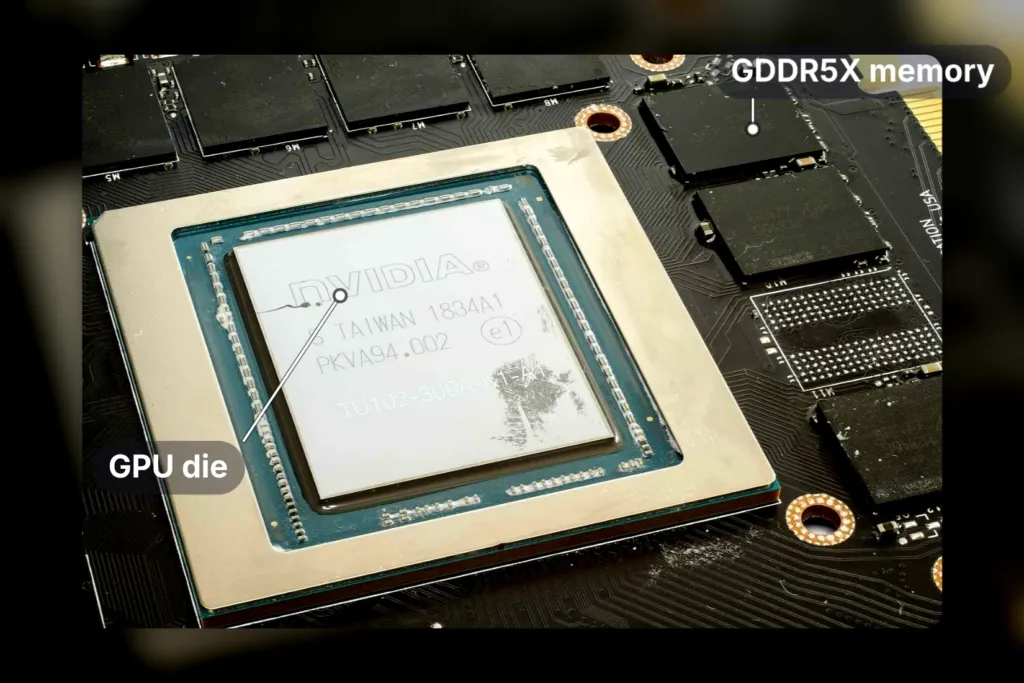
Ask a 1080 Ti owner why they haven’t moved on, and the answer almost never leads with frame rate. It leads with memory. The 1080 Ti is not fast by current standards, but its 11GB buffer holds up better than the 8GB cards a buyer at its price would actually move to in memory-bound games, and XDA points out that plenty of those 8GB cards stutter badly once the resolution climbs. That’s the shape of the complaint: not a lower number on screen, but the stutter that shows up when a game runs out of room, and the 11GB buffer is what keeps the 1080 Ti usable at 1440p in some modern titles when newer, smaller-buffer cards start choking on the same scene.
| GPU | VRAM | Memory type | Bandwidth |
|---|---|---|---|
| GTX 1080 Ti | 11GB | GDDR5X | 484 GB/s |
| RTX 3060 | 12GB | GDDR6 | 360 GB/s |
| RTX 4060 | 8GB | GDDR6 | 272 GB/s |
| RX 6600 XT | 8GB | GDDR6 | 256 GB/s |
Dell Technologies’ own figures make the comparison for you. Only the RTX 3060 actually beats the 1080 Ti on capacity, carrying 12GB of GDDR6 against the 1080 Ti’s 11GB of GDDR5X, but it does that with 360 GB/s of bandwidth against the 1080 Ti’s 484 GB/s, a gap of roughly a quarter. The RTX 4060 and RX 6600 XT don’t even get that far: both ship 8GB, both run slower than the 3060 at 272 GB/s and 256 GB/s, and both sit below the 1080 Ti on capacity and bandwidth at once. A card bought in 2017 is still out-spec’ing cards sold new today on the one number that decides whether a game stutters.
Memory bandwidth
Nvidia sells the RTX 3050 in two different memory configurations, 8GB or 6GB of GDDR6, and bandwidth splits the same way: 224 GB/s on the 8GB card, 168 GB/s on the 6GB one. Either number sits well below the 1080 Ti’s 484 GB/s, and the 6GB version in particular is the kind of card a buyer working to a tight budget actually ends up with, which makes the 1080 Ti’s 11GB look even further ahead of where new money lands at that price point.
- Higher texture settings stay available in supported games instead of getting capped by the buffer
- Open-world games streaming big assets drop fewer frames
- Multi-monitor setups across different resolutions run without the buffer running short
- Background apps have room to run alongside the game without squeezing the card
- Memory-bound situations go to the 1080 Ti over 8GB cards, not because it’s faster but because it doesn’t run out
Capacity Now Costs 80-Class Money
XDA’s point is the one that actually ends the argument: wanting 12GB or more today doesn’t mean shopping the mid-range at all, it means an 80-class card, and an 80-class upgrade means spending over $1,000.
Used Prices and What to Check Before Buying
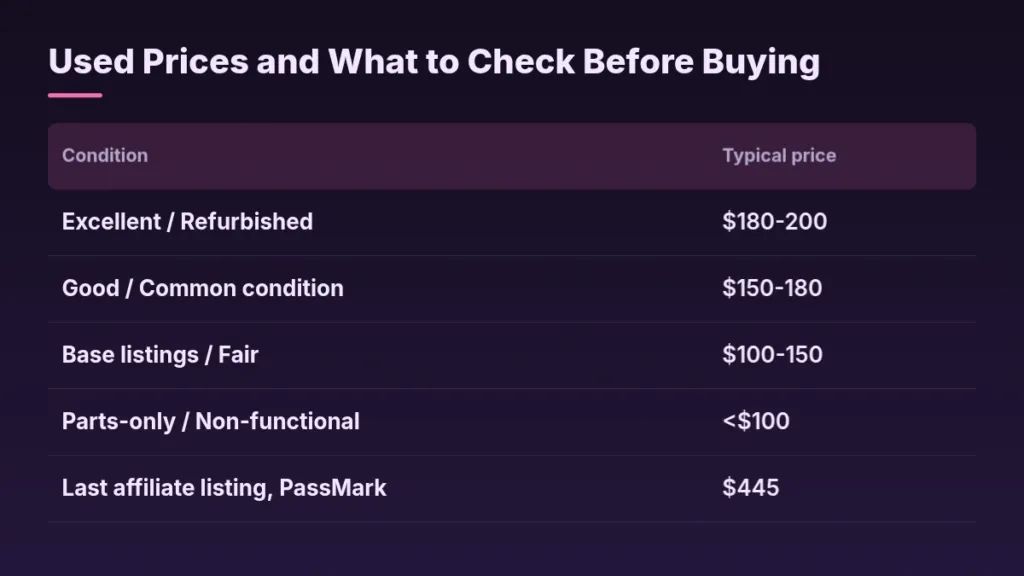
A used GTX 1080 Ti costs whatever condition you’re willing to accept, and that range is wide enough to matter. Dell’s own condition bands put a working card between $100 and $200: excellent or refurbished units run $180 to $200, good common-condition cards go for $150 to $180, and base or fair listings sit at $100 to $150, with parts-only or non-functional cards dropping under $100. PassMark’s affiliates last listed one at $445, more than double what even an excellent used example brings on the open market. Those aren’t the same market – one is a private seller letting go of a card they’re done with, the other is whatever a retailer’s shelf still has priced at – and treating $445 as what this card costs is a mistake nobody shopping used actually needs to make.
| Condition | Typical price |
|---|---|
| Excellent / Refurbished | $180-200 |
| Good / Common condition | $150-180 |
| Base listings / Fair | $100-150 |
| Parts-only / Non-functional | <$100 |
| Last affiliate listing, PassMark | $445 |
Dell’s guide puts the whole decision inside a budget: this is a sub-$350 call from the start, and Dell suggests the card as a short-term gaming solution rather than something to plan a build around. That framing is what makes sense of the price bands above – nobody paying $445 is making a considered long-term purchase here, they’re buying a bridge until something better comes along.
Pros
- Original packaging and accessories still included
- No history of mining use
- Recent thermal paste replacement
- Remaining functional warranty
Cons
- Heavy wear on the cooling fans
- BIOS modification or overclocking damage
- Missing heat pads or dried-out paste
- A price well below the rest of the market
- Check the seller’s reputation and return policy first
- Ask for detailed photos of the card’s condition
- Ask about thermal paste replacement history
- Confirm all original accessories are included
- Test the card thoroughly as soon as it arrives
Game Ready Drivers Stopped in October 2025
Nvidia ended Game Ready driver support for Pascal in October 2025, which means a used 1080 Ti buyer is paying for hardware that no longer gets day-one game patches. Dell’s writeup still describes continued updates, just at reduced priority, so a used buyer should read both halves of that: the card isn’t abandoned, but it’s also not getting what a current card gets.
This is exactly what the fan-wear and BIOS-damage checks on a used listing are guarding against. Owners report cards that stop being detected on the PCIe bus at all, and a card on its way out may only boot after several failed POSTs in a row.
It used to be always detected, now its not detected at all and the PC only boots after a couple of failed POSTs
Not every used 1080 Ti is on its way out, though. Plenty of owners are still running the card they paid for years ago, and still getting use out of it at a price that’s long since been forgotten.
ganyan pala price ng 1080ti dati tapos nagagamit pa din hanggan ngaun. solid talaga
What Replacing It Costs in 2026
Walk away from the used market and the GTX 1080 Ti’s replacement sits in 80-class territory, which Nvidia’s own numbers put at over a grand for the card alone. That list price is the number on the slide, not the number at checkout: memory costs have pushed GPU prices up across the stack, and the MSRP underneath every one of these cards has stopped meaning much in this economy.
| GeForce RTX 5090 | Starting at $1999 |
| GeForce RTX 5080 | Starting at $999 |
| GeForce RTX 5070 Ti | Starting at $749 |
| GeForce RTX 5070 | Starting at $549 |
| GeForce RTX 5060 Ti | Starting at $379 |
| GeForce RTX 5060 | Starting at $299 |
| GeForce RTX 5050 | Starting at $249 |
Nvidia’s own price list runs from the RTX 5090 at $1999 down to the RTX 5050 at $249, with the RTX 5080 at $999 standing as the nominal entry to 80-class and the RTX 5070 Ti at $749 sitting below it. The $249 RTX 5050 looks like the cheap way in, but Nvidia benchmarks it against the RTX 3050 at 1080p High, not against anything a 1080 Ti owner would call a step up. What every Blackwell card does bring, top to bottom, is DLSS 5 and Multi Frame Generation, the features Pascal has none of.
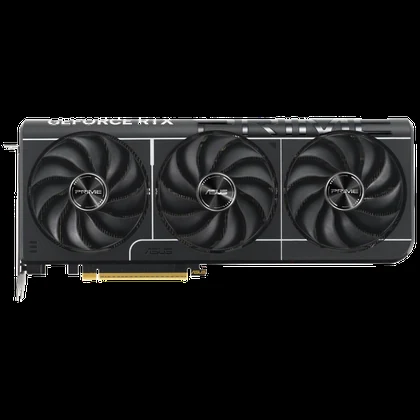
The card is only one line on the bill. A machine old enough to still be running a GTX 1080 Ti is old enough that the CPU, the motherboard and the RAM all want replacing alongside it, and DDR5 pricing is usually where that whole plan comes apart.
People who already made this jump aren’t reporting the long, easy ownership the 1080 Ti gave them. One owner’s numbers say the opposite.
My 1080 lasted nearly 10 years before I felt it needed upgrading, but I think I’ve had the 4070 about 4 and I am already starting to “feel the itch”.
Where the GTX 1080 Ti Lands Today
Line the GTX 1080 Ti up against what’s selling new right now and the comparison lands somewhere specific. XDA calls it basically an RTX 3060 in rasterised performance, and Dell puts it in the same bracket as that card plus the RTX 4060 and the RX 6600 XT. The RTX 3060 isn’t a niche pick either, it’s one of the most popular GPUs on the Steam Hardware Survey, which means a 2017 flagship is trading blows with a card millions of people already own and bought new. The one thing that card has and the 1080 Ti doesn’t is ray tracing, hardware the Pascal chip was never built with.
Those two readings don’t actually fight each other. Tick off features and the GTX 1080 Ti fails every box modern silicon ships with. Ask instead whether it still plays what its owner plays, and it passes. Which question you’re asking decides whether this card looks obsolete or looks fine.
Pros
- You game mainly at 1080p
- You already have a compatible system
- Your budget sits under $350
- You want performance rather than features
- You need a short-term gaming solution
Cons
- You need 1440p or higher
- You want ray tracing
- You want warranty cover
- Power efficiency matters to you
- Long-term reliability worries you
Dell calls the GTX 1080 Ti a reliable pick for budget 1080p gaming, and the qualifier that matters is the one right after it: a short-term solution, not a lasting powerhouse. The card still has strong community support behind it too, people overclocking it, modding it, and keeping a resale market alive for it, which is as much a part of why it’s still worth buying used as anything on a spec sheet.
XDA’s broader point is that nothing since has matched the GTX 1080 Ti on price-to-performance, and there’s no obvious reason that changes. Nvidia has no high-end competition pushing it to repeat that deal, and PC gaming has shrunk to a footnote on its balance sheet next to everything else the company sells. A card this good at this price wasn’t a floor Nvidia set for itself. It was a one-off.
None of that explains why people still talk about this card the way they do. Owners describe it in terms that have nothing to do with FPS counters, and a comment under a listing for an Aorus GTX 1080 Ti Extreme Edition makes the point better than any benchmark could.
Oh brother. Oh. I want to buy this gpu. Not to put it in my pc but to frame it and hang on my wall next to my bed. Its so damn beautiful 😍