
Key Takeaways
- 1Buy the Ryzen 5 3600 over the 3600X unless you specifically need the bundled Wraith Spire or want the extra headroom: TechBuyersGuru’s own Cinebench and Dirt Rally testing had the cheaper chip finishing ahead of its $50-pricier sibling.
- 2If your comparison point is Intel’s $262 Core i5-9600K rather than AMD’s own $199 3600, the 3600X’s case gets much stronger – Tom’s Hardware and PC Perspective both picked it there.
- 3For rendering, encoding or compression work, the 3600X beats a 4.9GHz-overclocked i5-9600K by double-digit margins across Cinebench, Blender and 7-Zip, so creators should ignore the 1080p gaming charts entirely.
- 4For 1080p gaming specifically, the i5-9600K actually leads the average frame rate in most titles KitGuru tested, even though it’s doing so at near-100% CPU utilisation while the 3600X coasts at 30-50%.
- 5Don’t bother chasing a manual all-core overclock on this chip. PBO’s 200MHz offset returned just 25MHz, and an overclock can cost single-core performance by giving up the 4.4GHz stock boost.
- 6Shopping used in 2026, the 3600X at $86.11 delivers a Passmark value score of 210.3, nearly double the Core i7-8700K’s 122.7 at $110.51, making it one of the cheapest functional AM4 builds available – though a Ryzen 7 5700X3D upgrade at the same $249 AMD launched the 3600X at closes a 45.3% performance gap on the same socket.
The Published Specification
AMD lists the Ryzen 5 3600X as a 6-core, 12-thread part running a 3.8 GHz base and a 4.4 GHz boost, inside a 95W TDP that matches Intel’s rival chip almost exactly. What stands out is the cache: 32MB of L3 shared across the die plus 3MB of L2 (512KB per core) adds up to 35MB on a $249 chip, a figure that’s unusually generous at this price and the thread this section keeps coming back to. AMD launched it on 7 July 2019.
| Cores / Threads | 6 / 12 |
| Base / Boost | 3.8 GHz / 4.4 GHz |
| TDP | 95W |
| L2 Cache | 3MB (512KB per core) |
| L3 Cache | 32MB shared |
| Total GameCache | 35MB |
| Lithography | 7nm CCD, 12nm IOD |
| Transistors | 3.9 billion per CCD, 2.09 billion IOD |
| CCD die size | 74 mm² |
| IO die size | 125 mm² |
| Thermal interface | Solder |
| Memory | Dual-channel DDR4-3200 |
| Max memory | 128 GB |
| PCIe | 24 PCIe 4.0 lanes |
| Socket | AM4 |
| Unlocked | Yes |
| Bundled cooler | Wraith Spire |
| MSRP | $249 |
| Launch date | 7/7/2019 |
A Cut-Down 8-Core Die
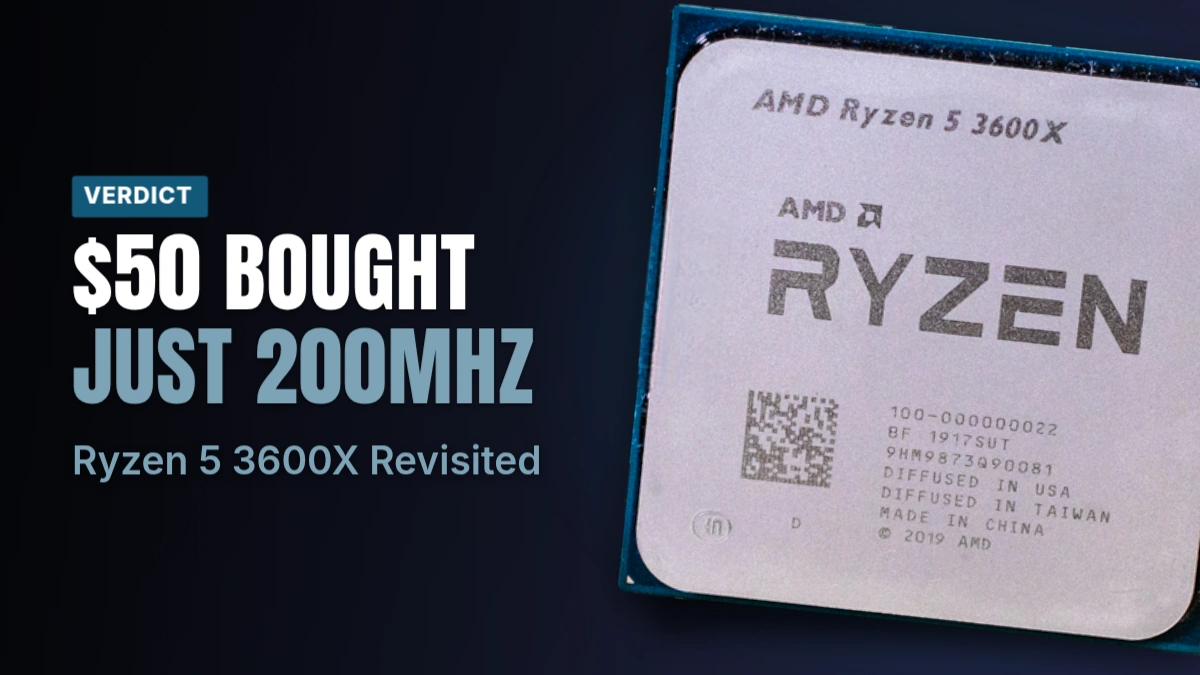
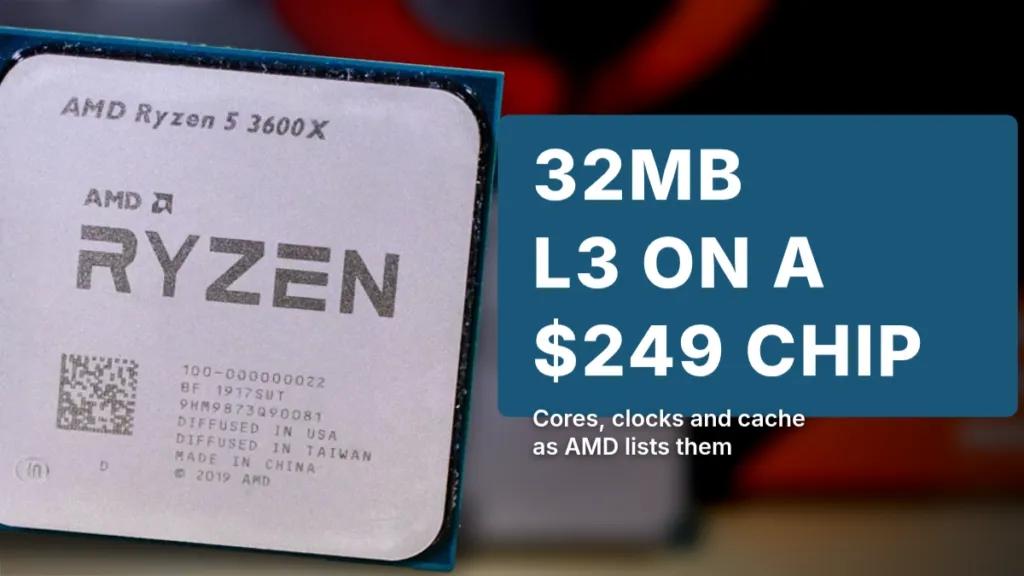
The 3600X isn’t half a Ryzen 9 3900X cut down the middle — it’s a single CCD built from 2 core complexes (CCXs), with one core switched off in each to get to six. What AMD doesn’t cut is the L3 array: the chip keeps the full cache capacity of the 8-core parts built on the same silicon, which is exactly why the GameCache total above lands where it does. That CCD is a 7nm part carrying 3.9 billion transistors on a 74 mm² die, paired with a separate 12nm IO die, 2.09 billion transistors on 125 mm², that holds the memory controller. AMD solders the die to the heat spreader rather than using paste, the same choice shown in the photo above.
Add the L2 and L3 together and the 3600X reaches 35MB, against 36MB on the full 8-core Ryzen 7 built from the same CCD, a 1MB gap between a 6-core chip and its 8-core sibling. Intel’s price rival, the Core i5-9600K, ships with 9MB of L3 and nothing else to add to it, so the cache gap between the two platforms isn’t close at all.
| Cache | Ryzen 5 3600X | Ryzen 7 (8-core) | Core i5-9600K |
|---|---|---|---|
| L3 | 32MB | 32MB | 9MB |
| Total GameCache / cache | 35MB | 36MB | ~11MB |
Memory Support and Infinity Fabric
The official spec is dual-channel DDR4-3200, but that number only holds for 2 DIMMs. Fill all 4 slots with dual-rank sticks and official support drops to DDR4-2667; four single-rank DIMMs still drop it to DDR4-2933. Memory speed matters more here than it does on an Intel build, because AMD ties the Infinity Fabric interconnect to the memory clock, and on Zen 2 that link defaults to an 1800MHz ceiling. KitGuru’s advice is to treat DDR4-3000 as the floor rather than the target, not the nicety it would be on a platform where the fabric speed and memory speed aren’t locked together.
| DIMMs populated | Memory ranks | Official supported rate |
|---|---|---|
| 2 of 2 | Single | DDR4-3200 |
| 2 of 4 | Single | DDR4-3200 |
| 4 of 4 | Single | DDR4-2933 |
| 2 of 2 | Dual | DDR4-3200 |
| 2 of 4 | Dual | DDR4-3200 |
| 4 of 4 | Dual | DDR4-2667 |
The lane count tells the same story as the cache did: Tom’s Hardware counts 24 PCIe 4.0 lanes on the 3600X against 16 lanes on the Core i5-9600K, on a chip that also costs $249 to the 9600K’s $262. Run that through price-per-thread and Tom’s Hardware gets $20.75 on the 3600X against $43.67 on the 9600K — more than double, for a chip carrying the same 95W rating and nearly identical clocks.
| Ryzen 5 3600X | Core i5-9600K | |
|---|---|---|
| Price | $249 | $262 |
| Cores / Threads | 6 / 12 | 6 / 6 |
| Base / Boost | 3.8 / 4.4 GHz | 3.7 / 4.6 GHz |
| TDP | 95W | 95W |
| Total cache | 35MB | ~11MB |
| PCIe lanes | 24 (Gen 4) | 16 (Gen 3) |
| Price per thread | $20.75 | $43.67 |
What the Chip Actually Cost
The list price isn’t even settled among the people who reviewed it. PC Perspective, KitGuru, Tom’s Hardware and technical.city all give $249, while Overclockers’ own lineup table lists it at $229, a $20 gap nobody resolves. What it actually sold for at review time ran from $239 on Amazon, per PC Perspective, up to $249.99 at Amazon and Newegg, per Overclockers, with TechBuyersGuru finding it at $240. The UK price in July 2019 sat at £240; Overclockers UK later cut that to £219.
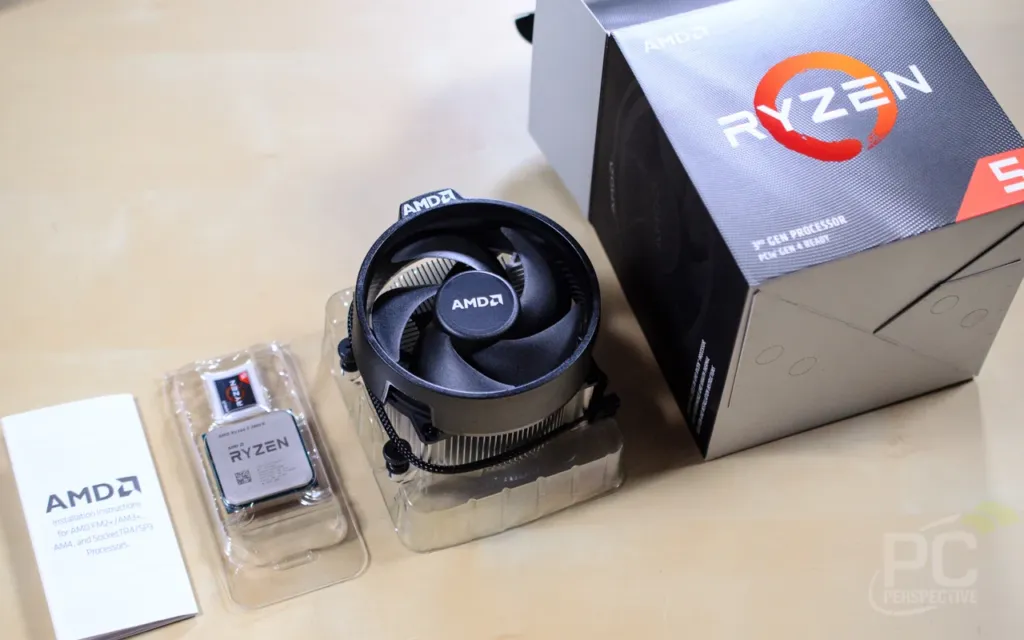
AMD includes the Wraith Spire cooler in the box; Intel includes nothing with the 9600K, leaving the buyer to source one separately. That’s the line item every per-chip price comparison above misses, and it’s the one that moves once you cost a whole build rather than just a CPU.
Motherboards and the X570 Premium
The 3600X drops into existing AM4 boards, but B350, X370, B450 and X470 all need a BIOS update first to run it. X570 boards start at £160, or around $170 for the cheapest ones, per TechBuyersGuru, and that’s the board tier that actually supports the chip’s PCIe Gen 4 lanes without a flash. Going B450 instead saves £60-80 on the board alone, and at this price that saving buys more than Gen 4 PCIe does for most builds — Gen 4 support is the thing a B450 board gives up to get there.
KitGuru priced out both full builds rather than just the chips. A 3600X on an MSI B450 Tomahawk (£90-100) with the bundled Wraith Spire comes to £330-340 total. A 9600K on an MSI Z390A-PRO plus a Cooler Master Hyper 212X, which it needs since Intel includes no cooler, comes to £340. The two platforms land within £10 of each other once the whole parts list is counted, not just the processor’s own price tag.
| Build | CPU | Motherboard | Cooler | Total |
|---|---|---|---|---|
| Ryzen 5 3600X | £240 | MSI B450 Tomahawk £90-100 | Included Wraith Spire £0 | £330-340 |
| Core i5-9600K | £220 | MSI Z390A-PRO | Cooler Master Hyper 212X | £340 |
Real Clocks Versus the Rated Boost
The 3600X’s box says 4.4GHz boost, but that number is close to theoretical once the chip is doing real work. KitGuru logged 4.125GHz all-core in Cinebench, Overclockers saw 4.1GHz to 4.2GHz all-core under heavy load, and GamersNexus measured about 4104MHz all-core during Blender on the Ryzen 5 3600 – three readings within a hair of each other on an all-core workload. Lighter loads climb higher: GamersNexus’s 3600 held nearer 4175MHz in Shadow of the Tomb Raider, and its frequency plots showed no boost duration limit, so the chip holds that speed rather than stepping down after some timer runs out. Single-thread boost tells a similar story: KitGuru saw it reach around 4300MHz, and the full 4400MHz rated figure seldom showed up in its logs at all.
Measured clock speeds vs the rated boost
Manual Overclocking Headroom and Voltage Cost
4 reviewers landed in a narrow clock band but a wide voltage one, and the voltage is the real finding here. KitGuru held 4.3GHz all-core at 1.35V, while GamersNexus needed 1.43V to hold that same 4.3GHz on a Ryzen 5 3600 – a wide gap for an identical clock speed. Overclockers settled for 4.25GHz at 1.4V, and TechBuyersGuru only managed 4.2GHz, needing 1.45V to get there. GamersNexus’s own numbers put that variance in perspective: a Ryzen 9 3900X held the same 4.3GHz at just 1.34V, better silicon running the identical frequency on noticeably less voltage than the Ryzen 5 parts needed. Overclockers also pushed one chip to 4.35GHz at 1.45V, far enough to finish a benchmark run but not far enough to call stable.
| Reviewer | Chip | Stable all-core OC | Voltage |
|---|---|---|---|
| KitGuru | Ryzen 5 3600X | 4.3GHz | 1.35V |
| Overclockers | Ryzen 5 3600X | 4.25GHz | 1.4V |
| TechBuyersGuru | Ryzen 5 3600X | 4.2GHz | 1.45V |
| GamersNexus | Ryzen 5 3600 | 4.3GHz | 1.43V |
| GamersNexus | Ryzen 9 3900X | 4.3GHz | 1.34V |
6 Cores, Serious Heat
Don’t assume a 6-core chip runs cool once you start pushing it. KitGuru’s Corsair H100X, a 240mm liquid cooler, was already struggling at 1.35V, and the bundled Wraith Spire isn’t even in contention at that setting.
What PBO Actually Delivers
KitGuru asked for a 200MHz Auto OC offset through Precision Boost Overdrive and got 25MHz back, at most. The reason is mechanical rather than a tuning failure: PBO works by raising the package power and motherboard VRM limits the chip is allowed to hit, and KitGuru never saw those limits being approached in the first place, so there was nothing left for PBO to lift. Tom’s Hardware reached the same conclusion from a different angle, listing extremely limited manual and auto overclocking headroom as a con.
Small Clock Gains From Cooling Alone
Precision Boost takes whatever thermal headroom a cooler hands it, and TechBuyersGuru’s swap tests show how little that amounts to with no CPU settings touched. Moving the Ryzen 5 3600 from its bundled Wraith Stealth to a Wraith Spire added 30MHz, and moving the Ryzen 5 3600X from Spire to liquid cooling added another 50MHz. Stack PBO on top of the liquid cooler and the total comes to 100MHz over stock – free, but small.
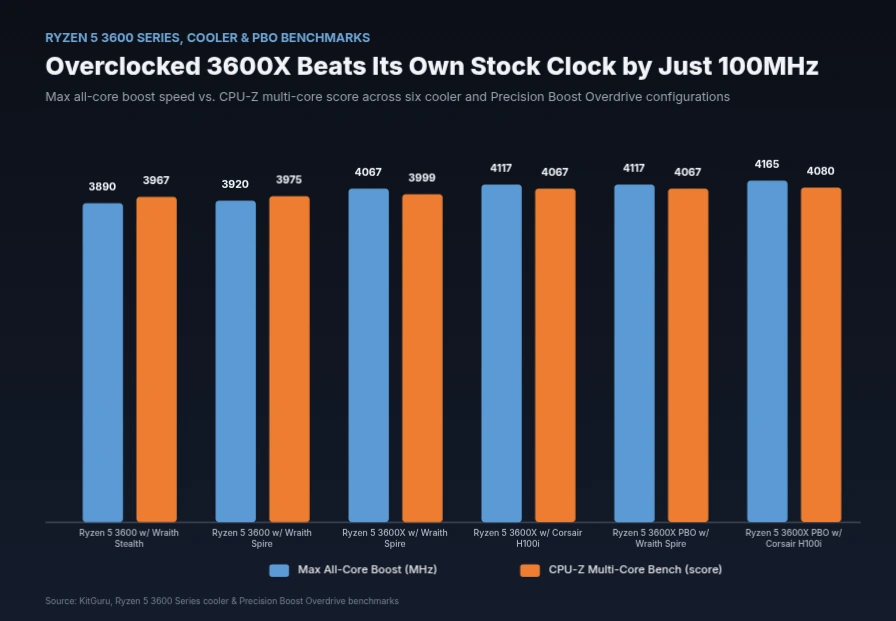
What the Overclock Actually Buys
Turn the megahertz into benchmark results and the story gets weaker fast. Overclockers measured roughly 3% gained across most of its tests, one or two frames per second in games, and nothing at all in Shadow of the Tomb Raider. Single-core scores actually got worse, because an all-core overclock gives up the 4.4GHz single-core boost that stock behaviour would otherwise hit. Overclockers’ own conclusion was to leave the chip on auto.
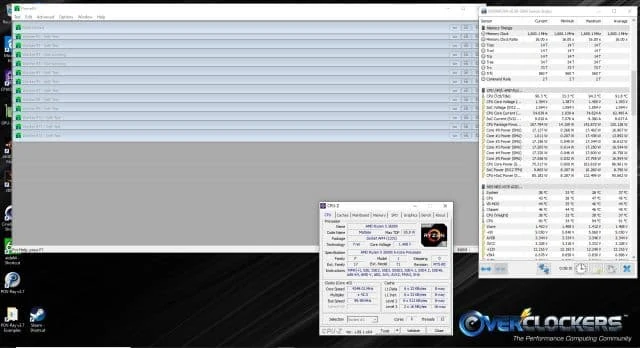
Overclockers’ 4.25GHz run at 1.4V held through nearly 40 minutes of Prime95 small FFTs on an EVGA CLC 240 before a core dropped out – long enough to call stable for benchmarking, but a reminder of how close to the edge even this modest overclock was sitting.
Pros
- Precision Boost 2 already extracts most of the chip’s performance at stock, landing around 4.1GHz all-core with zero tuning
- A better cooler alone nudges clocks up for free, with no settings changed
Cons
- Manual overclocks hit a hard wall between 4.2GHz and 4.3GHz
- PBO with a 200MHz offset returned just 25MHz
- Single-core performance drops once the chip is overclocked all-core, trading away the 4.4GHz boost
- Heat outruns even a 240mm AIO at 4.3GHz and 1.35V
1080p Gaming: 3600X vs Core i5-9600K
KitGuru put the Core i5-9600K up against the Ryzen 5 3600X at 1080p, and the matchup flips from what the productivity numbers suggest. Intel’s 6-core, 6-thread chip led the average frame rate in nearly every game KitGuru ran, and pushing it to a 4.9GHz overclock widened that lead further still. The 3600X carries 6 cores and 12 threads against the i5’s 6 cores and 6 threads, but none of that extra thread capacity shows up here – these are averages, and averages are exactly where a chip with no SMT and a higher clock does its best work.
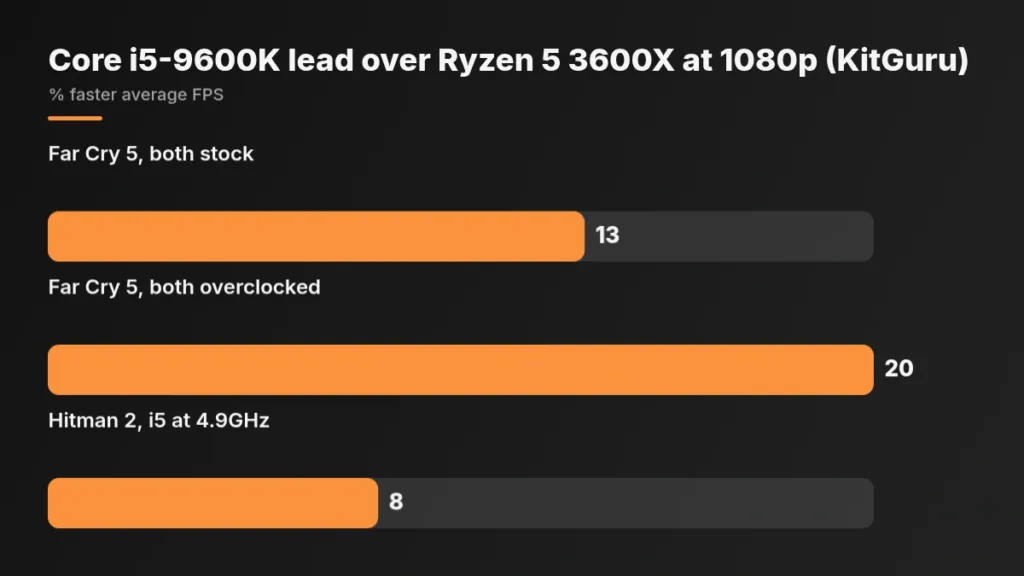
The clearest gaps sit in 3 titles. In Far Cry 5, the stock 9600K finished 13% ahead of the 3600X, and overclocking the Intel chip to 4.9GHz stretched that to 20% – yet both chips still averaged around 120 FPS or higher, so the percentage gap describes a race between 2 cards already well past playable. GTA V told a similar story: the 3600X averaged over 100 FPS on its own, and the i5 was only about 15 FPS quicker on top of that. Hitman 2 gave the 4.9GHz i5 a roughly 8% edge. None of these numbers change which chip you’d rather be gaming on, but they do settle which one wins the chart.
Core i5-9600K lead over Ryzen 5 3600X at 1080p (KitGuru)
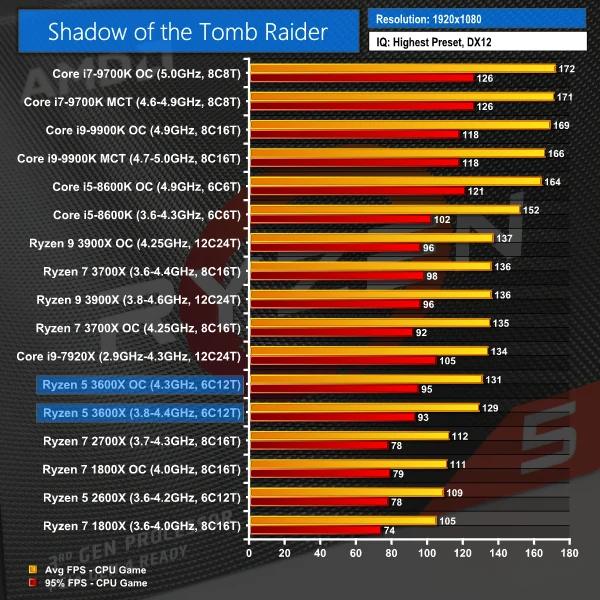
Plenty of the suite barely moves the needle either way. Deus Ex: Mankind Divided averaged around 110 FPS with minimums close to 80 FPS on both chips, Ghost Recon Wildlands kept every chip under 100 FPS regardless of which CPU sat behind the GPU, and Shadow of the Tomb Raider ran fine on either part unless 95 FPS or beyond is the specific target. In all three cases the graphics card is setting the pace, not the processor, which means the processor argument quietly stops mattering.
What the CPU Utilisation Logs Show
KitGuru logged CPU utilisation alongside every frame-rate run, and it’s where the wins stop looking free. In Far Cry 5 the overclocked i5 touched close to 100% utilisation while the 3600X hovered at 30-50%; in GTA V the 3600X again sat at 30-50% CPU use; Shadow of the Tomb Raider pinned the i5 near 100% while the Ryzen ran at 70-90%; Hitman 2 had the i5 at 80-95% utilisation against the overclocked 3600X’s 50-70%. The i5 is buying its frame-rate lead by running close to flat out, while the 3600X reaches its (slightly lower) numbers with half its capacity still unused. Anyone with a stream, a Discord call, or background downloads running is going to feel that difference long before they feel the percentages above.
| Game (1080p) | Core i5-9600K CPU use | Ryzen 5 3600X CPU use |
|---|---|---|
| Far Cry 5 | Close to 100% at times | 30-50% overall |
| GTA V | 50-80% overall | 30-50% overall |
| Hitman 2 (DX12) | 80-95% | 50-70% |
| Shadow of the Tomb Raider | Pinned close to 100% | 70-90% |
Headroom is the real spec here
The Core i5-9600K has 6 threads and no Hyper-Threading, while the 3600X has 12 threads through SMT, and KitGuru found the i5 regularly pinned above 70% utilisation while it was winning. The Ryzen’s extra threads aren’t doing anything for the frame rate in these numbers, but they are sitting there unused while the i5’s 6 threads carry the whole load. Background tasks, overlays, or a second application open are likely to hit the i5’s frame rate harder than the Ryzen’s, because the Ryzen has thread capacity to absorb that the i5 doesn’t.
Stepping Up to 1440p
KitGuru supplemented its 1080p suite with 2 games at 2560×1440, run on a Gigabyte Aorus RTX 2080 Ti, and raising the resolution closes the gap the 1080p numbers opened. The average difference between the two chips in Deus Ex became negligible once the GPU took over – fitting, since Deus Ex is particularly GPU-heavy at higher resolutions. Far Cry 5 still handed Intel roughly 10 FPS even at 1440p, so the Dunia engine’s Intel lean survives the resolution bump. With a less powerful card than a 2080 Ti in the system, that remaining gap would shrink further still.
What PC Perspective and GamersNexus Found
PC Perspective’s 1080p Ultra testing put Intel at the top of every chart, but its real finding is how little separates the Ryzen 3000 stack from itself: Metro Exodus put every Ryzen 3000 chip within a single FPS of each other, and the top half of its Shadow of the Tomb Raider chart spanned just 3 FPS total. In Civilization VI: Gathering Storm the 3600X sat 3 FPS ahead of the 8-core Ryzen 7 2700X, and the 3600X beat that same 8-core chip in Far Cry 5 too – Far Cry 5’s win there went to the Ryzen 7 3700X instead. Core count, in other words, buys almost nothing at 1080p inside AMD’s own lineup.
GamersNexus ran the cheaper Ryzen 5 3600 rather than the 3600X, but the two chips sit close enough that its numbers map across. In Total War: Warhammer 2’s Battle benchmark the 3600 averaged 158.9 FPS, with the stock 9600K leading by 4.4%; disabling SMT lifted the 3600 to 166 FPS, though that’s an academic result rather than a setting worth using. F1 2018 gave the 3600 a 267 FPS average at 1080p, with frametimes holding between 4.3ms and 5.0ms – the 9600K ran just 0.3ms faster on average, which is the real measure of how little daylight there is between them. Civilization VI’s turn timer told the same story at a larger scale: 34 seconds on the 9600K, a 5% improvement over the 3600. GamersNexus also flagged its 1440p Warhammer Battle run as GPU-bottlenecked, same pattern KitGuru found at that resolution.
Ryzen 5 3600 1080p averages (GamersNexus)
UserBenchmark’s pooled user data, which isn’t a controlled bench run the way KitGuru’s or GamersNexus’s figures are, lands in the same place anyway: it reckons the overclocked 9600K is around 11% better for gaming, while crediting the 3600X with 29% faster 64-core speed than the 9600K in multi-threaded work. It also notes the 3600X’s memory controller still carries high latency, the one spec where the aggregated numbers add something the per-game benchmarks don’t.
Rendering, Encoding and Compression Work
Hand the 3600X a render queue instead of a game, and its 6 cores and 12 threads stop being a spec-sheet curiosity and start being the whole story. KitGuru’s Cinebench R15 run had the stock 3600X beating a Core i5-9600K pushed to 4.9GHz by 37%, and R20 put it 26% ahead of that same overclocked chip. Tom’s Hardware reached the same verdict from its own testing, calling the 3600X the leader in gaming and application performance at its price – though as the last section showed, that gaming half of the claim doesn’t hold at 1080p against this particular i5.
Ryzen 5 3600X lead over the 4.9GHz Core i5-9600K
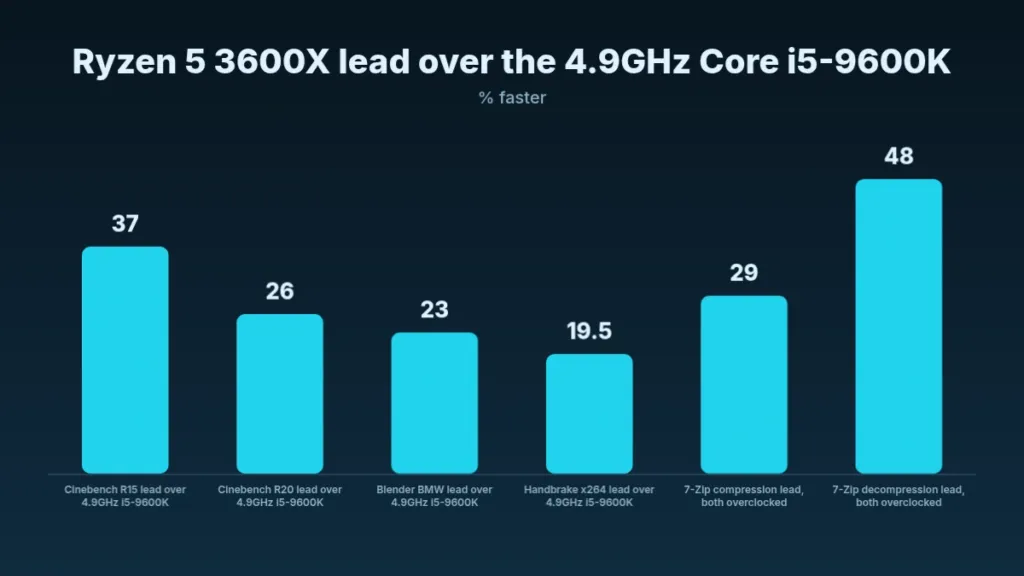
Single-thread is the one place Intel’s extra clock still buys something, though barely: KitGuru’s Cinebench R20 single-thread test had the 4.9GHz i5 just 3% ahead. Match the clocks instead and the picture flips – at around 4300MHz on both chips, the 3600X led single-thread by 11.5%, which is the real clock-for-clock comparison. That per-clock gain also shows up generationally: the 3600X ran 17% ahead of the Zen+ Ryzen 5 2600X in the same single-thread test.
Blender’s BMW render is where extra threads simply win outright. KitGuru had the stock 3600X finish 90 seconds ahead of the overclocked i5, a 23% cut in render time that widened to 26% once the 3600X itself was pushed to 4.3GHz. For scale on how far up AMD’s own stack you’d need to climb for a real step beyond that, the Ryzen 9 3900X rendered the same scene 94% faster than the 3600X, stock to stock.
Compression is where the gap opens widest. KitGuru had the 3600X 29% ahead of the overclocked i5 in 7-Zip compression, and 48% ahead in decompression, with both chips overclocked. GamersNexus’s absolute figures for the cheaper non-X 3600 give that lead some scale: 55,000 MIPS in compression and 72,000 MIPS in decompression, numbers that make clear this isn’t a synthetic quirk unique to the 3600X.
Video encoding splits down the middle depending on which codec is doing the work. KitGuru measured the stock 3600X averaging just under 51 FPS in Handbrake x264, 19.5% faster than the 4.9GHz i5, and close to 75% of what the 8-core Ryzen 7 3700X manages. Switch to x265 and the thread advantage stops paying: Intel’s AVX implementation in Coffee Lake lets the overclocked i5 roughly match the 3600X there, the one encoding workload in this set where more threads doesn’t mean a clear win.
GamersNexus ran its own suite of real applications on the plain Ryzen 5 3600 rather than the X, and the thread advantage carries straight into creative software rather than staying confined to synthetics. Blender’s Monkey Heads scene finished in 24.8 minutes, Premiere’s 1080p show report rendered in 4.8 minutes, and its 4K project took 14.2 minutes – 18% less time than the stock 9600K. V-Ray finished in 1.45 minutes, 23% under the Core i5-9600K.
| Workload | Ryzen 5 3600 | Margin vs Core i5-9600K |
|---|---|---|
| Blender GN Monkey Heads | 24.8 minutes | faster than stock and overclocked 9600K |
| Premiere 1080p show report | 4.8 minutes | faster than the 5.6-minute 9600K |
| Premiere 4K project | 14.2 minutes | 18% less time |
| V-Ray | 1.45 minutes | 23% less time |
| 7-Zip compression | 55,000 MIPS | well ahead of the 9600K |
| 7-Zip decompression | 72,000 MIPS | strong lead over the 9600K |
Photoshop is the counterexample that keeps this from being a blanket recommendation. GamersNexus measured the 3600 just 2% ahead of the 9600K there, because Photoshop rewards clock speed first and thread count a distant second. Overclocking only sharpens that split: pushing the 9600K lifted its Photoshop score 13% to 1065 points, while overclocking the 3600 reached 979 points, a gain of just 2.3%. Whatever headroom the 3600X has over Intel elsewhere, it isn’t available here.
Which Jobs Actually Reward the Extra Threads
Compression and rendering are landslides for the 3600X – 48% ahead in 7-Zip decompression is not a close call. But 2 workloads in this set come down to clock speed instead of thread count: Handbrake x265 encoding, where Intel’s AVX lets the overclocked 9600K match the 3600X, and Photoshop, where the 3600 was only 2% ahead of the 9600K. Anyone buying on these numbers should check which category their own software falls into before assuming the thread count decides it.
The Core i7-8700K: Same Layout, $100 More
Overclockers picked the Core i7-8700K as the chip the 3600X actually has to answer for: 6 cores and 12 threads, the same layout AMD built the 3600X around. Intel’s chip priced at $349.99 against the 3600X’s $249.99 – a $100 gap before anyone even counts that the 3600X ships with a Wraith Spire cooler in the box, where the 8700K comes with nothing at all. That gap is the frame every number below has to be read against.
| Test | Ryzen 5 3600X | Core i7-8700K |
|---|---|---|
| Cinebench R20 | 3725 | 3402 |
| Cinebench R15 | 1633 | 1404 |
| POVRay | 3345 | 2951 |
| HWBot x265 | 50.46 | 47.68 |
| 7Zip | 61879 | 54266 |
| SuperPi 1M (seconds) | 9.469 | 7.952 |
| wPrime 32M (seconds) | 3.391 | 3.468 |
| AIDA64 memory latency | 73.6 | 43.4 |
Every rendering and compression test Overclockers ran went the same way. Cinebench R20 gave the 3600X 3725 against the 8700K’s 3402, R15 put it at 1633 against 1404, and POVRay had it at 3345 against 2951. HWBot’s x265 encode (50.46 against 47.68) and 7Zip’s compression pass (61879 against 54266) followed the same pattern: the 8700K’s higher per-core boost never found a way past AMD’s extra threads, and Overclockers couldn’t get the Intel chip to pass the 3600X in any of them.
AIDA64 FPU tests
Floating point is where Zen 2’s redesign shows most plainly. The 3600X swept every AIDA64 FPU test, leading the FP64 ray trace 6663 to 6170, and the margin only grows from there – SinJulia came in at 10767 against the 8700K’s 7785, the widest gap in the set. AMD put a lot of work into floating-point performance in Zen 2, and these numbers are where that effort shows up.
Not every test flips AMD’s way. SuperPi 1M has the 8700K finishing in 7.952 seconds against the 3600X’s 9.469, and that lead holds at the longer 32M run too, 453.632 seconds against 532.223 – Intel’s higher single-core boost speed helps here, and SuperPi has favoured Intel even when clocks are matched, so this isn’t new. wPrime 32M swings back to AMD, 3.391 against 3.468, and the widest gap in either direction on this page isn’t a benchmark score at all: AIDA64 puts the 3600X’s memory latency at 73.6 against the 8700K’s 43.4, a specification where Intel’s older, more mature platform still has real room over AMD’s newer one.
Why the AIDA Write Score Looks Broken
One AIDA64 number needs explaining before it reads as a problem: write bandwidth landed at 25599, roughly half what the read (46759) and copy (44335) scores would suggest it should be. That’s not a defect – it’s the single-CCD Ryzen 5 3600X having only one link to Zen 2’s separate IO die, where dual-CCD chips get two links and write at full speed. KitGuru looked for a real-world cost from this and found none.
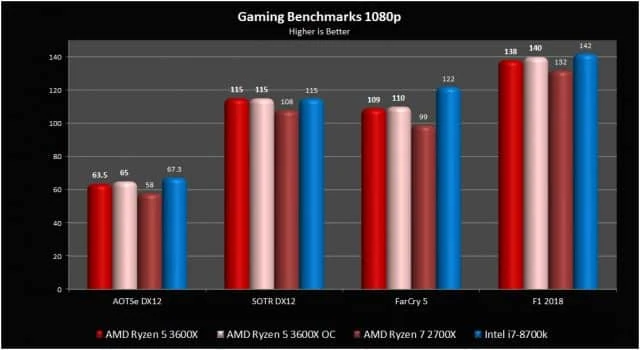
At 1080p the two chips land close enough that calling a winner outright would overstate the gap. Far Cry 5 is the one game where the 8700K pulls clearly ahead, and overclocking the 3600X only moved most titles by one or two FPS – Shadow of the Tomb Raider gained nothing from it at all. Fire Strike tells the same story from a different angle: the two chips post nearly identical graphics scores, and the 3600X’s higher physics score is what tips the overall result its way.
| PassMark figure | Ryzen 5 3600X | Core i7-8700K |
|---|---|---|
| CPU Mark | 18112 | 13554 |
| Single Thread Rating | 2645 | 2713 |
| Cache | L1: 384KB, L2: 3.0MB, L3: 32MB | L1: 384KB, L2: 1.5MB, L3: 12MB |
| TDP | 95W | 95W |
PassMark’s crowd-sourced database, built from 28410 combined submitted benchmarks, reads the same 2 chips and lands on the same split Overclockers found on its own bench. CPU Mark puts the 3600X at 18112 against the 8700K’s 13554, a 34% multi-thread deficit for Intel’s chip, while the single-thread ratings sit close enough – 2645 against 2713 – that PassMark itself calls them comparable. Both chips carry the same 95W TDP, so none of that multi-thread gap is bought with extra power headroom.
GamersNexus tested the cheaper non-X Ryzen 5 3600 rather than the 3600X, and even that chip holds its own against the 8700K. Its V-Ray render finished in 1.45 minutes, close to the 8700K’s stock time, and in Blender’s Monkey Heads test the 3600 finished in 24.8 minutes and came out faster than Intel’s chip outright.
Overclockers gave the 3600X its Overclockers Approved award, and the citation is about value rather than outright speed: a real winner on performance per dollar. Buyers who go AMD here keep the $100 the 8700K would have cost extra, plus whatever a bundled cooler is worth, and can put both toward a better GPU or SSD instead.
The Ryzen 7 2700X: 8 Cores for the Same Money
The 2700X is an 8-core, 16-thread Zen+ part built on a 12nm process, going up against a 6-core, 12-thread Zen 2 part built on 7nm. UserBenchmark reckons Zen 2 carries roughly a 13% IPC advantage over 12nm Zen+ per core, and KitGuru found the two chips selling for the same £240 in the UK. 2 fewer cores, a newer process, and a per-core edge, all at identical money – that’s the whole question the benchmarks below have to answer.
| Test | Ryzen 5 3600X | Ryzen 7 2700X |
|---|---|---|
| Cinebench R20 | 3725 | 4064 |
| 7-Zip | 61879 | 67515 |
| HWBot x265 | 50.46 | 45.14 |
| AIDA64 Queen | 76462 | 94744 |
| AIDA64 AES | 55690 | 71513 |
| AIDA64 FP64 ray trace | 6663 | 4289 |
Hand both chips an all-core throughput test and the extra 2 cores still carry the day. Overclockers’ Cinebench R20 run put the 2700X’s 4064 ahead of the 3600X’s 3725, and 7-Zip told the same story at 67515 against 61879. AIDA64’s Queen and AES benchmarks went the same way, and the reason is arithmetic rather than architecture: the 2700X is running 16 threads against the 3600X’s 12.
Flip to floating point and the thread deficit stops mattering. HWBot’s x265 pass had the 3600X’s 50.46 beating the 2700X’s 45.14, and AIDA64’s FP64 ray trace test widened that into the biggest swing in either direction: 6663 for the 3600X against 4289 for the 2700X. Overclockers called the floating-point tests the place where the newer Ryzen’s strength actually shows, and a 6-core beating an 8-core by that margin is the proof.
PCPer split the same workloads differently again. Its 7-zip compression pass went to the 3600X, but decompression and the x264 encode both went the other way, to whichever chip had more cores to throw at them. Compression rewards Zen 2’s per-core gains; decompression and video encoding reward Zen+’s extra threads, and PCPer’s numbers land on opposite sides of that line within the same utility.
KitGuru’s longer view puts the comparison in a different light entirely. The 3600X edges past the Ryzen 7 1800X in Cinebench R15, and in Handbrake’s x264 test its 50.9 FPS is level with that same chip. The 1800X was an 8-core, 16-thread part that cost $500 at launch in early 2017 – a mid-stack 6-core is now matching AMD’s previous flagship from two and a half years earlier.
UserBenchmark game EFps, 1080p Max
Games tip firmly the other way, and the lighter the title the bigger the gap. UserBenchmark’s 1080p figures have the 3600X’s CSGO Dust 2 result at 233 EFps against the 2700X’s 200, and Fortnite at 131 against 108 – both wider gaps than the heavier GTAV test produces. Across its whole game suite UserBenchmark puts the gap at 9% in the 3600X’s favour, and its effective speed metric scores the 3600X at 84.1% against 75.7% for the 2700X.
- Single-core average: the 3600X runs 20% faster than the 2700X
- 64-core average: the 2700X stays 8% faster once every thread is loaded
- Game EFps: a 9% lead for the 3600X across UserBenchmark’s suite
- Effective speed: 84.1% for the 3600X against 75.7% for the 2700X
GamersNexus found one workload where cache beats core count outright: a GCC compile that, by its own account, an overclocked 2700X should have won and didn’t. The 3600’s 35MB of total cache against the 2700X’s 16MB of L3 decided it – GamersNexus called the result cache hits all the way down.
Two things Zen+ simply couldn’t do turn up in Tech Buyers Guru’s testing. DOOM’s minimum frame rates leave the 2700X far behind the 3600 series, which pulls ahead there of even the Core i9-9900K. The memory controller tells the same story from a different angle: the same 32GB Corsair Dominator Platinum kit that booted at DDR4-3600 on the 3600 series would only run at DDR4-2933 on the 2700X.
Clearance Pricing on the Ryzen 2000 Series
By mid-2019 retailers were clearing out that same 2000-series stock, and the prices undercut the whole comparison. KitGuru found the Ryzen 7 2700 going for around £170, 2 more cores than a 3600X for less money than the 3600X itself costs, and the Ryzen 5 2600 at £120 – half the 3600X’s price for the same 6 cores and 12 threads on the older architecture. Even at £190, the 2700 still buys 33% more cores than a Ryzen 5 3600 for not much more cash.
GamersNexus’ actual advice for render work on a budget is to buy a discounted Ryzen 7 2700 and overclock it, which lands it close to Ryzen 7 2700X territory – about 1.25 minutes in V-Ray, near enough to the chip it’s standing in for. The catch is supply: GamersNexus noted that 2700 inventory wouldn’t keep being made forever, so the deal has an expiry date even if nobody’s put one on it yet.
Which of these two chips to buy depends entirely on what the machine is for. KitGuru’s take is that Zen 2’s cost-per-core earns its price if gaming is the main job, since the 3600X wins games and single-thread work outright while the 2700X only keeps its lead once every thread is loaded at once. The Ryzen 2000 clearance prices that make the 2700 and 2600 tempting won’t last, so anyone weighing them against a 3600X is working against a clock as much as a spec sheet.
AGESA 1.0.0.2 Versus 1.0.0.3AB: What Changed
PC Perspective ran its 3600X testing on a GIGABYTE X470 AORUS GAMING 7 WiFi, starting on launch BIOS F40, which carried AGESA 1.0.0.2, the first version of AMD’s microcode to support Ryzen 3000 at all. From there the version string splintered into letter suffixes: 1.0.0.3ABA came and went before release, pulled before it reached anyone, leaving 1.0.0.3ABB as the newest ComboAM4 build. AMD attaches no change log to any of these releases, so the only way to know what a letter suffix actually does to the chip is to run the same benchmarks on both and subtract.
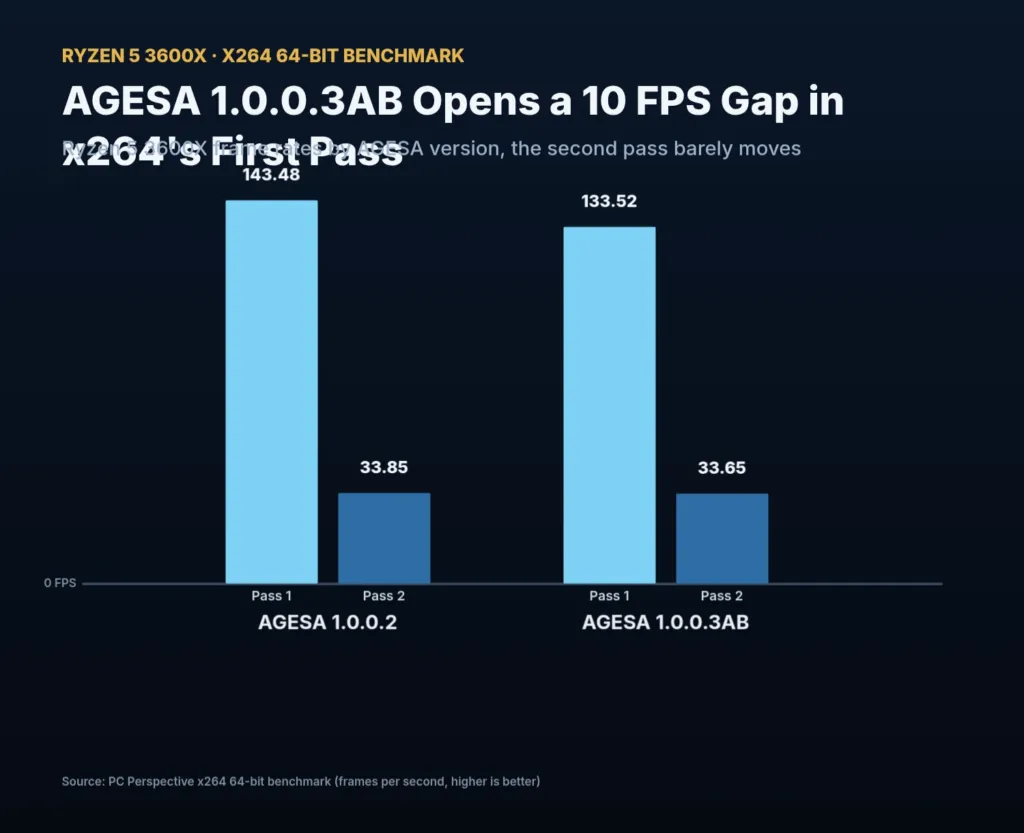
Subtracting is exactly what PC Perspective did, and the newer code came out behind on almost everything it touched. Cinebench R20 slipped slightly, 7-Zip showed a small regression too, and the x264 first pass dropped a full 10 FPS on 1.0.0.3AB while the second pass stayed close on both versions. A BIOS update is supposed to fix things or at worst do nothing; this one made the chip measurably slower in three out of 4 tests and badly slower in one, with no note from AMD explaining why.
x264 benchmark first pass, AGESA versions compared
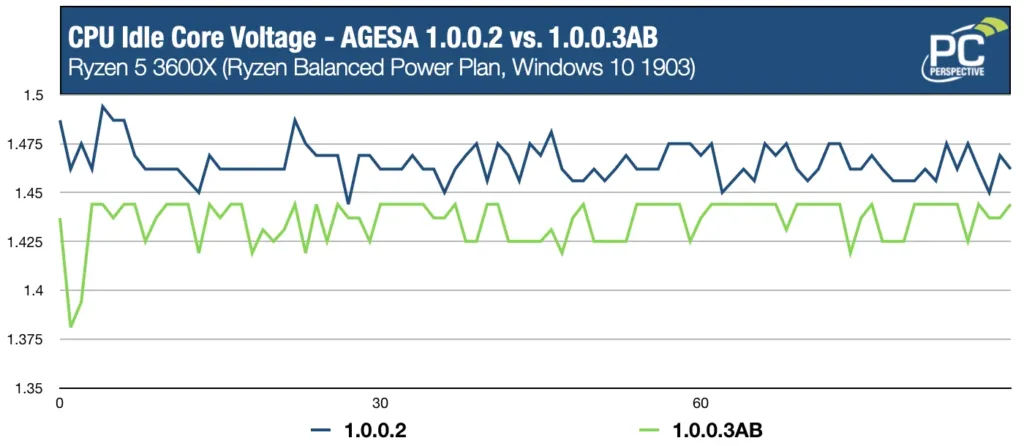
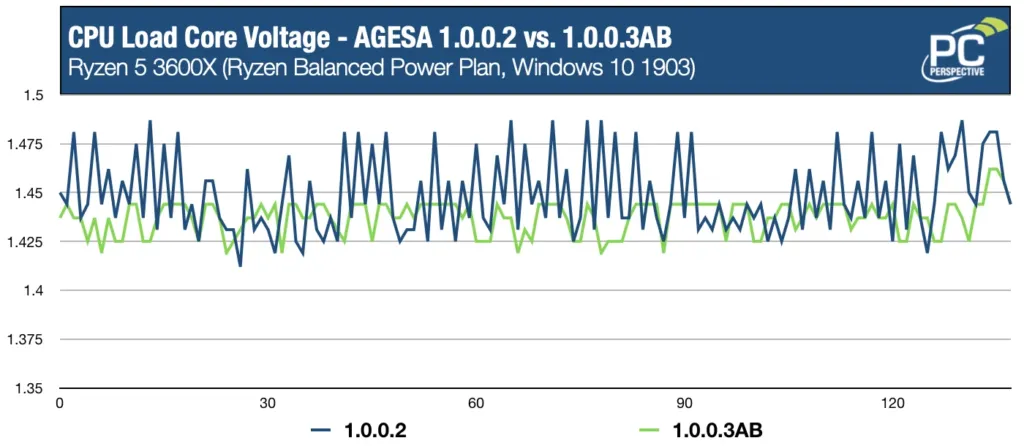
Security mitigations were the first suspect, but the voltage logs make a plainer case. On 1.0.0.2, idle voltage often sat at or above 1.475V; on 1.0.0.3AB it stays under 1.45V, and load voltage followed the same pattern between the two. The older code was simply running the chip on more volts, and more volts bought it a little extra clock, which GamersNexus measured as only a small frequency delta between versions. A small delta is still enough to show up in a test like x264’s first pass and invisible in most everything else.
PCIe 4.0 Casualty on X470
The benchmark losses aren’t the only cost of updating. 1.0.0.3ABB removed working PCIe 4.0 support from that X470 board, support that had been functioning fine before the update. BIOS updates across the industry are expected to do the same to other 400-series boards running the same microcode. None of this makes running the old code a real option on X570, where stability and memory support depend on the newer AGESA, so X570 owners take the hit whether they want it or not.
This matters for reading any 3600X review published around launch, because the microcode wasn’t held constant across them. KitGuru tested its 3600X on AGESA 1.0.0.3 using an MSI MEG X570 ACE, but its Ryzen 7 3700X and Ryzen 9 3900X numbers came from boards still running 1.0.0.2. GamersNexus ran its testing on a Gigabyte X570 Master on BIOS FC5. Reviewers converged on newer boards partly because Ryzen 3000 BIOSes on older boards proved flaky in testing, which means a chip-to-chip comparison inside a single review’s own charts may not be running on matched microcode at all.
| Reviewer | Board | AGESA / BIOS |
|---|---|---|
| PC Perspective | GIGABYTE X470 AORUS GAMING 7 WiFi | F40, AGESA 1.0.0.2 |
| KitGuru (Ryzen 5 3600X) | MSI MEG X570 ACE | AGESA Combo-AM4 1.0.0.3 |
| KitGuru (Ryzen 7 3700X, Ryzen 9 3900X) | ASRock X570 Taichi & Gigabyte X570 Aorus Master | AGESA Combo-AM4 1.0.0.2 |
| GamersNexus | Gigabyte X570 Master | BIOS FC5 |
What 95W Actually Costs: Power, Heat and Noise
KitGuru measured the 3600X pulling 145W from the wall under a Cinebench multi-thread load, a figure that lands level with the Ryzen 7 3700X despite that chip carrying 2 more cores. PC Perspective ran the same kind of comparison and found the 3600X drawing slightly more than the 3700X outright. The TDP labels on the box say 95W for the 3600X against 65W for the 3700X, so the chip with fewer cores and the higher rated power budget is the one actually spending it.
Ryzen 5 3600X system power draw at the wall
Overclockers pushed the load further with Prime95 Small FFT and saw system draw climb to 175W, then watched overclocking the 3600X add another 35W on top of that, for 210W total. KitGuru’s Core i5-9600K comparison puts that spending in context: running at 4.1GHz, Intel’s chip pulled 37W less in Cinebench than the 3600X, a gap of 26%, even though that i5 finished behind the 3600X in the multi-threaded work both chips were doing.
GamersNexus took its readings from the EPS12V rails on the chip itself rather than the wall, and logged 79W during Blender on the Ryzen 5 3600, climbing to 90W once overclocked. Hitman 2 barely touched the chip by comparison, drawing 52W stock and 56W overclocked, a fraction of what an all-core render demands. The two sets of numbers depend entirely on what’s being asked of the processor, not on any single power figure that can stand in for the chip as a whole.
TDP Isn’t a Power Draw Spec
TechBuyersGuru watched the 65W-rated Ryzen 5 3600 pull near 100W at the wall, and the 95W-rated Core i9-9900K go over 200W in that same test. Neither chip’s box number describes what it actually draws, and Intel’s overshoot is the far larger one.
Temperatures: Wraith Spire vs a 240mm AIO
On the stock Wraith Spire, the 3600X idled around 43C in a 25C room and climbed to 76C under a full all-core Cinebench R20 load. Push it harder with Prime95 Small FFT, as Overclockers did, and that same cooler hit 95C, a result that sits well above PC Perspective’s 76C only because Prime95 is a much harsher load than Cinebench, not because either reviewer’s Spire was struggling. Nothing throttled even at 95C, so the bundled cooler does its job at stock. Swap in a 240mm Corsair H100X and KitGuru held the chip below 75C under the same stock stress test, cutting a meaningful chunk off the ceiling the Spire allows.
| Load | Cooler | Temperature |
|---|---|---|
| Idle, ~25 C room | Wraith Spire | 43 C |
| All-core Cinebench R20 | Wraith Spire | 76 C |
| Prime95 Small FFT | Wraith Spire | 95 C |
| Stock stress test | Corsair H100X 240mm AIO | Below 75 C |
KitGuru wouldn’t even attempt a 4.3GHz overclock on the stock Spire, reserving that 1.35V run for the Corsair H100X instead. The reason is built into how Precision Boost 2 works: it spends any thermal headroom it finds on clock speed rather than leaving it on the table, so the cooler attached to the chip decides how hot it runs, not the process node. As KitGuru put it, 7nm doesn’t mean the chip runs cool, it means AMD built more room to push frequency, and Precision Boost 2 fills whatever room the cooler gives it.
Wraith Spire Noise Levels
PC Perspective measured the stock cooler ranging from 33 dBA at idle to 43 dBA on an open bench at full fan speed, and at that top end it gets noticeably loud. TechBuyersGuru’s own run landed close by at 44dB and 3200RPM, while the smaller Wraith Stealth that ships with the non-X 3600 stayed quieter at 36dB and 2600RPM. The raw numbers understate it, too: the Spire’s fan carries a higher pitch than the Wraith Prism coolers bundled with AMD’s higher-end chips, and that pitch is what a listener actually notices before the dBA figure explains why.
Bundled cooler noise levels
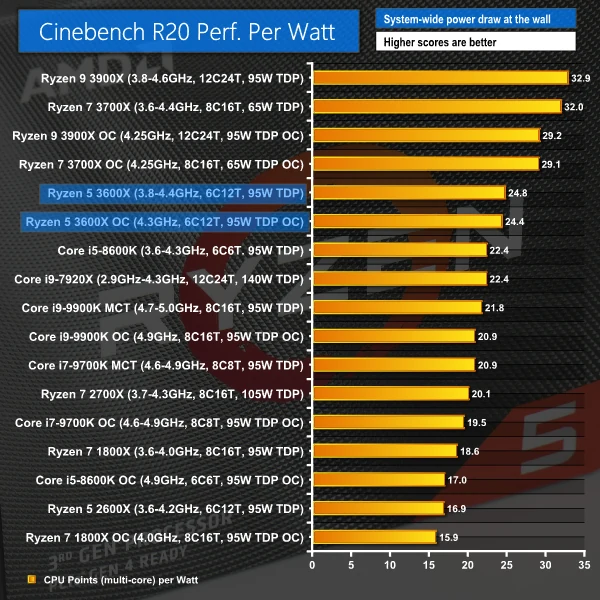
KitGuru scored the 3600X at 24.8 on performance per watt at stock, beating the 4.1GHz Core i5-9600K by 11%. It still loses that race to its own sibling, the Ryzen 7 3700X, which beats the 3600X outright on performance per watt. The explanation is the same frequency-versus-core-count trade that shows up everywhere else in these numbers: more threads running at a lower frequency suit multi-core rendering better than fewer cores pushed harder, and AMD built the 3600X to do the pushing.
A $50 Premium for 200MHz
Strip away the badge and the 3600X is the 3600 with 200MHz added to base and boost – 3.8GHz and 4.4GHz against 3.6GHz and 4.2GHz. Cache sits identical at 32MB of L3 and 3MB of L2 on both chips, and both support the same DDR4 3200 memory. That’s the entire case for paying $249 instead of $199, and it’s why nearly every reviewer who put the two side by side ended up recommending the cheaper one.
| Spec | Ryzen 5 3600X | Ryzen 5 3600 |
|---|---|---|
| Price | $249 | $199 |
| Cores / Threads | 6 / 12 | 6 / 12 |
| Base / Boost | 3.8 GHz / 4.4 GHz | 3.6 GHz / 4.2 GHz |
| L2 Cache | 3MB | 3MB |
| L3 Cache | 32MB | 32MB |
| Memory Spec | DDR4 3200 | DDR4 3200 |
| TDP | 95W | 65W |
| Bundled cooler | Wraith Spire | Wraith Stealth |
The spec sheet does hide two other differences. The 3600 is rated at 65W against the 3600X’s 95W, and AMD ships it with the smaller Wraith Stealth cooler rather than the Wraith Spire that comes with the X. Neither difference changes what’s actually inside the die.
KitGuru’s Verdict: Skip the X
KitGuru scored the 3600X 8 out of 10 and still told readers not to spend the extra £50. Their reasoning starts with the unlocked multiplier: a few minutes in BIOS turns a £190 3600 into a 3600X, at which point Precision Boost 2 narrows what was already a 200MHz gap on paper to something under 200MHz in practice. That £50 buys a 240mm AIO or a decent air tower instead, and either one does more for the chip than the factory clock bump ever could.
TechBuyersGuru went further, handing the 3600 five stars against 3.5 for the 3600X. In their own Cinebench and Dirt Rally testing the cheaper chip actually finished ahead of its pricier sibling, at street prices of $194 for the 3600 and $240 for the 3600X on the day they published.
UserBenchmark put a number on the gap and called the X SKU a marketing gimmick outright: 2% more performance for 20% more money. They went as far as pairing a 3600 with a $20 Gammaxx 400 cooler and found it outrunning a 3600X stuck on its bundled Spire.
GamersNexus reviewed the 3600 and left the $250 question hanging rather than answering it for the reader, asking outright whether the 3600X could justify itself once overclocking had closed most of the distance. They reached for first-gen Ryzen to make the point: the 1700 clocked up to 1800X speeds, a precedent that doesn’t flatter the X SKU here either.
Tom’s Hardware and PC Perspective Still Pick the X
Tom’s Hardware broke from the pack and called the 3600X the best mid-range processor on the market, but they got there by judging it against Intel rather than against its own sibling. Against the $262 Core i5-9600K, the 3600X’s $249 list looks like a $13 discount – though that’s a narrower gap than the roughly $30 the previous-generation 2600X held over the Core i5-8600K, meaning AMD’s premium 6-core is creeping closer to Intel’s price rather than undercutting it the way its predecessor did.
PC Perspective handed the 3600X a gold award, and noted that at its $239 Amazon price rather than the $249 list, the gap to the $199 3600 looks a lot more reasonable than the full $50. Even so, PC Perspective’s own pick for the best Zen 2 buy wasn’t either Ryzen 5 – it was the 8-core, $329 Ryzen 7 3700X.
Ryzen 5 3600 and 3600X street prices at review time
Pros
- 200MHz higher base and boost clocks straight out of the box
- Tom’s Hardware named it the best mid-range processor on the market
- PC Perspective backed it with a gold award
Cons
- Cache and memory support are identical to the $199 3600
- The $50 premium buys nothing beyond that 200MHz on paper
- Precision Boost 2 and an unlocked multiplier erode even that 200MHz once the 3600 is pushed
- UserBenchmark puts the real-world gap at 2% more performance for 20% more money
The 3600X Years After Launch
AMD launched the 3600X on 7 July 2019 at $249, and when it brought the Ryzen 7 5700X3D to market on 8 January 2024, it priced that chip at the same $249 – on the same AM4 socket the 3600X already occupies. Technical.city scores the 3600X 10.58 overall against the 5700X3D’s 15.37, a 45.3% gap that moves the newer chip from 981st to 623rd in the site’s rankings while the 3600X stays put. For anyone who still has a 3600X in a working system, that isn’t an abstract comparison between 2 chips on a spec sheet; it’s a drop-in upgrade into the exact same motherboard, for the exact money AMD asked the first time around.
| Ryzen 5 3600X | Ryzen 7 5700X3D | |
|---|---|---|
| Launch date | 7 July 2019 | 8 January 2024 |
| Launch price (MSRP) | $249 | $249 |
| Cores / threads | 6 / 12 | 8 / 16 |
| TDP | 95 Watt | 105 Watt |
| Aggregate score | 10.58 | 15.37 |
| Passmark | 18112 | 26307 |
| GeekBench 5 single-core | 1666 | 1922 |
| GeekBench 5 multi-core | 7074 | 10107 |
| Cost-effectiveness | 6.13 | 30.13 |
| Place in the ranking | 981 | 623 |
The single-core numbers explain why the 5700X3D doesn’t feel like a different generation in everyday use: 1666 against 1922 on Geekbench 5 is a real gap but not a dramatic one. Multi-core is where it opens up, 7074 to 10107, because the 5700X3D is carrying 8 cores against the 3600X’s 6, and Passmark’s aggregate score follows the same pattern, 18112 against 26307. The number that actually stings is technical.city’s cost-effectiveness rating, 6.13 for the 3600X against 30.13 for the 5700X3D, because that one isn’t measuring 2019 dollars against 2024 dollars – it’s measuring what each chip is worth to buy right now.
GeekBench 5 — Ryzen 5 3600X vs Ryzen 7 5700X3D
Price is the whole story once a chip goes used, and Passmark now lists the 3600X at $86.11 against $110.51 for the Core i7-8700K it used to lose to on paper. At that pricing the 3600X’s 18112 CPU Mark beats the 8700K’s 13554 outright, and Passmark’s value metric – 210.3 against 122.7 – isn’t close. UserBenchmark still ranks the 3600X 248th out of 1427 chips for speed, which is the honest read here: not a fast chip anymore, but nowhere near an obsolete one either.
By technical.city’s own tracking, the 3600X still meets minimum specs for 100% of known games and recommended specs for 99% of them. It’s behind, but it isn’t shut out of anything – a chip can drop from 981st to wherever and still clear the bar for nearly every game that gets made.
The Latency Behind the Complaints
KitGuru logged 33ms of cache and memory latency on the 3600X, identical to the figures it measured on the 3700X and the 3900X, against 17ms for a Coffee Lake Core i5 on the same test. That gap doesn’t show up in an average frame rate, but it’s exactly the kind of number that shows up in 1% lows years later, once a game’s working set outgrows what the cache can hold close by.
The reason traces back to how AMD built the chip: the 3600X splits its 32MB of L3 cache across two CCXs, where the 5000 series keeps L3 on a single CCD. That split is exactly what one owner, troubleshooting weak 1% lows on their own 3600X, pointed to when a forum thread asked what was going wrong.
Your RAM could be partly to blame. 3200 CL22 is pretty high latency. Your CPU is likely needing to go to your memory often because the 3600X has the L3 cache of 32mb split between two different CCDs, making it inefficient compared to the 5000 series, which has it on a single CCD.
What 3600 Owners Say 6 Years In
6 years into owning a 3600 or 3600X, people are pairing it with cards nobody expected it to meet: the 4070 Super, the 6700 XT. Used pricing has fallen to the point that one buyer found a 3600 new on Amazon for $60, and several owners credit FSR with stretching the chip’s useful life at 1440p well past what anyone assumed it would hit.
I Love my goated 3600 cpu i will never abandon it, i came from core 2 duo e7300 before it my combo is r5 3600 + 4070 super aka digital foundry build
my 3600 and 6700xt combo at 1440p has done me well for 6 years now and thanks to FSR they have plenty of life left
Grabbed a 3600 new on Amazon in the us for $60 a few months ago.
Set those against the owners who moved on. People who went from a 3600 to a 5700X3D or to a 5600 both describe the same thing: not a jump in average frame rate, but a real difference in 1% lows and stutter. That’s the latency problem showing up in exactly the place the KitGuru numbers predict it would, and it’s the practical reason to leave the chip behind rather than a reason to call it broken.
I used to run a 3600 until last year, when I realized it’s probably bottlenecking my 4070. And although 4070 is not much faster than a 5060ti(10-15% vs 5060ti maybe a bit more vs 9060xt), when I jumped to a 5700x3d I saw a real difference especially in 1% lows.
I feel like if you could get the 5600 is way much better. I had the 3600 couple of years ago, upgraded to a 5600 and it was a day and night different, no more stutters and better 1% lows

None of this contradicts what reviewers said when the chip was new. Gamers Nexus called the Ryzen 5 3600 more versatile and cheaper than the Core i5-9600K, and KitGuru said the 3600X was enough for 120Hz or 144Hz gaming and the obvious choice the moment any rendering or video editing entered the picture. The argument for threads over raw clock speed was the one that turned out to matter, and it’s the reason the chip is still in machines years after review embargoes lifted.