
Key Takeaways
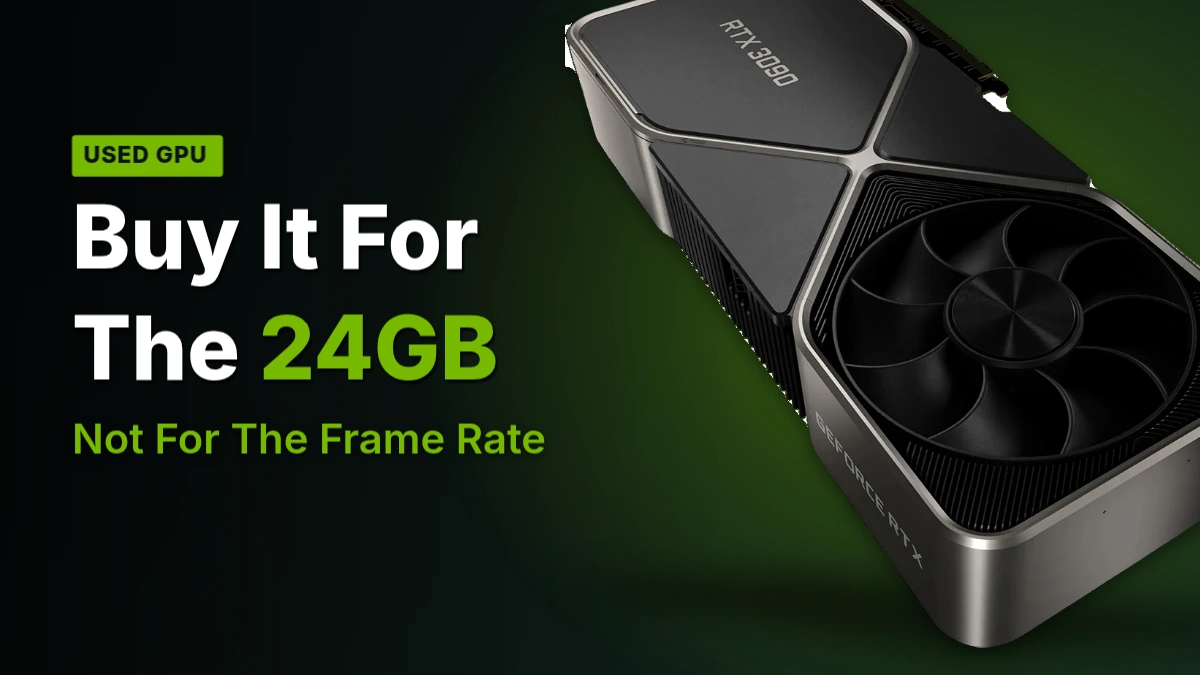
- 1Buy the RTX 3090 for the 24GB ceiling, not for gaming – the RTX 4070 Ti Super beats it by 18-22% at 4K on just 16GB, and the RTX 4080 Super adds another 20-25% on top of that.
- 2At native 4K with ray tracing maxed, the 3090 falls to 45-55 FPS; switching DLSS Quality back on is what gets it to 60-75 FPS, so don’t expect native 4K60 from this card in anything demanding.
- 3Cyberpunk 2077 at 4K with ray tracing maxed only uses about 14-16GB of the 3090’s 24GB, which means most gamers are paying for several gigabytes of VRAM their games never touch.
- 4If your project genuinely crosses 16GB, the math changes entirely: a 3080 forced to overflow into system memory took about 400 seconds on a scene the 3090 rendered in 36 seconds.
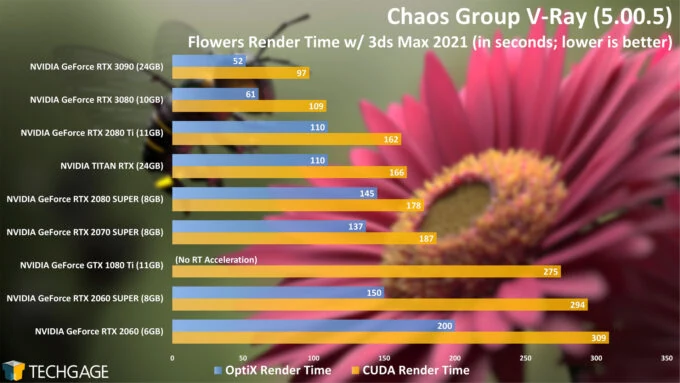
- 5In Blender and V-Ray, the 3090 roughly halves the TITAN RTX’s render times – Classroom with OptiX drops from 49 to 25 seconds, Flowers from 110 to 52.
- 6Skip the RTX 3090 Ti unless you find one priced like a 3090: it costs $500 more and draws 100W more for only a 5-8% real-world gain, with the same 24GB buffer.
- 7In Premiere Pro and After Effects, a 3090 performs about the same as a 4090 – don’t pay generation premiums for editing work that’s CPU- or encoder-bound.
- 8Pay €750-900 for a Suprim X or AORUS XTREME over the €520-680 ordinary boards only for the cooler and validated BIOS; it’s the same die and the same performance either way.
- 9Avoid any RTX 3090 listed at €320-480 – that price band is server-pull or ‘Public Turbo’ units running modified BIOS with no consumer warranty.
- 10Before buying used, make the seller run a 30-minute FurMark test logged with GPU-Z: clocks should hold steady with temperatures at or below 83°C.
The Silicon Every 3090 Board Shares
Every RTX 3090 board, Gigabyte’s Gaming OC included, starts from the same die: 10,496 cores feeding 24GB of GDDR6X across a 384-bit bus, and that width is the only reason the memory can move 936 GB/s in the first place – narrow the bus and the bandwidth number falls with it. Peak FP32 comes in at 35.6 TFLOPS, and NVIDIA put a $1,499 price on all of it at launch.
| Cores | 10,496 |
| Memory | 24GB GDDR6X |
| Memory bus | 384-bit |
| Bandwidth | 936GB/s |
| Peak FP32 | 35.6 TFLOPS |
| Base clock | 1,400 MHz |
| Boost clock | 1.73 GHz |
| PCIe | PCIe 4.0 x16 |
| SRP | $1,499 |
Techgage measured the base clock at 1,400 MHz; Puget Systems clocked the boost at 1.73 GHz. Neither number tells you what you actually get to use of that 24GB, though – Windows reports roughly 23.7GB of it, with firmware and reserved memory overhead eating the rest before a game ever touches it.
Check Your Case Clearance First
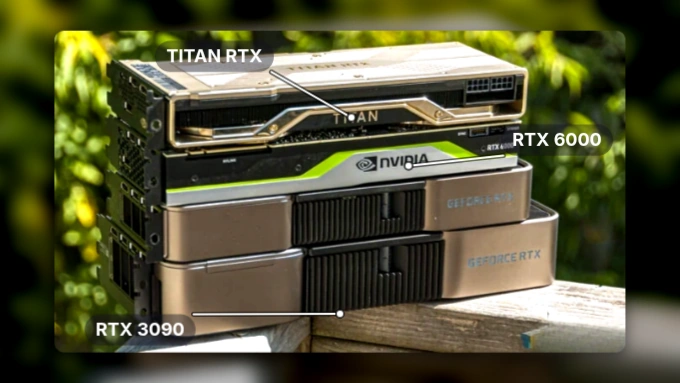
The Founders Edition alone eats 3 PCI slots, and most partner boards go wider still – only a handful of vendor designs hold the line at 2 slots. Measure your case before you buy this thing, not after it’s already in the cart.
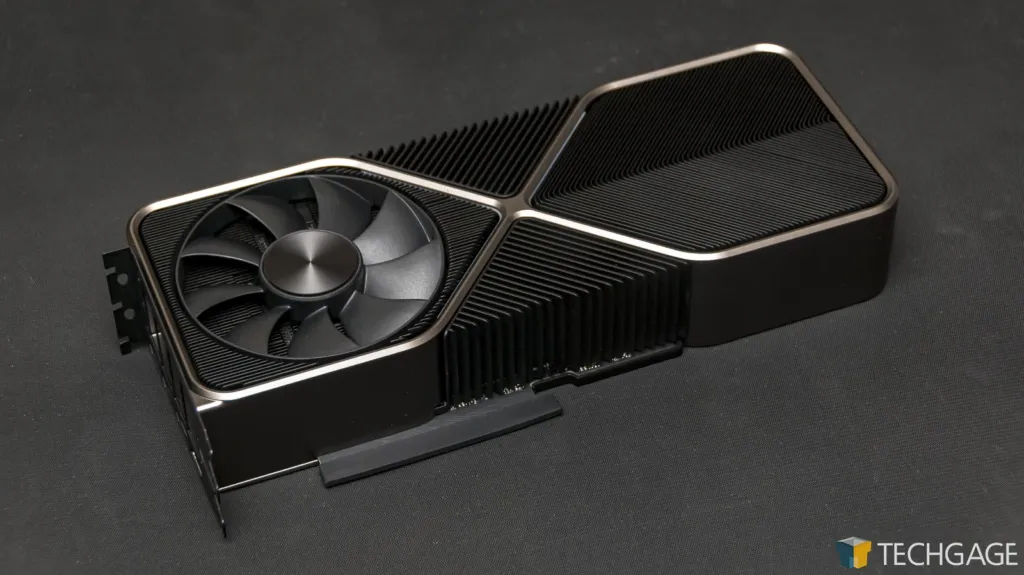
The Founders Edition PCB covers barely half the card’s total length, which is why the power connector lands mid-board instead of at the end where every other card puts it. The rest of that length is cooler, built large enough to keep the Ampere chip underneath it running quiet under load.
The bus tops out at PCIe 4.0 x16, full stop. Drop the card into a PCIe 5.0 board and it still runs at 4.0 speeds – 64 GB/s bidirectional – because that’s the ceiling the silicon was built to, not something a newer slot can lift. Not a dealbreaker on a current platform, just a number worth knowing before you build a system around this card specifically.
On the reference board, that 24GB is physically 24 individual 1GB chips arranged in a clamshell layout, packed onto both sides of the PCB. That same reference design turned out to be flexible enough to take other chip counts entirely, which is exactly what one YouTube commenter pointed to when explaining how modded variants of the card got made.
The 3090 reference card uses 24 1GB chips clamshell design. So, reuse the 3090 reference PCB design, but pair the 3080 chip with 20 1GB chips nets you 20GB VRAM.
Power, Heat and the Connector Question
NVIDIA rates the RTX 3090 at 350W, and every spec listing for the card agrees on that number. Techgage measured the difference that makes at the wall: a full system running the 3090 pulled 100W more than the same system running the TITAN RTX it replaced, logged with a Killawatt meter across the whole rig rather than the card alone. That’s not a card-only figure, so some of that 100W is everything else in the box working harder to feed it, but the direction is the same either way – this card asks for more than what came before it.
| TDP | 350W |
| Power connector | 12VHPWR or dual 8-pin PCIe |
| Founders Edition adapter | 12-pin, included in box |
| Recommended PSU | 750W or more |
| Recommended +12V rail | 60A continuous or better |
| Card width | 3 slots |
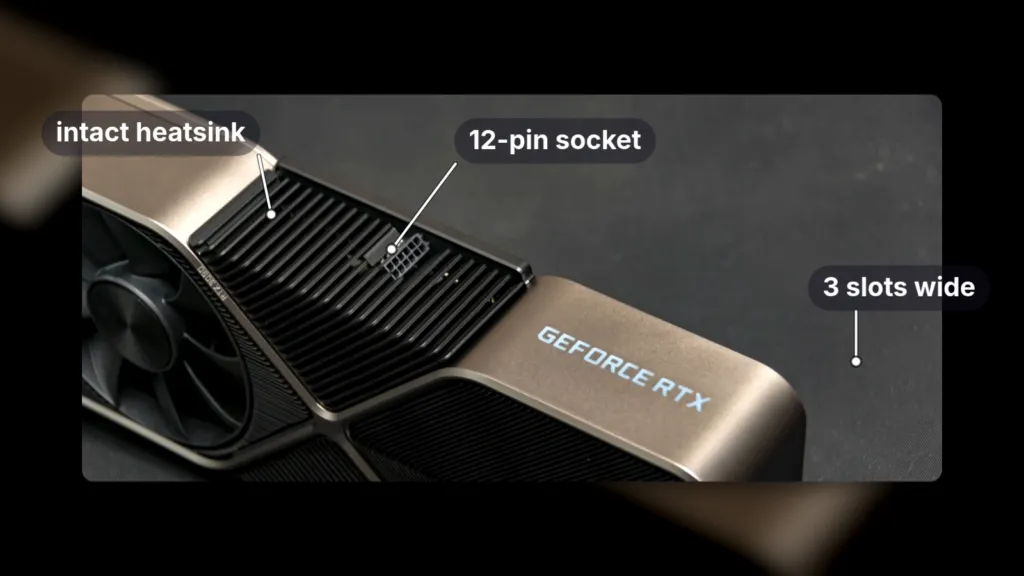
NVIDIA’s own floor is 750W with 60A on the +12V rail, and the card itself needs a 3-slot-wide space in the case before you even get to the PSU. The connector question isn’t the one-way street it was in 2020, though. Plenty of power supplies sold today carry native 12VHPWR straight off the shelf, and for anyone still running dual 8-pin, certified manufacturers sell adapters that cover the gap in either direction.
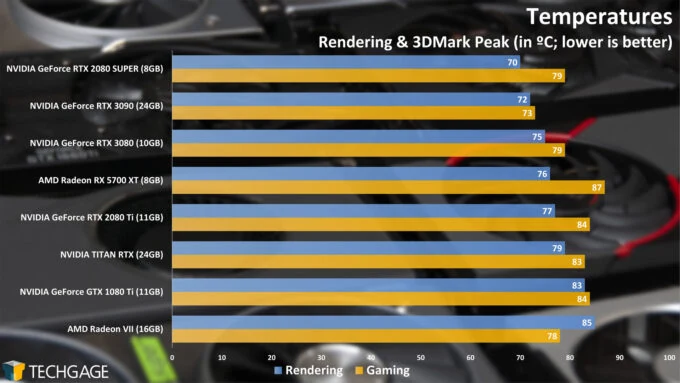
The 3090 is audible at full load, but it doesn’t stand out next to other recent NVIDIA cards the way the Radeon VII did – that one was the obvious loud card in the room, and the 3090 simply isn’t.
Checking a Used 3090 Before You Pay
Ask the seller for a 30-minute FurMark run logged with GPU-Z. A healthy card holds 83°C or under with clocks staying steady through the whole run – that’s what good thermal paste and an intact heatsink look like. Temperatures climbing above that, or clocks that won’t hold, are the warning sign.
That FurMark log has a blind spot worth knowing about: most monitoring software only reports the temperature of the front-side memory. The GDDR6X chips mounted on the back of the PCB have essentially no cooling of their own, and nothing in a standard GPU-Z reading is showing you what they’re actually doing.
Main prob with this mod is the same issue the 3090 had; the memory on the back of the PCB essentially has no cooling and gets stupid hot and a lot of monitoring software only reports the temp of the front memory so it seems fine.
Not everyone wanted the connector NVIDIA moved to with this card. The 3090 will run on 12VHPWR or on dual 8-pin PCIe, and the Founders Edition’s 12-pin socket only works with the bundled adapter in place – plenty of buyers would rather have just kept plugging in two 8-pin cables.
why can’t we go back on 8pin pcie…
These frame rates all come from the same settings bundle: 4K Ultra, DLSS set to Quality, ray tracing turned up to High. That’s not native resolution with ray tracing switched off to flatter the numbers – it’s upscaling plus the heaviest lighting mode turned on, aggregated across 3 reviewers’ benches, HardwareDealz, TechPowerUp and Notebookcheck, run through 2023 and 2024. Keep that in mind before the frame rates below start looking either impressive or disappointing.
RTX 3090 at 4K Ultra, DLSS Quality, RT High
Ashes of the Singularity clears 102 FPS, the easiest result here by a wide margin, while Forza Motorsport (2023) settles at 71 and Cyberpunk 2077 holds 62 – both comfortably past the 60 mark that matters for a smooth 4K session. Starfield drops to 54 and Alan Wake 2 to 48, and that’s the honest spread: 3 of 5 titles clear 60, two don’t. Ashes is an older, lighter engine, and 102 FPS on the same card that struggles to break 50 in Alan Wake 2 is less about the 3090 getting faster and more about what the game is asking it to do.
| Setting | FPS in demanding titles |
|---|---|
| Native 4K, no upscaling | 45–55 |
| 4K with DLSS Quality | 60–75 |
Strip DLSS out and demanding titles fall to 45-55 FPS at native 4K, below the 60 FPS line most people use to call a card a 4K card. Switch DLSS Quality back on and the same games climb to 60-75. The 3090 only earns 4K60 with upscaling doing part of the work – at native resolution in anything heavy, it doesn’t.
The 24GB Buffer Isn’t Driving These Frame Rates
Cyberpunk 2077 at 4K with ray tracing maxed out uses about 14-16GB, nowhere near the 3090’s full 24GB. The frame rates above come from the GPU’s cores and the 384-bit bus, not from the extra headroom – an 8GB gap sitting unused while the card renders Starfield at 54 FPS. Anyone buying this card for gaming on the strength of the 24GB number is paying for memory the games in this section never touch.
NVIDIA launched the 3090 as an 8K-ready gaming card, leaning on an HDMI 2.1 port that can drive an 8K display at 60 FPS. Measured against what the card actually does in current games – DLSS Quality needed just to clear 60 FPS at 4K in anything demanding – that pitch reads like a different product.
Gamers and people running local LLMs on the same card don’t agree on what that 24GB is for, and one Reddit user running local models put it plainly.
24gb vram is very good for gaming, but not “very good” for LLMs. Also laptop GPUs are different than desktop GPUs.
The Jobs That Actually Use 24GB
Techgage tested this card and came back with a blunt answer: not many people need 24GB of VRAM. A 10GB frame buffer suits most workloads, and if you’re not sure which camp you’re in, you’re probably in the first one. What follows is the narrow list of jobs where that answer flips, almost all of them large 3D projects where the scene itself, not the resolution or the settings, is what eats the memory.
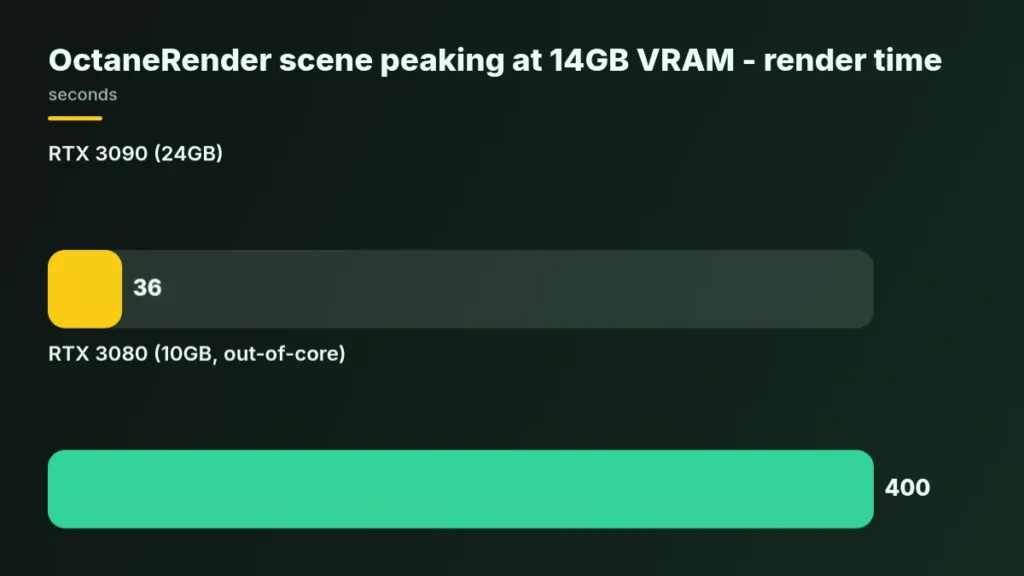
Techgage’s clearest demonstration came from an Octane scene NVIDIA supplied for testing, one that peaked at 14GB of VRAM – past what a 10GB card can hold. On the 3090, it rendered in 36 seconds. Feed the same scene to a 3080 and the card has nowhere to put the overflow but system memory, running in what Octane calls out-of-core mode; Techgage measured that render at about 400 seconds. That’s not a modest tax for running short on memory, it’s roughly a tenfold blowout, and the only reason it happens at all is that the scene didn’t fit.
OctaneRender scene peaking at 14GB VRAM – render time
What happens when a job doesn’t fit
Run a project that exceeds a card’s VRAM and there are two ways it can go: the GPU falls back to system RAM and performance craters, the way the 3080 did in the Octane test above, or the system crashes outright.
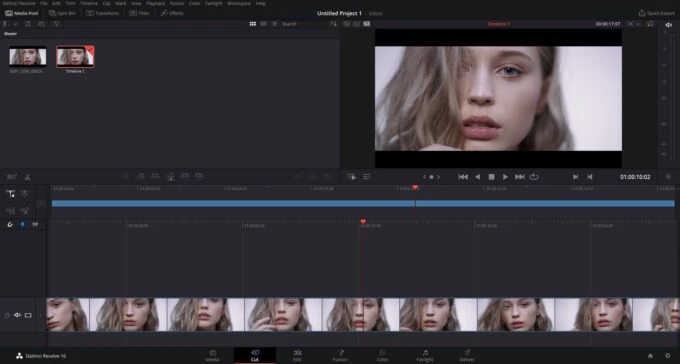
- DaVinci Resolve 18.6+ Fusion comps can spike past 18GB when the timeline is built on over-4K proxies
- Multi-layer Resolve timelines running noise reduction across stacked layers also push past that 18GB mark
- Running LLaMA-3 8B locally often lands in the 16-20GB range
- Fine-tuning Stable Diffusion XL with LoRA also tends to land in that same 16-20GB band
- Blender Cycles wants VRAM headroom once geometry gets complex, especially with OptiX acceleration doing the work
- Volumetric lighting and denoising passes in Cycles are what actually consumes that headroom, not the base scene
8K DaVinci Resolve projects are the one case on this list where VRAM isn’t working alone. AMD leaned on exactly this kind of workload when it revealed the RX 5700 XT, and Techgage’s own test of 8K Resolve playback showed why the PCIe generation matters as much as the frame buffer: the same project played back smoothly on a PCIe 4 bus, and Techgage saw stuttering in the same test running on PCIe 3.
Rendering Results Across Six Engines
Octane is where the generational jump looks biggest: Techgage’s OctaneBench 2020 run put the 3090 at up to twice the speed of the TITAN RTX, a card that cost $1,000 more than the 3090’s $1,499 price. Against the 3080, the card it’s actually meant to replace in the same generation, the margin shrinks to 19%. Pick your comparison and you get a different card: the TITAN RTX number flatters it, the 3080 number doesn’t.
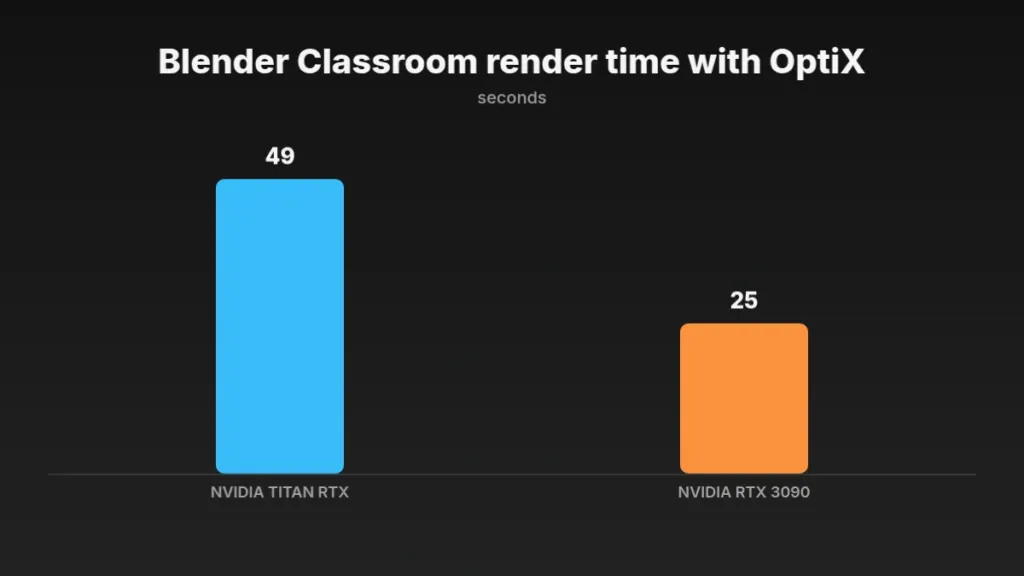
Blender’s numbers are the cleanest in the whole suite. The BMW render, once a 60-second job on older hardware, now finishes closer to 20 seconds than 30 on the 3090 – near half the time the TITAN RTX needed for the same scene. Classroom with OptiX enabled tells the same story: 49 seconds on the TITAN RTX drops to 25 on the 3090.
Blender Classroom render time with OptiX
Viewport work scales differently depending on where you’re working. In Blender’s material preview mode, the 3090 gained 20 FPS over the TITAN RTX at 2160p and ran more than double the frame rate of the GTX 1080 Ti. Drop down to 1080p or 1440p with the Controller model loaded and that lead disappears, because the CPU runs out of room first – 4K is where this card actually gets to show what it can do.
V-Ray splits the story in two. Against the TITAN RTX, the Flowers scene with OptiX enabled more than halves, 110 seconds down to 52. Against the 3080 it’s the weakest result in the whole suite – the standalone V-Ray benchmark shows only a 19% gain, the smallest generational step Techgage recorded anywhere. What both Ampere cards do agree on is beating the best heterogeneous CPU-plus-GPU combination Techgage tested, with OptiX switched on.
| Test | TITAN RTX | RTX 3090 |
|---|---|---|
| Blender Classroom, OptiX | 49 seconds | 25 seconds |
| V-Ray Flowers, OptiX | 110 seconds | 52 seconds |
Redshift is softer again against both reference cards – Techgage called the lead over the 3080 comfortable but not mind-blowing, and it doesn’t quite halve the TITAN RTX render time either. The number that matters more than either of those: Redshift ships with RTX switched off by default, and turning it on hands you a noticeable rendering boost for free.
Turn RTX On in Redshift
Redshift doesn’t enable RTX out of the box. Go into the settings and switch it on yourself – the performance is sitting there unused until you do.
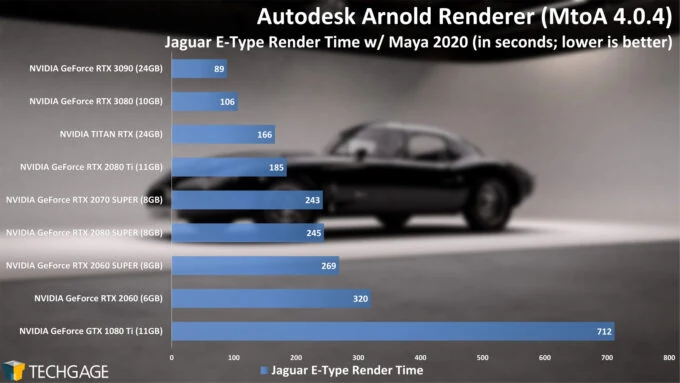
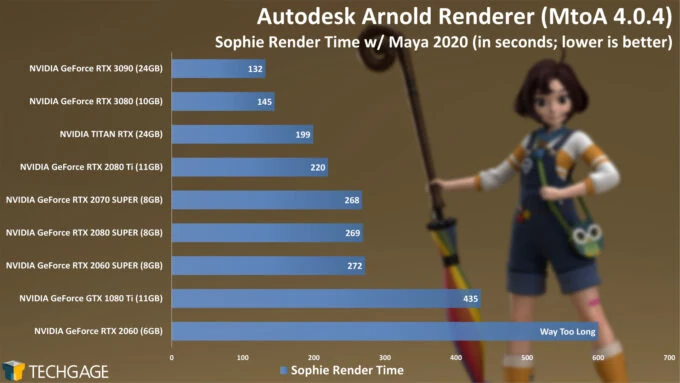
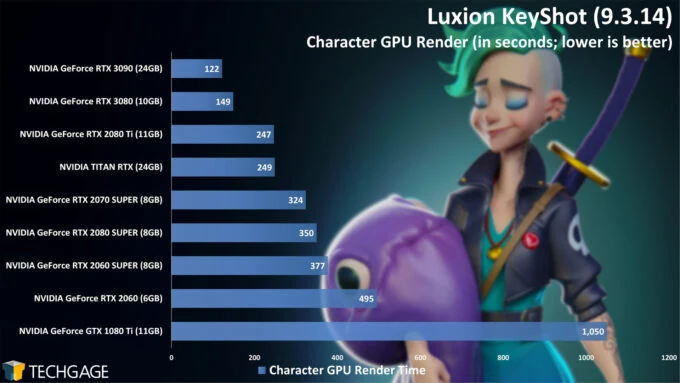
Arnold and KeyShot both make the same point from different angles: pick a different scene inside the same renderer and you get a different answer. Arnold’s two projects, Jaguar and Sophie, didn’t scale the same way against the 3080, and there’s no RTX toggle to test either side of – the renderer uses OptiX by default and grabs the RT cores automatically if they’re there. KeyShot’s two projects scaled differently from each other too, though its Character render landed the clean number: half the TITAN RTX’s time.
Creative Apps: Ampere Flagships vs the 4080 and 4090
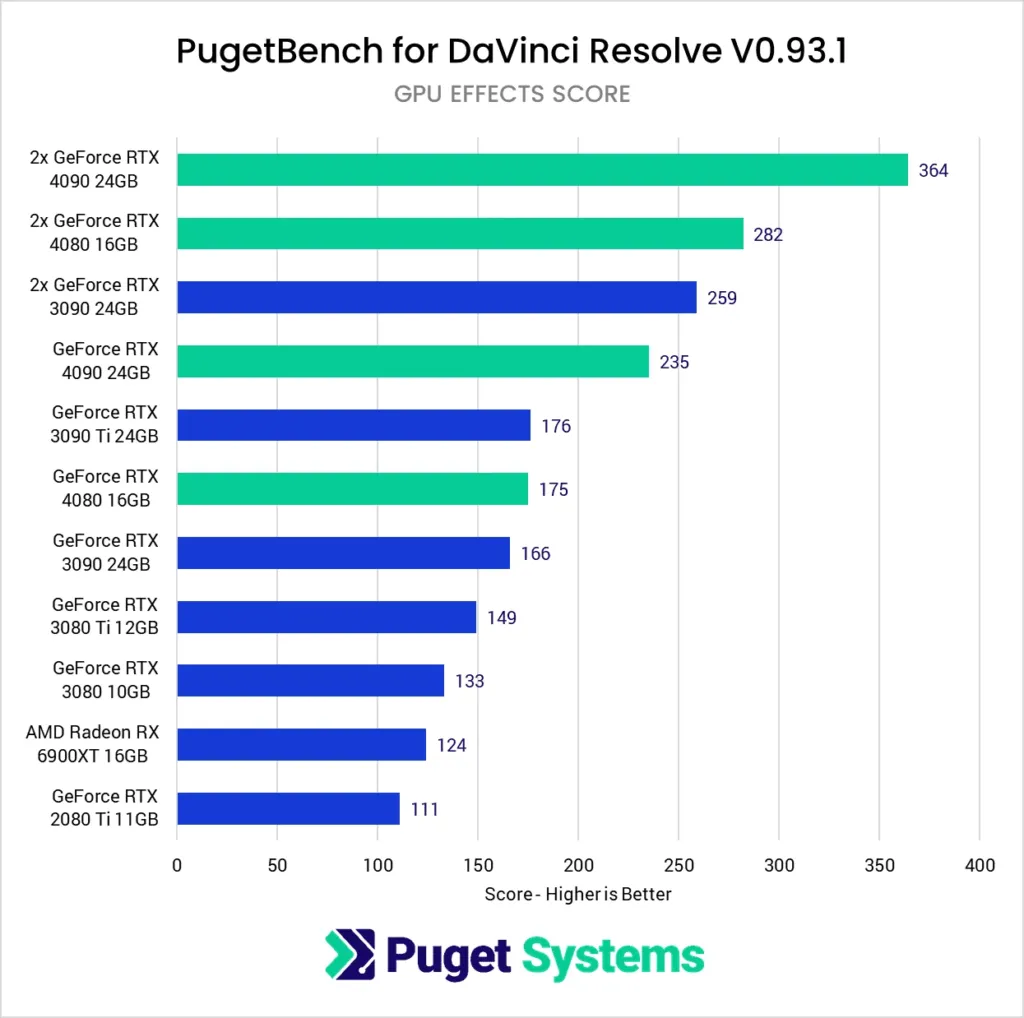
Resolve is the one app here where the GPU actually does the work, not the CPU or the encoder, which is why it’s the one place the generational gap shows up honestly. Puget Systems measured the 4080 beating the 3080 Ti by 18% on Resolve’s GPU score, covering OpenFX and noise reduction, and that gain only brings the 4080 level with the 3090 Ti – so a 3090 Ti owner loses nothing by staying put. The real jump is the 4090, which runs about 40% ahead of the 3090 in the same GPU score. If Resolve is where you live, the 4090 is the only 40-series card worth the move; the 4080 just catches up to what Ampere’s best already had.
Generational gains in creative apps, Puget Systems
Premiere tells a flatter story. From the 3080 up through the 3090 Ti there’s barely any separation, and even the 4090 only manages 17% over the 3090 on GPU effects – Lumetri Color and most blur work. That’s because most of what Puget’s Premiere benchmark measures isn’t raw GPU work at all; it leans on the CPU or on NVENC and NVDEC, so throwing a newer card at it buys almost nothing.
After Effects is the extreme version of the same pattern. The 3090 actually edged out the 4090 by a fraction, which sits inside Puget’s own 5% margin of error and so means the two cards are identical here. Above the 3080, After Effects stays CPU-bound even in Puget’s GPU-heavy test projects, run on an AMD Threadripper PRO 5975WX 32-Core – so for base After Effects work, a 3090 is as good as anything NVIDIA has shipped since.
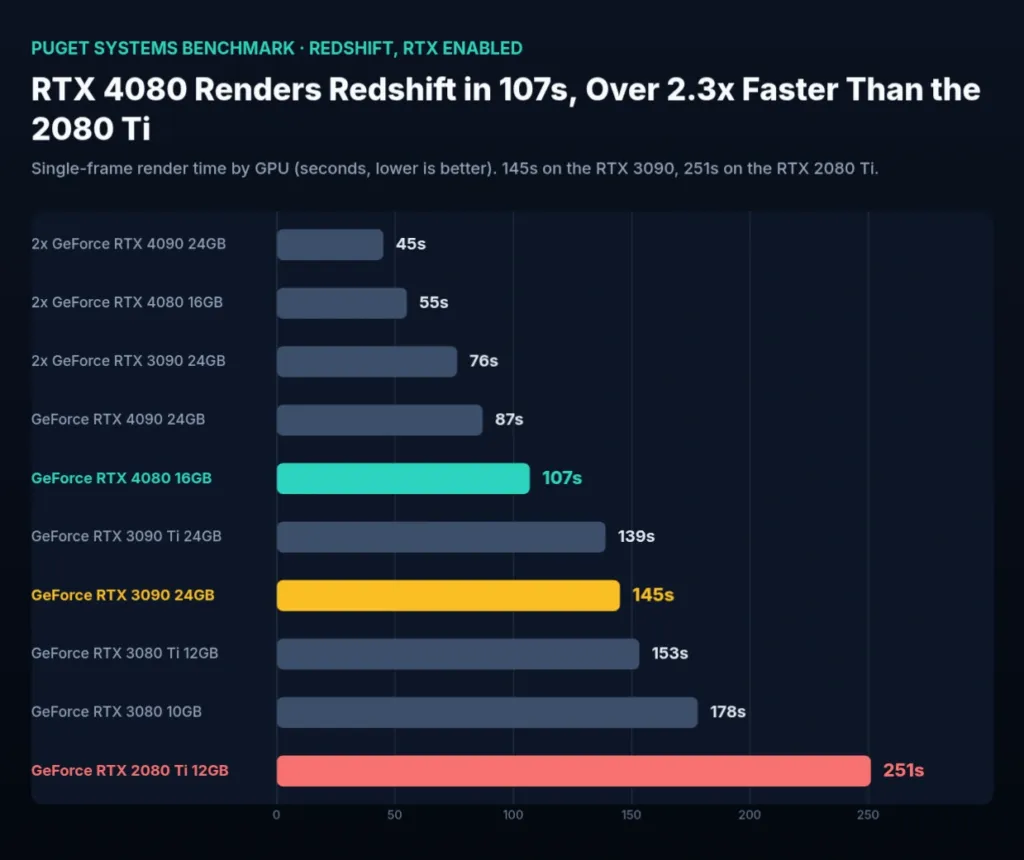
Rendering is where the newer silicon earns its keep. Puget’s single-frame Redshift render ran 251 seconds on the 2080 Ti, 145 seconds on the 3090, and 107 seconds on the 4080 – a real drop with every generation, not a rounding error. Blender backs that up: the 4080 finishes 43% faster than the 3090 Ti. If your work is GPU rendering rather than editing, this is the one category where buying newer actually buys you time back, not just a bigger number on a chart.
Redshift single-frame render time, Puget Systems
Unreal Engine is the real-time case, and it’s the one place a pair of 3090s actually earns a result: Puget found one 4090 matches roughly two 3090s, tested across three scenes, with and without ray tracing, at several resolutions. Puget ran the comparison without DLSS to keep it even, which means that result is real rendering muscle rather than an upscaler doing the work. One card beating two is also one card beating the hassle of getting two running together.
Encoding runs on a completely different clock to any of this. RTX 40-series cards export ProRes to H.264 25% faster than RTX 30, and that comes down to dual encoders NVIDIA added for this generation. NVENC and NVDEC barely change within a generation, which is why the 4080 and 4090 scored identically on this test and why adding a second GPU didn’t move the number at all. No Ampere card, 3090 included, closes this particular gap – it’s baked into the silicon generation, not the model you buy.
Which App You Use Decides the Verdict
There’s no single answer to how far behind a 3090 is – it depends entirely on what’s open on screen. In After Effects it’s dead even, edged out by a fraction. In Premiere the spread from the 3080 up to the 3090 Ti is barely there. In Resolve the 4090 pulls 40% clear. And in rendering, the 4080 finishes a Redshift frame in 107 seconds against the 3090’s 145. Same 2 generations, four completely different verdicts depending on which app you actually live in.
The 3090’s 24GB vs 16GB on the 4070 Ti Super and 4080 Super
Drop the 3090 into a 4K lineup against cards with two-thirds its VRAM and the memory capacity stops mattering the moment the frame counter starts. Averaged across 5 titles at 4K Ultra, DLSS Quality and RT High, the RTX 4070 Ti Super beats the 3090 by roughly 18-22%, and the RTX 4080 Super piles on another 20-25% on top of that. Both cards carry 16GB. The 3090 carries 24GB. The extra 8GB buys nothing here.
| Game | RTX 3090 (FPS) | RTX 4070 Ti Super (16GB) | RTX 4080 Super (16GB) | RTX 4090 (24GB) |
|---|---|---|---|---|
| Cyberpunk 2077 | 62 | 74 | 98 | 132 |
| Starfield | 54 | 68 | 89 | 117 |
| Alan Wake 2 | 48 | 61 | 82 | 109 |
| Forza Motorsport (2023) | 71 | 85 | 112 | 148 |
| Ashes of the Singularity | 102 | 118 | 145 | 187 |
Cyberpunk 2077 at 4K Ultra, DLSS Quality, RT High
Alan Wake 2 at 4K Ultra, DLSS Quality, RT High
The 4070 Ti Super’s lead isn’t a Cyberpunk 2077 fluke. It hits 74 FPS there against the 3090’s 62, then holds the same shape everywhere else: 68 FPS in Starfield, 61 in Alan Wake 2, 85 in Forza Motorsport (2023), 118 in Ashes of the Singularity. 5 titles, five wins, which is exactly what makes that 18-22% figure something to plan a purchase around rather than a number that happened to favor one engine.
Move up a tier and the 3090’s results stop looking marginal and start looking bad. The 4080 Super runs Cyberpunk 2077 at 98 FPS and Forza Motorsport (2023) at 112, both comfortably above anything the 3090 manages at 4K. Alan Wake 2 is the clearest case of all: the 3090’s 48 FPS sits well behind the 4080 Super’s 82, and further still behind the 4090’s 109.
None of this comes from a bigger chip. Ada’s lead comes from improved RT cores and 4th-generation Tensor cores, plus memory that Ada simply uses more efficiently per gigabyte-second. The 4090 proves the point on its own: it carries the same 24GB the 3090 does, but moves it at 1008 GB/s against the 3090’s 936 GB/s, and still pulls ahead by a wider margin than capacity alone could explain. Capacity was never the whole story.
- The 4070 Ti Super does all of this on roughly 35% less power than the 3090 draws
- Both newer cards add full AV1 encode and decode, something the 3090 doesn’t have at all
- The 3090’s only remaining edge shows up once a project’s VRAM footprint actually passes 16GB
The 16GB Test
Unless the workload in front of you genuinely exceeds 16GB of VRAM, buy the 4070 Ti Super over the 3090. It’s roughly 20% faster and runs about 35% more power-efficient doing it. The 3090’s 24GB only wins the argument once a project crosses the 16GB line – everywhere else, the decision is already made.
The 3090 Ti: Same 24GB, Bigger Numbers
10 percent more cores, 100 MHz more boost clock, faster memory chips – that’s the full list of what NVIDIA actually changed for the 3090 Ti. The memory speed moves from 19.5 Gbps to 21 Gbps, which works out to roughly 10% more bandwidth on top of the core and clock gains. None of that adds up to a new tier of card: every number is a single-digit or low-double-digit step up, and the 24GB frame buffer buyers are actually shopping for doesn’t move at all.
| Spec | RTX 3090 | RTX 3090 Ti |
|---|---|---|
| VRAM | 24GB | 24GB |
| Cores | 10,496 | 10,752 |
| Boost clock | 1.73 GHz | 1.86 GHz |
| Memory speed | 19.5 Gbps | 21 Gbps |
| Power | 350W | 450W |
| MSRP | $1,499 | $1,999 |
That stack of 10% gains translates into a 5-8% real-world performance gain, and the cost of getting it is a 100W jump in TDP, 450W against the 3090’s 350W, plus a $500 jump in launch pricing, $1,999 against $1,499. The spec sheet moved by double digits across cores, clock and memory bandwidth; the frame rate moved by single digits. On the secondhand market, where both cards now land close enough in price that the gap barely registers, that mismatch is the whole decision: the extra power draw and the extra dollars buy a performance gain most buyers won’t feel, while the 24GB that actually matters to anyone shopping this generation is identical on both cards.
NVLink and the Case for a Second 3090
NVIDIA built NVLink into the 3090 and then killed it off entirely for the 40 series, which makes this the last consumer GeForce that can tie 2 cards together into one VRAM pool rather than two separate ones. Run a pair of them and Techgage found they combine into a single 48GB frame buffer, room for scenes that simply won’t fit in 24GB no matter how you optimize them. That pair cost $500 more than a single TITAN RTX at the time, math that only makes sense if you’re one of the people who actually hits the 24GB ceiling. Without NVLink, there’s no equivalent move: a scene that outgrows the card’s VRAM spills into system RAM instead, and that fallback either tanks performance or crashes the system outright. Pooling isn’t a nice-to-have at that point, it’s the difference between the job finishing and the job not running.
| Card | VRAM | NVLink | VRAM pooling across two cards |
|---|---|---|---|
| RTX 3090 24GB | 24GB | Yes | Yes — 48GB combined |
| RTX 4080 16GB | 16GB | No | No |
| RTX 4090 24GB | 24GB | No | No |
| RTX 6000 Ada | 48GB | No | Not applicable — single card |
The jobs that actually need NVLink to use multiple GPUs are mostly specific to Unreal Engine: GPU lightmass, the inner and outer frustum work in nDisplay, and the path tracer Unreal 5.1 shipped. nDisplay is the case worth flagging – it technically runs without NVLink, but the performance hit is bad enough that people at Epic told Puget Systems it isn’t worth attempting. None of this matters much if you’re running a GeForce card in a virtual production pipeline anyway, since those cards have no Quadro Sync, which rules out a chunk of that work before NVLink even enters the picture. Epic added SMPTE 2110 support in Unreal 5.1 as one possible route around the gap, and better PCIe handling might ease it further, though that improvement may not land until PCIe 5.0.
What a Second Card Actually Buys You
Pooling memory is only half the reason to run 2 cards – the other half is raw throughput, and how much you get depends entirely on the app. Puget Systems measured a 61% gain in Resolve going from one card to two, while rendering engines like Octane, Redshift, V-Ray and Blender typically pick up 80-90% from the second GPU. Blender itself scales fine across multiple cards, but its official benchmark doesn’t support multi-GPU at all, so any published Blender number almost certainly understates what 2 cards actually deliver. Premiere Pro, meanwhile, effectively ignores a second card entirely – it’s not in the running if that’s your workload. Beyond 2 cards the gains stop being worth chasing anyway, since size and power limits make 3 or 4 GPUs a rare setup outside dedicated render farms.
Gain from adding a second GPU
If You Need More Than 24GB and Won’t Run a Pair
Skip NVLink and skip pairing cards, and the only route past 24GB is the Quadro line – specifically the RTX 6000 Ada, which carries 48GB on a single card. Otoy is working on improving Octane’s out-of-core performance, software that aims to let a scene run on hardware that doesn’t have enough VRAM for it, which is the other long-term answer to the problem NVLink used to solve with brute force.
Used RTX 3090 Prices and Vetting a Card
The ordinary partner cards – the Gigabyte Gaming OC this card is built around, alongside the MSI Ventus and ASUS TUF – sit at €520-€680 on eBay.de and Kleinanzeigen right now. Pay €750-€900 instead and you land on the Suprim X or AORUS XTREME, and that extra money buys a bigger cooler and a validated BIOS rather than another frame: it’s still the same die underneath.
| Card / tier | Typical European price |
|---|---|
| Lightly used RTX 3090 (MSI Ventus, Gigabyte Gaming OC, ASUS TUF) | €520–€680 |
| High-end RTX 3090 (Suprim X, AORUS XTREME) | €750–€900 |
| ‘Server disassembly’ / ‘Public Turbo’ units | €320–€480 |
| New RTX 4070 Ti Super 16GB | €720–€790 |
| New RTX 4080 Super 16GB | €1,050–€1,180 |
Put that €520-€680 figure against what a new card costs in Europe right now: a 4070 Ti Super runs €720-€790, and a 4080 Super runs €1,050-€1,180. Both new cards carry 16GB, next to the 3090’s 24GB, which makes the used card the cheaper buy and the only one of the three clearing the VRAM bar this whole article’s been built around.
Watch for Server-Pull Cards
Anything listed at €320-€480 is a ‘server disassembly’ or ‘Public Turbo’ unit, not a retail 3090 that happened to get cheap. These are repurposed enterprise variants running a modified BIOS, and they come with no consumer warranty at all – buy one and you’re on your own if it fails.
GPU listings on eBay draw a particular kind of scam: a brand-new account undercutting every legitimate listing, taking payment, and getting banned before the card ever ships. It’s common enough that buyers warn each other about it by name on Reddit.
It’s a scam, ebay has these $400-$500 GPU that are actually $1500. They are sold by new accounts that take your money and get banned.
Run a FurMark Stress Test
Ask the seller for a 30-minute FurMark run with a GPU-Z log alongside it. Stable clocks and load temperatures at or below 83°C say the thermal pads and heatsink are still doing their job; anything climbing past that over the half hour is a card you walk away from.
Inspect the Connectors and Capacitors
Look over the PCIe edge connector and the capacitors for scoring, discoloration or damage. Clean contacts and components with no visible stress point to a card that lived in a system with decent airflow rather than one that got cooked.
Confirm the VRAM Across Reboots
Run nvidia-smi -q and check the reported capacity across a few reboots. The 3090’s 24GB of GDDR6X leaves about 23.7GB usable once firmware takes its share, and a number that holds steady every time is what tells you the memory subsystem is sound – a reading that drifts or drops is a card with a failing module.
NVIDIA has committed to security and stability updates for the 30-series through at least Q2 2025, and the things a creator actually leans on – CUDA, NVENC, OptiX, plus H.264, H.265 and JPEG acceleration – all still work. What’s moved on is new feature development, which now follows Ada Lovelace instead, so don’t expect this card to pick up anything NVIDIA builds going forward.
The value case isn’t a European one alone. Buyers elsewhere are still hunting these down and working the price lower than whatever the listing says.
Rendering, Editing and Gaming Read the Card Differently
Line the 3090 up against the TITAN RTX it replaced, and the story is entirely flattering: Techgage found it up to twice as fast, running on the same 24GB frame buffer, for $1,000 less than the TITAN RTX’s $2,499 SRP against the 3090’s $1,499 launch price. That was the easy sell in 2020, and it’s the comparison that sticks in people’s memory of this card years on.
Set the 3090 against the RTX 3080 instead – the card NVIDIA actually built it to replace within the same generation – and the gap Techgage measured was far smaller: 19% faster in OctaneBench and 19% faster again in the standalone V-Ray benchmark, for more than twice the 3080’s $699 price. That’s not the margin of a speed buy, not when the cheaper card costs that much less for four-fifths of the result, and it’s the exact point where the 3090’s reputation starts turning into a VRAM card rather than a fast one.
| Comparison | Benchmark | RTX 3090 result |
|---|---|---|
| vs RTX 3080 | OctaneBench 2020 | 19% faster |
| vs RTX 3080 | V-Ray standalone benchmark | 19% faster |
| vs TITAN RTX | Blender Classroom, OptiX | 25 seconds vs 49 seconds |
| vs TITAN RTX | V-Ray Flowers, OptiX | 52 seconds vs 110 seconds |
| vs TITAN RTX | Blender 2160p viewport | 20 FPS higher |
Rendering is where the generational jump between 24GB cards stops being subtle: Blender’s Classroom scene with OptiX fell from 49 seconds on the TITAN RTX to 25 seconds on the 3090, and V-Ray’s Flowers project with OptiX dropped from 110 seconds to 52 seconds – render times roughly halving rather than inching down. Blender’s BMW project landed closer to 20 seconds than 30 on the 3090, and Puget Systems said GPU rendering is exactly where new card generations show their largest gains. If the work is Blender, V-Ray, Octane or Redshift, this is the suite where the money shows up.
Editing tells almost the opposite story. Puget Systems found little difference between the RTX 3080 and the RTX 3090 Ti in Premiere Pro, because many of its tasks lean on the CPU or on NVENC and NVDEC rather than raw shader speed, and that encode and decode hardware tends to be identical across every card in a generation. After Effects goes further still: any mid or high-end RTX 30 or RTX 40 card lands on par for most users there, to the point that the 3090 actually beat the RTX 4090 by a fraction on After Effects’ overall score. Buy for editing and the GPU you pick barely moves the number.
Ada took the things the 3090 actually had going for it and moved every one of them forward. The RTX 4070 Ti Super beats the 3090 by around 18-22% at 4K while running 35% more power-efficient, and the RTX 4080 Super adds a further 20-25% on top of that – both on 16GB, both cheaper to run. Ada’s enhanced RT cores and 4th-gen Tensor cores widen the gap further, and newer GPUs add full AV1 encode and decode that the 3090 simply doesn’t have. Even the RTX 4090, the one Ada card that actually matches the 3090’s 24GB, moves 1008 GB/s against the 3090’s 936 GB/s. Speed, efficiency and codec support all moved past this card; capacity is the one column where it hasn’t been caught.
Capacity Isn’t Speed
24GB was meant to carry creators through this entire generation, Techgage said, and on paper it largely has – Cyberpunk 2077 at 4K with ray tracing maxed only uses around 14-16GB, well inside the 3090’s buffer. But VRAM size alone doesn’t guarantee performance: the RTX 4070 Ti Super only loses to the 3090 once a project actually crosses 16GB. Below that line, the 3090’s extra 8GB is dead weight it carries around for nothing.
Puget Systems framed the whole decision the right way: whether the card is worth it comes down to your workflow and the time it saves you, not a spec sheet. Anyone regularly limited by GPU performance should see a solid return on the 3090, Puget Systems said – and that single line explains every result above it. If the GPU is the bottleneck, the maths works. If it’s the CPU or the encoder, as it is in most of Premiere Pro and After Effects, it doesn’t.